

MetaLogic Bulk Video Watermark
Watermark hundreds of videos in one streamlined workflow.
Add text, image or animated watermarks to entire batches of videos. Set your design once, reuse it whenever you need it, and keep complete control over your files and export settings.
- One-time license
- 14-day free trial
- Privacy-friendly
- GPU Accelerated



Native cross-platform desktop app
Watermarking one video at a time does not scale.
A manual workflow may feel manageable with two or three videos. Once the folder grows, the same repetitive steps begin consuming hours, and small inconsistencies become much harder to avoid.
MetaLogic Bulk Video Watermark replaces those repeated steps with one reusable batch workflow.
Repeating the Same Setup
Recreating the same watermark position, opacity and export settings for every video wastes time that should be spent producing or publishing content.
Inconsistent Branding
Small differences in scale, position or opacity can make videos from the same campaign look like they were produced by different teams.
Unnecessary Uploads
Cloud tools can require large source files to be uploaded before processing begins, adding waiting time and placing private client media outside your computer.
Slow Delivery
When every file needs individual attention, urgent batches and client revisions quickly become a production bottleneck.
Set it once. Keep every video consistent.
The application is built around the three things that matter most in a professional batch workflow: speed, control and privacy.
Process the Entire Batch Together
Add hundreds of videos, configure your watermark once and let the queue process each file using the same approved setup.
- Add individual files or complete folders
- Track progress for every video
- One configuration across the batch
Control Every Watermark Layer
Combine text, images and logos, then adjust position, size, margins, opacity and appearance without returning to a full video editor.
- Multiple tex, image and animated layers
- Reusable watermark profiles
- Customize Margins, Effects, Styles, and More
Keep Your Videos on Your Computer
Processing happens locally, so source videos and client content do not need to be uploaded to a third-party service.
- Offline processing
- No cloud upload queue
- Suitable for private client media
From a folder of videos to publish-ready output.
The workflow stays simple even when the batch is large. Import, design, review and process from one application.
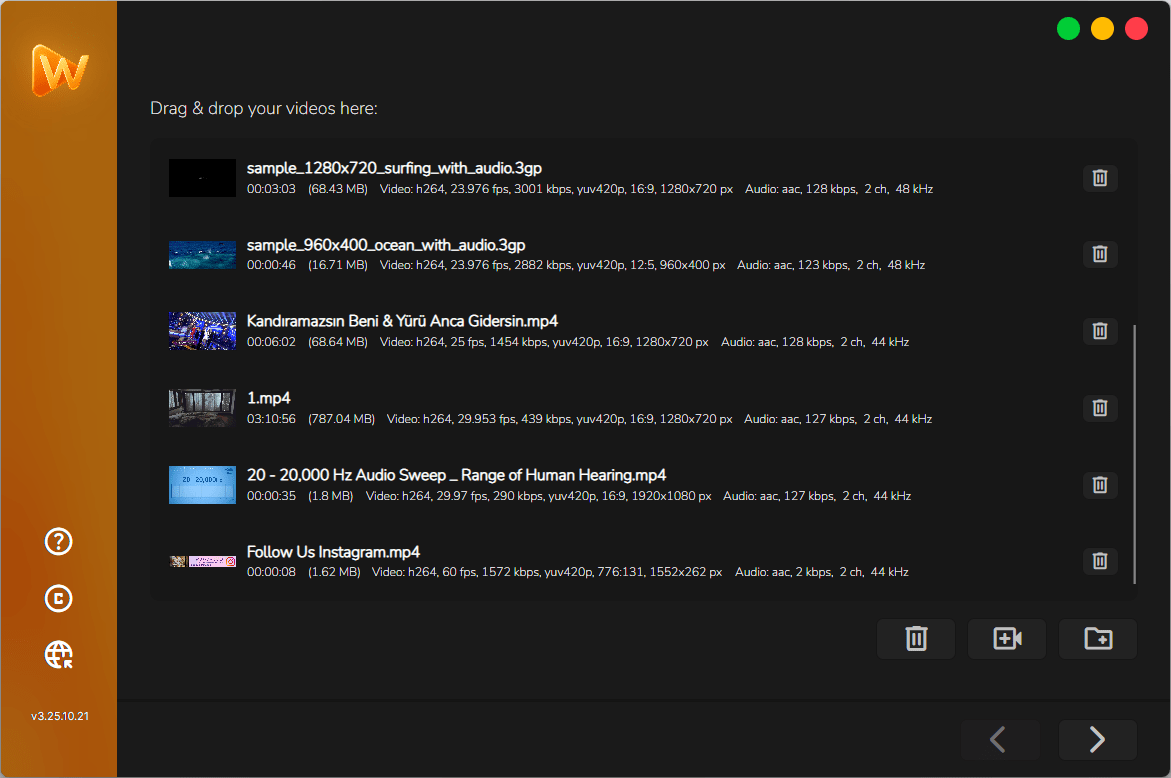
Add Your Videos
Drag files into the application or select an entire folder. Review the queue before processing begins.
- Individual files or complete folders
- Support for more than 300 input formats
- Per-file status and progress
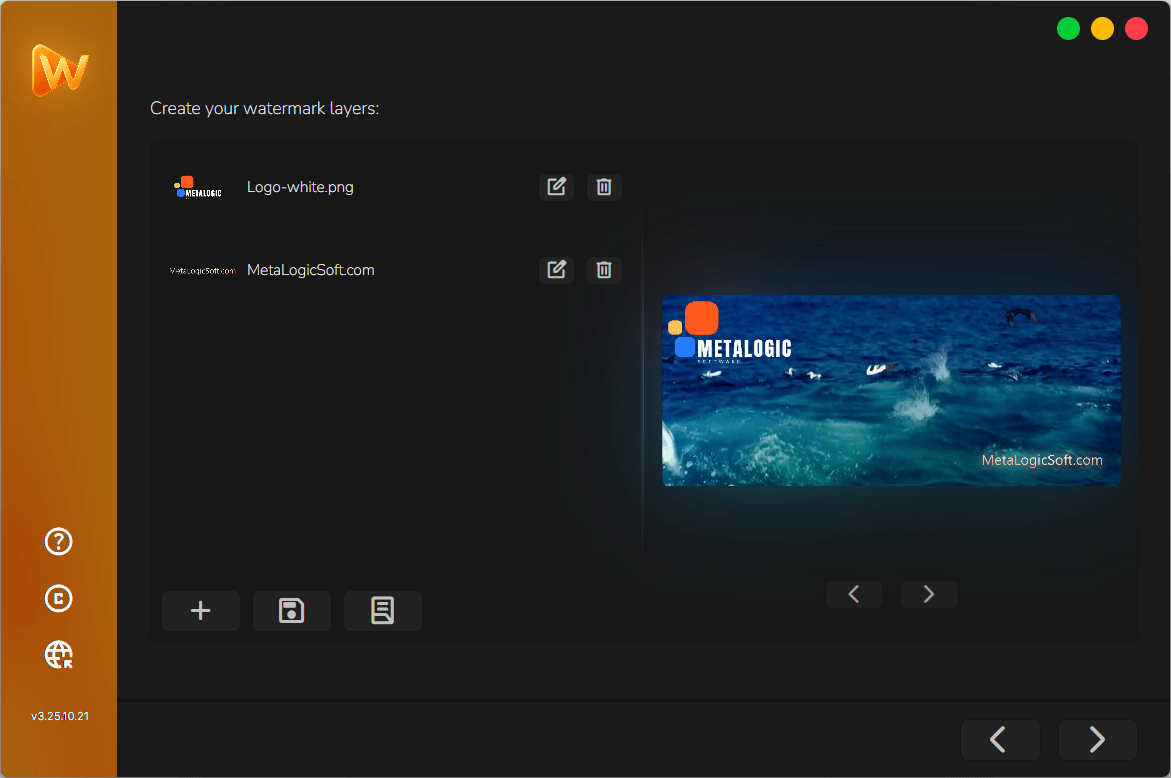
Build Your Watermark
Add text, an image or a animation. Adjust its position, size, margin, opacity and visual treatment while viewing the result.
- Animated, text and image layers
- Flexible positioning
- Live preview
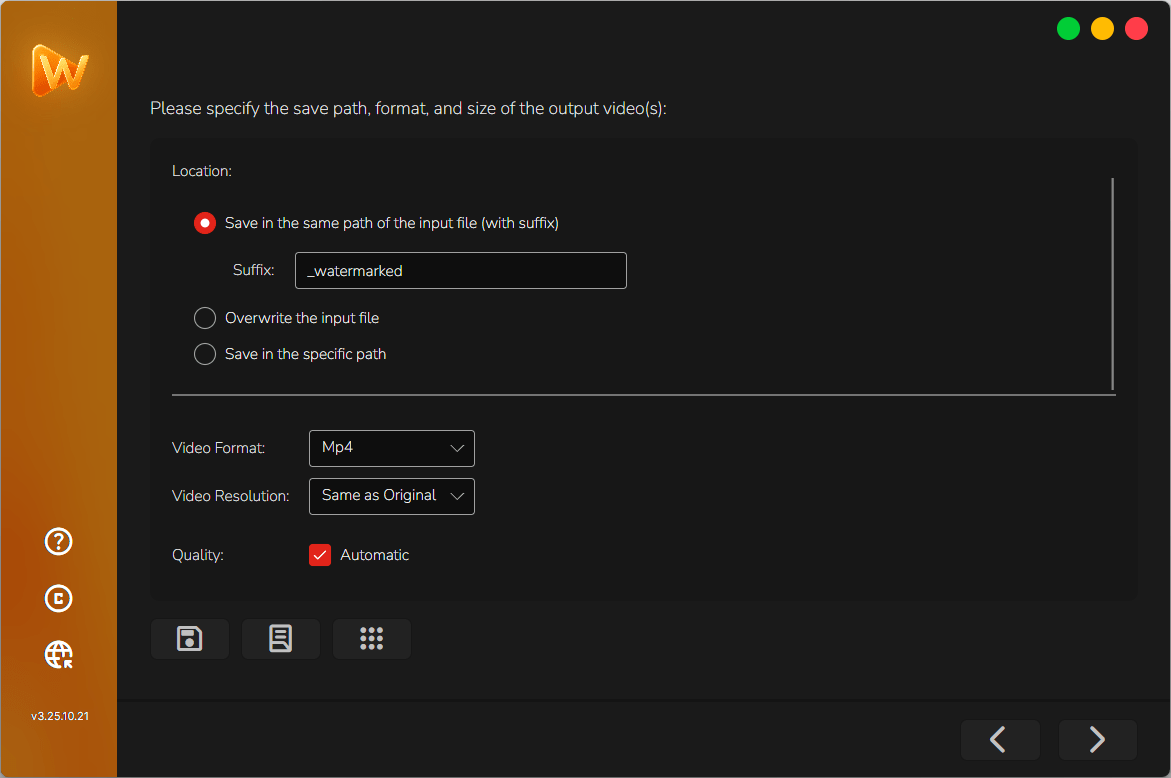
Choose Your Output Settings
Select the output format, codec, resolution, frame rate and quality settings that match your publishing workflow.
- MP4 with H.264 or H.265
- Resolution and frame-rate control
- Quality and compression settings
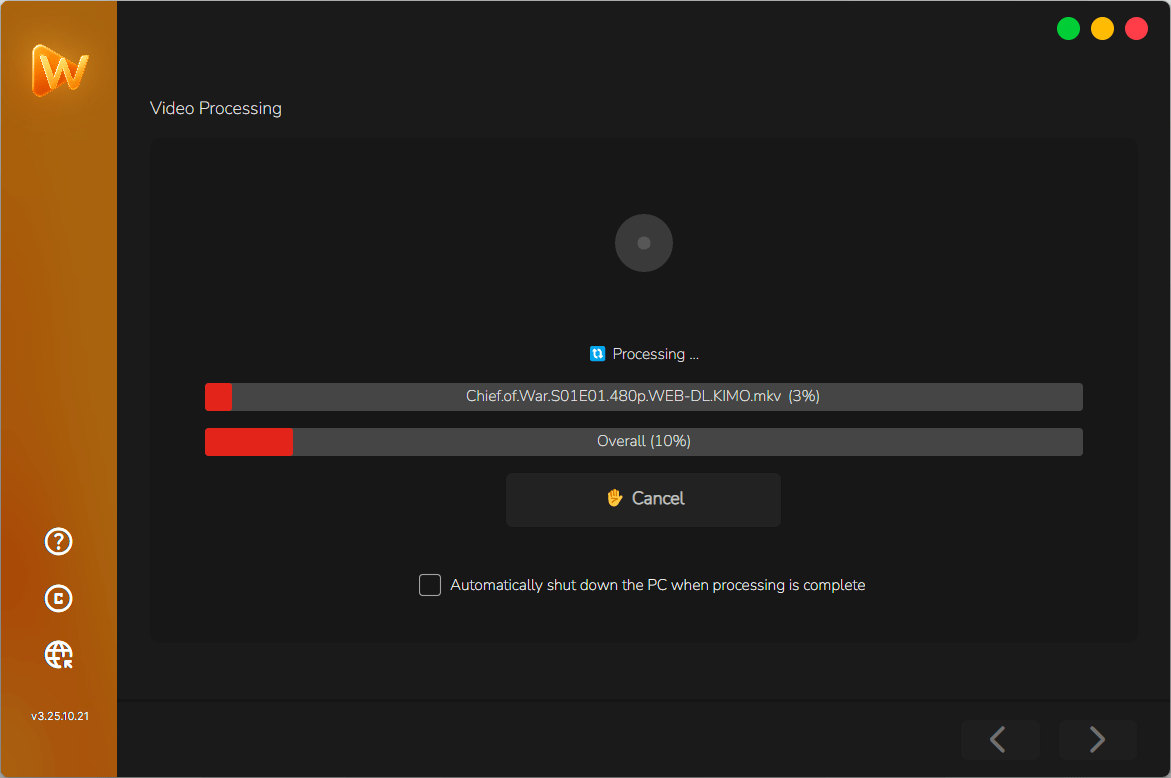
Start the Batch and Move On
Run the queue with GPU acceleration and monitor progress as each completed video is written to the selected destination.
- GPU-accelerated processing
- Per-file progress
- Consistent output across the batch
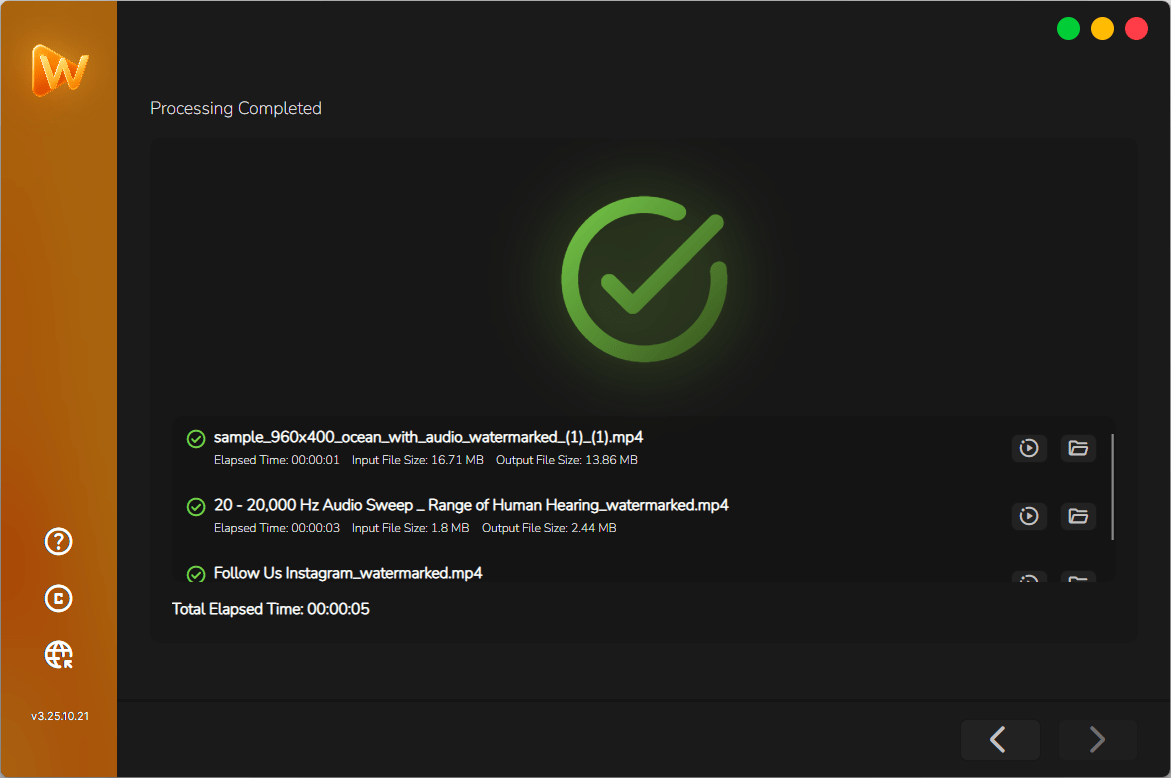
Review the Results and Publish
See a clear summary when the batch is complete. Check each video's processing time and file size, play it right away or open its folder. If a video has an error, you can see and copy the error message.
- Summary of completed videos and total time
- Processing time and file size before and after, for each video
- One-click Play and Show in folder
The control you need, from watermark to final export.
Prepare consistent videos for publishing, client delivery or private archiving—without opening a full editing timeline.
Animated, text and image watermarks
Combine multiple layers and control font, position, size, margin, opacity, timing and visual effects with a live preview.
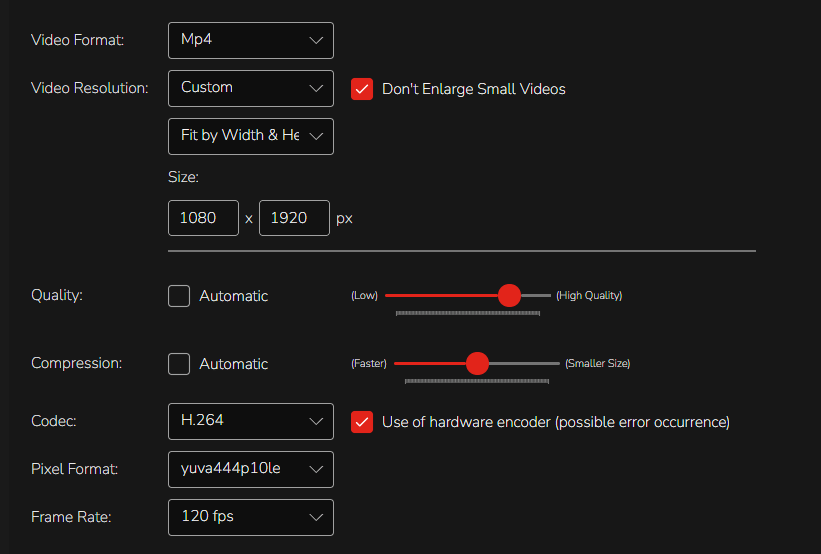
Video quality and compression
Set format, resolution, codec, pixel format and frame rate. Adjust quality and compression to manage clarity, compatibility and file size.
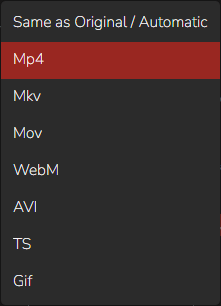
Formats for every destination
Export to MP4, MKV, MOV, WebM, AVI, TS or GIF, or keep the original format automatically.
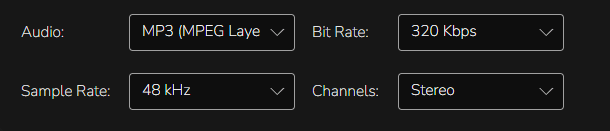
Audio settings
Set format, resolution, codec, pixel format and frame rate. Adjust quality and compression to manage clarity, compatibility and file size.
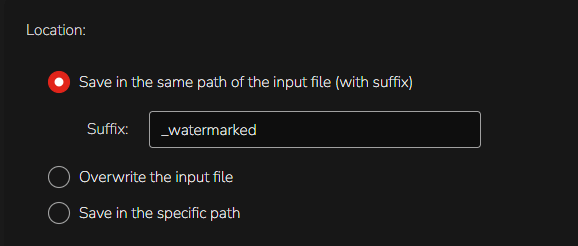
Output location
Save beside the original with a suffix, overwrite the source or choose a dedicated destination folder.
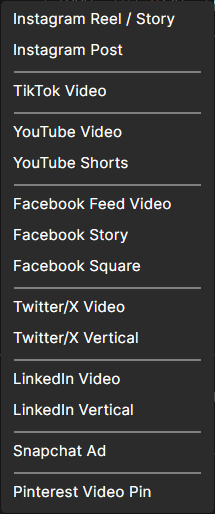
Ready-made social presets
Prepare outputs for Instagram, TikTok, YouTube, Facebook, X, LinkedIn, Snapchat and Pinterest without rebuilding settings each time.
- 300+ input formats
- Multiple watermark layers
- Live preview
- Reusable profiles
- Video and audio controls
- Quality and compression
- GPU acceleration
- Offline processing
Choose the right balance between visual quality, compatibility and file size. Your source videos stay on your computer throughout the workflow.
Made for people who process more than one video at a time.
Content Creators
Apply consistent branding across YouTube, TikTok, Instagram and other video libraries without reopening every file in an editor.
Freelance Video Editors
Save reusable profiles for recurring clients and deliver complete branded batches with fewer repetitive steps.
Social Media Teams
Prepare campaign videos for multiple accounts while keeping positioning and branding consistent across every output.
Agencies and Studios
Handle high-volume client work locally, reuse approved brand setups and reduce turnaround time across the team.
Course Creators
Add visible branding or ownership marks to complete lesson modules before publishing or distribution.
Videographers
Apply a logo or ownership mark across previews, portfolios and client deliveries.
Real workflows. Measurable time saved.
See how creators and video professionals use MetaLogic Bulk Video Watermark in their recurring production work.
“I watermark 40–60 videos every month, and this is the first tool that genuinely made my workflow easier. It's extremely fast, and the video quality stays untouched.”
Sarah Mitchell
Tech YouTuber
40–60 videos watermarked every month
“I work with several clients, and time is always tight. MetaLogic easily saved me 6–7 hours a week. The tools are professional, but the interface is simple enough that I didn't need a learning curve.”
Daniel Cortez
Freelance Video Editor
Saves 6–7 hours every week
“We produce content for multiple platforms daily. The watermark scales perfectly across all video sizes, and the fact that it works offline is a huge plus for our team.”
Aisha Khan
Social Media Manager
Fully offline team workflow
Stop rebuilding the same watermark for every video.
Full video editors are valuable when every clip needs creative editing. MetaLogic Bulk Video Watermark is designed for a different job: applying a consistent watermark and export setup across an entire batch.
Keep your full editor for creative work. Use MetaLogic Bulk Video Watermark when the job is consistency, privacy and volume.
Choose the license that matches your workflow.
Pay once for lifetime use of the version you purchase. Every paid license includes one year of product updates and support.
Personal
$ 29.99
One-time payment
For individual creators and editors
1 device
activation allowance
- Lifetime use of the purchased version
- One year of free updates
- One year of free support
- All core watermark features
Teams
$60
$ 49.99
One-time payment
For small teams and multi-device workflows
Up to 2 devices
activation allowance
- Lifetime use of the purchased version
- One year of free updates
- One year of free support
- All core watermark features
Agencies
$150
$ 99.99
One-time payment
For studios, agencies and larger workflows
Up to 5 devices
activation allowance
- Lifetime use of the purchased version
- One year of free updates
- One year of free support
- All core watermark features
Questions, answered clearly.
A manual workflow may feel manageable with two or three videos. Once the folder grows, the same repetitive steps begin consuming hours, and small inconsistencies become much harder to avoid.
Does MetaLogic Bulk Video Watermark lower the quality of my videos?
No. The software preserves your original quality. Watermarks are applied cleanly without blurring, compression loss, or color shifts.
How fast can the software process videos?
Speed depends on your hardware, but with GPU acceleration enabled, most users see processing speeds several times faster than traditional tools—especially when handling large batches.
Can I use both text and image watermarks at the same time?
Yes. You can create multiple layers, mix animated, text and images, adjust opacity and effects, and position each layer independently.
Are my videos uploaded to your servers?
No. Everything happens offline on your device. None of your files are uploaded, making the process private, secure, and fast.
Can I save my watermark settings as a preset?
Yes. You can save your watermark styles and export settings as presets, allowing you to reuse them for future projects.
Can I change the resolution, format, or quality of my exported videos?
Yes. MetaLogic Bulk Video Watermark lets you fully customize your export settings. You can adjust the output resolution, choose your preferred format (including MP4 in H.264 or H.265), set the frame rate, and control the overall quality and compression level. This helps you produce videos optimized for YouTube, TikTok, Instagram, or professional client delivery.
What video formats can I import into MetaLogic Bulk Video Watermark?
MetaLogic Bulk Video Watermark supports more than 300 input formats, including MP4, MOV, MKV, AVI, WMV, M4V, FLV, and many more. You can add almost any standard or high-resolution video file, and the software will handle it without conversion.
Will my subtitles, audio tracks, or other video streams be preserved during export?
Yes. All existing audio tracks, subtitles, and embedded streams are preserved during the export process. MetaLogic Bulk Video Watermark only adds your watermark layers and does not remove or overwrite audio, subtitles, or metadata by default.
How can I get help?
Contact MetaLogic Support with your order information and a description of the issue. Paid licenses include one year of product support.
Can I get a refund?
Yes. 14-day money-back if it's not the right fit. The 14-day free trial is meant to make refunds rare, but we honor them.

Build the watermark once.
Apply it across the entire batch.
Download MetaLogic Bulk Video Watermark and test the workflow with your own files before choosing a license.
- Windows 10+
- macOS 12+
- One-time license