

MetaLogic MailVexa
Clean & verify bulk emails on your own computer.
Clean and verify bulk email lists on your own computer with multi-layer checks, including SMTP and catch-all detection. Keep your list files local and choose a ONE-TIME LICENSE. No monthly SaaS fees, no recurring credits. Built for maximum speed.
- One-time license
- 14-day free trial
- Privacy-friendly
- Runs locally



Native cross-platform desktop app
- A workflow worth reconsidering
What is your current verification workflow costing you?
For teams that verify lists regularly, the commercial model and handling process can matter as much as the final result.
- Recurring verification spending
Credit packs or subscriptions can become a repeating operating cost. Pricing varies by provider, but frequent list work often means purchasing capacity again.
- Uploading complete contact lists
Hosted tools can be convenient, but they require transferring list files to another platform. Some teams prefer to keep imported files and exports under local control.
- Limited visibility or control
A simplified service may expose fewer processing choices or technical reasons. That can make it harder to understand an uncertain result or adapt the workflow.
- Why verification matters
Verify before you send.
Sending campaigns to an unverified list puts your deliverability, budget, and data quality at risk. Verification is the step that happens before the campaign, not after.
Protect sender reputation
Mailbox providers track bounce rates and spam complaints. A list with invalid or risky addresses can lower your sender score, making even good emails harder to deliver.
Cut wasted send costs
Most email platforms bill per message. Removing invalid addresses before send means you do not pay for contacts that cannot receive mail.
Get trustworthy metrics
A clean list gives accurate open, click, and conversion rates. Dirty data hides what is actually working and leads to poor campaign decisions.
Maintain list hygiene
Regular verification keeps subscriber records accurate, supports compliance obligations, and reduces the chance of hitting spam traps or recycled addresses.
What happens if you skip verification?
Unverified lists often contain expired accounts, typos, role addresses, and spam traps. Sending to them increases hard bounces, spam complaints, and blacklistings. The result: lower inbox placement, wasted budget, skewed analytics, and long-term damage to your domain reputation. A few minutes of verification before a campaign is far cheaper than recovering from a poor sender reputation.
- How it works
From messy file to campaign-ready list in five steps.
A guided wizard walks you through import, cleanup, verification, review, and export — without ever leaving your desktop.
Drag & drop your list. Map your columns.
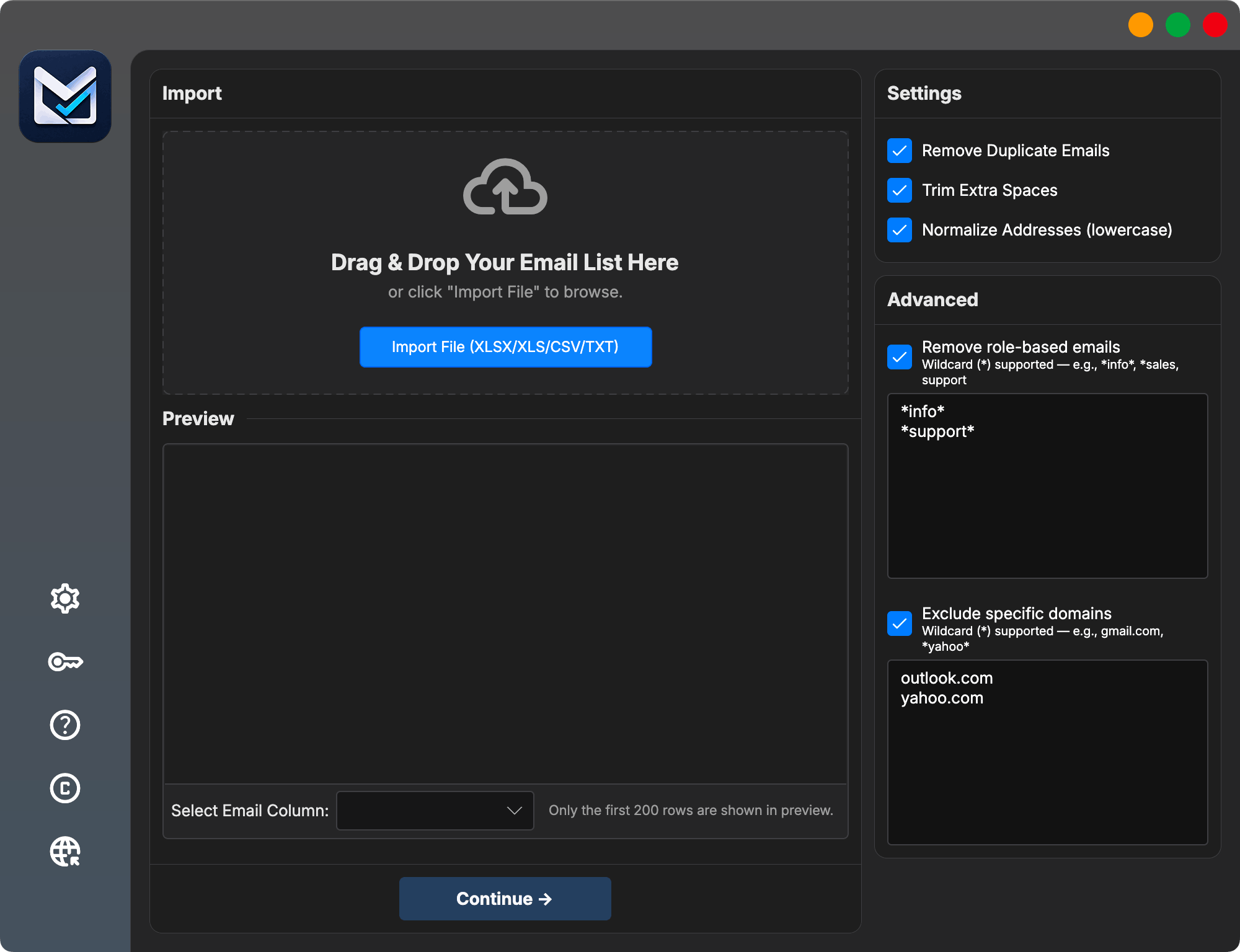
Import CSV, TXT, or Excel files of any size. MailVexa auto-detects email columns and lets you keep every other field — name, company, tags, custom data — straight through to export.
- XLSX · XLS · CSV · TXT support
- Auto column detection
- Preserves all custom fields
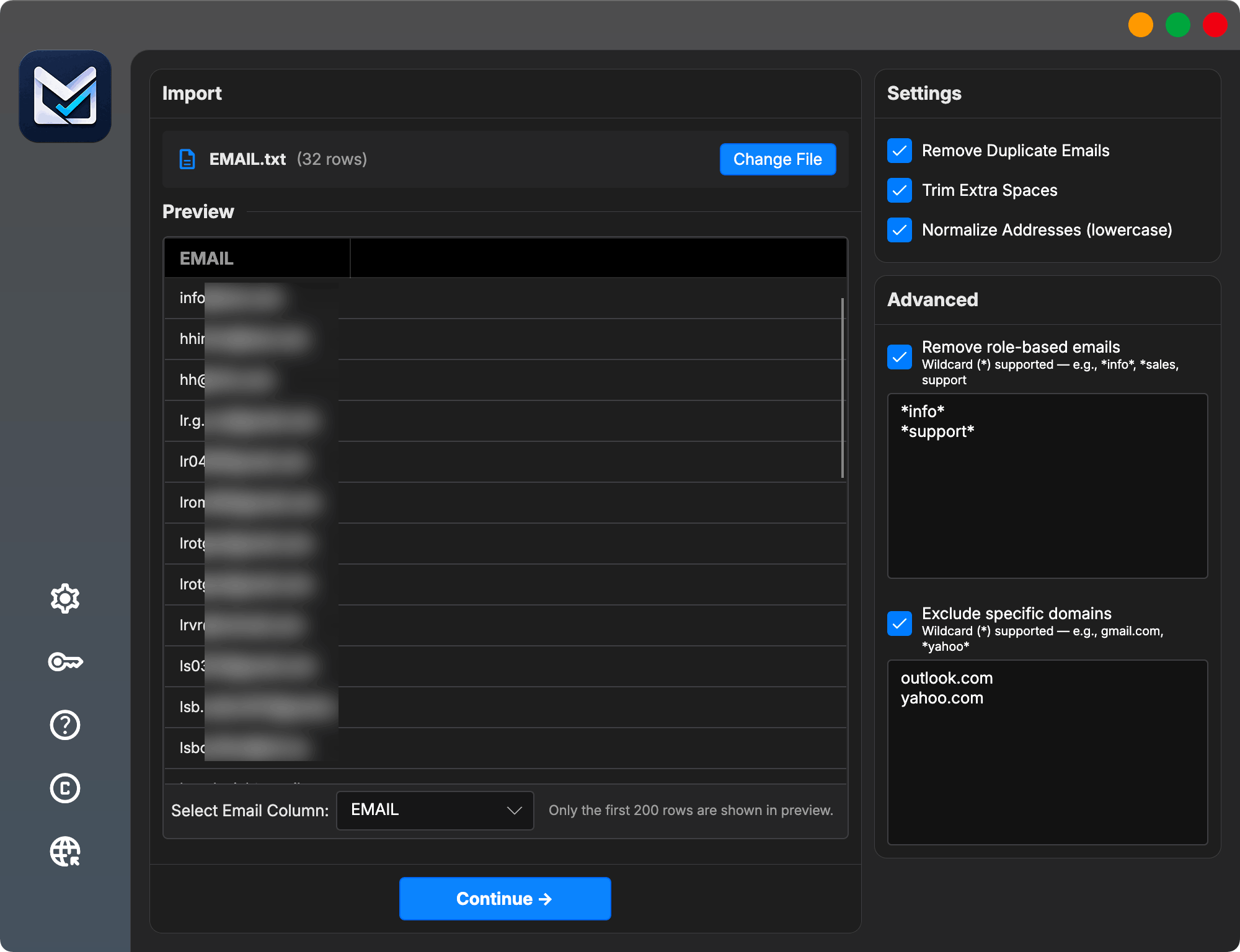
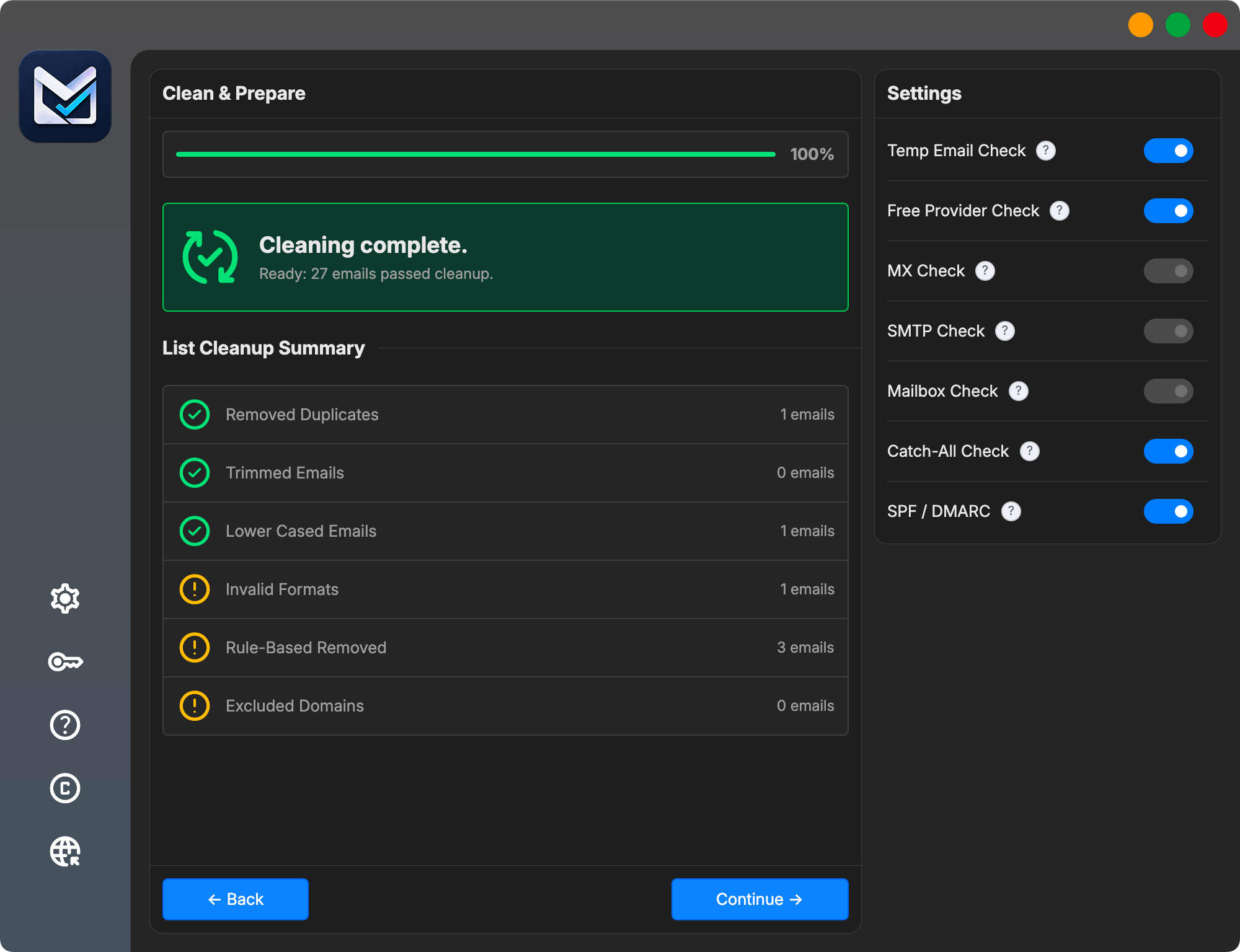
Dedupe, trim, normalize — automatically.
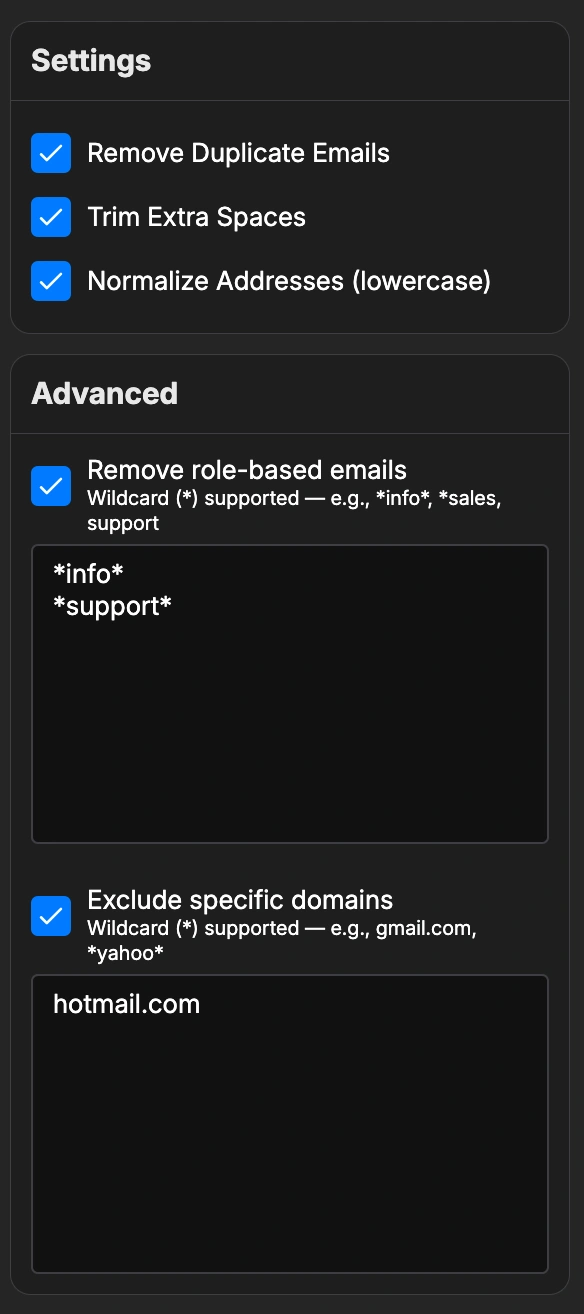
Smart rules catch the obvious problems before you waste verification quota: duplicates removed, extra spaces trimmed, addresses normalized to lowercase, role-based and specific domains filtered if you want.
- Remove duplicates & trim spaces
- Smart deduplication
- Role-based filter (info@, support@…)
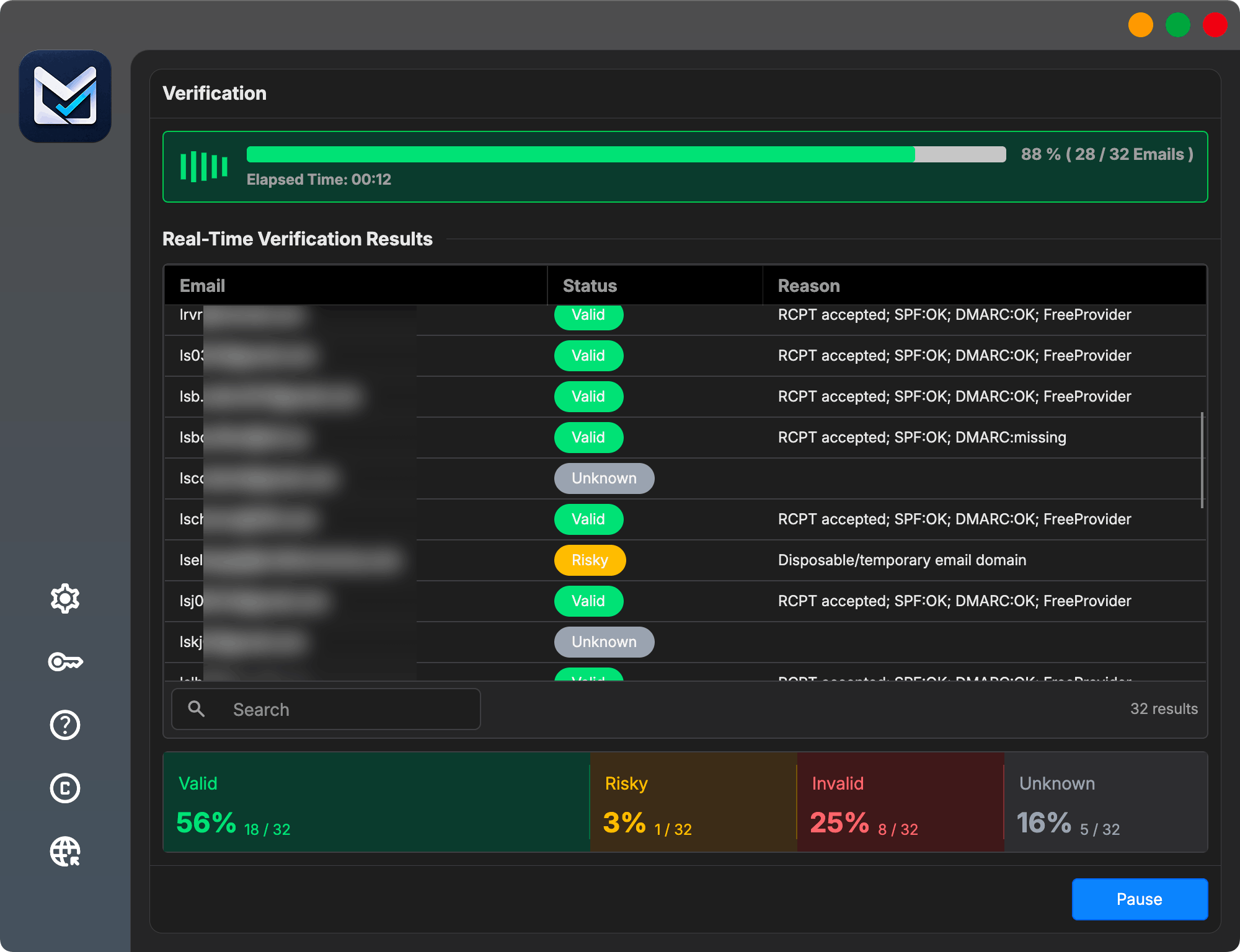
Multi-layer verification. Live progress.
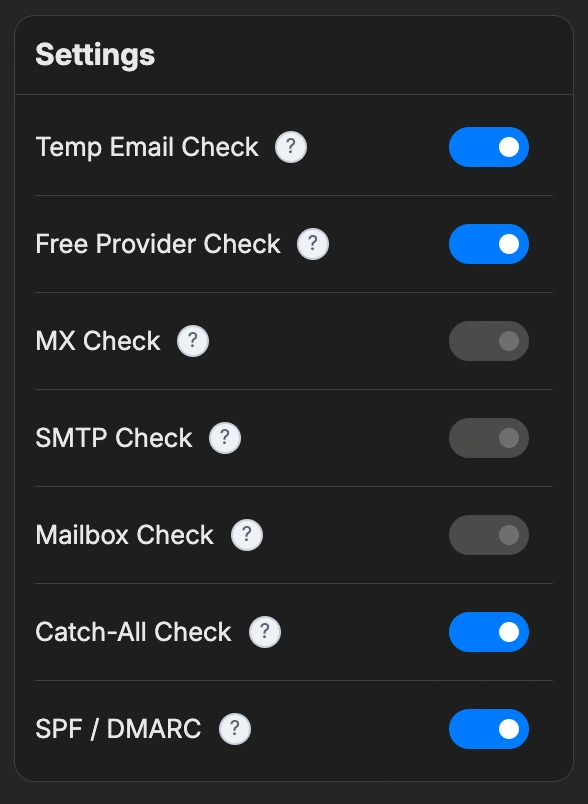
Format → disposable → free-provider → MX → SMTP → mailbox → catch-all → SPF/DMARC. The engine chains checks intelligently, rotates proxies if needed, and shows live progress so you always know what's happening.
- Parallel threads
- Pause / resume / recover
- Proxy pool with auto-rotation
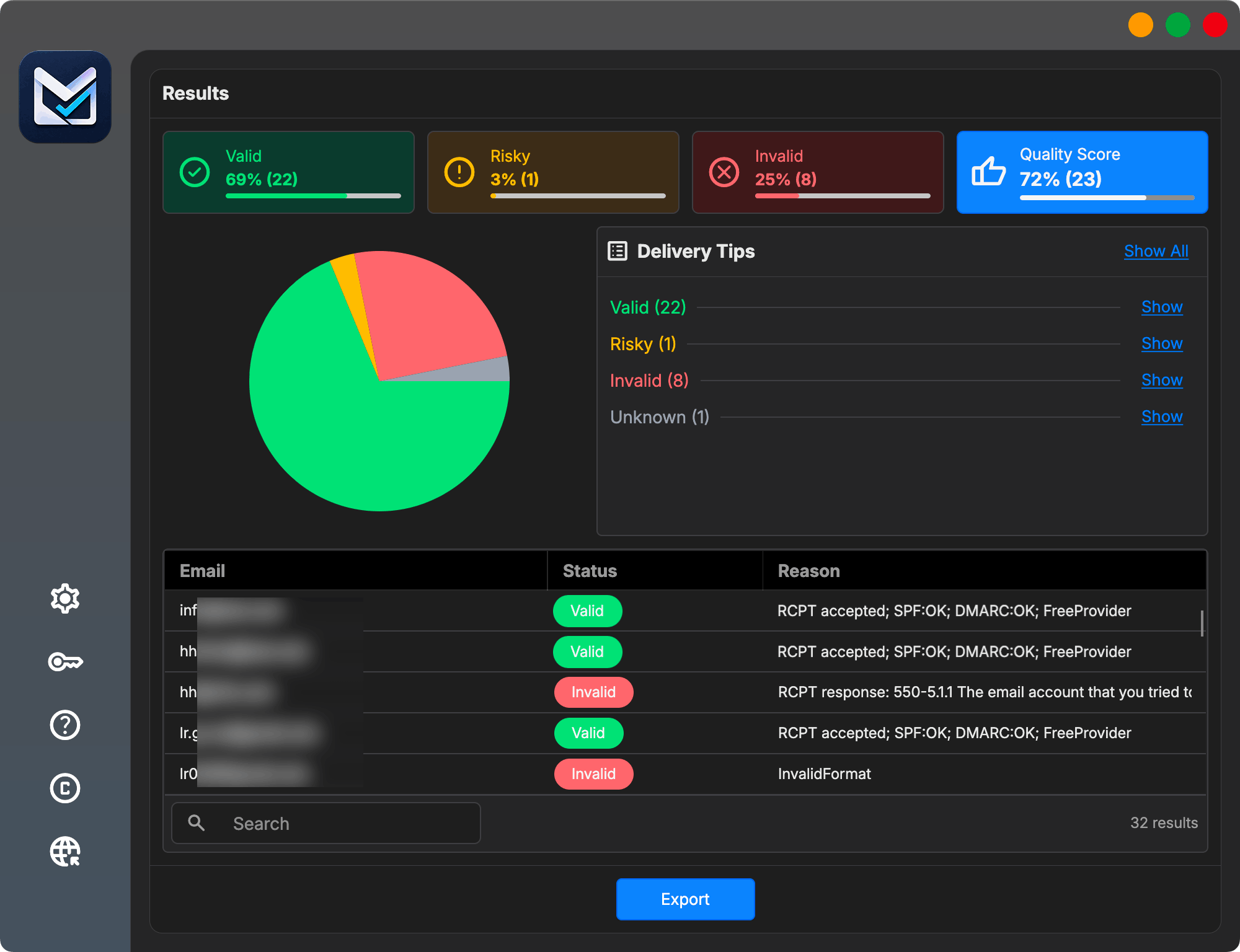
Browse, filter, and inspect every result.
Live dashboard with the four categories color-coded, drill-down by sub-reason (catch-all, disposable, role…), per-row detail (MX records, SMTP response), and free-text filter across the whole list.
- Color-coded buckets & sub-reasons
- Per-row MX / SMTP detail
- Filter, sort, and search
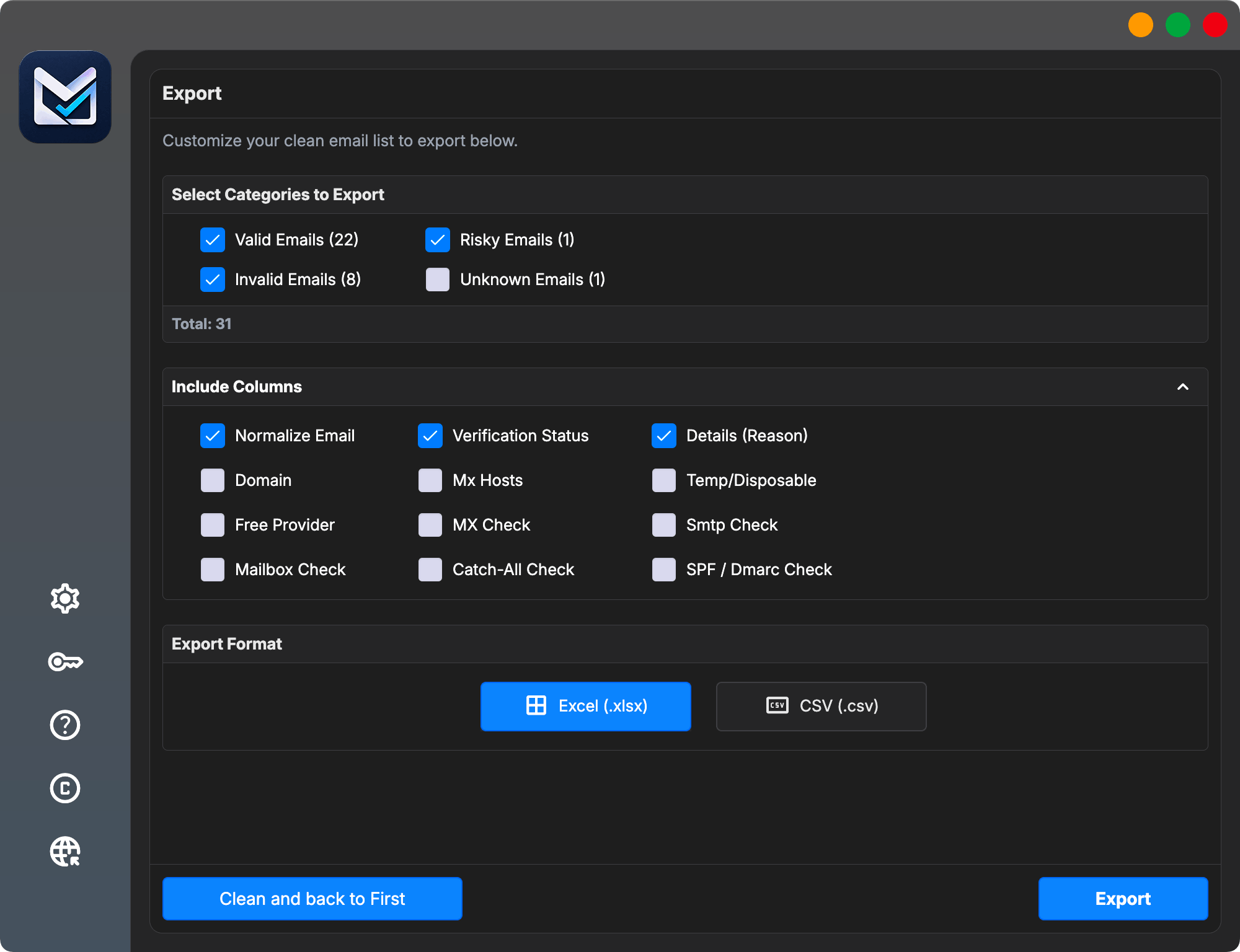
Choose what to export. Send it anywhere.
Pick which result categories to include (Valid, Risky, Invalid, Unknown). Keep all of your original file columns, and optionally add verification-detail columns — status, reason, domain, MX hosts, disposable & free-provider flags, SPF/DMARC — then save as Excel or CSV for Mailchimp, HubSpot, or your CRM.
- CSV · XLSX
- Select which categories to export
- Add extra status & verification columns
- Features
Built for serious marketers
Multi-threaded engine that scales to your CPU, smart cleanup rules, multi-layer verification, proxy rotation, pause/resume, and flexible export — all built into one desktop app.
Bulk import & smart cleanup
Drag XLSX, XLS, CSV, or TXT. Auto-preview the first 200 rows, pick the email column, dedupe, trim, normalize, and exclude role-based or wildcard domains.
Real-time dashboard
Watch progress, throughput, and live status as the engine works. A dynamic segment bar shows Valid / Risky / Invalid / Unknown distribution as it forms.
Maximum speed, multi-threaded
The engine scales to every core your CPU can give. Up to 100 parallel threads on Professional, unlimited on Agency — verify hundreds of thousands of addresses without leaving your desk.

Multi-layer verification
Format, disposable, free-provider, MX, SMTP, mailbox, catch-all, and SPF/DMARC — chained intelligently so results stay consistent and reliable.
Clean the list before verification
Remove duplicate emails, trim extra spaces, normalize addresses, and optionally filter role-based addresses or selected domains with wildcard rules.
- Duplicate and whitespace cleanup
- Lowercase normalization
- Role and domain filtering
Flexible export
Pick exactly which categories (Valid, Risky, Invalid, Unknown) and which columns to include. Export as Excel (.xlsx) or CSV — and start a new job in one click.
Inspect the details before you decide.
The results view keeps category totals, row-level statuses, and technical reasons together. That lets you examine why an address was classified before choosing what to export.
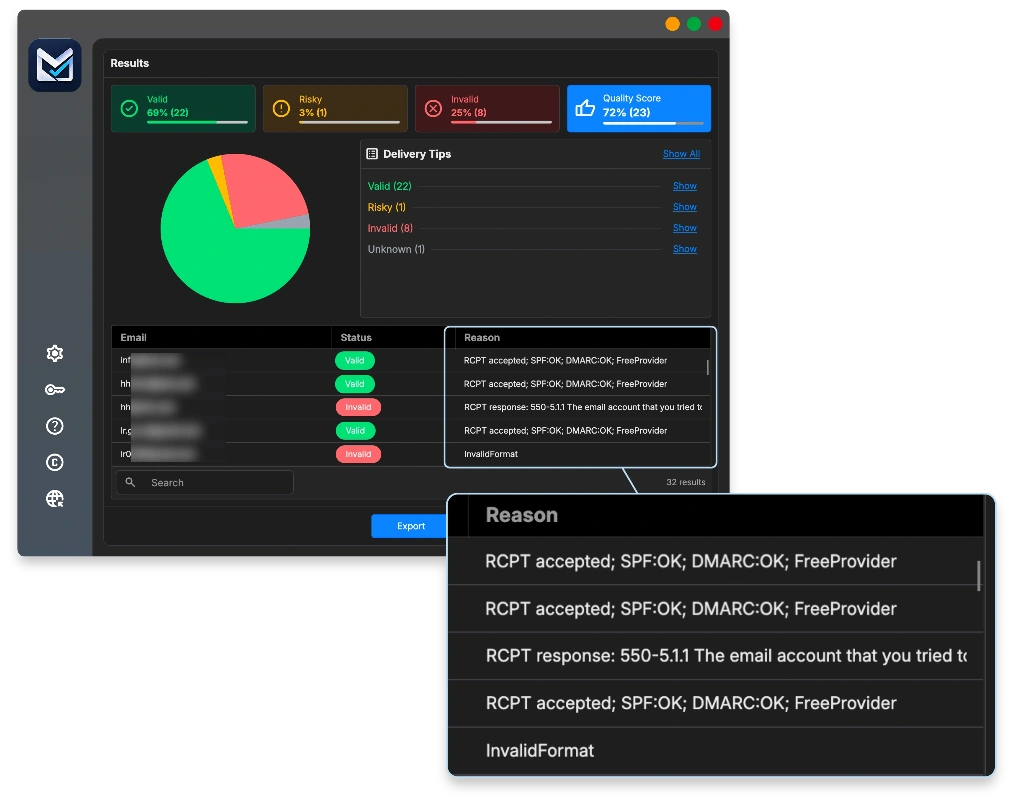
4 result categories
Valid, Risky, Invalid, Unknown — color-coded, with sub-reasons (catch-all, role, disposable…).
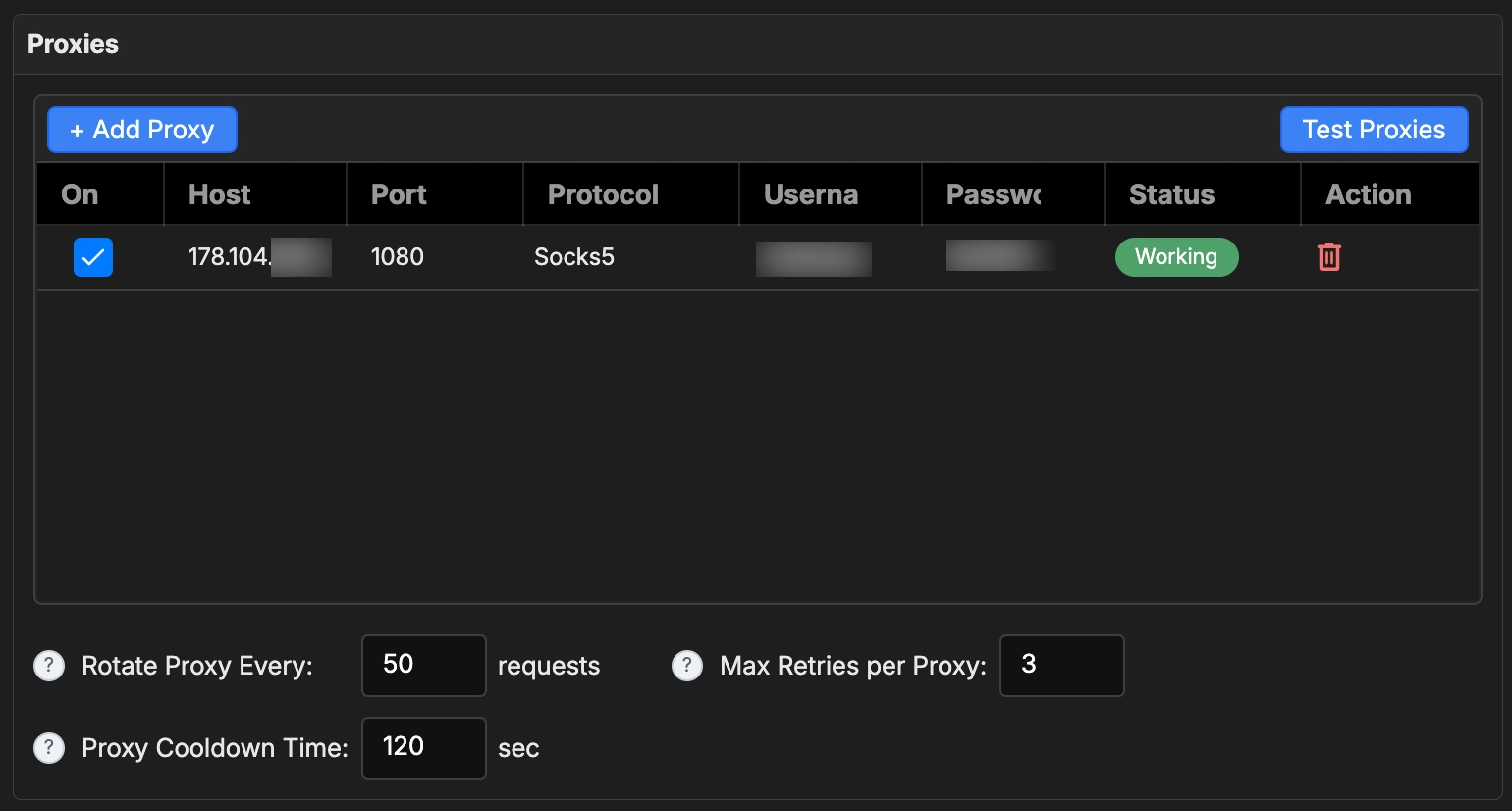
Proxy pool with rotation
Add HTTP / SOCKS proxies, test them in parallel, rotate every N requests, and cool down failures automatically — so your IP stays unblocked on big jobs.
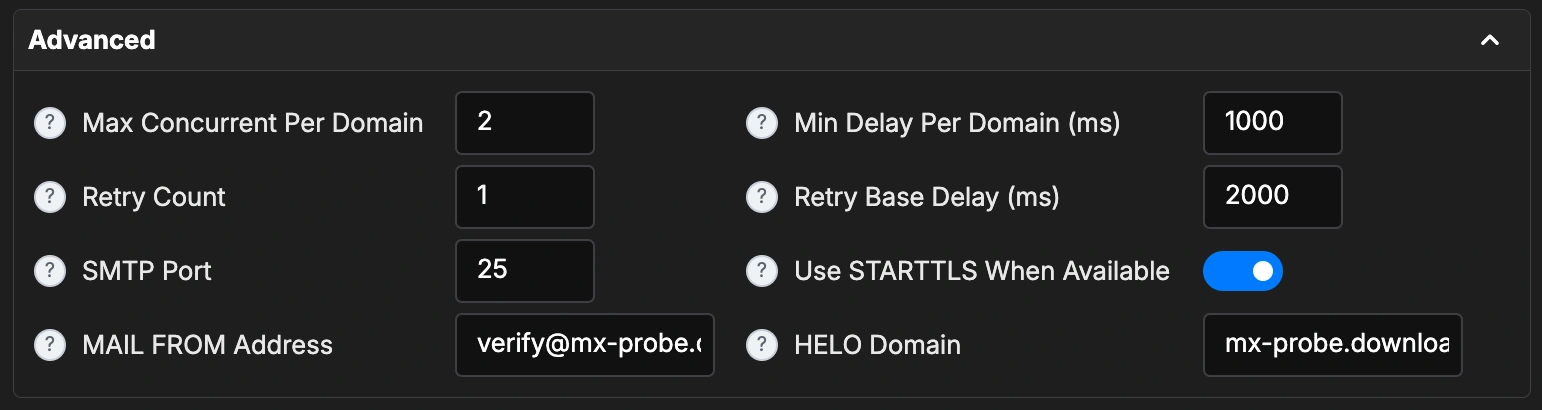
Fine-grained engine controls
Threads, per-domain concurrency, retry policy with exponential backoff, STARTTLS, custom MAIL FROM and HELO domain — tune the SMTP probe to match your network.
Native on Windows & macOS
A native cross-platform desktop application. DPI-aware on Windows, Apple-silicon-ready on macOS. No browser, no Electron, no install bloat.
Pause, resume & recovery
Pause any job mid-run. Close the app, lose power, change your mind — MailVexa restores state on next launch and picks up exactly where you left off.
Privacy-first by design
Your list never leaves your machine. License keys, proxy credentials, and email content stay local.
- Result Categories
Every email lands in one of four buckets.
Built to match how email marketers actually think — so you can decide at a glance which contacts to keep, watch, or drop.
Safe to send
Use with caution
Catch-all domains and disposable addresses. May deliver, may not. Review the reason before sending.
Don’t send
Bad syntax, missing MX, or the server explicitly rejected the recipient. Very likely to bounce. Keep these out of your campaign.
Inconclusive
- Desktop vs. SaaS
Why a desktop app beats a SaaS verifier.
Online verifiers can be useful — but they assume you’re happy uploading client lists and paying every month. MetaLogic MailVexa gives you another option.
One-time license. No credits. No surprises.
Choose a one-time software license that fits your workload. Compare usage limits, device allowances, and included updates below.
Trial
FREE
14-day evaluation
Test the full workflow before you buy.
- Up to 2,000 verifications
- 200 emails per job
- Up to 2 active proxies
- All verification checks
Personal
$69
$ 49
One-time payment
Freelancers, solo marketers, bloggers.
1 device
activation allowance
- 300,000 emails / month
- 25,000 emails per job
- Up to 5 proxies, 25 threads
- All verification checks
- Updates during license period
Professional
$199
$ 149
One-time payment
Small agencies, sales teams, high-volume marketers.
Up to 2 devices
activation allowance
- 1,000,000 emails / month
- 100,000 emails per job
- Up to 25 proxies, 100 threads
- All verification checks
- Updates during license period
Agency
$599
$ 299
One-time payment
Large agencies, lead gen, professional services.
Up to 5 devices
activation allowance
- Unlimited monthly verifications
- Unlimited emails per job
- Unlimited proxies & threads
- All verification checks
- Updates during license period
- Affiliate Program
Earn 40% commission on every license you refer.
Clear answers before you evaluate.
Privacy, network requirements, licenses, limits, and support in one place.
Is this a monthly subscription?
No. MetaLogic MailVexa offers one-time license plans. You buy once and own that version of the software, with updates during the license period (lifetime updates on Agency).
Is the license really a one-time payment, and what limits apply?
Yes. Each paid plan is purchased once and lets you continue using that purchased version. Monthly, per-job, device, proxy, and thread limits depend on the plan. Optional proxy services or other external infrastructure are not included.
What is included in the free evaluation?
The 14-day evaluation includes all verification checks, up to 2,000 verifications in total, 200 emails per job, and up to two active proxies. It is designed for testing the full workflow with a representative sample before purchase.
Do I need to upload my email list to a server?
No. The software runs on your own computer. Imports, verification, and exports happen locally. Verification does need internet access to perform DNS lookups and SMTP probes — but the list itself never leaves your device.
Can I export only valid emails?
Yes. The Export step lets you pick any combination of Valid, Risky, Invalid, or Unknown — and choose exactly which columns to include (status, reason, domain, MX hosts, free-provider flag, SPF/DMARC, and more). Output is Excel (.xlsx) or CSV.
Does verification require internet access or proxies?
Yes. DNS lookups and SMTP probes require internet access. Proxies are optional infrastructure you can configure and manage; their availability and cost are separate from the MailVexa license.
How fast is the engine, really?
As fast as your CPU and network allow. The multi-threaded engine scales linearly until you hit your bottleneck. Pro supports up to 100 parallel threads; Agency is unlimited. In practice, a 10k list typically completes in 25–60 minutes on a modern laptop.
How accurate are the results?
MailVexa uses the same chained verification approach as top SaaS verifiers (format → disposable → MX → SMTP → mailbox → catch-all). Accuracy depends on the destination provider's response — for major providers we typically match SaaS-tier accuracy, with the catch-all category honestly flagged rather than guessed.
What if I run into a domain that blocks me?
Add proxies to the proxy pool. MailVexa rotates them automatically and benches the bad ones. The engine also throttles per-domain to stay below thresholds.
How can I evaluate verification accuracy?
Use the trial with a representative sample and inspect the returned categories and reasons. Server responses can be definitive, cautious, or inconclusive, so MailVexa preserves Risky and Unknown outcomes instead of presenting every address as simply good or bad. A positive result is not a delivery guarantee.
Which operating systems are supported?
MailVexa supports Windows 10 or later and macOS 12 or later. Builds are available for Windows x64 and Arm64, plus macOS on Apple silicon and Intel.
What are the refund and support options?
MetaLogic publishes a conditional 14-day refund policy. Requests are handled through a support ticket in My Account, with email available if you cannot sign in. Review the published policy and license terms before purchasing.
Changelog
Explore the latest features, improvements, and fixes in MailVexa.
Version 4.26.09.27 — September 27, 2026
New features
- Exclude specific emails. Paste a list or load a .txt file with one email per line, such as hard bounces from a previous campaign. Matching rows are skipped during verification and exported as Invalid with the reason “ExcludedEmail”.
- Excluded Emails counter. A new counter appears in the List Cleanup Summary on Page 2.
- Split exports into multiple files. Choose the number of rows per file, such as 500. Files are saved as name-part-01, name-part-02, and so on.
Fixes
- CSV and TXT files saved with Windows Persian encoding (Windows-1256) now display Persian text correctly.
Improvements
- Cleanup settings on Page 1 are saved as soon as you press Continue.
Version 4.26.08.08 — August 8, 2026
Fixes
- Fixed a bug in the licensing system.
Version 4.26.06.25 — June 25, 2026
Initial release
- Multi-stage email verification: syntax, MX, SMTP, and mailbox/RCPT TO checks.
- Catch-all domain detection with a Risky flag; built-in disposable email registry; and free-provider detection for Gmail, Yahoo, Outlook, and more.
- SPF and DMARC authentication checks, STARTTLS encrypted handshakes, and customizable HELO domain and MAIL FROM identity.
- SOCKS5 and HTTP CONNECT proxies with rotation and cooldown.
Import, cleanup & export
- Five-step wizard: Import → Prepare → Verify → Results → Export.
- Drag-and-drop import for CSV, TXT, XLSX, and XLS files, with automatic delimiter detection.
- Cleanup tools for duplicates, extra spaces, normalization, role exclusion, and wildcard domain filters.
- Excel (.xlsx) and CSV exports with selective column inclusion.
- Live Valid, Risky, Invalid, and Unknown counters, plus a searchable and filterable results grid with per-row inspection.
Engine & desktop experience
- Configurable thread count, per-domain concurrency and delays, retry count with backoff, per-attempt timeout, and SMTP port.
- Batched result writes and local job persistence with SQLite.
- Dark and light themes with dynamic switching, and a Fluent UI with AcrylicBlur effects.
- Cross-platform support for Windows x64/ARM64 and macOS Intel/Apple Silicon.
Performance
- Parallel verification with semaphore-gated concurrency.
- Optimized DNS resolution with DnsClient.NET.
- Efficient writes in batches of 50 results.
- Low memory usage for large lists and fast startup with a native AOT-friendly architecture.
Platform support
- Windows 10 and 11: x64 and ARM64.
- macOS 10.15 Catalina or later: Intel.
- macOS 11 Big Sur or later: Apple Silicon M1, M2, M3, M4, and M5.
- Built on .NET 9.0 and Avalonia 11.3.

Ready to clean up your list?
Try the full app for 14 days. Verify up to 2,000 emails. If you don't love it, just delete the app — your data was never anywhere else anyway.
- Windows 10+
- macOS 12+
- One-time license