Quick answer
You can clean an email list, in this order:
- First you should export a copy
- Review the source of contacts
- Eliminate those who are on your suppression list
- Resolve duplicate records and formatting errors
- Validate the addresses that remain
- Finally, export only those contacts that meet all the verification criteria
Verification is a part of this process. It can convince you whether an address can receive email or not. It does not tell you whether that person approved to recessive from you, or whether they remain interested in. These are two different things.
Consider any email list that has been collecting contacts for a year, and yet you will face the same problems. duplicate entries, someone who unsubscribed but is stored in an old worksheet yet, outdated addresses that stopped working after someone changed jobs, A contact that has remained from a trade show in 2023 who has no idea who you are.
Sending emails to this list can cause good campaigns to fail even before they reach their audience.
This guide helps you through the process of cleaning step by step. It is ideal for people and users who are not professional and technical. Every step guides you what to do and, more significantly, what you should avoid.
Cleaning and verification are not the same thing in email cleaning process
Verification is a test that is more likely to be technical. It is a process that determines whether the contact is still active and can receive mail.
Cleaning is the whole task. It concludes data quality, permission, exclusion list, and whether the person is still enthusiastic about your content and receiving from you.
A valid address doesn’t automatically make someone necessarily a suitable recipient. A person who unsubscribed last month may still has a completely leitimate address.
Export your contacts and keep the original list
Before starting the process and changing anything in your list, export the list and save an original untouched copy and start working on a duplicate file. If a decision is discovered to be incorrect, so you have the chance to return and check.
You shouldn’t export only the email column
This is the most typical mistake at the beginning of the workflow, and it gradually impacts the rest of the process. You can’t make any reliable decisions with a list of empty addresses.
preserve these fields if your system includes them:
- Subscription state: Subscribed, unsubscribed, or pending.
- Source: Where the contact originated, whether through a signup form or an event.
- Signup date: helpful for assessing how long the permission has been in place.
- Last interaction: A click, open, purchase, or reply.
- Previous undelivered data: you need to be aware If an address failed formerly.
Without these columns, you cannot determine whether a customer is active or whether a contact unsubscribed two years ago. Both of them look equivalent when all you have is an email address.
Check the source of contacts
Now review the source column. For each group of addresses, asking just one question can help you to make the right decision: did these people agree to receive the type of emails you intend to send?
A person who downloaded a guide signed up to have that guide. It does not mean the person has agreed to a weekly promotional newsletter.
A verifier is unable to create a permission
Acquired lists, automatically collected (scarped) addresses, and contacts with an unknown origin should not be apart of your campaign, even if a verification tool identifiesall of them as usable addresses. Verification is testing whether a mailbox exists or not. It does not provide no meaningful data about consent to receive emails.
Google’s sender guidelines suggest campaign owners not to buy email addresses and not to send to ones who did not sign up.
If you cannot obviously explain how a contact has been added to your list, eliminate it. Don’t send email to ask them for authorization either. That email is itself an unsolicited marketing messages to a person who never requested.
Apply your exclusion list first
An exclusion list, commonly known as a suppression list, is simply a list of contacts who must never get your campaign emails. Applying it in first step saves you from sending emails to verified addresses that are not useful for you and will gradually hurt your campaign.
Three groups are this kind of emails:
- Spam complainants: A person who marked one of your emails as spam.
- Unsubscribes: Anyone who asked not receive information from you.
- Permanent delivery failures: Addresses that have already verified as nonexistent.
Keep the data, do not just delete them
If you delete an unsubscribe instead of keeping them, that address can enter your list again through an old document or a new import. The record is what protects you from repeating the process.
When two records for the same contact conflict with each other, the unsubscribe or complaint always is more reliable. An older subscribed record can’t be replaced with a newer opt-out.
Remove duplicates and fix formatting
Now organize and clean the data itself. This step requires no payment and makes all other steps faster.
| Problem | Example | What to do |
|---|---|---|
| Same address twice | [email protected] in two files | Keep a record, and pereserve the most recent status |
| Unnecessary spaces and capitalization issues | [email protected] | Trim extra spaces, transform to lowercase |
| Empty rows | An empty cell in the email column | Remove the row |
| Damaged address | jane@@example.org | Remove it. It cannot be fixed reliably |
| Possible typing mistake | [email protected] | Set aside and confirm with the contact if you can |
You do not have to do this process manually
A spreadsheet Is suitable for small files, but lots of verification tools can handle this part of process for you. There is an individual Clean up stage in MailVexa that runs before any stage of cheking email addresses, so you do not spend verification limit on rows that were never going to succeed.
Managed automatically: extra spaces, duplicate records, mixed upper and lower case, with optional filters for role-based addresses and specific domains. Addresses with invalid syntax are detected by the format check at the beginning of verification process and are labeled as Invalid contacts.
Still your decision: whether a suspected typo should be verified with the contact, or whether a role-based address belongs to the specific campaign, No tools should make those calls for you and finally you are the final decision-maker.
Do not guess a corrected spelling
It looks helpful to change exmaple.net to example.net. But you are making a new Email address for someone who never gave that you. If it belongs to another person, you are now emailing a stranger witch is completely unusual even harmful for your campaign.
The same warning applies to removing dots or plus tags. On Gmail, [email protected] and [email protected] reach the same inbox. They are two distinct Person on many other providers. Applying this as a general rule may cause different contacts who are not the same person to be merged.
Verify the remaining addresses
After all of previous steps everything left is now worth testing appropriately. Verification occurs in layers, and each layer can answer a different question.
- Format: Is the address written properly? This only detects typing errors, nothing else.
- Domain and mail server: Does the domain exist, and does it have a server which accepts email? This rules out dead domains much faster.
- Mailbox: is this specific mailbox active? The tool can ask the mail server directly and also reads the reply.
That last layer is the is the most important one among all. An address may look perfectly correct and still belong to nobody. [email protected] is written properly and does not exist.
For more detail on how these examinationswork, see our guides on what email validation is and why it is important before running a campaign.
Doing this with MailVexa
MetaLogic MailVexa is a powerful and secure desktop application designed for Windows and macOS that can manage steps 4 through 8 in only one process. It can run on your own computer, so there is no need to upload your contact list file to any other company’s server. The verification checks themselves still requires internet access, because this tool has to perform DNS lookups and needs to contact mail servers.
There are five stages that this workflow moves through: Import, Cleanup, Verify, Results, and Export.
At import stage, you drag in a CSV, TXT or Excel file. The email column is identified automatically, and your other columns such as name, company and tags are transferred to the export file. The cleanup step applies the resolves from step 4: deleting duplicates, removing extra spaces, transforming to lowercase, and as an option filtering role-based addresses or specific domains.
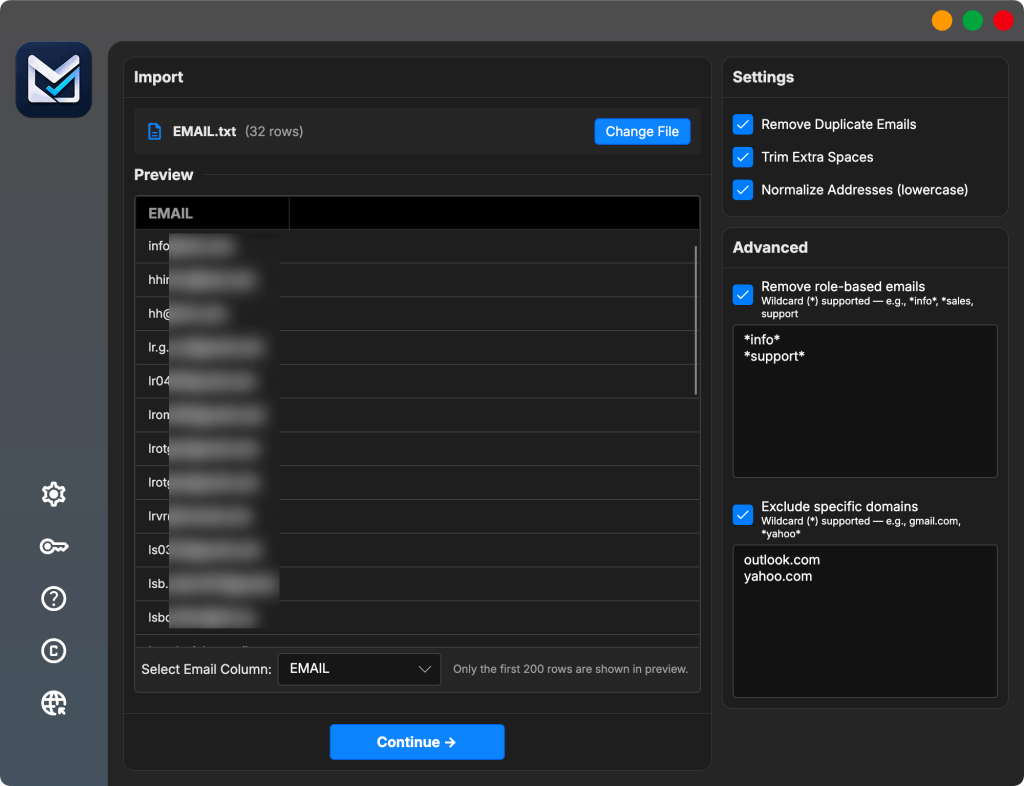
Clean and review your list before you export it. The MailVexa trial version covers up to 2,000 verifications over 14 days, without any payment and no card needed. Your list stays on your own computer throughout all process and there is no need to upload your list to any other server.
Check the results correctly
Verification results are classified in four categories. Some tools even include a reason, including catch-all or disposable email addresses, that is explaining why an address placed in this category.
| Result or type | What it means | Recommended action |
|---|---|---|
| Valid | The mailbox exists and the server accepted it. | Include, if permission and interest also check out. |
| Invalid | Bad format, no mail server, or the server rejected the recipient. | Remove, and add to your exclusion records. |
| Risky | The address may work, but something is uncertain. | Keep in a separate file. Do not include by default. |
| Unknown | The server gave no clear answer, or the connection failed. | Set aside and try again later. This is not a rejection. |
| Catch-all (reason) | The domain accepts mail for every address, so the server cannot confirm this specific mailbox. | Treat with caution. Certainty is limited, not zero. |
| Disposable (reason) | A temporary address, often created to claim a download. | Usually remove. These rarely become customers. |
| Role-based (reason) | A shared inbox such as info@ or support@. | Judge by context. Real, but often read by several people. |
Five common possible mistakes people can make here
- Valid does not mean approved: The only thing that it can confirm is the existence of the mailbox. It’s very different from talking about permission or interest.
- Unknown is not invalid: It means the examination was unconfirmed. Deleting this group of contact can remove real people.
- Catch-all is not a failure: Many valid companies can run catch-all domains. You basically have less conviction.
- Role email addresses can be valid: If your business emails a company’s Support team, you can be sure that address is exactly valid.
- Free providers are not low quality: A Gmail address can belong to a real person as often as a company address does.
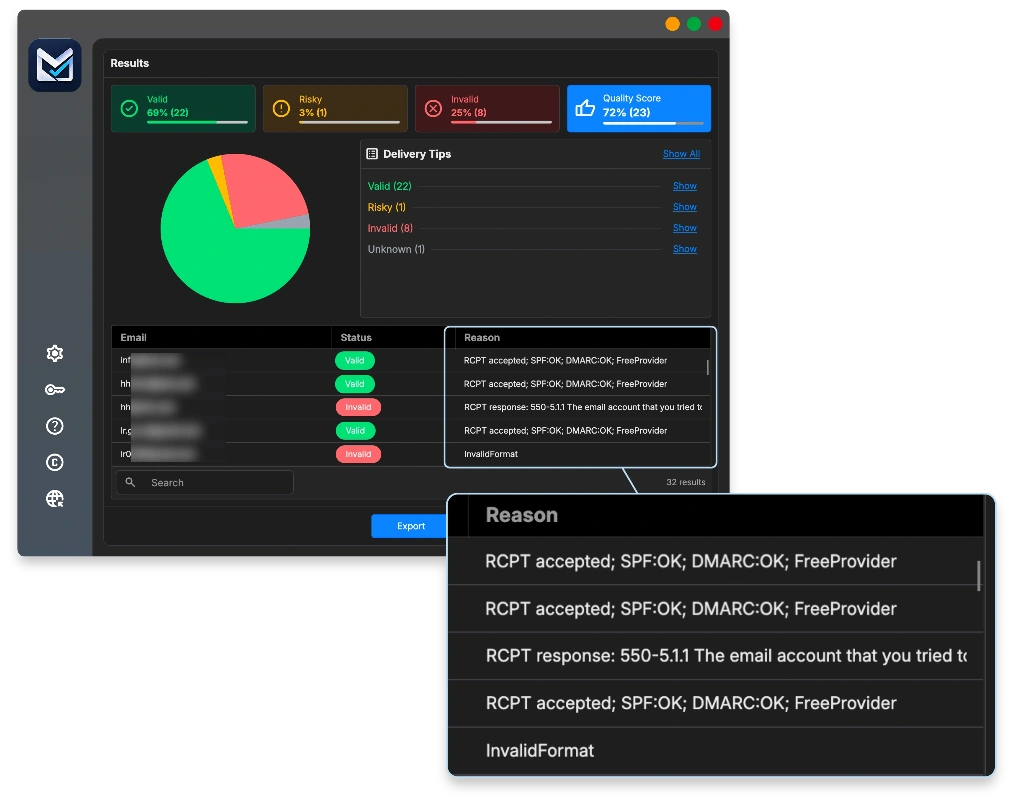
The Results in MailVexa screen shows all four categories with their related sub-reasons, and is very useful in filtering, organizing the list and search across for specific records. You can open a single row to see the detail belongs to every result, including the MX entries and the feedback is given by mail server.
Check inactive subscribers individually
This stage has no connection with verification. An address might be completely valid and belong to a real person who is not enthusiast to receive your emails since a year ago.
Consider their activity, not only at opens. Open tracking is distorted by privacy settings that load images automatically and by users that block images totally. Clicks, replies, purchases and website visits are more reliable signs to decide about validity of addresses.
There is not any universal cut-off
Rules like “eliminating everyone after 90 days” are common often, but they are not suitable for every business. If you are sending emails per week, six months of silence suggests something. If you send twice a year, it provides little information.
A customer who purchases from you every spring is not inactive in November, so the connection is important too.
For contacts who are still subscribed but have gone quiet, a small re-engagement campaign is a reasonable next step. Send it to that group only, and keep it separate from your main campaign.
Never include unsubscribers or complainants in a re-engagement campaign. They already answered.
Export a campaign-ready segment
Don’t consider exporting the Valid results as the last stage of this process. If all three criteria are met at the same time you can confirm a contact as a valid one.
- The verification result is appropriate for stating campaign.
- The contact is subscribed at the moment and not on any exclusion list.
- This specific campaign is related to them.
By keeping your original columns in the export, and inserting the verification date of each address Six months later, you can use the date to be sure whether the result is still reliable.
Re-apply your exclusions at import time
It can be a time between exporting the list and uploading it to your sending platform. Someone may have unsubscribed during that period.
Check your modified file comparing with the current exclusion list once more before you use it. It will take only a minute and helps you to prevent the most common cause of spam complaints.
MailVexa’s Export stage will let you choose which contact categories to add to your list, keep a copy of all original file columns, and you can add verification detail columns such as status, reason, domain, MX hosts, and SPF or DMARC flags. The output is Excel or CSV, which can be imported into most sending platforms and CRMs.
A worked example
Here is a real list to show how the numbers can change. Each contact is counted once, in one category only.
| Stage | Removed or set aside | Remaining |
|---|---|---|
| Starting file | 12,000 | |
| Duplicate records merged | 900 | 11,100 |
| Exclusion list applied | 600 | 10,500 |
| Invalid after verification | 1,200 | 9,300 |
| Risky, kept in a separate file | 450 | 8,850 |
| Unknown, to retry later | 150 | 8,700 |
| Inactive, moved to re-engagement | 700 | 8,000 |
The campaign goes to 8,000 contacts instead of 12,000. At first that looks like a loss until you notice what was deleted. The 1,200 invalid addresses were never going to receive any email from you. The 600 excluded contacts were people you are not allowed to email. The rest are waiting in separate files to check later again, not removed.
Keep the list clean after sending
Cleaning the list before a campaign is not whole of verification process and is the half workflow. The campaign itself produces some new information, and that information only useful if you take action based on it.
| What happens | What it means | What to do |
|---|---|---|
| Permanent failure (hard bounce) | The address does not exist. | Remove it and add it to your exclusion records. Do not retry. |
| Temporary failure (soft bounce) | A full mailbox, a busy server, or a message that was too large. | Keep the contact. Watch for a repeated pattern before removing. |
| Unsubscribe | The person asked to stop. | Add to exclusions immediately, across every system you use. |
| Spam complaint | The person marked your email as spam. | Remove from all lists, not only the one they were on. |
How often you repeat the full cleaning process depends on your own situation, not on a fixed schedule. Clean more often when your list is growing quickly, when the contacts are older, when you send rarely, or when you have just imported data from another system.
For the wider picture beyond list hygiene, see 15 ways to improve email deliverability and reach more inboxes.
Before you send
- I saved an untouched copy of the original file
- I kept the source, status, date and interaction columns
- Every contact has a reliable source I can explain
- Unsubscribes, complainants and past permanent failures are excluded
- Duplicates are merged and formatting is resolved
- The remaining addresses are confirmed
- Risky and Unknown results are in separate files, not in the campaign
- Inactive contacts are managed separately
- I re-checked exclusions after adding them into my sending platform
- The export list covers the verification date
Common questions
Can I clean a list manually in a spreadsheet?
Partially . A spreadsheet manages duplicates, extra spaces, blank rows and obvious formatting issues perfectly. However, it cannot help with is to ask a mail server whether a mailbox exists. For that stage you need a verification tool. Use both: the spreadsheet for organizing, the tool for verify.
Should I remove every Unknown and catch-all address from list?
No. Unknown means the checking process was uncertain, often because a server was slow or rejected to answer. Catch-all means the domain accepts everything, so the tool cannot verify one specific mailbox. Both may be real persons. keep them out of your main campaign, keep them in separate files, and check the Unknown group again in a few weeks later.
How often should I clean up my email list?
It relies on how fast your list changes. You have to clean your list before running any large campaign, before mailing addresses you have not used in months, and after importing contacts from any other system. Moreover, a list that changes weekly needs more attention than one the one growing twice a year.
Can a validated address still Bounce?
Yes. Verification indicates the time it was performed. An account can close the next day, a mailbox can fill up, or a server can become unavailable. Verification removes the largest and most expected sources of bounces. It cannot remove all of them.
Will cleaning my list guarantee my email reaches the inbox?
No, not any tool can guarantee this, and be aware of any tool that promises this. Cleaning eliminates one of major obstacles. The category that your email lands also depend on your authentication configuration, and there are too many factors effecting this process: your content, your sender reputation, and the way customers react to your emails, so inbox placement is something that nobody can guarantee.
Sources
- Google — Email sender guidelines. Guidance on permission, buying addresses, unsubscribe handling and complaint rates.
- Yahoo — Sender Best Practices. Guidance on list hygiene and handling bounces and complaints.
- MetaLogic MailVexa product page. Source for the described features, supported file formats, result categories and licence terms.
Provider requirements change. Check the original pages before making decisions based on them.
Clean and review your list before you export it
MailVexa runs the import, cleanup, verification, review and export steps on your own computer. Your contact file is never uploaded anywhere, and you can see the reason behind every result before deciding what to include.
Windows and macOS. One-time licence instead of monthly credits. The trial covers up to 2,000 verifications over 14 days, with no credit card required.
We build MetaLogic MailVexa, so weigh our description of it accordingly. The cleaning process described here works the same way whichever tool you use.