Quick answer
Email validation is the process of checking whether an email address really exists before you send to it. A validation tool checks the format, looks up the mail server for the domain, and asks that server whether the mailbox exists. No email is sent during the check.
Skipping it is expensive. A list left unchecked for a year often bounces 15 percent or more. High bounce rates damage your sender reputation, and once Gmail or Yahoo stop trusting your domain, they reject your messages instead of delivering them. That includes the messages going to your real customers. One campaign sent to a bad list can quietly reduce the results of every campaign you send after it.
You built your list over months. You wrote the campaign. You picked the send time. Then half of it bounces.
This happens to almost everyone, and the cause is nearly always the same. Some of the addresses on the list do not exist any more. Maybe they never did.
This guide explains what email validation is, what happens during a check, and why doing it before you press send matters more than most people realise. It is written for people who are not email experts. There is no jargon that is not explained.
What is email validation?
Email validation is a check. It answers one question: can a message actually be delivered to this address?
A validation tool does this without sending anything. It connects to the mail server that handles the address, starts a conversation, and asks whether the mailbox exists. Then it reads the answer and closes the connection. The person who owns the address never knows it happened.
Think of it like calling a phone number and hanging up before it rings. You learn whether the number is connected. You do not disturb anyone.
Validation or verification? Same thing
You will see both words used. Some people say email validation, some say email verification. They mean the same process. This guide uses both, because you will meet both.
What validation is not
Two things often get confused with validation. It helps to know the difference.
- It is not a spell check. Checking that an address looks correct is only the first small step. The address
[email protected]is written perfectly, and it does not exist. - It is not a test send. Sending a real email to find out what bounces is exactly what damages your sender reputation. Validation happens before that, and quietly.
What happens during a check
A good validation tool runs several checks in order. Each one is cheap and fast. Each one removes a different kind of bad address.
| Step | What it checks | What it catches |
|---|---|---|
| 1. Format | Is the address written correctly? | Typos like name@gmailcom or a missing @ sign |
| 2. Domain and MX | Does the domain exist, and can it receive mail? | Dead companies, misspelled domains like gmial.com |
| 3. Disposable | Is this a temporary address? | Throwaway addresses people use to get a free download |
| 4. Role account | Is this a shared inbox? | info@, support@, sales@ and similar |
| 5. Mailbox (SMTP) | Does this specific mailbox exist? | Employees who left, closed accounts, invented addresses |
| 6. Catch-all | Does this server accept every address? | Domains that say yes to everything and cannot be trusted |
| 7. SPF and DMARC | Is the domain configured properly? | Extra signal about how well the domain is maintained |
Three words you will keep seeing
These three come up in every article about email. Here is what they actually mean.
DNS and MX. DNS is the address book of the internet. It turns a name like gmail.com into a server address. Inside DNS there is a record called MX. It says which server handles email for that domain. If a domain has no MX record, no email can reach it at all. A validation tool checks this early, because one lookup can rule out a whole domain.
SMTP. This is the language that email servers use to talk to each other. When a tool checks a mailbox, it opens an SMTP conversation with the server and asks about that one address. It reads the reply and closes the connection. Nothing is delivered.
SPF and DMARC. These are records a domain owner puts in DNS to prove who is allowed to send email using that domain. SPF lists the servers that may send on the domain’s behalf. DMARC tells receiving servers what to do with messages that fail the check. Together they stop other people from pretending to be you. A validation tool reads them as a signal of how well a domain is looked after.
The mailbox check in step 5 is the important one. It is also the hardest to do well, because mail servers do not always answer honestly. Good tools know this and say so. Weak tools guess.
What the results mean
After a check, every address gets a result. Most tools use four groups. Knowing what to do with each one is where many people go wrong.
| Result | Meaning | What to do |
|---|---|---|
| Valid | The mailbox exists and accepts mail. | Send to it. |
| Invalid | The mailbox does not exist. Mail to it will bounce. | Remove it from your list. |
| Risky | The address may work, but something is uncertain. Often a catch-all domain or a role account. | Keep it separate. Send carefully, or not at all on important campaigns. |
| Unknown | The server did not give a clear answer. | Try again later. Do not treat it as invalid. |
Unknown is an honest answer, not a failure
Some mail servers refuse to confirm anything. A tool that marks those addresses as Unknown is telling you the truth. A tool that marks them Invalid is guessing, and every wrong guess deletes a real customer from your list. When you compare tools, this behaviour matters more than a headline accuracy number.
✨ Read more: Email verification results explained
Why good lists go bad
A clean list does not stay clean. This surprises people who collected every address honestly. Email data decays by roughly 20 to 30 percent every year, and there is nothing you can do to stop it.
Here is where the damage comes from.
| Cause | What happens |
|---|---|
| People change jobs | Their work address is closed. This is the single biggest cause in B2B lists. |
| Typos at signup | People mistype their own address. They never get your welcome email and never tell you. |
| Fake signups | Someone wants your free download and types anything to get it. |
| Abandoned accounts | Old personal addresses that nobody opens any more. |
| Bought or scraped lists | Usually the worst quality of all, and often the riskiest. |
Spam traps are the real danger
When an address is abandoned for a long time, providers sometimes turn it back on as a spam trap. It looks like a normal address. It is not. Sending to one tells the provider directly that you are mailing people who did not ask for it.
Old lists collect these quietly. You cannot see them. Validation removes many of them before they can hurt you.
What happens if you skip it
Most people think a bounce is just a message that did not arrive. It is worse than that. Every bounce is a report card sent to the provider about you.
What a bounce rate actually is
Your bounce rate is the share of your messages that could not be delivered. If you send 1,000 messages and 30 come back undelivered, your bounce rate is 3 percent.
There are two kinds of bounce. Treating them the same way is a common and costly mistake.
| Hard bounce | Soft bounce | |
|---|---|---|
| What it means | The address does not exist | A temporary problem stopped delivery |
| Typical cause | Closed account, typo, invented address | Mailbox full, server busy, message too large |
| Will it work later? | No. It is permanent. | Often yes, within a few days |
| What to do | Remove it from your list now | Keep it and try again later |
| Damage to reputation | High | Low, unless it keeps happening |
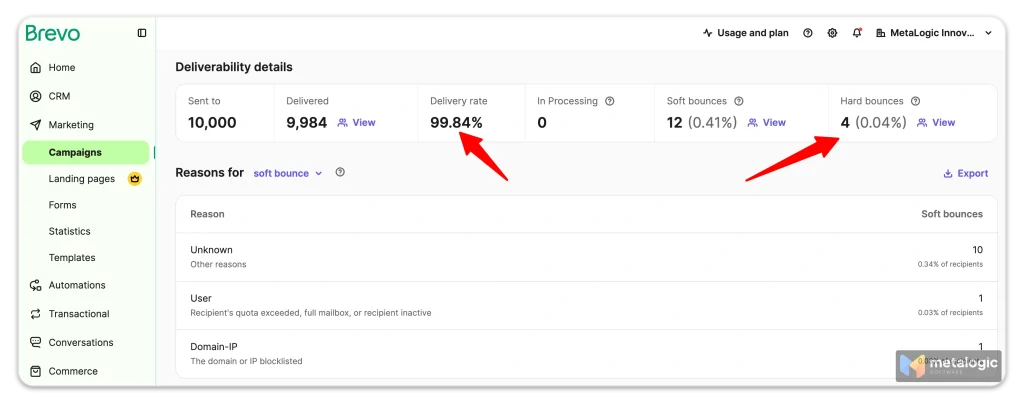
Hard bounces are the ones that hurt you, and they are the ones validation prevents. A hard bounce tells the receiving provider that you are sending to addresses you never checked. Enough of them and the provider decides you are not a careful sender.
Soft bounces are mostly noise. A mailbox that was full on Tuesday may be fine on Friday. Watch them, but do not delete those contacts.
There is no single safe number
Every email platform measures bounces slightly differently and sets its own limits. Under 2 percent is a widely used guide, and under 1 percent is healthy. But do not treat any percentage as permission to keep sending. If your rate starts climbing, find out why before your next campaign.
The rules changed in 2024
Since February 2024, Google and Yahoo apply a shared set of rules to anyone sending around 5,000 messages a day or more to personal accounts. Microsoft started enforcing its own version in 2025.
| Metric | Safe | Trouble |
|---|---|---|
| Spam complaint rate | Below 0.1% | 0.3% and above |
| Bounce rate | Below 2% | Above 5% is an emergency |
| Authentication | SPF, DKIM and DMARC set up | Missing records |
Rejected, not filtered
When you cross those lines, your mail is not quietly moved to the spam folder. It is refused at the door, with a 550 error. Nobody sees it at all.
Recovery is slow on purpose. Once a domain goes above the complaint limit, it has to stay below the line for seven days in a row before Google will help it deliver again.
The label does not come off
Once your domain crosses about 5,000 messages a day to Gmail, it is treated as a bulk sender permanently. Sending less later does not undo it. One big campaign to a list you never checked can put you under rules you will live with from then on.
Your email platform is watching too
Mailchimp, Brevo, Sendgrid and the rest all monitor your bounce rate. High bounces can get your account limited or closed, because your behaviour affects the reputation of their servers as well as yours.
What bad data really costs
Numbers make this easier to feel. Imagine a list of 10,000 addresses where 15 percent are dead. That is a normal figure for a list that has not been checked in a year.
| Without validation | After validation | |
|---|---|---|
| Addresses you send to | 10,000 | 8,500 |
| Messages that can arrive | 8,500 | 8,500 |
| Bounce rate | ~15% | Under 2% |
| Sender reputation | Damaged | Protected |
| Your open rate looks like | Lower than reality | The truth |
Look at the second row. The same number of people receive your message either way. Validation does not cost you a single real reader. It only removes the ones who were never there.
What it does change is everything underneath. Your reputation stays intact, your reports become honest, and you stop paying your email platform to send messages into nothing.
Want to see the state of your own list? MetaLogic MailVexa checks 2,000 addresses free for 14 days. It runs on your computer, so your contacts are never uploaded anywhere. No card is needed to start.
How to validate your list
The process is the same with any tool. Here is how it works in MetaLogic MailVexa, which runs as an application on your own computer.
Step 1. Export your list
Get your contacts out of your email platform or CRM as a file. CSV, TSV, TXT and Excel files all work. You do not need to clean the file first.
Step 2. Open the file and map your columns
Drag the file into the application. It finds the email column automatically. All your other columns, such as names and companies, stay with the data.
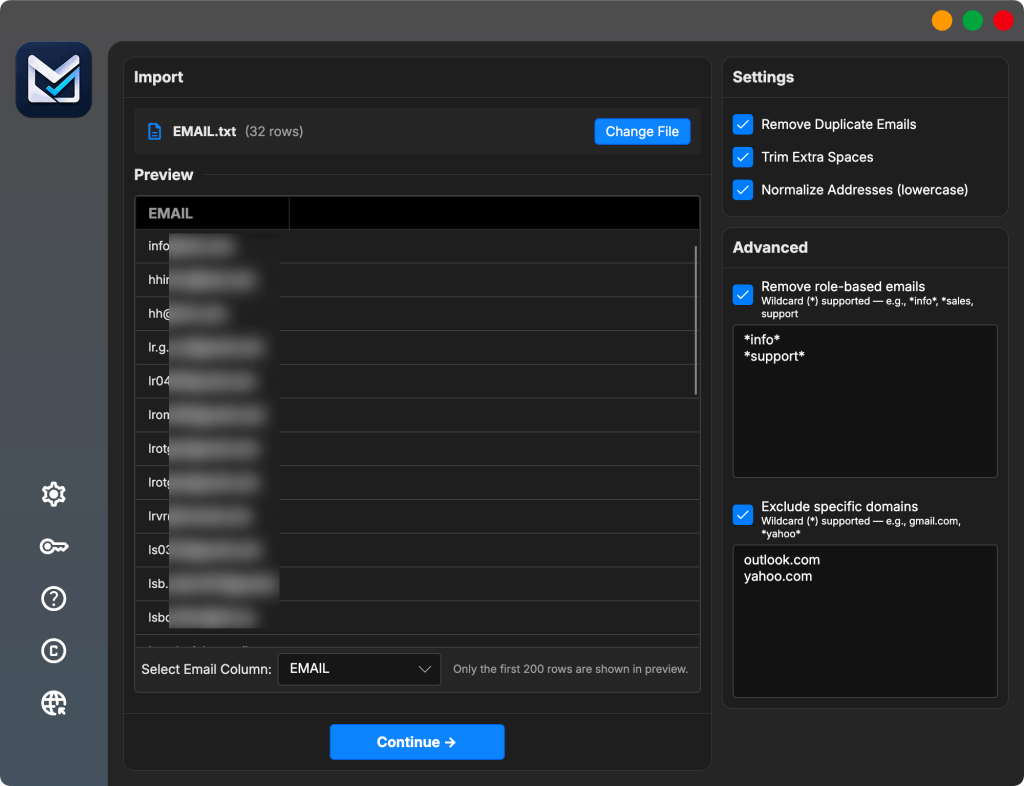
Step 3. Clean the obvious problems first
Before any network check runs, remove duplicates and decide what to do with role addresses such as info@ and support@. This step is instant and it makes the real check faster.
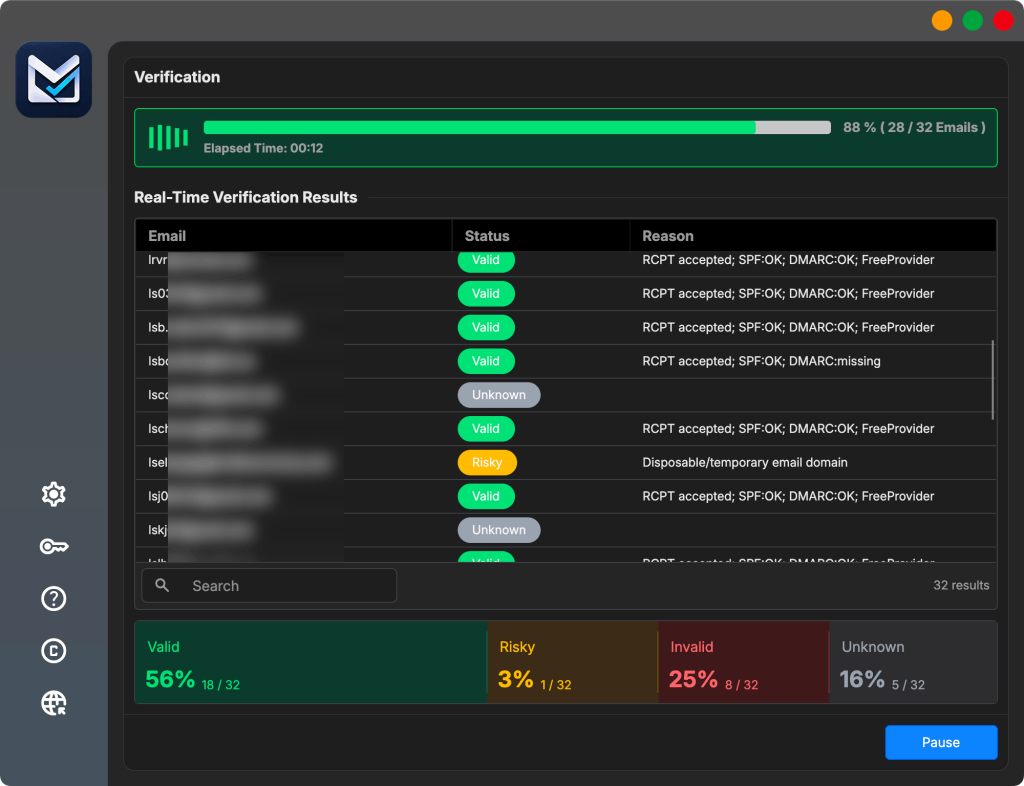
Step 4. Run the validation
Now the tool performs the full check on every address. You can watch the progress as results arrive. A list of 10,000 addresses usually finishes in about 45 to 60 minutes on a normal laptop.
A full walkthrough of one verification run.
Step 5. Read the results, then export
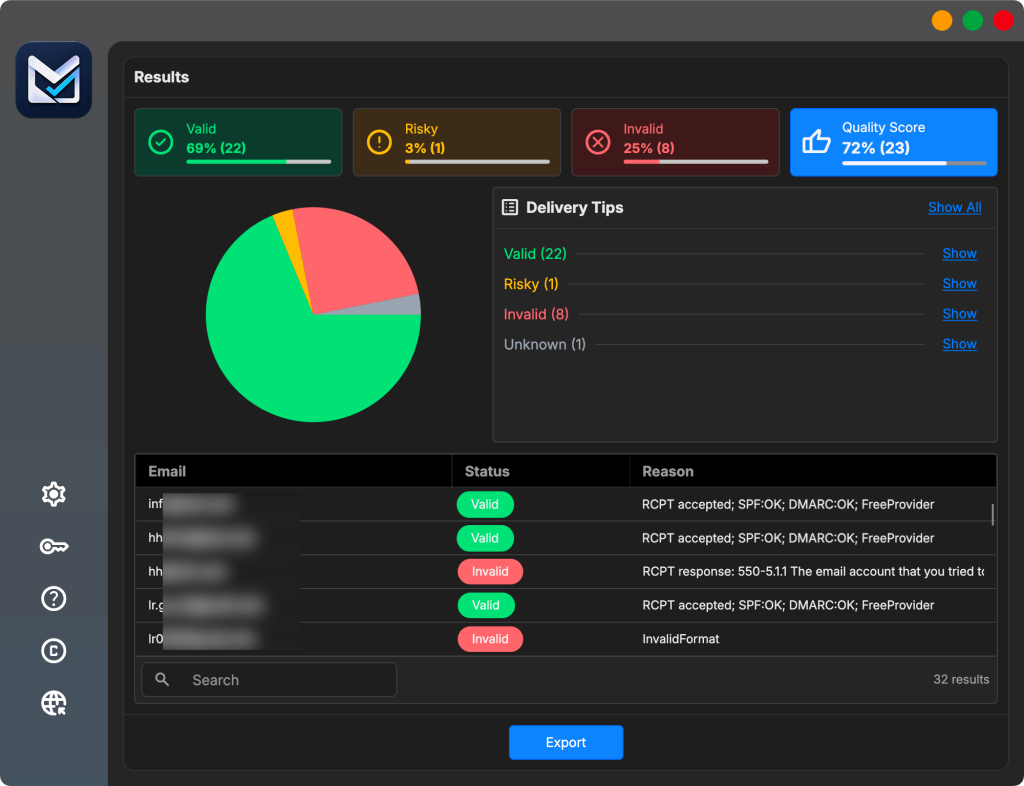
Every address now has a result and a reason. You can see exactly why an address was marked invalid, down to the answer the mail server gave.
Export the groups you want. Most people export Valid addresses for the campaign and keep Risky ones in a separate file for later.
Read more: How to clean your email list before a campaign?
Do not delete your Risky and Unknown addresses
Keep them in a separate list. Unknown results often become clear when you check again in a few weeks. Risky addresses can still be real customers. Removing them forever is a decision you cannot undo.
Set up your sending domain correctly
Validation cleans your list. It does not tell the receiving server who you are. That is a separate job, and it is the other half of getting your email delivered.
Since February 2024, Google applies a minimum standard to everyone who sends to Gmail accounts, with stricter rules above roughly 5,000 messages a day. Yahoo and Microsoft now apply similar rules.
| Requirement | All senders | 5,000+ per day |
|---|---|---|
| SPF or DKIM | At least one | Both required |
| DMARC | Recommended | Required |
| Forward and reverse DNS (PTR) | Required | Required |
| TLS connection | Required | Required |
| Spam rate | Below 0.3% | Below 0.3%, aim under 0.1% |
| One-click unsubscribe | Good practice | Required for marketing mail |
What each record does, in plain words
SPF is a short line you add to your domain’s DNS. It lists which services are allowed to send email using your domain. If you send through a platform such as Mailchimp or Brevo, that platform must appear in your SPF record. If it does not, your messages are much more likely to be treated as spam.
DKIM adds an invisible signature to every message you send. The receiving server uses it to confirm the message really came from your domain and was not changed on the way. Google requires a key of at least 1024 bits, and recommends 2048.
DMARC tells receiving servers what to do when a message fails the SPF and DKIM checks. You can start with a policy of p=none, which only collects reports and changes nothing. That is enough to meet the requirement, and it lets you see who is sending mail using your name.
Reverse DNS (PTR) gives the sending server’s IP address a name, and that name must point back to the same IP address. If you send through an email platform, they handle this. If you run your own mail server, you must set it up yourself.
If you send through an email platform, most of this is already done
Mailchimp, Brevo, Sendgrid and similar services handle the technical side. But you still have to add the DNS records they give you to your own domain. Many people skip that step and never realise their domain is unauthenticated.
Open your platform’s domain settings page and check that every record shows as verified. It takes two minutes.
Watch your spam rate
Google offers a free tool called Postmaster Tools. It shows your spam complaint rate, your domain reputation, and whether your messages are authenticated. Google requires senders to keep this rate below 0.3%, and advises keeping it below 0.1%.
This is the number that decides whether your mail is delivered or refused, and it is the number a dirty list pushes in the wrong direction.
Three things Google tells senders not to do
Do not buy email addresses from other companies. Do not send to people who did not sign up. Do not send test phishing campaigns from your own domain, because your domain can end up on a blocklist.
Google also advises increasing your sending volume slowly. Doubling your volume overnight is one of the fastest ways to get rate limited.
The full official list is worth reading once, and it is short: Google’s email sender guidelines.
Online service or desktop app?
There are two kinds of tools, and the difference is bigger than it first looks.
Most email verification software is not really software. It is a website. You create an account, upload your contact list, and wait. Your contacts are then stored on that company’s servers.
A desktop application works differently. It reads the file from your own disk. The checks still go out to the internet, because that is how validation works. But the list itself never leaves your computer.
| Online service | Desktop app | |
|---|---|---|
| Where your list goes | Uploaded to their servers | Stays on your computer |
| How you pay | Per address, forever | Once, for a licence |
| Re-checking a list | Costs again every time | Costs nothing |
| Client or GDPR data | Needs a vendor agreement | Nothing to disclose |
| Works offline | No | The app does, the checks need internet |
If you handle a client’s database, or work with data protected by GDPR, this is not a small detail. The sentence “we uploaded the contact list to a third party” has consequences that the price comparison does not show.
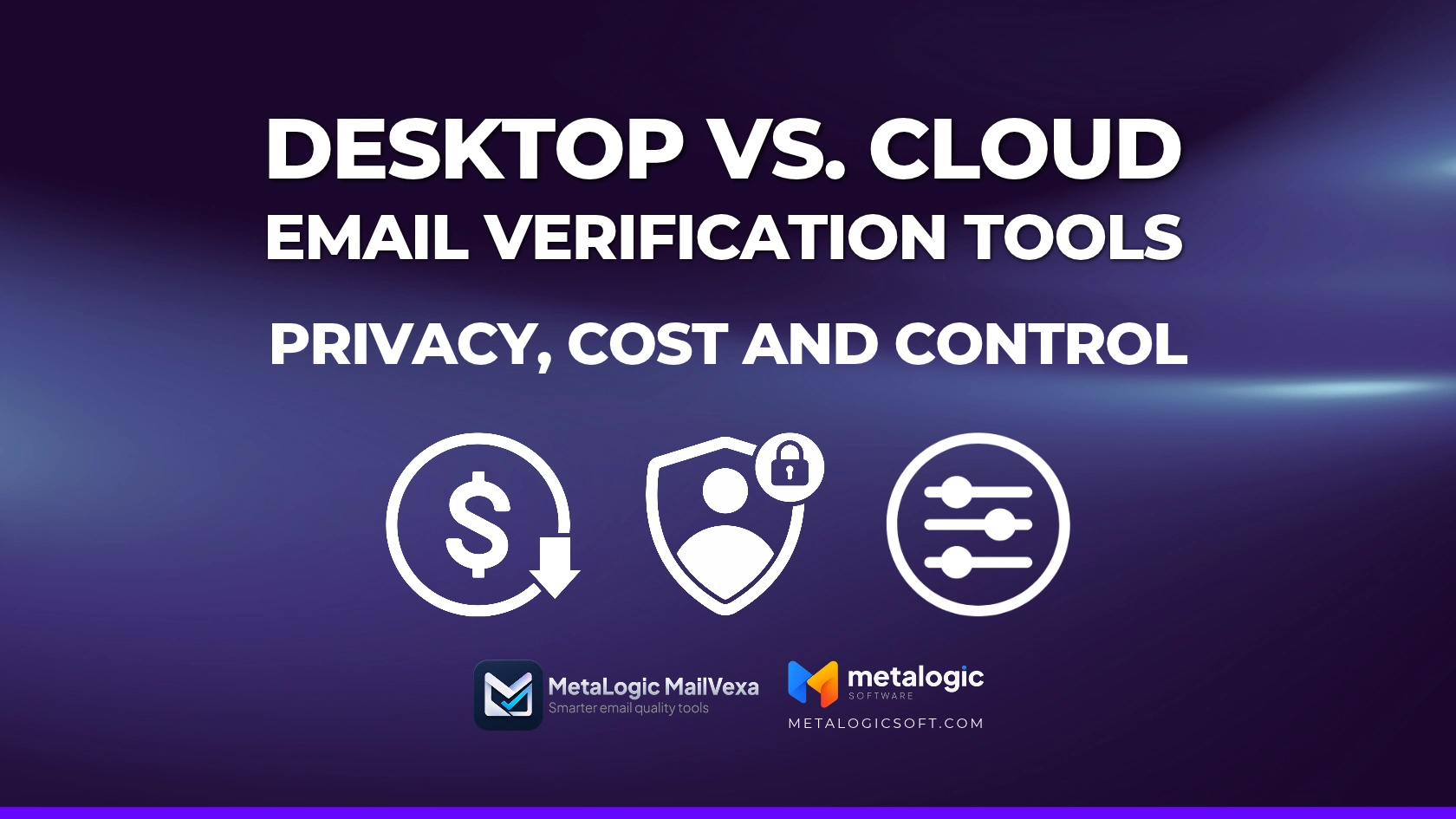
We wrote a full comparison of seven tools, including the online ones, if you want to go deeper: desktop versus cloud, and what a year of each really costs.
How often should you validate?
There is no single right answer. It depends on how fast your list changes.
| Your situation | How often |
|---|---|
| You add contacts every week | Monthly |
| You send campaigns regularly | Every three months |
| You send rarely | Before every campaign |
| You are mailing a list you have not used in six months | Always, without exception |
| You just imported a list from somewhere else | Before the first send |
The one rule that matters most
Validate before any large campaign, and always before mailing an old list. Those two moments cause more deliverability damage than everything else combined.
Mistakes to avoid
- Validating once and thinking you are done. Your list starts decaying the next day. This is maintenance, not a one time task.
- Deleting everything that is not Valid. Unknown is not Invalid. You will delete real people.
- Using a free tool that only checks the format. It catches typos and nothing else. Most dead addresses look perfectly correct.
- Sending a test campaign to find bad addresses. That is the expensive way to learn, and the damage is already done by the time you see the report.
- Buying a list and validating it. Validation makes a bought list deliverable. It does not make it legal, and it does not make those people want your email.
- Ignoring your bounce report after sending. It tells you what your validation missed. Feed that back into your next clean.
Common questions
Does validation guarantee my email reaches the inbox?
No, and be careful with any tool that promises this. Validation checks the quality of the address. Reaching the inbox also depends on your authentication records, your sender reputation, your content, and how people react to your messages. Validation removes one large obstacle. It does not remove all of them.
Can I just check my list in Excel?
Only partly. Excel can find duplicate rows and obvious mistakes, and that is a useful first step. But a spreadsheet cannot ask a mail server whether a mailbox exists. Use Excel to tidy the file, then use a validation tool for the real check.
Read the full cleaning process here.
Does my email platform already do this?
Not in the way you might think. Most platforms remove addresses that bounced after a campaign. That means the damage to your reputation has already happened. Validation takes place before the first send, which is the whole point. Check what your platform actually offers.
Why do I get so many Unknown results?
Several things cause this. The connection may have timed out. The receiving server may have limited you temporarily. Your internet provider may block the port that validation needs. Or the provider may simply refuse to confirm whether a mailbox exists, which large providers often do. Check the reason given for each result, then try those addresses again later.
Does validation detect every spam trap?
No. Do not assume that. A spam trap can be a technically working mailbox, so a successful check does not prove the address belongs to a real subscriber. Validation removes many recycled traps, but collecting your contacts properly in the first place is still the only real protection.
Does validation make a purchased list safe to send to?
No. Validation can tell you which addresses are technically deliverable. It cannot create permission or interest. Google advises senders not to buy email addresses and not to send to people who did not sign up. A clean bought list is still a bought list.
How long does it take to validate a list?
It depends on how many addresses you have, how many different domains they use, your internet connection, and how quickly the receiving servers reply. As a rough guide, 50,000 addresses usually take about 15 to 25 minutes on a normal computer. The most reliable estimate comes from running a small sample of your own list first.
Can a valid address become invalid later?
Yes, and it happens constantly. Accounts get closed and people change jobs. This is why a single validation is not enough. Keep a note of when each address was last checked, and update your records using the bounce report from every campaign.
Does email validation send a message to the address?
No. The tool starts a conversation with the mail server and closes it before any message is sent. The owner of the address is not contacted and sees nothing.
Is email validation accurate?
For most domains, yes. The check asks the mail server directly. Large consumer providers such as Gmail and Yahoo are more careful about what they confirm, so some results come back as Unknown. A good tool tells you that instead of guessing.
Is email validation legal?
Yes. It is a technical check of a mail server, not an email sent to a person. The separate question is whether you have the right to email that person at all, and validation does not change that.
Can I validate a list for free?
For a few addresses, yes. Most online services give a small free allowance each month. Genuinely free bulk validation does not exist, because every check costs the provider money. Free unlimited tools usually check only the format, which misses almost every dead address.
What is a good bounce rate?
Below 2 percent is the usual guide, and under 1 percent is healthy. Above 5 percent needs attention before your next send. There is no single number that applies to every platform, because each one measures and enforces differently. Follow your own provider’s guidance, and investigate any increase early rather than waiting for a limit.
Will validation improve my open rate?
Your real open rate does not change, but the number you see becomes correct. Dead addresses count as sends that nobody opens, which makes your reports look worse than reality. Many people see their reported open rate rise sharply after their first proper clean.
What is the difference between email validation and email verification?
Nothing. They are two names for the same process. Some tools prefer one word, some the other.
Check your list before your next campaign
MailVexa validates your email list on your own computer. Your contacts are never uploaded. It runs on Windows and macOS, and you pay once instead of paying for every check.
Try it on 2,000 addresses for 14 days. No credit card required.
We build MetaLogic MailVexa, so treat our opinion of it accordingly. Everything in this guide about bounce rates, provider rules and list decay applies whichever tool you choose.