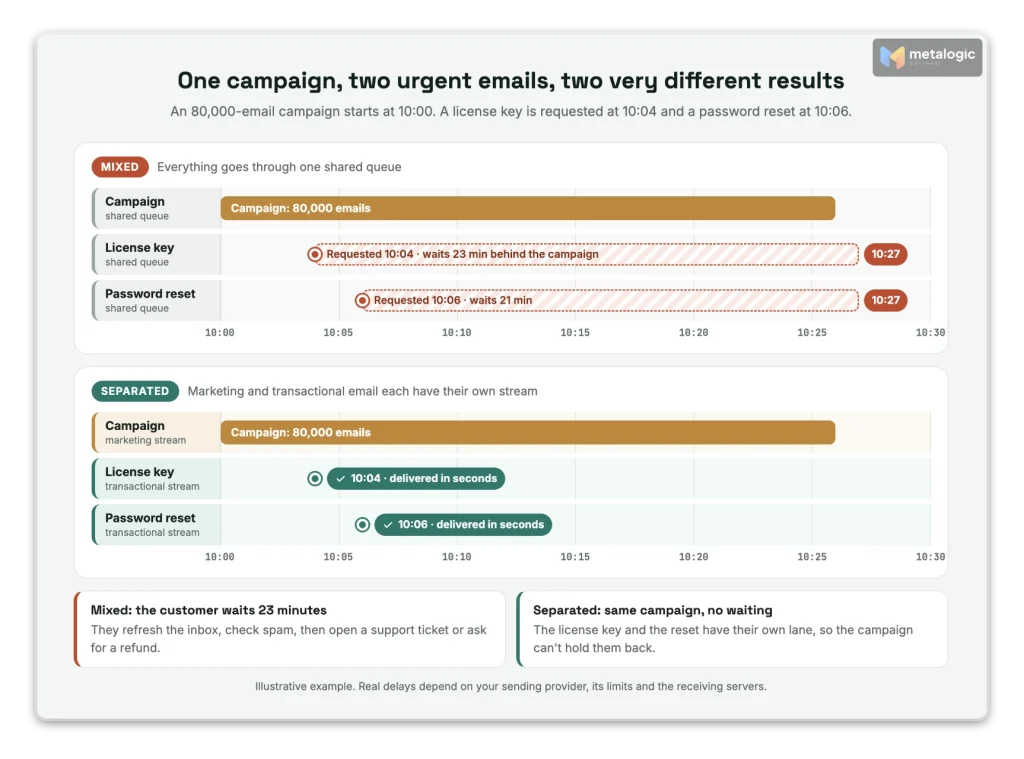
It’s Black Friday. At 10:00 your store sends a discount campaign to 80,000 people.
At 10:04, a customer buys your software and waits for the license key. At 10:06, someone else clicks “Forgot password”. Both emails go into the same queue as the campaign. Both wait.
The customer refreshes the inbox. Nothing. They check spam. Nothing. They open a support ticket, or ask for a refund.
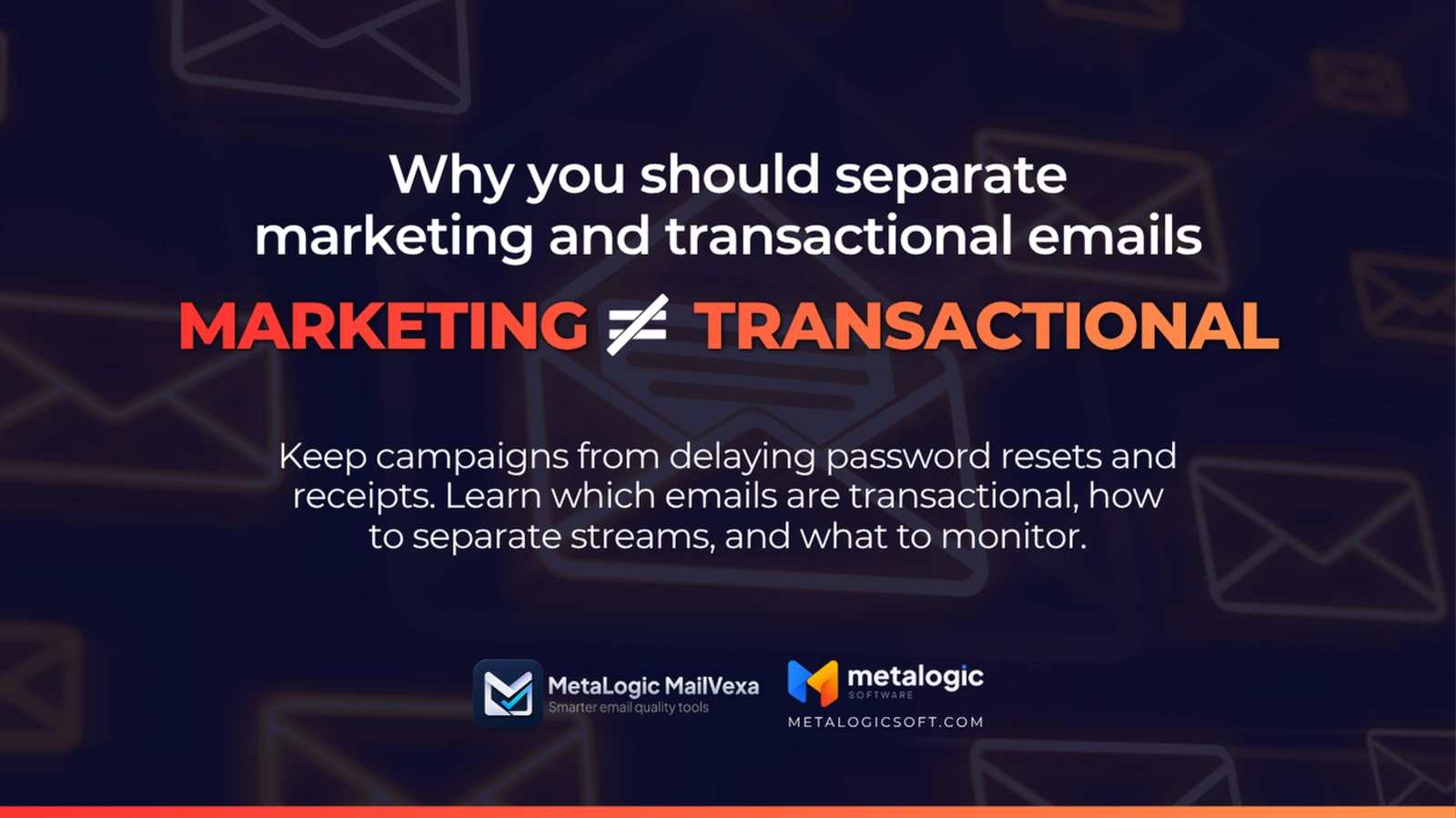
This happens when marketing and transactional emails share the same path: the same sending limits, the same reputation and the same unsubscribe rules. This guide shows you how to tell the two apart, which level of separation you actually need, and how to set it up step by step.
Quick answer
Separate them so a campaign can never delay or damage the emails your customers need right now: password resets, receipts, login codes and license keys.
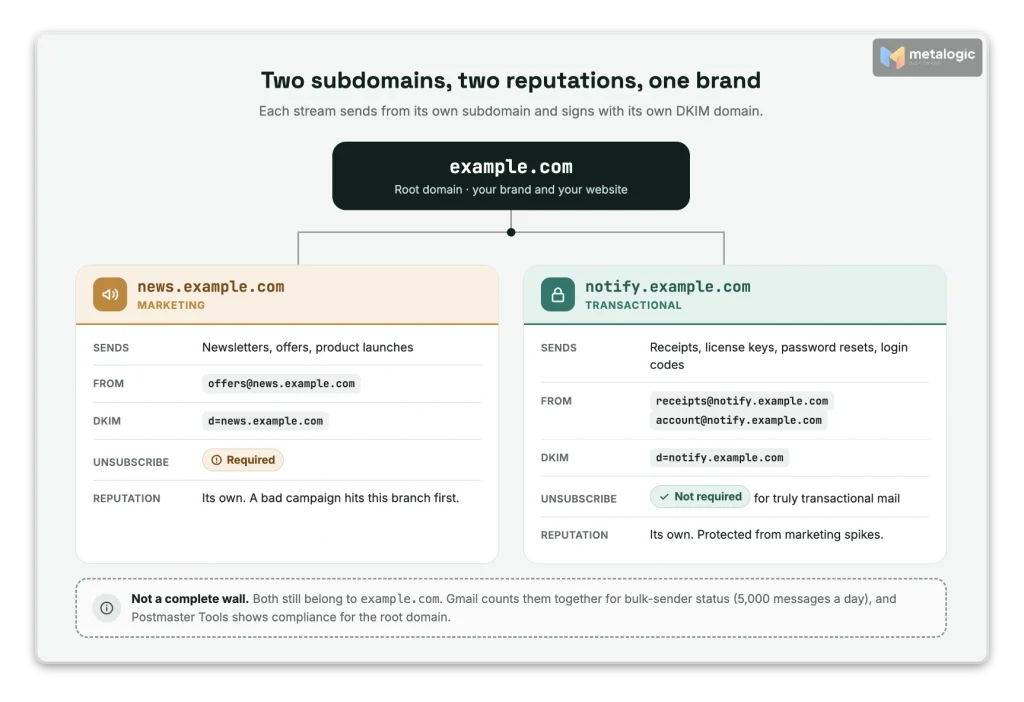
For most businesses, that means two sending identities on two subdomains (for example news.example.com and notify.example.com), each with its own authentication, and separate streams or IP pools in your email platform when your volume grows. Keep unsubscribes separate too, so leaving the newsletter never blocks a password reset.
Separation reduces risk and makes problems easier to find. It doesn’t guarantee the inbox.
What are marketing and transactional emails?
| Marketing emails | Transactional emails | |
|---|---|---|
| Main purpose | Promote, sell, keep in touch | Complete or confirm something the person did or asked for |
| Examples | Newsletter, discount, product launch | Password reset, receipt, license key, login code, shipping notice |
| What triggers it | Your campaign plan or a marketing automation | The person’s action, or an event in their account |
| How urgent | Depends on the campaign | Often very urgent: seconds or minutes |
| What the reader expects | Content they signed up for | A message about their own action or account |
| Unsubscribe link | Required | Not required for truly transactional mail |
Three things people often get wrong:
- Transactional isn’t only about payments. A password reset or a login code is transactional too.
- Automated doesn’t mean transactional. A birthday discount is automated and sent to one person. It’s still marketing.
- The purpose decides, not the tool. Sending through a “transactional API” or naming a template “system” doesn’t change what the email is.
How to classify the emails in between
Some emails sit in a gray area. This table helps you decide:
| Usually transactional when… | Becomes marketing when… | |
|---|---|---|
| Welcome email | It confirms the account and explains how to log in | It’s part of a series that promotes products and offers |
| Abandoned cart | Rarely. The person didn’t complete anything | It reminds or tempts the person to buy. Automation alone doesn’t make it transactional |
| Renewal notice | It neutrally says an existing subscription will renew | It offers a discount to come back or upgrade |
| Product update | It’s a required security or terms notice | It introduces a new paid feature |
| Receipt with a promotion | The receipt is the whole message (logo and branding are fine) | A promo is added, depending on where you send (see below) |
The rules differ by country and by mailbox provider
United States: the FTC’s CAN-SPAM guide looks at the “primary purpose”. A message becomes commercial if the subject line suggests a promotion, or if the transactional content “does not appear mainly at the beginning of the message”. The FTC adds that “the law views these categories narrowly.”
United Kingdom: the ICO is stricter. If a service message has elements that are direct marketing, “even if that is not the main purpose of your message”, it counts as direct marketing. General branding or logos don’t. A neutrally worded automatic renewal notice may not be marketing.
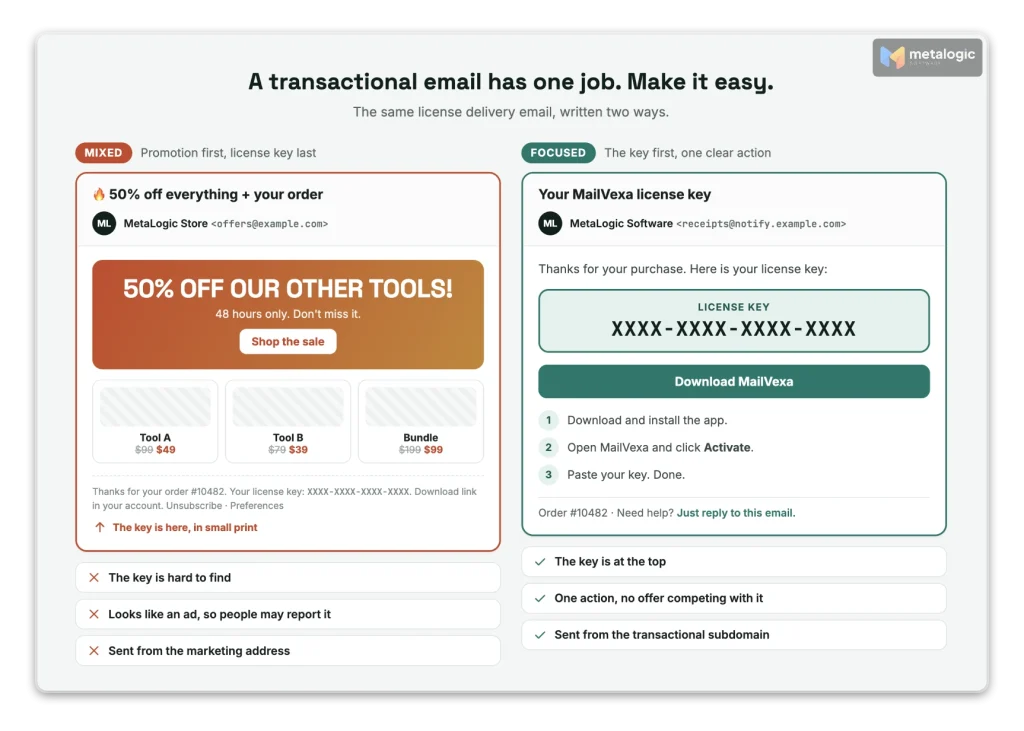
Gmail: its sender guidelines say: “Don’t mix different types of content in the same message. For example, don’t include promotions in sales receipt messages.”
This is general information, not legal advice.
What goes wrong when you mix both types
1. One reputation carries both
If a campaign gets spam complaints, the damage doesn’t stay with the campaign. Gmail’s sender FAQ is clear: “High spam rates negatively affect message delivery for any message type that you send.” Yahoo’s sender requirements say it directly: “Segregate Email types by IP or DKIM domain,” and “Don’t send bulk/marketing email from the same IPs you use to send user mail, transactional mail, alerts, etc.”
2. They compete for the same sending capacity
Limits exist on both sides of the connection, and a big campaign can use them up:
- Your platform’s limit. Amazon SES, for example, sets one sending rate per account: the “maximum number of emails that Amazon SES can accept each second for this account in the current AWS Region.” A campaign and a password reset in the same account share it.
- The receiver’s limit. Gmail tracks limits per domain and per IP. Its guidelines say: “The IP address quota is shared for all senders that use that IP address. When the IP address hits its quota, all domains that send from that IP address stop sending emails.” Your resets get deferred along with the campaign.
3. Unsubscribes stop the wrong emails
If your unsubscribe works on “all email”, someone who leaves your newsletter can stop receiving password resets too. Twilio SendGrid warns about exactly this in its suppression docs: an all-or-nothing unsubscribe “prevents recipients from getting any email messages, including non-promotional ones like password resets.”
4. Your reports hide the problem
A campaign of 80,000 and a day of 600 receipts produce one blended number. If receipts start bouncing or arriving late, the average barely moves. You learn about it from angry customers, not from your dashboard.
What “separating email streams” actually means
Separation isn’t one switch. It has layers, and each layer protects something different:
| Layer | What it separates | Effort |
|---|---|---|
| 1. Different From address | How readers recognise each type (news@ vs receipts@) | Very low |
| 2. Different subdomain and authentication | Domain reputation and DKIM identity per stream | Low |
| 3. Separate stream or subaccount | Settings, suppression lists and reports | Low to medium |
| 4. Separate queue and sending capacity | Urgent emails don’t wait behind campaigns | Depends on the platform |
| 5. Separate IP pools | IP reputation per stream | Medium. Needs enough volume |
| 6. Separate providers | Everything, including outages at one provider | High. Two systems to keep in sync |
A new From address alone separates almost nothing
Changing [email protected] to [email protected] helps readers, and Gmail asks that “messages of the same category should have the same From: email address.” But it doesn’t give you a separate IP, queue or domain reputation. Both addresses still share everything behind them.
How to use subdomains for each type
For most businesses, layer 2 is the best value: little effort, real separation. A simple plan:
| Use | Example sender address |
|---|---|
| Newsletters and promotions | [email protected] |
| Receipts and license delivery | [email protected] |
| Account messages (password reset, login codes) | [email protected] |
Amazon SES recommends exactly this in its best practices: “Unique subdomains develop their own reputations. Using subdomains reduces the risk of damage to your reputation if, for example, your marketing communications land in a spam trap or trigger a content filter.”
Set up each subdomain properly
- Three domains matter in every email: the From domain the reader sees, the DKIM
d=domain that signs it, and the Return-Path domain that SPF checks. For real separation, each stream should be signed with its own subdomain. - Authenticate each one with SPF, DKIM and DMARC, following SPF, DKIM and DMARC explained.
- Test with a real email from each stream and check the headers, not just a DNS checker.
- Keep your brand clear. Use the same brand name in the From name, and a reply address people can actually use.
A subdomain is not a complete wall
Subdomains still belong to your main domain, and mailbox providers know it:
- Gmail counts them together. “Messages sent from the same primary domain count toward the 5,000 limit” for bulk senders. And once you qualify, you are “permanently considered” a bulk sender.
- Postmaster Tools rolls them up. Its Compliance status uses data from subdomains but shows the result for the main domain only.
- On shared IPs, some platforms can’t isolate it. Amazon SES says that with shared IPs “your sender reputation is set at the account level and can’t be isolated.”
So a subdomain reduces risk. It doesn’t remove it. Bad marketing practices can still hurt the whole brand.
Do you need separate providers or dedicated IPs?
Can one email platform handle both?
Yes, if it truly separates them. Some platforms are built for this. Postmark, for example, uses separate message streams and says “transactional and broadcast traffic do not mix in Postmark, including IP ranges.” Amazon SES lets you attach a dedicated IP pool to each configuration set, one for marketing and one for transactional, so that “your sender reputation for transactional emails is then isolated from that of your marketing emails.”
Do two accounts or two API keys mean separate infrastructure?
Not necessarily. Two API keys in the same account usually share the same sending limits, IPs and reputation. Ask your platform: “If my campaign hits a limit, will my password resets wait?”
When are separate IP pools or providers worth it?
- Separate IP pools: when you send enough volume, steadily, to keep each pool warm. Gmail’s own ideal is one IP: “Ideally, send all messages from the same IP address.” It advises a different IP per message type only “if you must send from multiple IP addresses.”
- Separate providers: when transactional email is critical to your business and you want it to survive a problem at your marketing platform. The cost is two systems, two sets of DNS records and two suppression lists to keep in sync.
Small business? Start with layers 1 to 3
Different From addresses, separate authenticated subdomains, and separate streams or unsubscribe groups cover most of the risk. A dedicated IP isn’t a requirement for separation. Read shared vs. dedicated IP before you pay for one.
Handle unsubscribes and suppression lists correctly
Different events should stop different emails:
| What happened | Stop marketing? | Stop transactional? |
|---|---|---|
| Unsubscribed from the newsletter | Yes | No. They still need receipts and resets |
| Hard bounce (the address doesn’t exist) | Yes | Yes. Nobody can receive it |
| Spam complaint on a campaign | Yes | Follow your platform’s rules. Never move the address to another stream to get around it |
| Blocked by your platform’s safety rules | Yes | Don’t bypass it. Find the cause |
- An unsubscribe is not an invalid address. It’s a choice about marketing. It must not stop a password reset the person asks for later.
- Use unsubscribe groups or per-stream lists, not one global “stop everything” switch.
- With two platforms, sync the status and the reason. A hard bounce found by one must be known by the other.
- Never use “bypass” settings to reach unsubscribed people with marketing. SendGrid’s docs say to use them “only when you must deliver a message” to everyone, for example because of a regulation.
Don’t relabel marketing as “transactional”
Gmail requires one-click unsubscribe “only for marketing and promotional messages,” and gives password resets and reservation confirmations as transactional examples. But that’s not an escape route. Gmail adds: “Message recipients, not Google, determine the nature of the messages they receive.” If people see a promotion, they’ll report it as one.
Keep transactional emails focused and fast
- The purpose is clear in the subject line and the first line (“Your license key for MailVexa”).
- The code, link, receipt or key is easy to find, near the top.
- No sales offers that compete with the main message.
- Urgent emails have their own queue, priority and a sensible retry policy.
- Duplicate sends are prevented (one click on “resend” shouldn’t create five emails).
- Delays and errors are logged, so you can answer “I didn’t get the email” in minutes.
A good example: a license delivery email should make access simple: the key, the download link, and how to activate. If you want to introduce your other products, do it in a separate campaign, on the marketing stream, to people who agreed to receive it.
How to separate an existing email setup
- List every source that sends email with your domain: store, CRM, newsletter tool, website forms, app, helpdesk, invoices.
- Classify each email by purpose using section 02.
- Choose addresses, subdomains and streams for each type.
- Set up and test authentication for each path with a real email.
- Review the rules for unsubscribes, bounces and complaints in each stream.
- Test under load: send a password reset while a campaign is going out, and time it.
- Move gradually and watch the results for each stream.
- Keep a way back. Know how to return to the old path if something breaks.
Don’t invent emails to warm up the new path
A new transactional subdomain warms up naturally with real receipts and resets. Don’t generate extra “transactional” messages just to build volume. For marketing streams, follow a proper plan in how to warm up an email domain and IP address.
Monitor each stream separately
| Stream | What to watch |
|---|---|
| Marketing | Spam complaints, bounces, unsubscribes, clicks, sales |
| Transactional | Delivery time, rejected and deferred messages, bounces, and “I didn’t get the email” tickets |
| Both | Authentication results and delivery by mailbox provider (Gmail, Outlook, Yahoo) |
- Add each subdomain to Google Postmaster Tools. Google explains that “to see dashboards for subdomains independently from the primary domain,” you add the subdomains the same way.
- Remember: delivered isn’t the inbox. A server accepting your email doesn’t mean it landed in the inbox.
- Don’t judge transactional email by opens. Google says it “doesn’t track open rates.” For a password reset, the real signal is: did the person reset the password?
For the full method, see how to monitor email deliverability.
Where email list verification fits in
Separation protects your transactional stream from your marketing stream. It doesn’t fix the marketing list itself. And most of the risk starts there: old addresses, typos and fake signups produce the bounces and complaints that hurt your reputation.
So before each campaign, on your marketing stream:
- Verify the list of people who gave consent, and remove addresses that would bounce.
- Decide what to do with uncertain results (Risky and Unknown) instead of sending to them blindly.
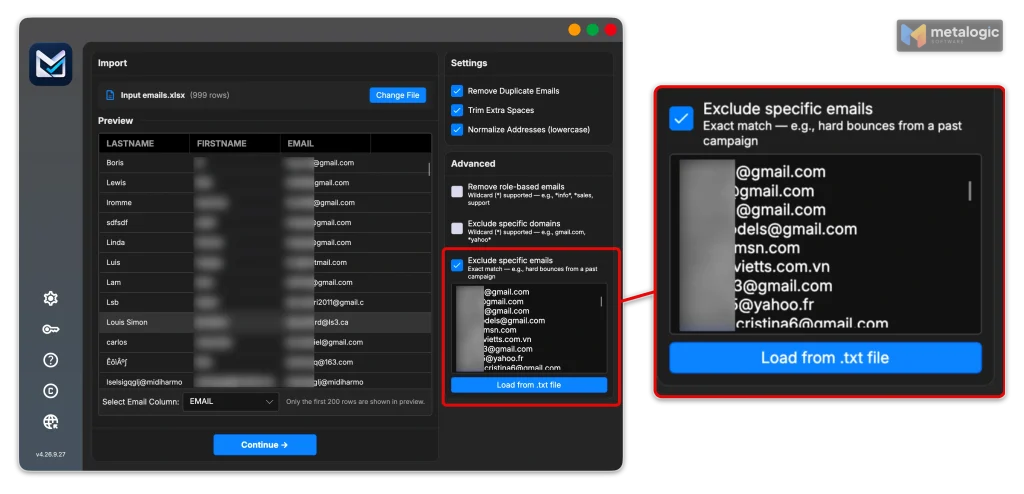
- Keep your “do not send” list (past hard bounces, unsubscribes, complaints) out of every new import.
MetaLogic MailVexa is email verification software for exactly this step. It runs on your own Windows or Mac computer, so your list never leaves your machine:
- Layered checks for every address: format, disposable domains, free providers, MX, SMTP and mailbox, catch-all, and the domain’s SPF/DMARC.
- Four groups with reasons: Valid, Risky, Invalid and Unknown, so you can decide calmly instead of guessing.
- Exclude specific emails: paste or load past hard bounces and complaints from your email platform. Matching rows are skipped and marked
ExcludedEmail. That’s how you keep suppression in sync, even across two platforms. - Exports your platform can import: CSV or XLSX, with your own columns kept, and split files for import limits.
- About 10,000 checks an hour with one proxy, and a one-time license instead of credits.
What verification is not
Email list validation doesn’t prove consent, and it doesn’t guarantee the inbox. It also isn’t part of your transactional path. A password reset or login code must go out immediately, never wait for a batch check. MailVexa is for preparing campaign lists. Stream separation and authentication are set up in your email platform and DNS.
For the full routine, see how to clean your email list before sending a campaign. Then download MailVexa and check the list for your next campaign. For the bigger picture, see 15 ways to improve email deliverability.
Common questions
Can I use the same email provider for both types?
Yes, if it really separates them: separate streams or subaccounts, separate suppression lists, and ideally separate sending capacity or IP pools. Two API keys in one account often share everything.
Is a different From address enough?
No. It helps readers recognise each type, but both addresses still share the same domain reputation, IPs and sending limits. Use separate authenticated subdomains as well.
Do I need a separate domain or just a subdomain?
For most businesses, subdomains of your main domain are enough and keep your brand recognisable. A completely separate domain adds isolation but can look unfamiliar to customers.
Do transactional emails need an unsubscribe link?
Gmail requires one-click unsubscribe only for marketing and promotional messages. Truly transactional messages, like password resets, are excluded. Local laws may still apply.
Can I include promotions in an order confirmation?
Be careful. Gmail advises against promotions in receipts. In the UK, any promotional element makes it direct marketing. US law is more lenient if the receipt comes first and the subject line is transactional.
Will separate subdomains completely protect my main domain?
No. Gmail counts subdomains together with the main domain for bulk-sender status, and Postmaster Tools rolls their compliance up to the main domain. Subdomains reduce risk, they don’t remove it.
Do small businesses need dedicated IPs?
Usually not. Separate subdomains, From addresses and streams cover most of the risk. Dedicated IPs need steady volume to work well.
Does separation guarantee inbox placement?
No. It keeps one stream’s problems from spreading to the other. The inbox still depends on consent, list quality, authentication and complaints.
Sources
Mailbox providers
- Yahoo: Sender requirements and recommendations. “Segregate Email types by IP or DKIM domain.”
- Gmail: Email sender guidelines. Same From per category, IP per message type, no promotions in receipts, IP quotas.
- Gmail: Sender guidelines FAQ. Subdomains count toward bulk status, one-click unsubscribe scope.
- Google: Set up Postmaster Tools. Separate dashboards for subdomains.
Email platforms
- Amazon SES: Tips and best practices. Subdomains per message type.
- Amazon SES: Sending quotas. One sending rate per account and Region.
- Amazon SES: Configuration sets. Separate IP pools for marketing and transactional.
- Postmark: Message streams
- Twilio SendGrid: Suppressions. All-or-nothing unsubscribe and bypass warnings.
Regulators
- FTC: CAN-SPAM Act compliance guide. Transactional categories and the primary purpose test.
- ICO: Identify direct marketing. Service messages.
Product
- MetaLogic MailVexa. Desktop email verification software for Windows and macOS.
Protect your campaigns at the source: the list
Separation keeps your receipts safe from your campaigns. MailVexa keeps your campaigns clean: it removes addresses that would bounce, keeps past bounces and complaints out, and shows a reason for every result, all on your own computer.
Windows and macOS. Pay once, use for life. Free 14-day trial with up to 2,000 verifications.
We build MetaLogic MailVexa, so weigh our description of it accordingly. We have no commercial relationship with any email platform mentioned in this guide. Provider rules and documentation were checked in October 2026 and change often. Legal points are general information, not legal advice.