Anyone can type your company name into the “From” line of an email. Nothing in email itself stops them. That is how phishing messages pretend to be your bank, your supplier, or you.
So when your newsletter arrives at Gmail or Outlook, the receiving server has to ask a simple question: did this really come from the domain it claims? SPF, DKIM and DMARC are the three ways your domain answers that question.
Here is the part most guides skip. All three can show “pass”, and your email can still fail. By the end of this guide you will know why, and how to check it on a real message in two minutes.
One honest limit before we start. The DMARC standard, RFC 9989, says clearly that passing authentication does not guarantee delivery to the inbox. It proves who sent the email. It does not prove anyone wants it.
Quick answer
SPF says which servers may send email for your domain. DKIM adds a digital signature that proves the message came from your domain and was not changed. DMARC checks that the domain in the visible “From” address matches a domain that passed SPF or DKIM, and tells receivers what to do if it does not.
You need all three. Gmail, Yahoo and Outlook.com now require them from anyone sending around 5,000 or more emails a day.
The three records at a glance
A simple way to picture them: think of a private event.
| SPF | DKIM | DMARC | |
|---|---|---|---|
| Like | The guest list at the door | A wax seal on the envelope | The rule the doorman follows |
| Question it answers | Is this server allowed to send for the domain? | Was it signed by the domain, and unchanged? | Does the visible sender match a domain that passed? |
| Where it lives | A TXT record on your domain | A public key at selector._domainkey | A TXT record at _dmarc |
| What it checks | The hidden sending address (MAIL FROM) | The signing domain (d=) | The visible “From” domain |
The last row is the whole secret. SPF and DKIM each check a different domain from the one your readers see. DMARC is what connects them to the “From” address. We come back to this in “How they work together: alignment” section.
Before you start: three things to understand
What a DNS record is
DNS is the internet’s address book. A DNS record is one line of instructions stored in it for your domain. SPF, DKIM and DMARC are all DNS records, usually of the type TXT, sometimes CNAME.
Who does what
Three different companies are often involved. Mixing them up is where most setup confusion starts.
| Role | What it does | Example |
|---|---|---|
| Domain registrar | Where you bought the domain | The company you pay each year for the name |
| DNS host | Where your DNS records are edited | Often the registrar, sometimes Cloudflare or your web host |
| Email sending service | The platform that actually sends your campaigns | Mailchimp, Brevo, SendGrid, Google Workspace |
Your sending service gives you the records. You add them at your DNS host. The registrar only matters if it also hosts your DNS.
The three “sender” addresses in every email
Every email carries more than one sender identity. This is the most important idea in this guide.
| Identity | Also called | Who sees it | Checked by |
|---|---|---|---|
| From | Header From, visible sender | Your reader | DMARC |
| MAIL FROM | Return-Path, envelope sender, bounce address | Only servers | SPF |
| DKIM domain | The d= value in the signature | Only servers | DKIM |
Why this matters
When you send through an email platform, the MAIL FROM and DKIM domain often belong to the platform, not to you, unless you set up domain authentication. Then SPF and DKIM pass for their domain, and DMARC fails for yours.
SPF: who is allowed to send
SPF stands for Sender Policy Framework, defined in RFC 7208. It is a list of servers that may send email using your domain in the hidden MAIL FROM address.
What an SPF record looks like
example.com TXT "v=spf1 include:spf.mail-provider.example ip4:203.0.113.10 ~all"| Part | Meaning |
|---|---|
v=spf1 | This is an SPF record. |
include: | Also allow the servers listed by another domain, usually your email platform. |
ip4: / ip6: | Allow one specific IP address or range. |
a / mx | Allow the servers behind your domain’s A or MX records. |
~all | Anything else is “probably not allowed” (softfail). |
-all | Anything else is “not allowed” (fail). |
?all | No opinion (neutral). Treated like having no SPF. |
Google’s guide to setting up SPF recommends ~all. The DMARC standard adds a good reason: a strict -all can cause some receivers to reject a message before DMARC even gets a chance to see that DKIM passed.
Two rules that break SPF silently
Only one SPF record per domain
If you add a second v=spf1 record for a new email platform, both become invalid. The result is an error called permerror. Always merge new services into your one existing record by adding another include:.
The 10-lookup limit
SPF allows at most 10 DNS lookups in total. Every include, a, mx, ptr, exists and redirect counts, including the ones hidden inside each include. ip4, ip6 and all do not count. Go over 10 and SPF fails with permerror.
This is a limit on lookups, not on IP addresses. Five platforms that each use three includes internally already break it.
SPF and forwarding
When someone forwards your email, it leaves from their server, not yours. SPF then fails, because that server is not on your list. Google’s guide to forwarding email explains this and recommends DKIM, which survives forwarding much better.
DKIM: the signature
DKIM stands for DomainKeys Identified Mail, defined in RFC 6376. Your email platform signs each message with a private key only it holds. You publish the matching public key in DNS. Receivers use it to check the signature.
What a DKIM record looks like
s1._domainkey.example.com TXT "v=DKIM1; k=rsa; p=MIIBIjANBgkqh...long key..."The first part, s1, is called the selector. It lets one domain have several keys, for example one per email platform. The signature in each email names both the selector (s=) and the domain (d=), so the receiver knows exactly which key to look up.
What DKIM proves, and what it does not
- It proves the message was signed by that domain, and the signed parts were not changed on the way.
- It does not encrypt your email. Anyone can still read it.
- It does not prove the email is safe or wanted. A spammer’s domain can sign perfectly valid DKIM.
- It can break if something changes the message in transit, such as a mailing list adding a footer.
Use a 2048-bit key
Gmail requires DKIM keys of at least 1024 bits and recommends 2048. The standard RFC 8301 says the same. Google’s guide to setting up DKIM suggests 1024 only if your DNS host cannot store a longer key.
DMARC: the rule and the reports
DMARC stands for Domain-based Message Authentication, Reporting, and Conformance. It does three things:
- Checks that the visible “From” domain matches a domain that passed SPF or DKIM.
- Tells receivers what you want done with mail that fails.
- Asks receivers to send you reports about mail using your domain.
What a DMARC record looks like
_dmarc.example.com TXT "v=DMARC1; p=none; rua=mailto:[email protected]"The three policies
| Policy | What you are saying | What receivers usually do |
|---|---|---|
p=none | “I have no preference yet. Just send me reports.” | Handle mail normally. Other spam filtering still applies. |
p=quarantine | “Treat failing mail as suspicious.” | Usually put it in spam. |
p=reject | “Failing mail is not really from me.” | Refuse it. |
Google’s guide to setting up DMARC describes the same three options in practical terms.
p=none does not mean “pass”
This is the most common misunderstanding. The policy is only your preference. Whether a message passes or fails DMARC depends on alignment, not on the policy. A message can fail DMARC under p=none, and receivers still apply all their normal filtering.
The reports
ruais where aggregate reports go: daily summaries of which servers sent mail as your domain and whether it passed. This is the part you actually need.rufasks for individual failure reports. Most providers refuse to send them for privacy reasons. Gmail does not supportrufat all.
The pct tag is gone
Older guides tell you to roll out DMARC with pct=10, then 25, then 50. The current standard, RFC 9989, removed pct because receivers rarely applied it accurately.
Some official help pages from Google and Microsoft still mention it, because they have not been updated yet. You can leave pct out. A new optional tag, t=y, now serves as a softer test mode.
How they work together: alignment
Alignment means the domain that passed SPF or DKIM is the same domain your readers see in “From”. DMARC passes if at least one of these is true:
- SPF passes, and its MAIL FROM domain aligns with the From domain, or
- DKIM passes, and its
d=domain aligns with the From domain.
One aligned pass is enough. You do not need both for DMARC itself.
Relaxed or strict
| Mode | Rule | Does bounce.example.com align with example.com? |
|---|---|---|
| Relaxed (default) | Same main domain is enough | Yes |
| Strict | Must be exactly identical | No |
You set this with aspf= for SPF and adkim= for DKIM. The standard notes that nearly all domain owners find relaxed alignment sufficient. Leave both at the default unless you have a specific reason.
Example 1: everything lines up
| Identity | Domain | Result | Aligned (relaxed)? |
|---|---|---|---|
| From | [email protected] | ||
| MAIL FROM (SPF) | bounce.example.com | pass | Yes |
DKIM d= | example.com | pass | Yes |
| DMARC | Pass | ||
Even with strict SPF alignment, this message still passes, because DKIM’s example.com is an exact match.
Example 2: two passes, one fail
| Identity | Domain | Result | Aligned? |
|---|---|---|---|
| From | [email protected] | ||
| MAIL FROM (SPF) | bounces.esp-example.net | pass | No |
DKIM d= | esp-example.net | pass | No |
| DMARC | Fail | ||
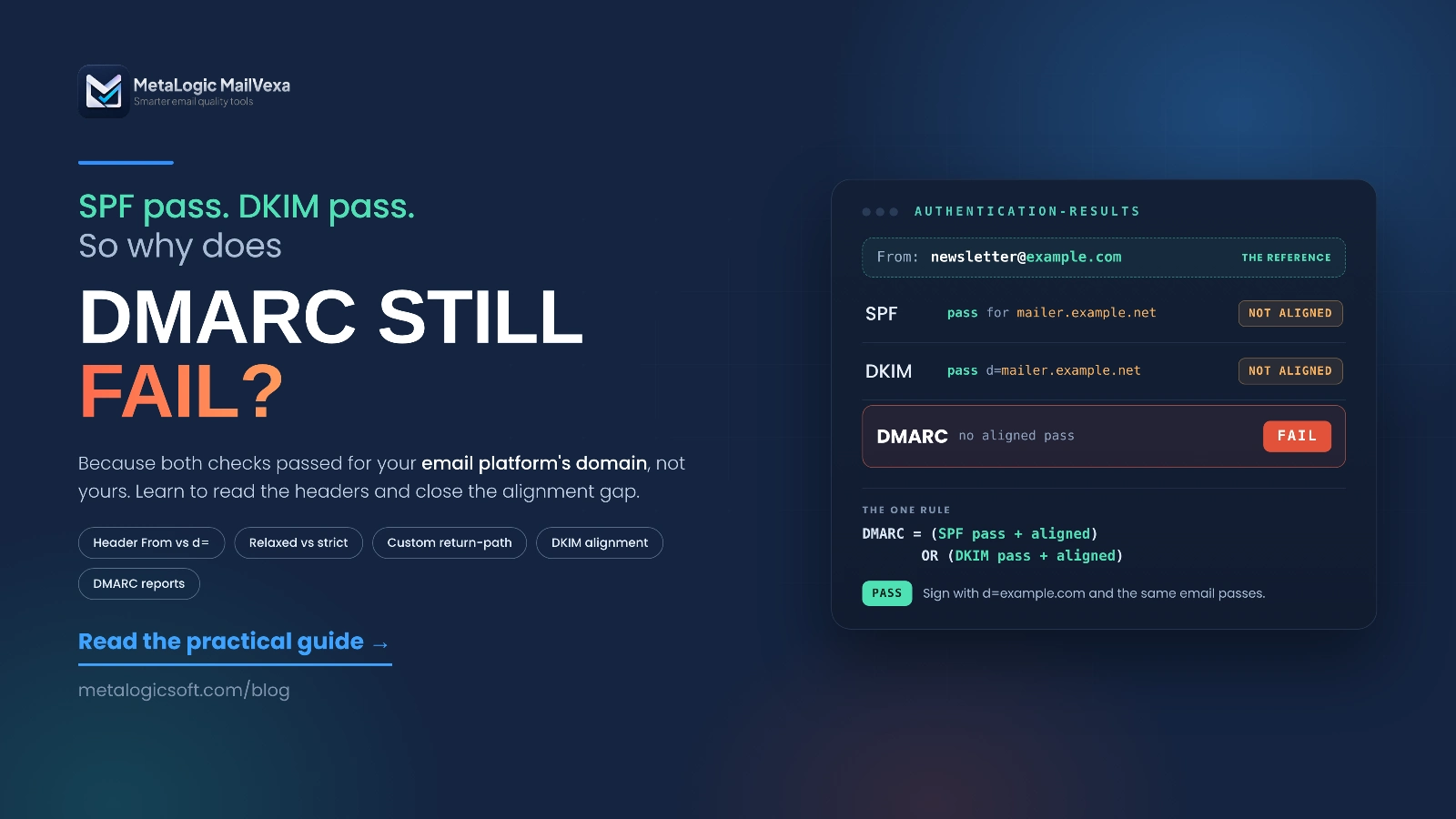
SPF passes. DKIM passes. DMARC fails, because both passed for the email platform’s domain, not for yours. Microsoft’s guide to setting up DMARC shows this exact situation in a real header. The fix is to set up domain authentication in your email platform, so it signs with your own domain.
DMARC needs one aligned pass. Providers may want more.
DMARC itself is satisfied by one aligned pass. But Gmail, Yahoo and Outlook.com require high-volume senders to have both SPF and DKIM working. And the standard says a domain using p=reject must not rely on SPF alone. Set up both.
What Gmail, Yahoo and Outlook require
Last checked: 30 September 2026. These rules change, so confirm on each provider’s page.
| Provider | All senders | High-volume senders |
|---|---|---|
| Gmail | SPF or DKIM | About 5,000+ a day: SPF and DKIM, DMARC (p=none is fine), From aligned with SPF or DKIM |
| Yahoo | SPF or DKIM | SPF and DKIM, DMARC of at least p=none that passes. Relaxed alignment is fine. |
| Outlook.com | Good practice recommended | Over 5,000 a day: SPF pass, DKIM pass, DMARC of at least p=none, aligned |
A few details that often get lost:
- Gmail’s rules apply to personal Gmail accounts. Google’s sender guidelines FAQ says they do not apply to mail sent to Google Workspace business accounts.
- Yahoo does not publish a volume threshold. Its sender FAQ says so directly. Assume the bulk rules apply to you.
- Outlook.com now rejects, not just filters. Since May 2025, non-compliant high-volume mail is refused with error
550 5.7.515. Microsoft explains the fix on its support page for that error. - Outlook.com is not Microsoft 365. The rule above covers outlook.com, hotmail.com and live.com. Business mailboxes on Microsoft 365 are handled by each company’s own settings, using what Microsoft calls composite authentication.
How to set it up safely, in eight steps
- List every service that sends as your domain. Newsletter platform, Google Workspace or Microsoft 365, invoicing, CRM, website forms, support desk. Missing one is the most common cause of trouble later.
- Find your DNS host. That is where you will add every record.
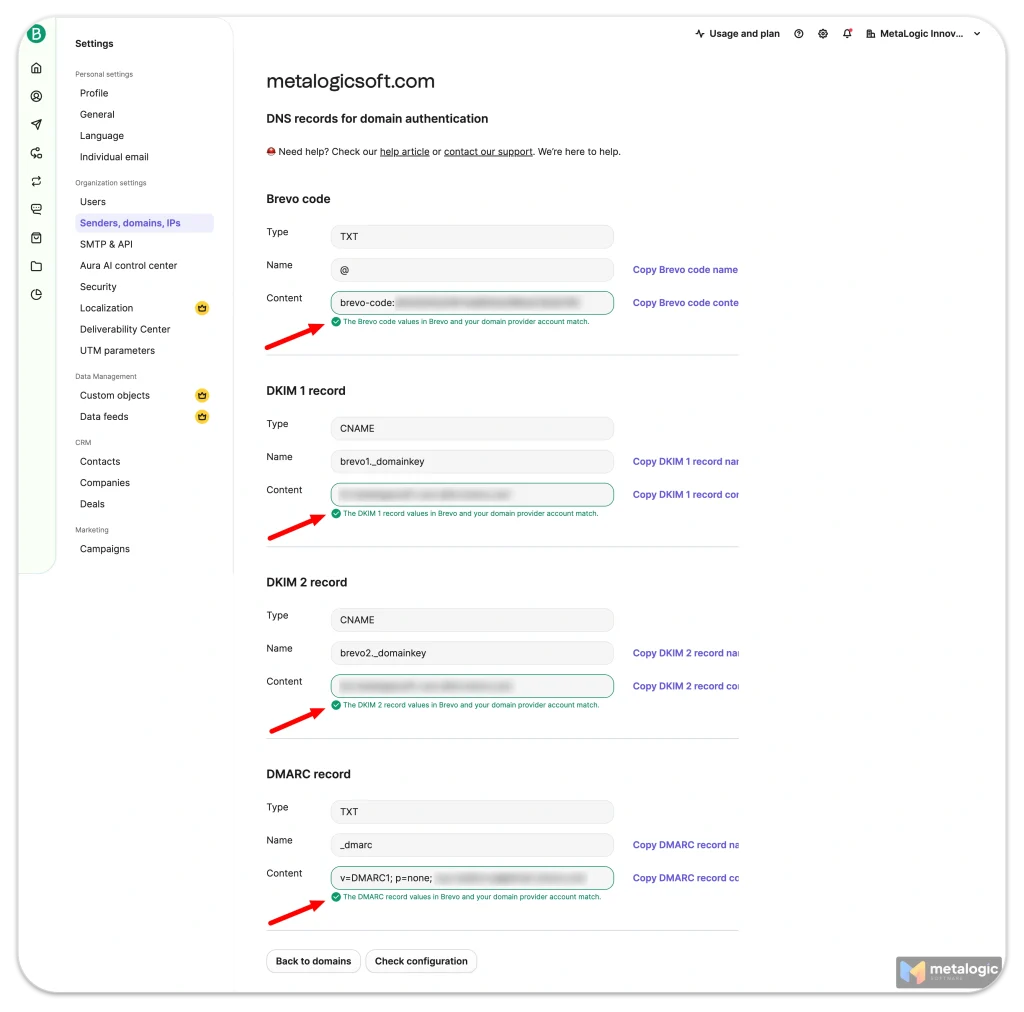
- Get the records from each service. Every platform generates records specific to your account. Mailchimp gives you CNAME and TXT records, and SendGrid generates a set of its own. Never copy records from another website or tutorial.
- Build one SPF record. Merge every service into a single
v=spf1record, and count your lookups. - Turn on DKIM in every service. Adding the DNS record is not enough. Most platforms also need you to press “verify” or “enable”.
- Publish DMARC at
p=nonewith aruaaddress, so reports start arriving. - Test with real emails. Send from each service to a Gmail account and check the headers (see “How to check that a real email passes” section).
- Tighten slowly. Read the reports. When every legitimate service passes, move to
p=quarantine, then later top=reject.
Do not jump straight to p=reject
If you publish p=reject before every service is set up, your own invoices, password resets or support replies can start being refused. The standard suggests about a month at none, then a similar period at quarantine. Google’s recommended DMARC rollout moves faster. Take whichever pace lets you read your reports properly.
And if people at your domain post to mailing lists, the standard advises against p=reject entirely, because lists change messages and break DKIM.
How to check that a real email passes
A record existing in DNS proves nothing. Only a real message proves it works. Here is how to check one.
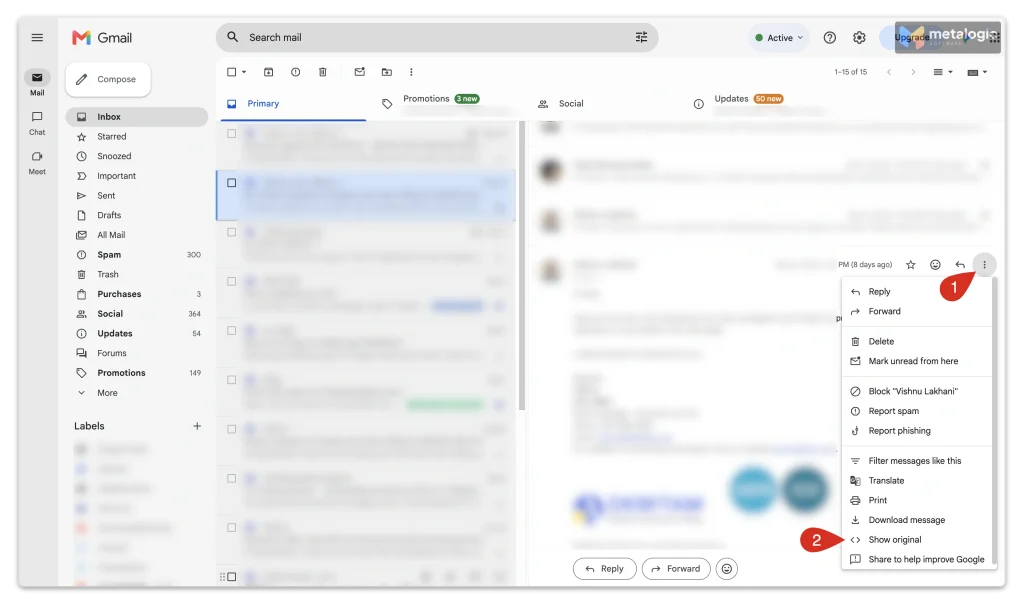
- Send a real campaign email to a Gmail address you can open.
- Open it, click the three dots, then Show original. Google’s guide to viewing the full header shows where it is.
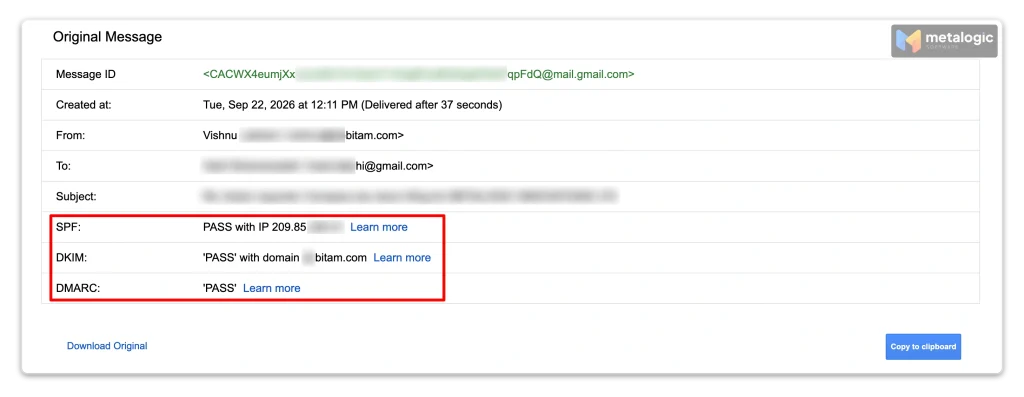
- Look at the SPF, DKIM and DMARC lines at the top.
- Now check the domains next to them. This is the step people skip.
Further down in the raw header you will find a line called Authentication-Results, defined in RFC 8601. It looks like this:
Authentication-Results: mx.google.com;
   dkim=pass header.d=example.com;
   spf=pass smtp.mailfrom=bounce.example.com;
dmarc=pass header.from=example.comRead header.d and smtp.mailfrom. If they show your email platform’s domain instead of yours, you have the problem from Example 2, even if every result says pass.
Common mistakes and how to fix them
| Mistake | What you see | Fix |
|---|---|---|
| Two SPF records | SPF permerror | Merge them into one record |
| Too many includes | SPF permerror | Remove unused services; stay under 10 lookups |
| DKIM record added but not enabled | No DKIM signature, or signed by the platform | Enable and verify DKIM inside the platform |
| Wrong selector | DKIM fails, key not found | Use the exact selector name your platform gave you |
| Message changed in transit | DKIM fails only for forwarded or list mail | Test with a direct message first |
| SPF and DKIM pass, DMARC fails | Domains next to “pass” are not yours | Set up domain authentication so the platform signs with your domain |
| A forgotten service | Mail from one tool fails after tightening DMARC | Add it to SPF and enable its DKIM before moving to reject |
Authentication is only one part of deliverability
SPF, DKIM and DMARC prove who is sending. They say nothing about who you are sending to.
A perfectly authenticated campaign can still fail because:
- Part of your list is made of addresses that no longer exist
- Some contacts never agreed to hear from you
- Too many people mark your emails as spam
Mailbox providers watch all of these. Yahoo’s guidance, for example, asks senders to remove invalid recipients promptly. Our spam troubleshooting guide walks through every one of these causes in order.
Where MailVexa fits
MetaLogic MailVexa does not set up SPF, DKIM or DMARC for you. That happens at your DNS host and your email platform.
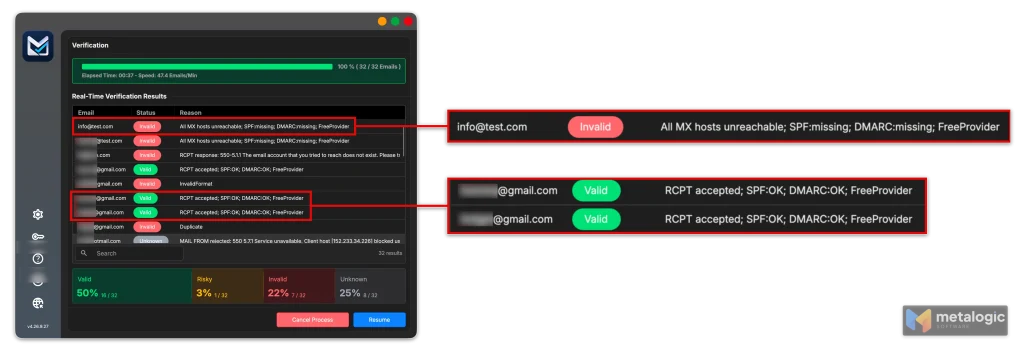
What it does is the other half: email list validation. It checks each address on your list before you send: its format, whether the domain can receive mail, whether the mailbox exists, and whether it is a catch-all, disposable or role address. It also looks up SPF and DMARC on each recipient’s domain as an extra signal. Results come back as Valid, Risky, Invalid or Unknown, and your list never leaves your computer.
Two checks before every campaign
Sender side: does a real email pass SPF, DKIM and DMARC, with your domain next to each?
List side: has the list been verified, with invalid addresses removed? See how to clean your email list before sending for the full process, and what each verification result means for reading the output.
Common questions
Do I need SPF, DKIM and DMARC if I use an email platform?
Yes. The platform can send for you, but authentication for your own domain only happens once you add its records to your DNS and complete its domain authentication steps.
Can DMARC pass if SPF fails?
Yes. DMARC needs only one aligned pass. If DKIM passes and aligns with your From domain, DMARC passes even when SPF fails, which is common with forwarded mail.
Why does DMARC fail when SPF and DKIM both pass?
Because of alignment. They passed for a different domain, usually your email platform’s. Set up domain authentication so the platform uses your own domain.
Does p=none mean my emails pass DMARC?
No. p=none is only your instruction to receivers. Whether a message passes depends on alignment. It just means you have not asked them to act on failures yet.
Can several email services use the same domain?
Yes. Put all of them into one SPF record using several include: entries, and give each service its own DKIM selector. Keep an eye on the 10-lookup limit.
Do subdomains need their own settings?
Partly. SPF is not inherited, so each subdomain that sends mail needs its own SPF record. DKIM works per signing domain. DMARC is inherited from the main domain unless a subdomain has its own record, and the sp= tag lets you set a separate policy for subdomains.
Does passing all three guarantee the inbox?
No. It proves the email is really from you. Inbox placement also depends on your reputation, complaints and list quality.
Pre-campaign authentication checklist
- I have a list of every service that sends email as my domain
- My domain has exactly one SPF record
- My SPF record stays under 10 DNS lookups
- DKIM is enabled and verified in every sending service
- My DMARC record exists at
_dmarc, with aruaaddress - A real email shows SPF, DKIM and DMARC as pass
- The domains next to “pass” are my own, not my platform’s
- I read DMARC reports before tightening my policy
- My list has been verified before this campaign
Sources
Requirements and standards checked on 30 September 2026.
Standards (IETF)
- RFC 9989: DMARC. The current DMARC standard. Alignment, policies, reports, and the removal of pct.
- RFC 7208: SPF. SPF mechanisms, the one-record rule, and the 10-lookup limit.
- RFC 6376: DKIM. How DKIM signatures, selectors and public keys work.
- RFC 8301: DKIM key length. Minimum 1024-bit keys, 2048 recommended.
- RFC 8601: Authentication-Results header. How authentication results appear in email headers.
Google / Gmail
- Email sender guidelines. Requirements for all senders and bulk senders.
- Email sender guidelines FAQ. Scope of the rules, including Google Workspace accounts.
- Set up SPF. SPF record format and the ~all recommendation.
- Set up DKIM. DKIM key length options.
- Set up DMARC. DMARC policies and reporting in practical terms.
- Recommended DMARC rollout. Moving from none to quarantine to reject.
- Best practices for forwarding email. Why forwarding breaks SPF.
- Trace an email with its full header. How to use Show original.
Microsoft / Outlook
- Outlook’s requirements for high-volume senders. SPF, DKIM and DMARC for 5,000+ emails a day.
- Fix NDR error 550 5.7.515 in Outlook.com. The rejection error for non-compliant high-volume mail.
- Set up DMARC in Microsoft 365. The three sender identities and the SPF/DKIM pass but DMARC fail example.
- Email authentication in Microsoft 365. Composite authentication for business mailboxes.
Yahoo
- Sender Best Practices. Authentication requirements and removing invalid recipients.
- Sender FAQs. No published volume threshold for bulk senders.
Email platforms and references
- Mailchimp: Set up email domain authentication. Account-specific CNAME and TXT records.
- SendGrid: Configure domain authentication. Account-specific DNS records.
- Cloudflare: What are DNS records?. Plain explanation of DNS records.
- Cloudflare: What is a domain registrar?. Registrar versus DNS host.
Product
- MetaLogic MailVexa product page. Verification checks, result categories and trial terms.
Provider requirements change. Check the original pages before making decisions.
Your domain is authenticated. Now check your list.
Authentication proves who is sending. MailVexa checks who you are sending to, on your own computer, and shows the reason behind every result before you press send.
Windows and macOS. Free 14-day trial with up to 2,000 verifications.
We build MetaLogic MailVexa, so weigh our description of it accordingly. Everything else in this guide applies whichever tools you use.