You typed “software” because you wanted something to install. You’ll find a dozen listicles naming the same seven products, all described that way. What none of them mention is that six of the seven aren’t software at all — they’re cloud services that run in your browser, on someone else’s servers, with your contact list uploaded to them.
That one difference decides where your data lives and what you pay every month. It might be completely fine for you, but it’s a decision, and you should get to make it on purpose rather than discover it at the upload screen.
It also explains why the search feels so unsatisfying on a Mac. The few genuine desktop verifiers that exist have historically been Windows-only, so Mac users get handed the same list of websites with the word “Mac” swapped in.
This guide takes an honest look at all seven: what each one really is, what it costs over a year of regular use, and which one fits how you actually work. We build one of them, and we’ll say so clearly when we get to it.
What these lists actually mean
Six of the seven tools below are web applications. You open a browser, create an account, upload a CSV of your contacts, wait, and download the results. They work on Windows and Mac the same way Gmail “works” on both — because both have a browser.
That’s not a criticism. It’s just a different product category with different trade-offs, and it deserves to be labelled honestly:
| Tool | What it actually is | Runs on | Your list |
|---|---|---|---|
| MetaLogic MailVexa | Native desktop app | Windows & macOS | Stays on your machine |
| ZeroBounce | Web app + API | Browser | Uploaded |
| NeverBounce | Web app + API | Browser | Uploaded |
| Hunter.io | Web app + API | Browser | Uploaded |
| EmailListVerify | Web app + API | Browser | Uploaded |
| BriteVerify | Web app + API | Browser | Uploaded |
| Mailgun Validate | Web app + API | Browser | Uploaded |
Why this hits Mac users harder
On Windows there have always been a few real desktop verifiers to choose between. On macOS there have been almost none, so “best email verification software for Mac” articles just recycle the same six websites. If you’re on a Mac and you’ve been wondering whether you missed something — you didn’t. The category barely existed until recently.
Only one tool in this comparison ships a native build for both platforms, which is the practical reason it’s listed first rather than any claim about superior accuracy.

Our bias, stated up front
We make MailVexa. You should weigh everything we say about it accordingly. What we’ve tried to do here is describe the other six accurately enough that you could confidently pick one of them after reading this — because if a desktop app isn’t what you need, we’d rather you knew that now than after a refund request.
Why this matters before you hit send
The arithmetic is unforgiving. If 15% of your list is dead, 15% of your campaign cannot be delivered — and cleaning that list moves your delivery ceiling from 85% to above 98%. No subject line, no send time, and no email platform can recover an address that doesn’t exist. That isn’t a marketing claim, it’s subtraction.
But the second-order damage is worse than the arithmetic, and it’s the part people discover late.
Bounces are a reputation signal, not just a statistic
Since February 2024, Google and Yahoo have enforced a shared set of rules on anyone sending roughly 5,000 or more messages a day to personal accounts. Spam complaint rates must stay below 0.3%, with Google advising you stay under 0.1%. Microsoft began enforcing its own version in 2025.
Cross those thresholds and your mail is rejected outright at the SMTP level — a 550 error — not quietly filtered into a spam folder. And recovery is slow by design: once a domain goes above 0.3%, it has to stay below that line for seven consecutive days before Google’s delivery mitigation applies to it again.
Dead addresses push every one of those metrics the wrong way at the same time. They bounce, they drag your open and click rates down, and old lists frequently contain recycled spam traps that report you directly to the provider.
The classification doesn’t wear off
Any domain that crosses roughly 5,000 messages a day to Gmail is classified as a bulk sender permanently. Reducing your volume later doesn’t reverse it. One large campaign to an uncleaned list can put you under rules you’ll live with from then on.
What healthy looks like
| Metric | Target | Trouble starts |
|---|---|---|
| Bounce rate | Under 2% | Above 5% — treat as an emergency |
| Spam complaints | Under 0.1% | 0.3% triggers rejection |
| List cleaning | Quarterly, and before every large send | Lists untouched for a year |
What this looks like in practice
Abstract targets are easy to nod at, so here is one of our own campaigns, sent to a list cleaned before the send. 3,427 recipients:
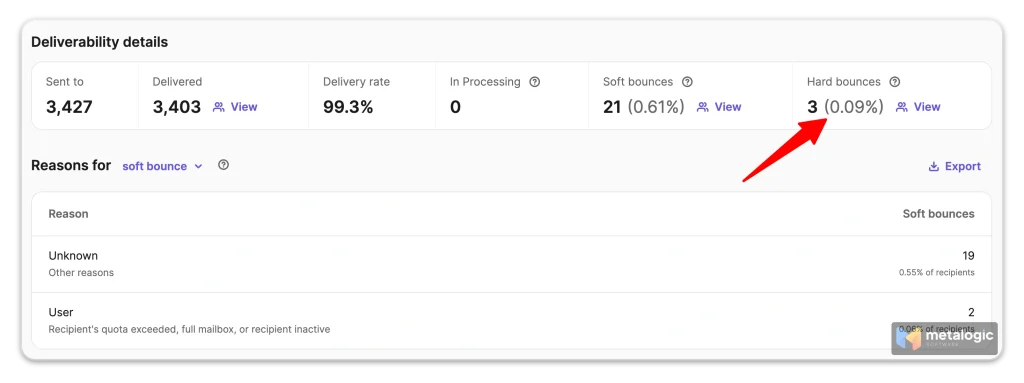
| Metric | Result | Common threshold |
|---|---|---|
| Delivery rate | 99.3% | — |
| Hard bounces | 3 (0.09%) | 2% |
| Soft bounces | 21 (0.61%) | — |
The number that matters for list quality is the hard bounce rate. A hard bounce means the address does not exist, and those are what damage your sender reputation. Soft bounces are transient — a full mailbox, a server having a bad afternoon — and they usually resolve on their own, which is why nineteen of the twenty-one above came back with no specific reason at all.
0.09% sits more than twenty times below the 2% line where email platforms start paying attention. That headroom is the entire point of verifying before you send instead of learning about your list from the bounce report.
Verification is the cheapest deliverability work available to you. Authentication records take a technical afternoon. Content, segmentation and re-engagement take months of effort with uncertain results. Removing addresses that simply don’t exist takes one run of a tool and fixes the single largest input into every number above.
Sender reputation takes months to rebuild and minutes to damage. That asymmetry is the whole argument for cleaning a list before you send to it rather than after you find out.
The two questions that decide it
Every one of these tools does the same core work: syntax check, MX lookup, SMTP probe, catch-all detection, disposable-domain filtering. Accuracy differences between serious vendors are real but small, and they’re not what you’ll regret in six months.
These two are.
1. Where is your list allowed to go?
If you’re verifying your own newsletter list, uploading it is a non-issue. If you’re an agency handling a client’s customer database, a recruiter working with candidate data, or anyone touching EU residents’ data under GDPR, “we uploaded the contact list to a third-party vendor” is a sentence with consequences. You need a data processing agreement, a lawful basis, and an answer when the client asks where their data went.
A local desktop app sidesteps the question entirely. The file never leaves the machine. DNS and SMTP lookups still go out to the internet, because that’s how verification works — but the list itself stays put.
2. Are you renting or buying?
SaaS verifiers charge per email verified, usually via credits. That model is excellent when your volume is low or unpredictable. It becomes expensive, permanently, when verification is a routine part of your work.
The uncomfortable part is the behaviour it creates. When every check costs money, you stop re-verifying. You skip the list you cleaned two months ago. You send to stale data because re-checking felt wasteful. We’ve seen this play out more than the cost itself.
The 7 tools, compared
1. MetaLogic MailVexa — the desktop option
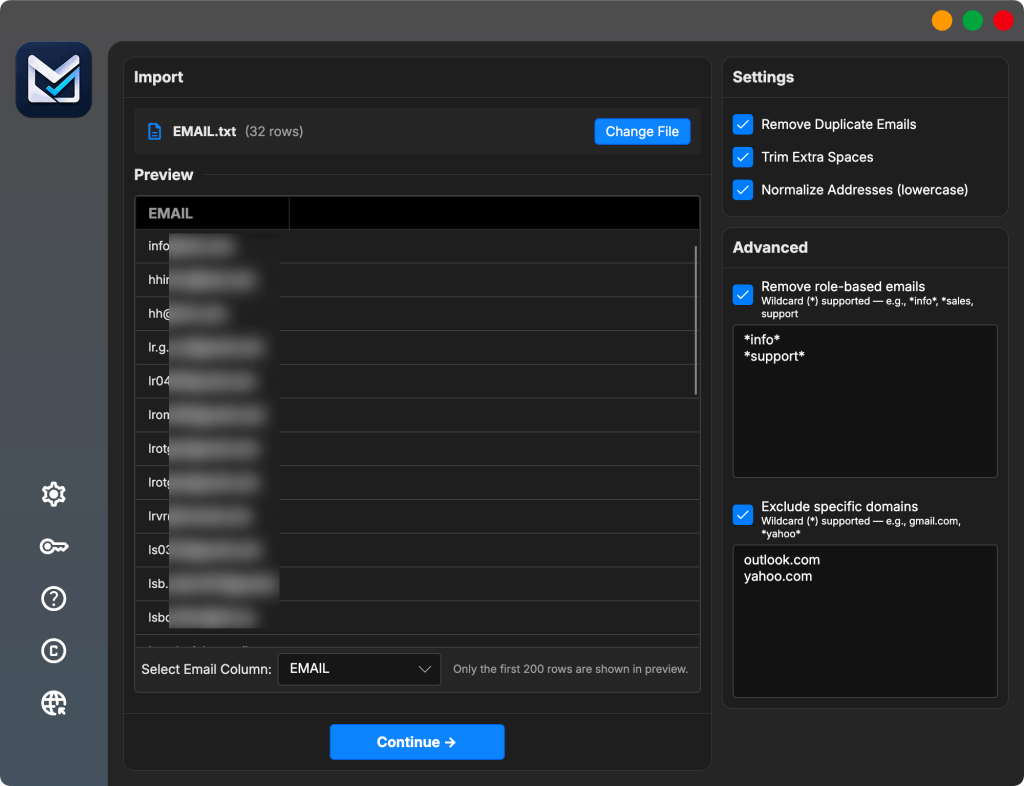
MailVexa is a native Windows and macOS application. You drag in a CSV, TSV, TXT or Excel file, it maps your columns, cleans duplicates and role-based addresses, then runs the full verification chain: format, disposable, free provider, MX, SMTP, mailbox, catch-all, SPF and DMARC.
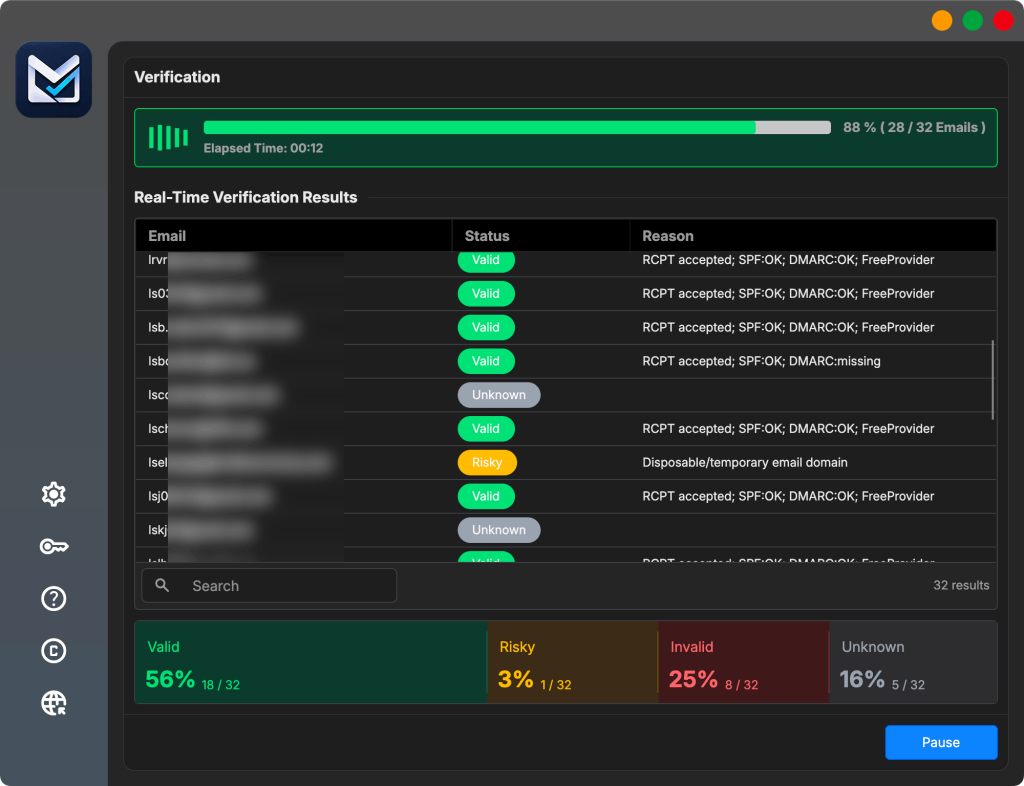
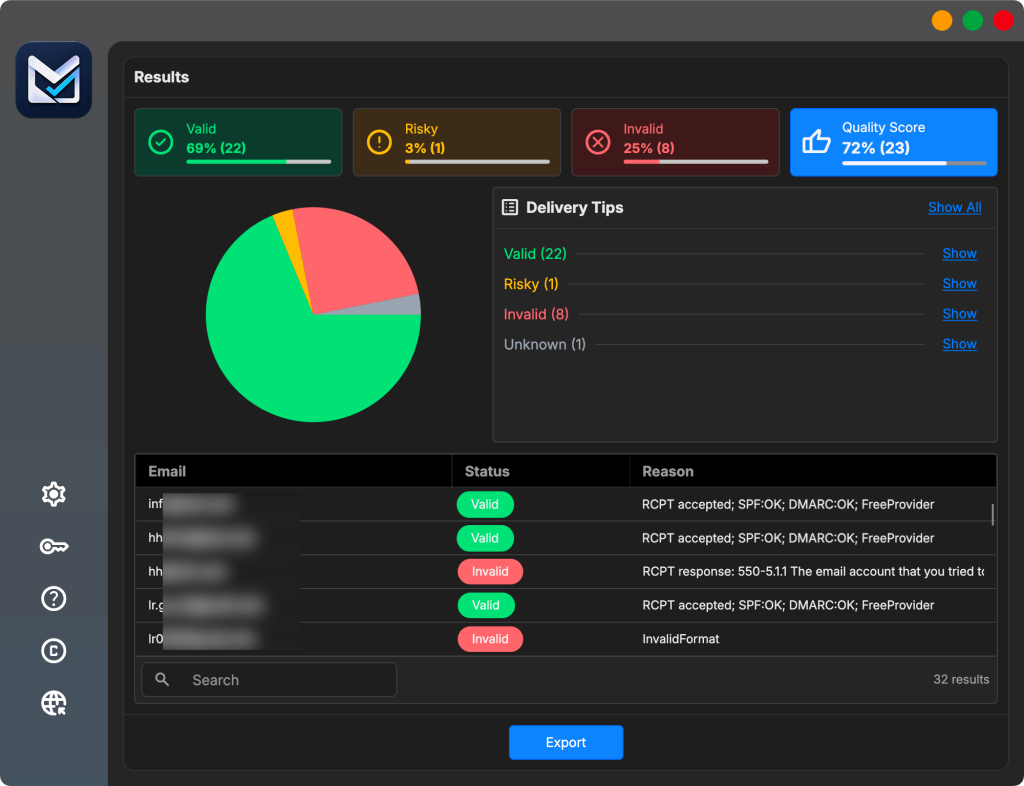
Results land in four buckets — Valid, Risky, Invalid, Unknown — with the reason attached to every row, down to the MX hosts and the actual SMTP response. You export exactly the categories and columns you want, keeping every original field in your file.
Two things make it different from everything else on this list. Your list never leaves your computer, and you pay once instead of per check. Licences run $49 for solo use, $149 for two devices with a million verifications a month, and $299 for unlimited on up to five devices. There’s a 14-day trial with 2,000 verifications and no card required.
It runs natively on both Windows and macOS, including Apple silicon, and a single licence covers either. That matters more than it sounds for mixed teams: most desktop utilities in this category are Windows-only, so a designer on a MacBook and a marketer on a ThinkPad usually can’t share a workflow. Here they activate the same licence and get the same app.
What you actually get
- Privacy. Your list is read from your own disk and never uploaded. No third-party server ever holds your contacts, which is the difference between answering a client’s data question and having to explain a vendor relationship.
- Lower total cost. A one-time licence from $49 against a per-email rate that never stops running. At any regular volume the licence is cheaper within the first month or two.
- No subscription. Nothing renews, nothing expires, no credits sitting unused at the end of a billing cycle.
- An allowance that refills instead of running out. Every plan has a monthly allowance that resets each month at no extra charge, for as long as you own the licence — 300,000 on Personal, a million on Professional, unlimited on Agency. Re-check the same list ten times and it costs exactly what checking it once costs. Credits work the opposite way: they deplete, and then you buy them again.
- Accuracy that matches the online services. The checks are the same SMTP conversations the SaaS tools run. Configured properly — correct HELO domain, matching reverse DNS, and a working proxy pool — a desktop verifier returns the same verdicts. Our guide to building your own SOCKS5 proxy covers that setup in about 20 minutes.
| Platform | Native Windows 10+ and macOS 12+ (Apple silicon), one licence covers both |
| Pricing | One-time licence, from $49 |
| Data handling | Local only — nothing uploaded |
| Best for | Agencies, sales teams, anyone cleaning lists regularly or handling client data |
| Weak spot | Slower raw throughput than SaaS on very large lists; no API or CRM integrations |
The one trade-off: raw speed
A SaaS verifier runs on distributed infrastructure with hundreds of IPs working in parallel, so on a very large list it will finish sooner. A desktop app works through your single connection, and destination servers throttle how fast one address can query them.
In practice a 50,000-address list completes in roughly 15–25 minutes on a modern laptop, which is fine for almost everyone. If you’re pushing much larger volumes, adding a proxy pool closes most of the gap by spreading requests across several addresses — here’s how to set one up.
2. ZeroBounce — the feature-rich one
ZeroBounce is the most complete platform here, and priced accordingly. Beyond validation it does AI-based engagement scoring, activity data, spam-trap detection, blacklist monitoring and inbox placement testing. If you want one dashboard that tells you not just whether an address is real but whether the person behind it opens anything, this is it.
Pay-as-you-go credits never expire, which is genuinely useful for irregular cleaning. Published rates run roughly $0.008 per email at entry volumes, falling as you buy in bulk; the monthly platform plan sits near $99. The free tier gives 100 credits a month, enough to evaluate.
| Platform | Browser + API |
| Pricing | Credits or monthly subscription |
| Best for | Teams that want deliverability tooling, not just validation |
| Weak spot | The most expensive option at volume |

3. NeverBounce — the volume play
If all you want is clean lists at the lowest per-email price, NeverBounce is the strongest SaaS pick. It starts around $0.008 per email and drops substantially at high volume. Integrations are its real strength: it plugs directly into most major ESPs and CRMs, so cleaning can happen on a schedule without anyone touching a CSV.
Watch the credit expiry. Unlike ZeroBounce, NeverBounce credits generally expire after twelve months, so bulk-buying to get the cheap rate only pays off if you’ll actually use them.
| Platform | Browser + API |
| Pricing | Credits, cheaper at scale, expiry applies |
| Best for | Automated, scheduled cleaning inside an existing stack |
| Weak spot | Thinner feature set; credits expire |

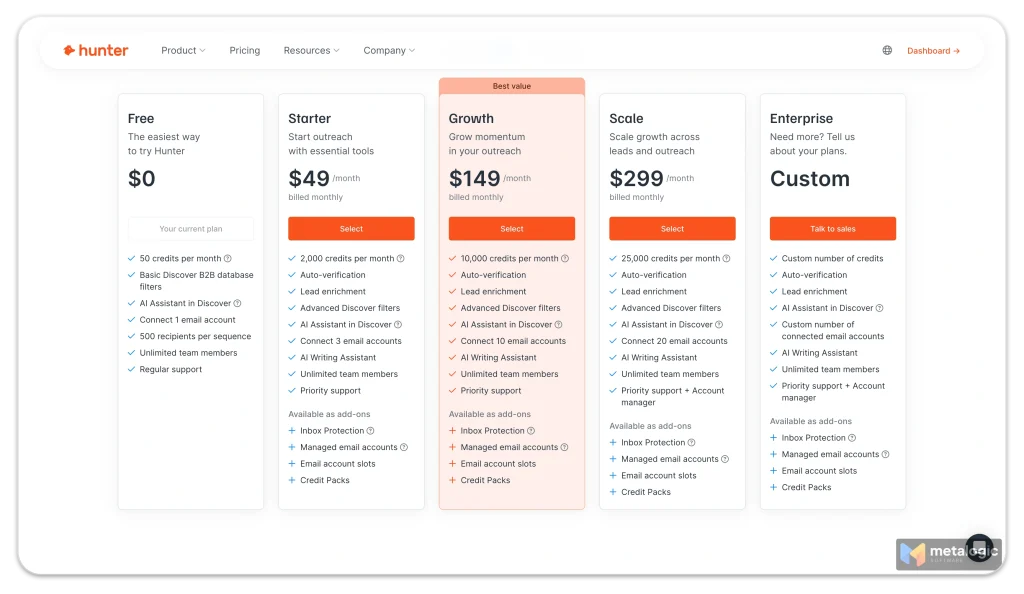
4. Hunter.io — verification as a side dish
Hunter is a prospecting tool first. You use it to find email addresses at a company, and verification comes along for the ride. As a verifier on its own it’s competent but not exceptional, and you’d be paying for a lead-generation platform to get it.
If you’re already running outbound through Hunter, use its verification and don’t buy a second tool. If you just have a list to clean, this isn’t the right purchase.
| Platform | Browser + API + extension |
| Pricing | Subscription, verification bundled with prospecting |
| Best for | Teams already doing outbound prospecting in Hunter |
| Weak spot | Overkill and overpriced if verification is all you need |
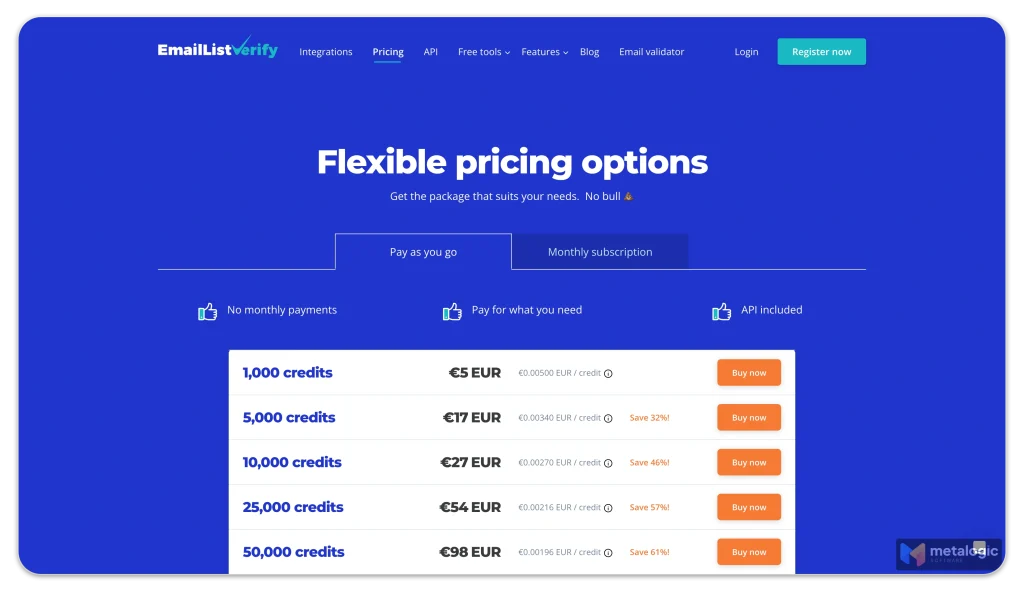
5. EmailListVerify — the budget SaaS
EmailListVerify is the cheapest credible option among the online services. It does the fundamentals properly — syntax, domain, MX, catch-all detection, disposable filtering — without the deliverability suite wrapped around it. For a startup cleaning a list a few times a year, that’s often the whole job.
You give up polish and support depth for the price. Bulk uploads are slower than the premium tools and the interface shows its age.
| Platform | Browser + API |
| Pricing | Credits, among the lowest per-email rates |
| Best for | Occasional cleaning on a tight budget |
| Weak spot | Fewer features, less polished experience |
6. BriteVerify — the enterprise-adjacent one
Part of Validity, BriteVerify does straightforward, reliable validation with pay-as-you-go pricing that suits unpredictable volume. It’s the safe procurement choice: a recognised vendor inside a larger data-quality company, which matters when a compliance team has to sign off.
Per-email pricing is toward the higher end, and you’re mostly paying for the institutional comfort rather than capability the cheaper tools lack.
| Platform | Browser + API |
| Pricing | Pay-as-you-go |
| Best for | Organisations that need a vendor procurement will approve |
| Weak spot | Premium price for standard capability |
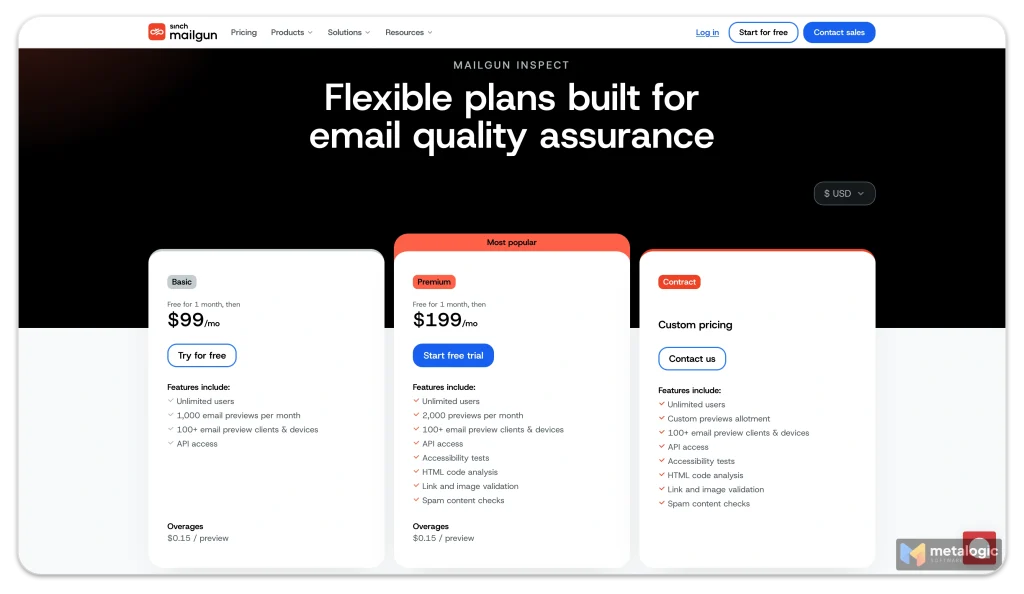
7. Mailgun Validate — for developers
Mailgun is a sending platform, and its validation service is built for developers who want to check addresses at the point of signup rather than clean lists in batches. The API is excellent. If you’re already sending through Mailgun, adding validation is a few lines of code.
There is a dashboard, and you can upload a list in it — so on paper it works like the others. But the whole product is built around the API, and the batch-cleaning experience feels like an afterthought next to tools designed for that job. As a standalone list-cleaning tool for a marketer, it’s the wrong shape.
| Platform | Browser + API |
| Pricing | Per validation, bundled with Mailgun plans |
| Best for | Developers validating at signup inside an app |
| Weak spot | Not built for non-technical batch cleaning |
What it costs over a year
Per-email pricing is hard to feel. Here’s the same work priced two ways, using a conservative mid-range SaaS rate of $0.006 per verification.
| Your volume | SaaS, 12 months | MailVexa licence |
|---|---|---|
| 5,000 emails/month | ~$360 | $49 once |
| 25,000 emails/month | ~$1,800 | $49 once |
| 100,000 emails/month | ~$7,200 | $149 once |
| 500,000 emails/month | ~$36,000 | $299 once |
Check the current rates yourself
Vendor pricing moves, and published per-email rates vary widely by volume tier and plan — roughly $0.003 to $0.02 across the tools above. The table uses a mid estimate to show the shape of the curve, not a quote. Price your own volume on each vendor’s page before deciding.
The second year is where it separates. The SaaS column repeats every year. The licence column doesn’t, and the monthly allowance behind it refills on its own.
Want to test the desktop approach before deciding? The MailVexa trial runs the complete workflow on 2,000 addresses for 14 days. No card, no upload, and if it’s not for you, deleting the app is the whole offboarding process.
When SaaS is the better call
We’d rather you buy the right thing than buy ours. There are situations where an online verifier is clearly the correct choice:
- You need real-time validation at signup. A desktop app can’t sit inside your registration form. You need an API, and Mailgun or ZeroBounce will serve you better.
- You’re processing millions of addresses on a deadline. Distributed infrastructure finishes faster than one machine will, proxies or not. If throughput is the binding constraint, pay for it.
- You verify rarely. Two lists a year, a few thousand addresses each? Pay-as-you-go credits will cost less than any licence.
- You want cleaning to happen automatically. If your CRM should hand off new contacts for verification without a human involved, you need integrations. NeverBounce is built for that.
- You need a vendor contract. Some procurement processes require an SLA, a DPA and a support line. That’s a service, not a software licence.
- You need engagement data, not just validity. Knowing an address is real is different from knowing it’s active. That’s ZeroBounce territory.
If none of those describe you — and for most marketers and agencies cleaning lists on a regular schedule, none of them do — the desktop option is cheaper, more private, and not meaningfully worse at the actual job.
What about free email verifiers?
A lot of people arrive here searching for freeware, so let’s deal with it directly rather than pretend the question wasn’t asked.
Genuinely free bulk verification doesn’t really exist, and the reason is structural. Every check is a live SMTP conversation from an IP address that someone has to own, maintain and keep off blocklists. That costs money per check. Anything offering unlimited free verification is either doing syntax-only checking — which tells you almost nothing, since [email protected] is perfectly valid syntax — or monetising your list in some way you’d rather it didn’t.
What actually exists, and is worth using:
- Free tiers on SaaS tools. ZeroBounce gives 100 credits a month, and most competitors offer a small one-off allowance. Fine for spot-checking a few addresses, useless for a list.
- Real trials. MailVexa runs 14 days and 2,000 verifications with no card, which is enough to clean a small list properly and see whether the results hold up against your own knowledge of your contacts.
- Open-source scripts. If you’re technical, you can write an SMTP prober yourself. Expect to spend your savings on debugging greylisting, connection limits and blocklisted IPs.
The honest framing: for a one-off list of a few hundred addresses, stack up free tiers and you’ll get through it. For anything recurring, the question isn’t free versus paid, it’s which pricing model costs less over a year — which is what the table above is for.
How to choose in 60 seconds
| If this is you | Pick |
|---|---|
| Agency or freelancer handling client lists | MailVexa — you can answer the “where did our data go” question |
| Cleaning lists monthly or more often | MailVexa — the licence pays for itself in weeks |
| Mixed team on Windows and Mac | MailVexa — native on both, one licence covers the team |
| GDPR or client-confidentiality constraints | MailVexa — nothing to disclose, nothing uploaded |
| Tired of credits expiring or running out mid-job | MailVexa — no per-check cost, re-verify as often as you want |
| One list, once, and never again | EmailListVerify or a free tier. Under 2,000 addresses, the MailVexa trial covers it for nothing |
| A few small lists a year, ongoing | MailVexa — roughly break-even in year one, cheaper every year after |
| Validating addresses inside your own product | Mailgun or ZeroBounce API |
| Want cleaning automated from your CRM | NeverBounce |
| Need engagement scoring and deliverability tools | ZeroBounce |
| Already prospecting in Hunter | Hunter.io — don’t buy twice |
Common questions
Is a desktop email verifier as accurate as an online one?
Yes, when it’s set up correctly. Both run the same SMTP conversation with the same destination server, so the verdict comes from the same place. What SaaS vendors have is a large pool of aged IP addresses, and on the big consumer providers that matters — a single unconfigured connection gets more inconclusive answers there.
Closing that gap is a configuration job, not a software limitation: a correct HELO domain, matching reverse DNS, an SPF record, and a proxy pool to spread requests. Our SOCKS5 proxy guide walks through all of it. It’s also worth checking that whichever tool you pick admits uncertainty rather than guessing — a result marked Unknown is far more useful than a real customer wrongly marked Invalid.
Do I need to upload my list to verify it?
Only with an online service. A local application reads the file on your own disk and performs DNS and SMTP lookups from your machine. Those lookups reveal the domains you’re checking, but the list itself is never transmitted or stored anywhere.
How often should I clean my list?
Email data decays roughly 20–30% a year as people change jobs and abandon addresses. Quarterly is a reasonable baseline; monthly if you’re actively acquiring contacts, and always before a large send or a re-engagement campaign to a list you haven’t mailed in a while.
What bounce rate should I be aiming for?
Under 2%, and treat anything above 5% as an emergency. Major inbox providers throttle senders well before that, and sender reputation takes months to rebuild once it slips.
Is there a real email verification app for Mac?
Very few. Most tools marketed as Mac email verifiers are web applications that happen to open in Safari or Chrome. MetaLogic MailVexa is a native macOS build, Apple silicon included, and the same licence also activates the Windows version — which is useful if your team runs both.
Is there genuinely free email verification software?
Not for bulk lists. Every verification is a live SMTP check from a maintained IP address, which costs the provider money. Free offerings are either syntax-only — which catches typos but not addresses that simply don’t exist — or come with a catch. Free tiers and real trials are the practical route: stack them for a one-off list, buy something for recurring work.
Can I try these before paying?
All of them offer some form of trial. ZeroBounce gives 100 free credits monthly, most SaaS tools offer a small free allowance, and MailVexa runs a 14-day trial covering 2,000 verifications with no card required.

Clean your list without handing it to anyone
A native app for Windows and macOS that verifies bulk lists on your own machine — one licence covers both. Pay once, use it forever, no credits ticking down. 14-day free trial, 2,000 verifications, no card required.
Pricing and feature details for third-party tools were accurate at the time of writing and are summarised from each vendor’s published information. Verify current rates on their own sites before purchasing. We build MetaLogic MailVexa; everything else here is included because people genuinely shortlist it.