You have an email list and a campaign coming up. You search for a verification tool, and every result says the same thing: 99% accurate, fewer bounces, fast.
If they all promise the same, how do you choose? Most people pick on price per credit, and that is usually the wrong number to compare. The real differences are elsewhere: where your list goes, how long it stays there, what you pay for uncertain results, and whether your credits expire before you use them.
This guide gives you a method to compare any tool, then applies it to five real ones: one desktop application and four online services. It does not rank them by accuracy, because nobody has published an independent test that would justify that. Instead, it shows you how to test them on your own list.
We did run one real test of our own: NeverBounce and MailVexa on the same 999 addresses, on the same day. Section 12 shares every number, and explains exactly why the two tools differed.
If you are new to the topic, start with what email validation is. If you just want a short list of tools, our top 7 email verification tools covers that.
Quick answer
Choose desktop email verification software if you want your list to stay on your own computer and prefer paying once. Choose an online service if you need an API, real-time checks on sign-up forms, or direct integrations with your email platform.
Before you buy either, compare five things: where the list is processed, how long the vendor keeps it, how Unknown and catch-all results are billed, whether credits expire, and what the plan limits are. Then test two tools on the same sample of your own list.
The five tools at a glance
This table compares one desktop tool and four online services. Everything comes from each vendor’s own pages, checked on 1 October 2026. “Not stated” means we could not find it in their documentation. It does not mean the feature is missing.
| MailVexa | ZeroBounce | NeverBounce | Bouncer | Emailable | |
|---|---|---|---|---|---|
| Type | Desktop app | Online service | Online service | Online service | Online service |
| Runs on | Windows, macOS | Browser | Browser | Browser | Browser |
| Where the list is processed | Your computer | Vendor’s servers | Vendor’s servers | Vendor’s servers | Vendor’s servers |
| Pricing model | Pay once, use for life | Credits or subscription | Credits or subscription | Credits | Credits or subscription |
| Unknown results | No credits used | Not charged | Billable in our test | Not charged | Free |
| Credits expire | No credits; monthly cap | Depends on account date | After 12 months | Never | Never |
| Upload kept for | Never uploaded | 30 days | 90 days | 60 days (FAQ) | 30 days |
| API | No | Yes | Yes | Yes | Yes |
| Free start | 14-day trial, 2,000 checks | 100 a month (business domain) | Small number of credits | 100 credits | 250 credits |
Prices and policies change
Every figure in this guide was checked on 1 October 2026. Vendors update their pricing and terms often. Before you buy, open each vendor’s page and confirm the numbers that matter to you.
Desktop software vs online services: how they work
Desktop software
- You install the application on your computer.
- You open your contact file inside it.
- The application checks each address directly with the mail servers.
- You export the results to a new file on your computer.
Online service
- You create an account.
- You upload your file, send addresses through an API, or connect your email platform.
- The vendor’s servers run the checks.
- You download the results, or they sync back to your platform.
| Who is responsible for | Desktop software | Online service |
|---|---|---|
| Where the file is stored | You | The vendor, for their retention period |
| The network used for checks | You (your internet, or your proxy) | The vendor |
| Keeping the software updated | You install updates | The vendor |
| Backups of results | You | Shared: they keep copies for a time |
Local processing does not mean offline
Desktop verification still needs the internet. To check whether a mailbox exists, the software has to look up the domain’s mail servers and talk to them directly, using the email protocol defined in RFC 5321. What stays local is your file: the list itself, your other columns, and the results.
The reverse is also true. A tool can have a desktop-style interface and still send your data to a cloud server. Ask where the checks actually run.
What each tool actually checks
Most serious verifiers run the same core checks. The differences are in how they name and explain the results.
| Check | What it asks, in plain words |
|---|---|
| Format | Is the address written correctly? |
| Domain and MX | Does the domain exist, and can it receive email? |
| SMTP mailbox check | Does the mail server say this specific mailbox exists? |
| Catch-all | Does the domain accept mail for every address, real or not? |
| Disposable | Is this a temporary throwaway address? |
| Role-based | Is it a shared inbox like info@ or support@? |
| Retry handling | What happens when a server is slow or says “try later”? |
| Reason shown | Can you see why each address got its result? |
Role and free addresses are not invalid
An info@ address or a Gmail address is real. Vendors treat them as labels, not failures. Bouncer’s documentation shows a deliverable address flagged as both role-based and free. Whether to keep them depends on your campaign, not on the label.
Accuracy: how to compare the claims
Every vendor advertises a number around 99%. Before you trust any of them, ask five questions:
- How was it measured? On what list, and against what evidence?
- What was in the test list? A list of big consumer providers behaves differently from company domains.
- How were Unknown results counted? Leaving them out makes any number look better.
- Who published it? An independent test, or the vendor’s own marketing?
- Does it match your list? A B2B list full of company domains is harder than a newsletter list.
None of the five tools in this guide publishes the method behind its accuracy figure. That does not mean the figures are wrong. It means you cannot compare them fairly. That is why we ran a small test of our own, described in section 12.
The two kinds of mistake
| Mistake | What happens | What it costs you |
|---|---|---|
| False positive | A bad address is marked valid | It bounces. Your sender reputation pays. |
| False negative | A real address is marked invalid | You delete a real customer. |
Fewer Unknowns is not proof of better accuracy
A tool that turns every uncertain address into “valid” or “invalid” will show fewer Unknowns. It may also be guessing. A tool that admits uncertainty can be the more honest one.
And whether a tool runs on your desktop or in the cloud tells you nothing about its accuracy. Both use the same mail-server checks.
Guarantees are more useful than percentages
A guarantee shows you what the vendor will actually stand behind, and on what conditions.
| Vendor | What they guarantee | Main conditions |
|---|---|---|
| NeverBounce | No more than 3% bounces, or the difference refunded | 500+ addresses, mailed within 72 hours, only Valid sent. Gmail, Outlook and Yahoo addresses excluded. |
| Emailable | 99%+ deliverability (97%+ on Microsoft addresses) | 1,000+ addresses, sent within 24 hours, claim within 72 hours, paying customers |
| Bouncer | Refund if a Deliverable address bounces | Bounce within 72 hours, for an objective reason |
Notice the time limits. Every guarantee assumes you send soon after verifying. A result from three months ago is not covered by anyone.
Catch-all, Risky and Unknown: how useful are the results?
The number of Valid results is not the whole story. What matters just as much is what a tool does with the addresses it cannot confirm.
| Tool | How it reports catch-all addresses |
|---|---|
| MailVexa | Flagged as Risky, with “catch-all” as the reason |
| ZeroBounce | Separate catch-all status. An optional second check can resolve some of them, and can take up to 12 hours. |
| NeverBounce | Its own status: “Accept all (Unverifiable)” |
| Bouncer | Inside Risky, with the reason “low deliverability” |
| Emailable | Resolves some fully. The rest are marked Risky with an Accept-All note. |
Questions to ask about any tool:
- Does it show the reason behind an uncertain result?
- Can you re-check Unknown addresses later, and does that cost extra?
- Can you export uncertain results separately from the Valid ones?
- Does an extra catch-all check add time or cost?
Compare total time, not first-pass speed
If a tool finishes the first pass in minutes but its extra catch-all step takes 12 hours, the list is not ready for 12 hours. Measure when you can actually use the file.
For what each result means and what to do with it, see email verification results explained.
Privacy and data handling: where does your list go?
Your contact list is customer data. Before you upload it anywhere, you should know what happens to it.
| Tool | How long uploads are kept |
|---|---|
| MailVexa | Not uploaded. The file stays on your computer. |
| ZeroBounce | Erased 30 days after upload |
| NeverBounce | Deleted 90 days after upload |
| Bouncer | Its FAQ says 60 days. Another Bouncer page says the retention period is under your control. |
| Emailable | Bulk files deleted after 30 days. API users can change this. |
Six questions worth asking any vendor:
- Is the full file uploaded, or can I send only the email column?
- How long is my data kept, and can I delete it sooner?
- What is stored in logs and reports after deletion?
- Which security certifications do you hold today? Ask for current reports, not badges.
- If a proxy is used, who else sits in the connection?
- Who is responsible for local copies and backups?
A tip if you use an online service
Upload only the email column. Keep names, companies and other fields in your own file, then match the results back by email address. Less data uploaded means less data exposed.
Desktop verification has its own responsibilities
With a desktop tool, nothing is uploaded, but you are now responsible for your own files, backups and any proxy you use. A proxy is a third party in the network path, so choose one you control. Our guide to building your own SOCKS5 proxy shows how to keep that part private too.
Pricing: compare the total cost, not the price per credit
There are three pricing models, and each suits a different pattern of use.
| Model | How it works | Best for |
|---|---|---|
| Pay as you go | Buy credits, one per address | Occasional, unpredictable use |
| Subscription | A fixed amount each month for a set number of checks | Steady monthly volume |
| One-time licence | Pay once, use within the plan’s limits | Repeated use over a long period |
Three real scenarios
All prices in US dollars, checked on 1 October 2026, from each vendor’s public pricing page.
How to read the MailVexa column
MailVexa prices are not monthly. You pay once and use the software for life. There is no subscription and nothing renews. The other columns for monthly volumes are paid again every month for as long as you keep verifying.
| Scenario | MailVexa | NeverBounce | Bouncer | Emailable | ZeroBounce |
|---|---|---|---|---|---|
| 5,000 addresses, once | $49, paid once. Use it for life. | About $40 ($8 per 1,000) | $35 | $38 | From $39 for 2,000; check the calculator |
| 50,000 a month, for a year | $49, paid once. No monthly fee. Personal covers up to 300,000 a month. | About $400 every month (about $4,800 a year) | About $250 every month (about $3,000 a year) | Check the slider | Check the calculator |
| 250,000 a month, for a year | $149 or $299, paid once. No monthly fee. | Enterprise quote | About $750 every month (about $9,000 a year) | Check the slider | Check the calculator |
Sources: NeverBounce pricing, Bouncer pricing, Emailable pricing, ZeroBounce pricing. Emailable and ZeroBounce show larger volumes through an interactive calculator, so we could not record those figures reliably.
The costs that are easy to miss
| Hidden cost | What to check |
|---|---|
| Credit expiry | NeverBounce credits expire after 12 months. ZeroBounce’s expiry rules depend on when your account was created. Bouncer and Emailable credits do not expire. |
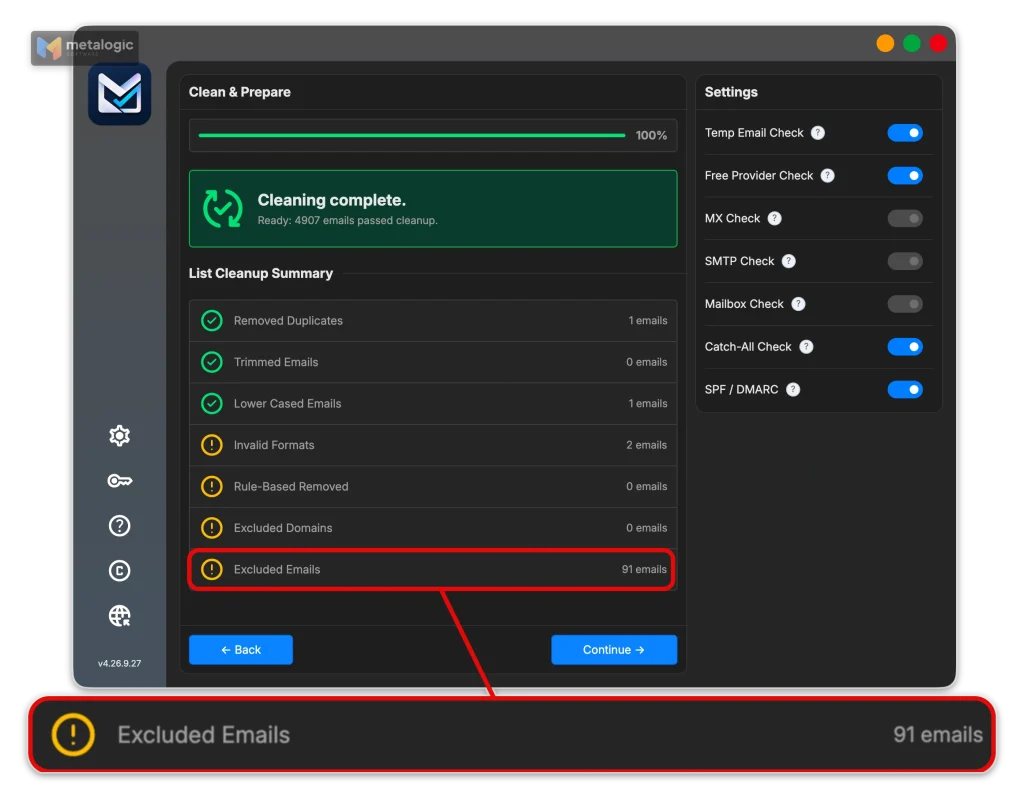
| Unknown results | ZeroBounce, Bouncer and Emailable do not charge for them. NeverBounce’s pricing pages do not say, but in our own test it listed 996 of 1,000 records as billable, including its 179 Unknowns. |
| Re-checking | Re-verifying Unknowns later may use new credits. |
| Extra checks | Deeper catch-all or scoring features may cost extra per address. |
| Proxies (desktop) | MailVexa does not include proxies. A small server costs a few dollars a month. |
| Licence limits (desktop) | Monthly caps, per-job caps, devices, and one year of updates and support. |
One-time does not mean unlimited
With MailVexa you pay once and use it for life. What is limited is volume: the Personal and Professional plans have a monthly and per-job limit, which resets every month. Only Agency removes them. Pick the plan that matches the volume you actually verify.
Speed, setup and everyday use
Speed matters, but the time from “I have a file” to “I have a usable result” matters more.
| Tool | Speed, as stated by the vendor |
|---|---|
| MailVexa | In our own test: about 10,000 addresses an hour, using one proxy server |
| ZeroBounce | About 100,000 addresses in 45 minutes |
| Emailable | 10,000 addresses in under 3 minutes |
| Bouncer | A 10,000-address list typically within an hour |
| NeverBounce | Not stated in the pages we checked |
These are claims under each vendor’s own conditions, not measurements under the same conditions. Cloud services have large server networks. A desktop tool depends on your proxy and internet connection.
Everyday features worth checking
- File formats. ZeroBounce accepts TXT, CSV, XLS and XLSX up to 1 GB. Emailable accepts CSV, XLSX and TXT. MailVexa accepts CSV, TXT, XLSX and XLS.
- Your other columns. Does the export keep names, companies and tags, or only the email?
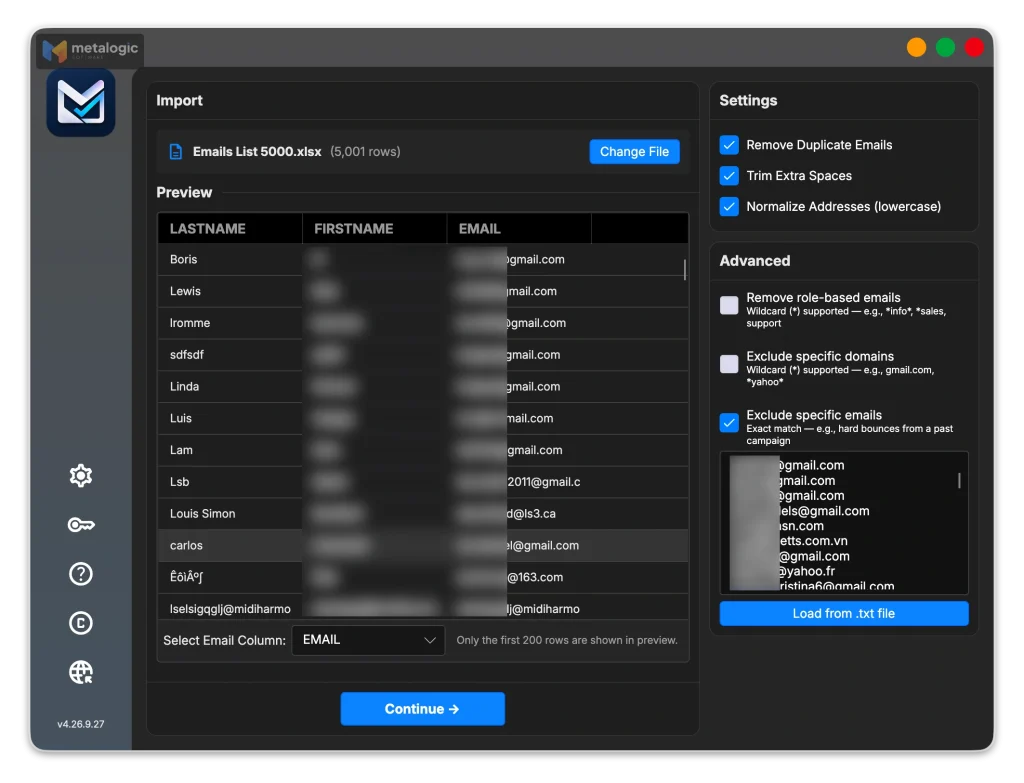
- Built-in cleanup. Duplicates, extra spaces, mixed case and role addresses removed before checking.
- Pause and resume. Can a long job survive closing the app or losing the connection?
- Exclusion lists. Can you remove past bounces or unsubscribes before checking, so you don’t pay to verify them?
- Export for your platform. Can you split the file if your email platform limits import size?
APIs and integrations: one-off cleanup or continuous checking?
There are two different jobs here. Most people only need the first.
| Need | What you want | Who offers it |
|---|---|---|
| Clean a list before a campaign | Upload or open a file, export a clean one | All five |
| Check addresses as people sign up | A real-time API on your form or CRM | The four online services |
Single and bulk checking are also different tools. NeverBounce’s API usage guidelines say the single-address check is meant for form submissions. Looping an existing list through it one address at a time can get your account locked. Lists belong in the bulk API.
A CSV export is not an integration
Every tool can export a file your email platform can import. That is not the same as a native integration that syncs results automatically. If you need automatic sync, check the vendor’s integration list for your exact platform.
The five tools, one by one
Each tool gets the same six questions, so you can compare them directly.
MetaLogic MailVexa
| Best suited for | People who verify regularly and want the list to stay on their own computer |
| Key capabilities | Format, disposable, free-provider, MX, SMTP, catch-all and SPF/DMARC checks. Cleanup before checking. An exclusion list for past bounces or unsubscribes. Pause and resume. A reason shown for every result. |
| Data handling | Files are read and written locally. Checks still need internet for DNS and SMTP. |
| Pricing and limits | Pay once, use for life, no monthly fee: Personal $49 (up to 300,000 a month, 25,000 per job, 1 device), Professional $149 (up to 1,000,000 a month, 100,000 per job, 2 devices), Agency $299 (no limits, 5 devices). Includes one year of updates and support. 14-day money-back. |
| Setup considerations | No API or native integrations. For larger volumes, a proxy server is strongly recommended, and is not included. |
| What to test | Unknown rate with and without a proxy. Whether the export, split into parts if needed, imports cleanly into your platform. |
ZeroBounce
| Best suited for | Teams who want many integrations and extra scoring tools |
| Key capabilities | Detailed statuses including catch-all, spamtrap, abuse and do_not_mail. Optional deeper catch-all check. 60+ integrations. |
| Data handling | Cloud processing. Uploads erased after 30 days. |
| Pricing and limits | Pay-as-you-go from $39 for 2,000. Subscription from $99 a month. Unknowns not charged. Credit expiry depends on account age. |
| Setup considerations | Business email domain needed for the free monthly credits |
| What to test | How many catch-alls the second check resolves, and how long it takes on your list |
NeverBounce
| Best suited for | Teams that need real-time checking on sign-up forms plus bulk cleaning |
| Key capabilities | Five clear result codes. Single and bulk APIs with documented usage rules. Automatic sync options. |
| Data handling | Cloud processing. Uploads deleted after 90 days. |
| Pricing and limits | $8 per 1,000 pay-as-you-go. Credits expire after 12 months. Subscription from $49 a month. Enterprise for 250,000+ a month. |
| Setup considerations | Use the bulk API for lists, not the single check |
| What to test | How many Unknowns your list produces, since in our test they were billable. Also whether you will use your credits within 12 months. |
Bouncer
| Best suited for | Occasional users who want credits that never expire |
| Key capabilities | Four clear statuses with reasons. Real-time and batch APIs. Integrations with platforms such as Mailchimp, HubSpot and Klaviyo. |
| Data handling | Cloud processing with EU storage. Retention stated as 60 days in one place and user-controlled in another. |
| Pricing and limits | $35 for 5,000, $250 for 50,000, $750 for 250,000. Unknowns not charged. Credits never expire. |
| Setup considerations | Confirm the current retention setting for your account |
| What to test | How many addresses land in Risky, and whether the reasons help you decide |
Emailable
| Best suited for | Teams that need fast bulk checks and many native integrations |
| Key capabilities | Four states plus a detailed list of reasons. Accept-all resolution where possible. Around 20 native integrations. |
| Data handling | Cloud processing. Bulk files deleted after 30 days. States SOC 2 Type II. |
| Pricing and limits | $38 for 5,000 pay-as-you-go. 15% off on subscription. Unknowns free. Credits never expire. |
| Setup considerations | Minimum pay-as-you-go purchase is 5,000 credits |
| What to test | How your company-domain addresses are classified compared with consumer ones |
How to test a tool before you commit
The only accuracy test that matters is the one run on your own list. Here is a fair way to do it.
- Pick a sample that looks like your list. 500 to 1,000 addresses, with the same mix of company and personal domains. Include a few addresses you already know bounced.
- Run the same sample through two tools, on the same day, so time does not affect the results.
- Record the conditions: settings used, time taken, and cost.
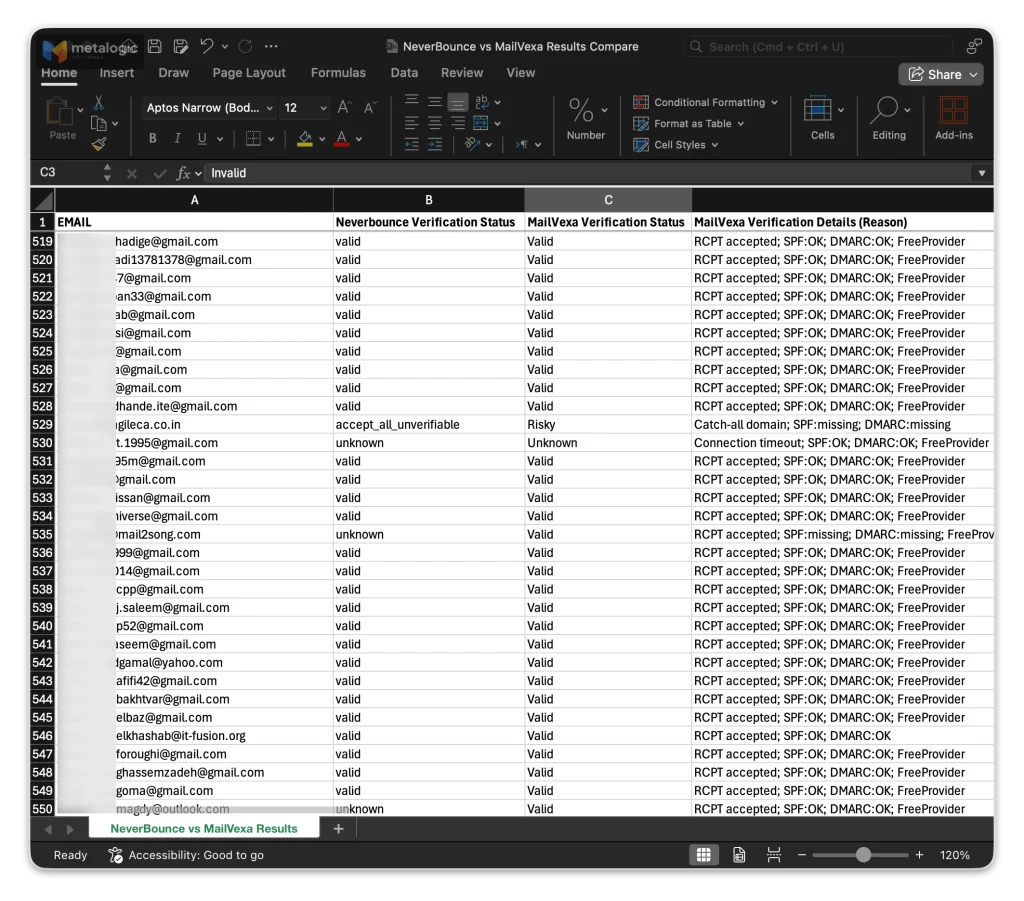
- Compare the disagreements, not just the number of Valids. Where the tools differ is where you learn something.
- Keep Unknowns apart, and check them again after 24 hours.
- Judge the output: are reasons clear, do your columns survive, does the file import cleanly?
Two tools agreeing is not proof
If both tools say Valid, the address is probably fine, but not certainly. Results from your next permitted campaign add real evidence. Remember that not every bounce means the mailbox does not exist. Some come from the sender’s own setup.
Once you have chosen, follow how to clean your email list before sending for the full preparation process.
Our own test: NeverBounce and MailVexa on the same 999 addresses
We said nobody publishes how their accuracy is measured. So we ran a test ourselves, and we are sharing every number. MailVexa ran with the setup we recommend for real work.
How we ran it
Date: 3 October 2026.
List: 999 real addresses, the same file for both. Mostly Gmail, Hotmail and Yahoo, plus company domains, and a few deliberate problems: a duplicate and badly written addresses.
NeverBounce: bulk upload in the web app, default settings.
MailVexa: desktop app, default settings, one proxy server with DNS and reverse DNS set up correctly.
This is one list, from one network. It is a real example, not an independent benchmark.
The results
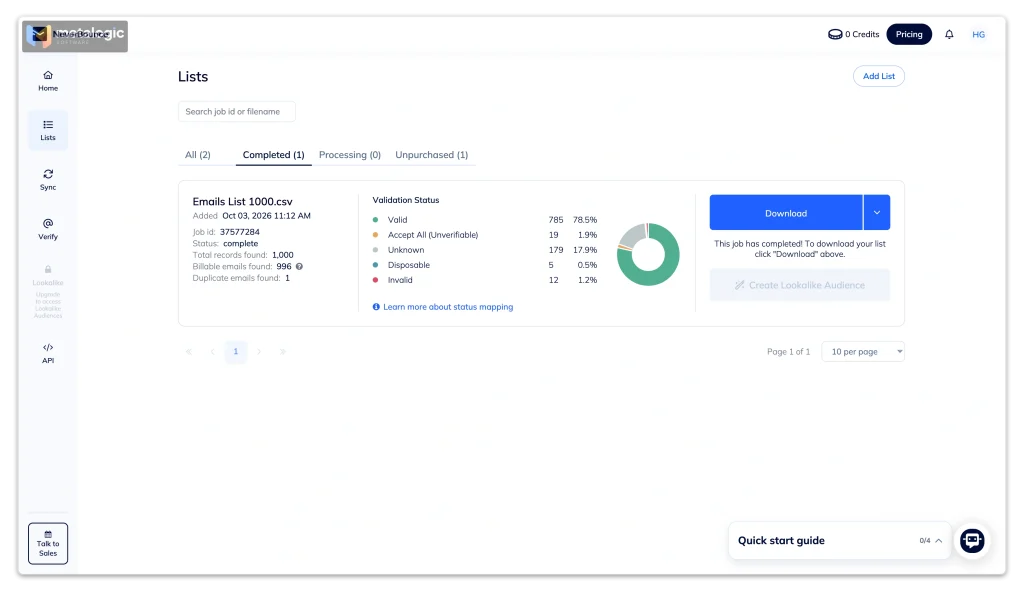
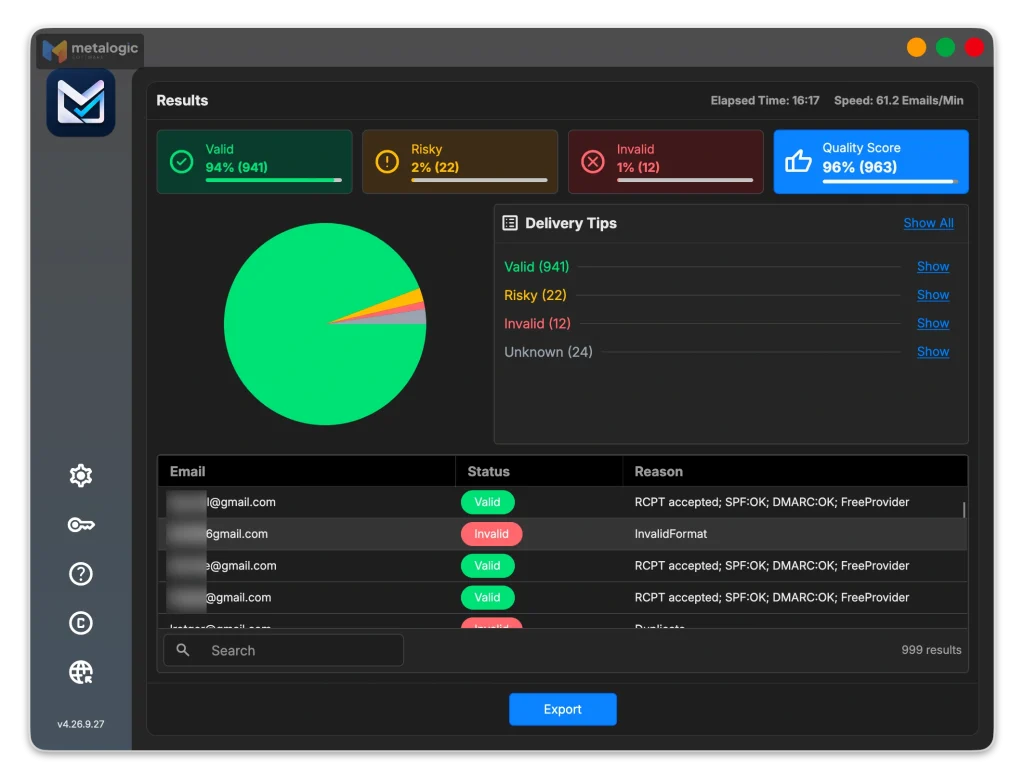
| Result | NeverBounce | MailVexa |
|---|---|---|
| Valid | 785 (78.6%) | 941 (94.2%) |
| Risky (catch-all, disposable) | 24 (2.4%) | 22 (2.2%) |
| Invalid | 11 (1.1%) | 12 (1.2%) |
| Unknown | 179 (17.9%) | 24 (2.4%) |
Put simply: MailVexa gave a clear answer for 975 of the 999 addresses (97.6%). NeverBounce gave a clear answer for 820 (82.1%).
Where they agreed
The two tools gave the same verdict on 815 of the 999 addresses (81.6%). Of the 785 addresses NeverBounce marked valid, MailVexa confirmed 781. Of the other four, one was a duplicate row and three were servers that did not answer in time.
Where they differed, and why
| What happened | Addresses | The reason |
|---|---|---|
| NeverBounce: Unknown MailVexa: Valid | 154 | 98 of these were Microsoft consumer addresses (Hotmail, Outlook, Live, MSN). When MailVexa asked, the mail server accepted the mailbox directly. |
| NeverBounce: Unknown MailVexa: Risky or Invalid | 10 | MailVexa found a clear reason: a catch-all or disposable domain, a rejected mailbox, or no reachable mail server. |
| NeverBounce: Accept all or Disposable MailVexa: Invalid | 4 | None of these domains had a reachable mail server, so no mailbox on them can receive email. |
| NeverBounce: Accept all MailVexa: Valid | 5 | All on mail.ru. The server accepted these mailboxes when MailVexa asked. |
| NeverBounce: Invalid MailVexa: Valid | 1 | A Yahoo Italy address. The server accepted the mailbox when MailVexa asked. |
| NeverBounce: Invalid MailVexa: Unknown | 5 | Server timeouts, and one Gmail mailbox reported as full and inactive. MailVexa kept these as Unknown rather than guessing. |
What this test shows
Far fewer Unknowns. MailVexa left 24 addresses unresolved. NeverBounce left 179. That is 155 more addresses you can actually decide about.
Microsoft addresses got real answers. NeverBounce could not confirm almost any Hotmail, Outlook, Live or MSN address in this list. MailVexa got a direct answer for 98 of them.
The setup matters. A proxy server with DNS and reverse DNS set up correctly is what lets strict providers answer your checks (see section 06).
Every result came with a reason. That is why every difference in the table above could be explained, address by address.
What it cost
NeverBounce listed 996 of the 1,000 records as billable. Since it returned 179 Unknowns, those were part of what you pay for. With MailVexa, the same list cost nothing beyond the licence you already own.
Your results will depend on your list and setup
Numbers will vary with the list and the network you check from. For real work, use the setup we used here: a proxy server with DNS and reverse DNS configured. Then test on your own sample using the method in section 11.
Which tool fits your workflow?
| Your situation | A good fit | Why |
|---|---|---|
| You verify regularly and want the list to stay on your computer | Desktop software such as MailVexa | No uploads, and a one-time cost that pays off with repeat use |
| You need to check one small list, once | A pay-as-you-go service, or a desktop trial | Lowest cost for a single job |
| You need real-time checks on sign-up forms | An online service with an API | Desktop tools do not offer this |
| You want results to sync automatically to your CRM | An online service with a native integration | A file export needs manual import |
| You are an agency cleaning many client files | Desktop Agency licence, or an online service with team features | Depends on whether client data may leave your computer |
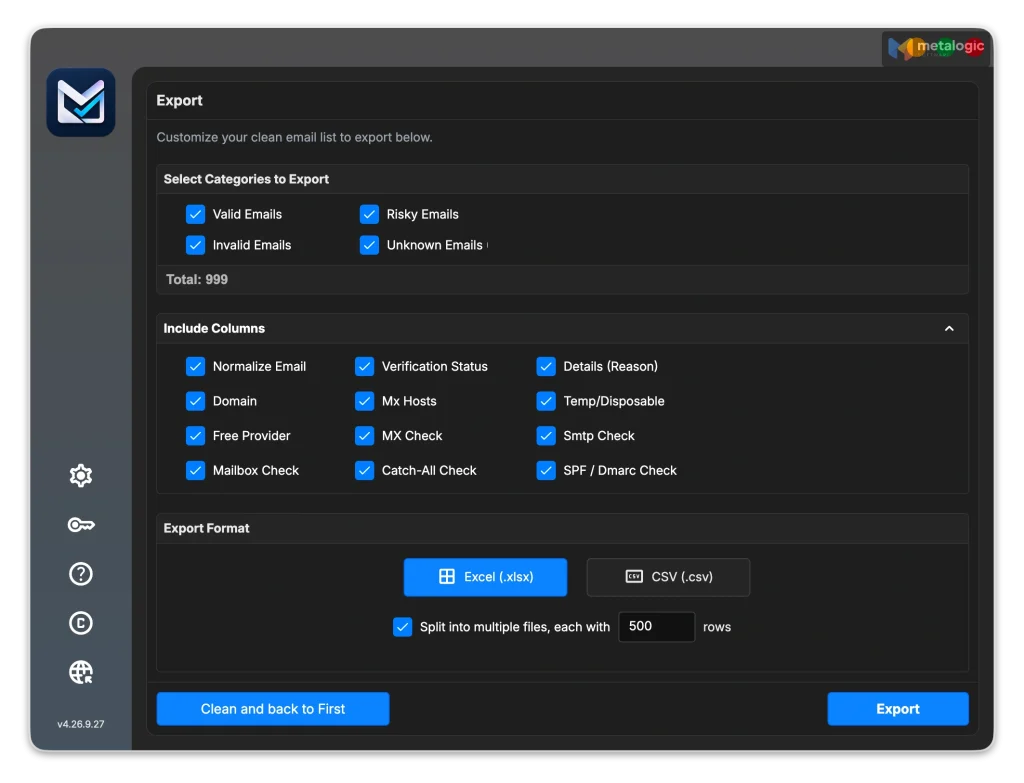
To see the full workflow step by step, read how to use MailVexa from import to verified export.
Common questions
Are desktop email verifiers as accurate as online services?
They can be. Both use the same mail-server checks. Results depend more on the network used for checking, retry handling and how uncertain cases are reported than on where the software runs. Test both on the same sample.
How did MailVexa and NeverBounce compare in a real test?
On the same 999 addresses, MailVexa returned 941 Valid and only 24 Unknown. NeverBounce returned 785 valid and 179 unknown. They agreed on 81.6% of addresses, and MailVexa confirmed 781 of NeverBounce’s 785 valid results. Section 12 explains every difference.
Can I verify email addresses without uploading my full list?
Yes. Use desktop software, which keeps the file on your computer. Or, with an online service, upload only the email column and keep the other fields locally.
Does desktop email verification work offline?
No. It needs the internet to look up mail servers and check mailboxes. Only the file and results stay local.
Why do two tools return different results for the same address?
Checks run at different times, mail servers answer different IP addresses differently, and each tool has its own rules for what counts as Risky. A difference does not mean either tool is wrong.
Can any tool verify every catch-all address?
No. A catch-all server accepts every address, so a standard check cannot confirm one specific mailbox. Some tools resolve part of them with extra checks. None resolves all of them.
Is a one-time licence always cheaper?
Not always. For a single small list, pay-as-you-go is cheaper. A one-time licence pays off when you verify repeatedly over months, within the plan’s limits.
Does a valid result guarantee inbox delivery?
No. It means the mailbox appears to exist. Google states plainly in its sender guidelines that it cannot guarantee messages pass its spam filters. Inbox placement also depends on your authentication, reputation and content.
Sources
All vendor pages checked on 1 October 2026.
MetaLogic
- MetaLogic MailVexa product page. Plans, limits, checks, trial and new features.
- Top 7 email verification tools. Our earlier list of tools.
- Build your own SOCKS5 proxy. Keeping the network path for checks under your control.
ZeroBounce
- Pricing. Pay-as-you-go, subscription, unknowns not charged, 30-day erasure, speed claim.
- Do my credits expire?. Expiry rules by account creation date.
- Catch-all email validation. Optional second check, up to 12 hours.
- Uploading files. Formats and the 1 GB limit.
NeverBounce
- Pricing. $8 per 1,000 credits, 12-month expiry, subscriptions.
- Result codes. Including Accept all (Unverifiable).
- Our guarantee. 3% bounce guarantee and conditions.
- Data storage. Uploads deleted after 90 days.
- API usage guidelines. Single vs bulk verification rules.
Bouncer
- Pricing. Credit packs, no expiry, unknowns not charged.
- Terminology. Statuses, reasons, role and free flags.
- Bouncer guarantee. Accuracy claim and refund conditions.
- FAQ. 60-day storage statement.
- Email verification. User-controlled retention, EU storage, speed claim.
Emailable
- Pricing. 5,000 for $38, unknowns free, no expiry, speed claim.
- All possible states and reasons. Result states and reasons.
- Understanding accept-all verification. How accept-all domains are handled.
- Bulk email verifier. Formats and column preservation.
- General help. Bulk files deleted after 30 days.
- Our guarantee. 99%+ deliverability guarantee and conditions.
- Enterprise. SOC 2 Type II statement.
Standards and providers
- RFC 5321: SMTP. Why mailbox checks need a network connection.
- Google email sender guidelines. No guarantee that messages pass spam filters.
Vendor prices and policies change. Check the original pages before you buy.
Test it on your own list
Take a sample of 500 addresses, run it through MailVexa, and look at the results with their reasons. Then compare it with any online service you are considering. Your list stays on your computer the whole time.
Windows and macOS. Pay once, use for life. Free 14-day trial with up to 2,000 verifications.
We build MetaLogic MailVexa, so weigh our description of it accordingly. We have tried to describe every tool from its own documentation, and the testing method in this guide works for any of them.