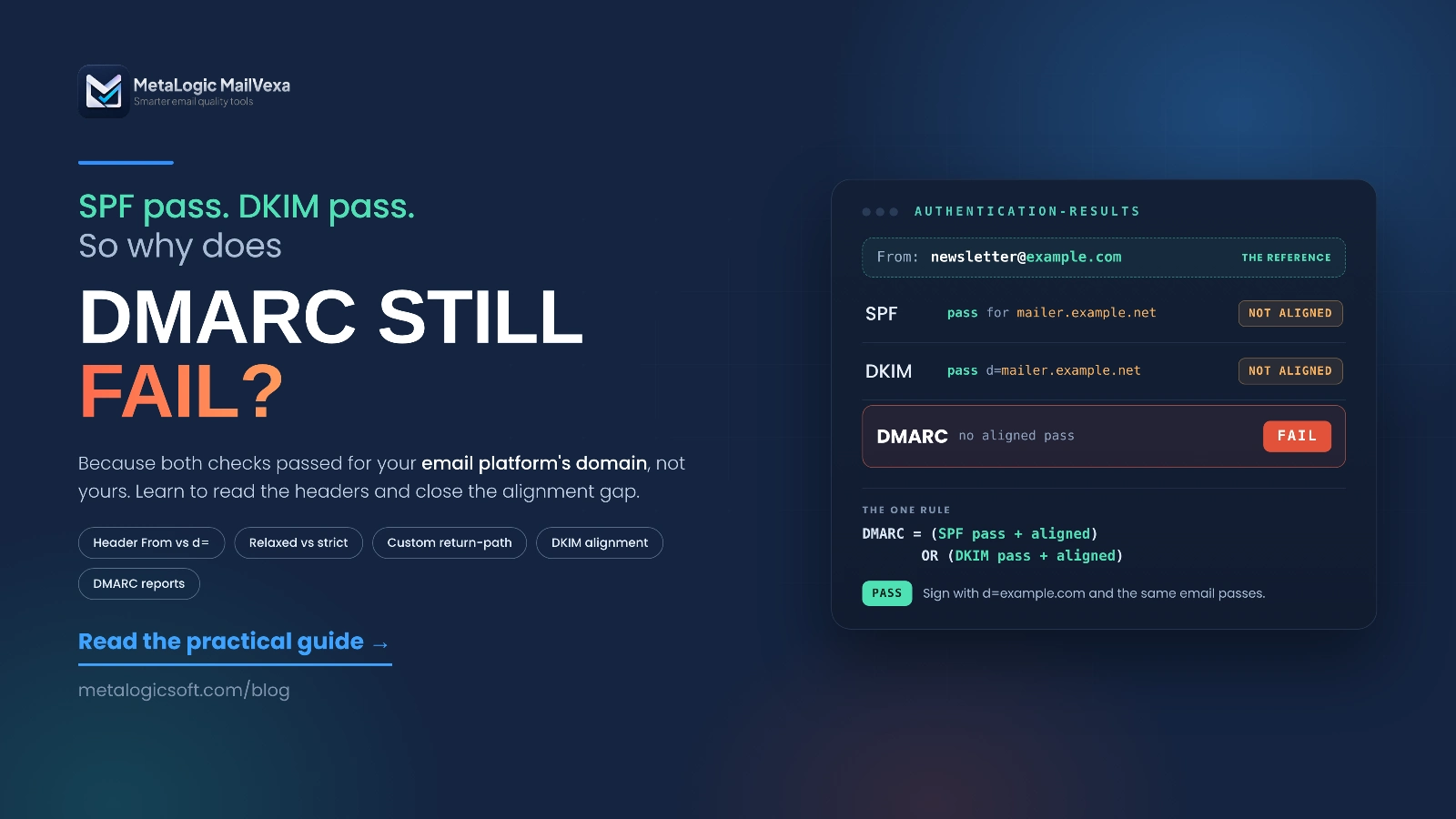
You set up SPF. You set up DKIM. You published a DMARC record. Every online checker shows green.
Then you open a real email and see this: spf=pass, dkim=pass, dmarc=fail.
How can two passes add up to a fail? The answer is one word: alignment. It is the most common reason DMARC fails, and the least explained.
This guide shows you how to read an email’s headers, find the domains that DMARC really compares, and fix the exact setting in your email platform or DNS. We use one simple example all the way through, so you can follow it step by step with your own email open next to it.
Quick answer
DMARC fails when no check is both “passed” and “aligned”. SPF or DKIM must pass, and the domain it passed for must match the domain in the visible From address.
That’s why SPF and DKIM can both pass while DMARC fails: they passed for your email platform’s domain, not for yours. The fix is usually to set up a custom DKIM signature and/or a custom return-path (MAIL FROM) domain in your email platform, so the checks pass for your own domain.
DMARC pass  =  (SPF pass  AND  SPF aligned)
               OR
(DKIM pass AND DKIM aligned)The one rule behind every DMARC result
DMARC doesn’t need both SPF and DKIM. One path that passes and aligns is enough. Microsoft says it plainly in its DMARC setup guide: “A message passes DMARC if one or both of the described SPF or DKIM checks pass.”
Here are the four situations you will meet most often:
| SPF | DKIM | DMARC | Why |
|---|---|---|---|
| Pass, aligned | None | Pass | One aligned pass is enough |
| Pass, not aligned | Pass, aligned | Pass | DKIM saves the message |
| Pass, not aligned | Pass, not aligned | Fail | Both passed, but for someone else’s domain. The classic case |
| Fail | Fail | Fail | Nothing passed at all |
Having a DMARC record in DNS doesn’t mean your emails pass. The record only states your policy. Each email is judged on its own. If you need a refresher on what SPF, DKIM and DMARC are, read SPF, DKIM and DMARC explained first. This guide is about why the result fails, and how to fix it.
Gmail and Yahoo require this for bulk senders
Gmail’s sender guidelines say: “For direct email, the domain in the sender’s From: header must be aligned with either the SPF domain or the DKIM domain.” Yahoo asks for the same. So alignment isn’t a technical detail. It decides whether your campaigns are accepted.
The domains DMARC actually compares
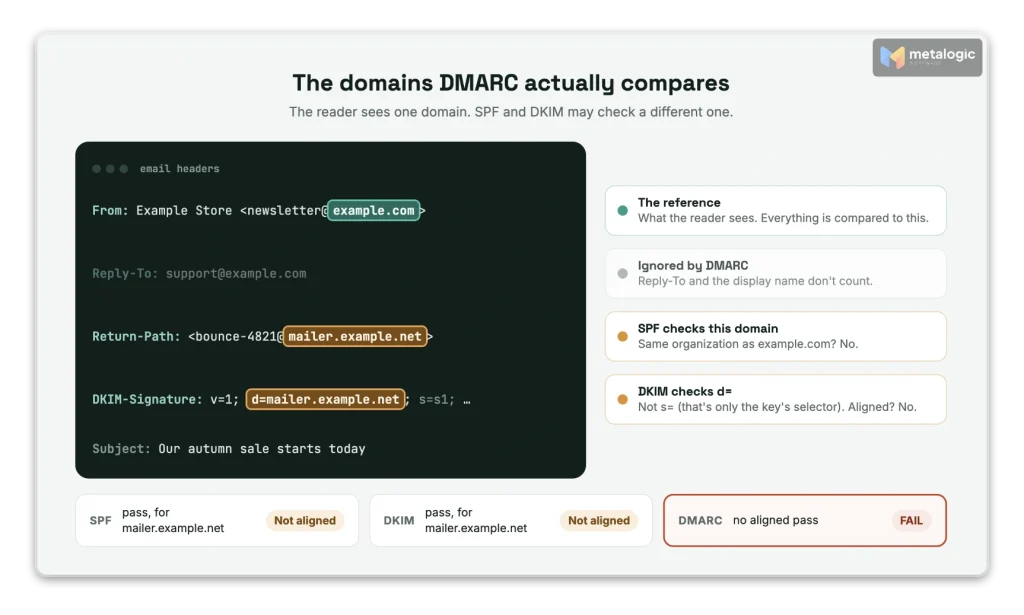
An email carries several “sender” addresses. Most people only see one. DMARC compares two or three of them:
| Field | What it is | Role in DMARC |
|---|---|---|
| Header From | The sender address the reader sees | The reference. Everything is compared to this domain |
| MAIL FROM (envelope sender) | The address used during sending. Bounces go here | The domain SPF checks |
| Return-Path | A header added at delivery. It shows the MAIL FROM | Where you can see the SPF domain |
DKIM d= | The domain that signed the email | The domain DKIM checks |
| Reply-To | Where replies go | Not used by DMARC |
Our example for the rest of this guide
A store sends its newsletter through an email platform. Here are the three important lines:
From: Example Store <[email protected]m>
Return-Path: <[email protected]t>
DKIM-Signature: v=1; a=rsa-sha256; d=mailer.example.net; s=s1; ...
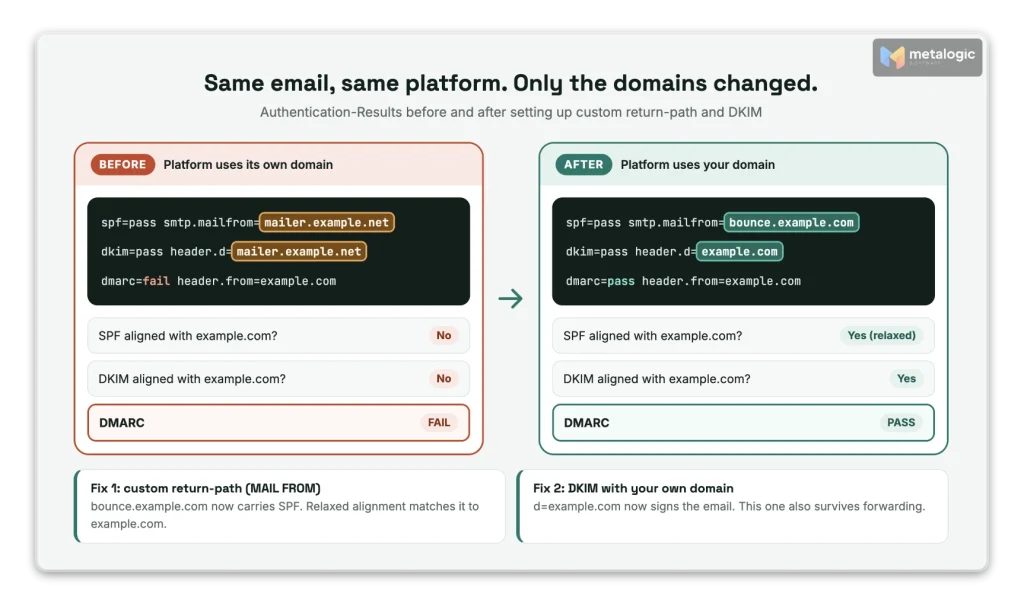
The reader sees example.com. But SPF checks mailer.example.net (the Return-Path), and DKIM was signed by mailer.example.net too. Both checks can pass. Neither is about example.com. So DMARC fails.
The platform’s domain is valid. That doesn’t make yours valid.
Your email platform proves that it sent the email. It doesn’t prove that example.com allowed it. And changing the display name (“Example Store”) or the Reply-To address changes nothing. DMARC only looks at the domain in the From address.
Relaxed vs. strict alignment
“Aligned” can mean two things. Your DMARC record chooses, separately for SPF and DKIM:
- Relaxed (
r): the two domains belong to the same organization.bounce.example.comandexample.comare aligned. - Strict (
s): the two domains must be exactly the same.
The tag aspf sets the mode for SPF. The tag adkim sets it for DKIM. If you don’t write them, both are relaxed by default.
| From domain | Domain that passed SPF or DKIM | Relaxed | Strict |
|---|---|---|---|
example.com | example.com | Aligned | Aligned |
example.com | bounce.example.com | Aligned | Not aligned |
news.example.com | mail.example.com | Aligned | Not aligned |
example.com | example.net | Not aligned | Not aligned |
Should you use strict? Usually not. The new DMARC standard, RFC 9989 (published May 2026, replacing RFC 7489), says: “In practice, nearly all Domain Owners have found relaxed alignment sufficient to meet their needs.” Strict mostly creates new failures, for example when your platform uses a bounce subdomain.
“Same organization” is not “the last two parts of the name”
For shop.example.co.uk, the organization is example.co.uk, not co.uk. Since RFC 9989, receivers find the organizational domain with a “DNS Tree Walk”: they look for DMARC records from the full domain upward. A subdomain can even declare itself a separate organization with the tag psd=n. If you’ve never added that tag, you don’t need to worry about it. Just don’t assume a simple “last two labels” rule.
Aligned is not enough. It must also pass.
If DKIM is signed with d=example.com but the signature is broken, it is aligned but failed. It doesn’t help DMARC at all. You always need both: pass and aligned.
The common reasons DMARC fails
First, separate two kinds of problems. They look the same in a report, but the fixes are different:
- Authentication failure: SPF or DKIM itself failed. Something is broken.
- Alignment failure: SPF or DKIM passed, but for another domain. Nothing is broken. It’s just set up for the wrong domain.
| What you see | Usual cause | What to do |
|---|---|---|
| SPF passes for your platform’s domain | The Return-Path uses the platform’s domain | Set up a custom return-path (MAIL FROM) domain (section 06) |
| DKIM passes for your platform’s domain | The platform signs with its own domain | Turn on DKIM with your own domain (section 07) |
| Subdomain mail fails, main domain mail passes | aspf=s or adkim=s in your record | Use relaxed, or match the domains exactly |
| One kind of email fails, others pass | A forgotten sender: CRM, helpdesk, website forms, store notifications, invoices | List every service that sends as your domain and set up each one |
dkim=fail | Wrong or missing key, wrong selector, signing not turned on, or the email was changed after signing | Check the DNS record and the platform’s DKIM status, then send a new test |
spf=fail or spf=permerror | The sending server isn’t in your SPF record, or the record has errors (for example more than 10 DNS lookups, or two SPF records) | Fix the SPF record of the MAIL FROM domain |
| Only forwarded emails fail | Forwarding breaks SPF, and sometimes DKIM | Make sure DKIM is aligned (section 08) |
If DMARC passes but your emails still land in spam, the cause is elsewhere. Use the spam troubleshooting guide for that.
How to read email headers and find the problem
This is the most useful skill in this guide. It takes five minutes, and it gives you the real answer, not a guess.
- Send a real test email from the platform that has the problem, to a Gmail or Outlook address you can open.
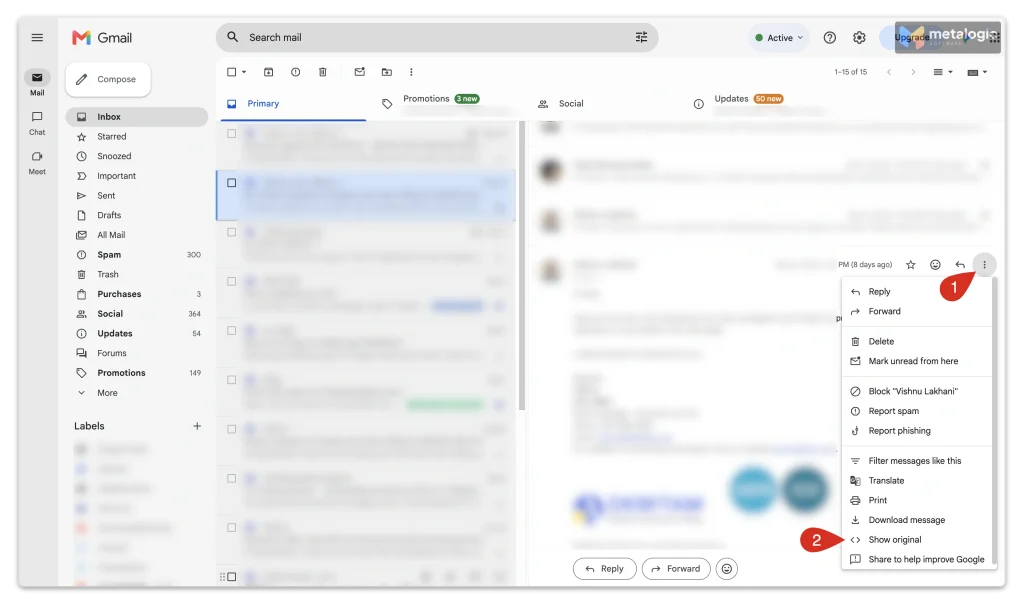
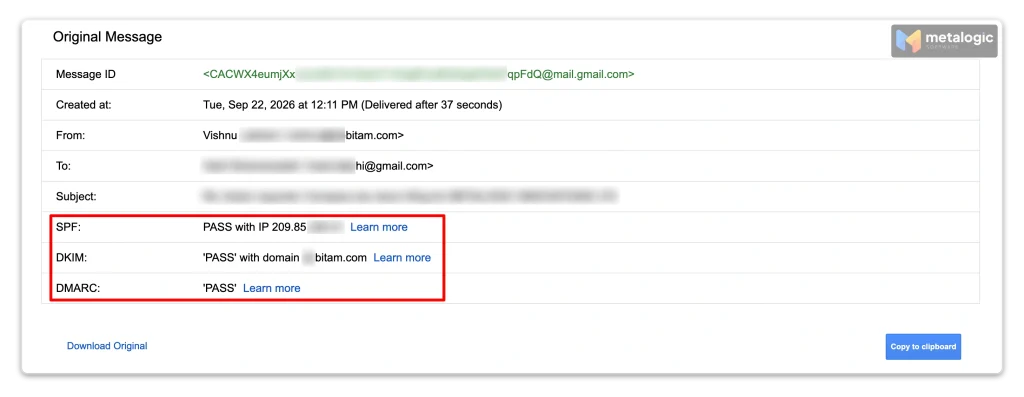
- Open the full headers. In Gmail, open the email, click the three dots (⋮) and choose Show original. In Outlook, use your app’s “view message source” or “message details” option, or paste the headers into Microsoft’s Message Header Analyzer.
- Find the From domain. This is your reference.
- Find the SPF result and the domain after
smtp.mailfrom=. - Find the DKIM result and the domain after
header.d=(thed=value). - Find the DMARC result and the domain after
header.from=. - Compare. Is the SPF or DKIM domain the same as the From domain (strict), or in the same organization (relaxed)?
Try it: find the problem
Authentication-Results: mx.receiver.example;
    spf=pass smtp.mailfrom=mailer.example.net;
    dkim=pass header.d=mailer.example.net;
dmarc=fail header.from=example.comThe answer: both checks passed, but for mailer.example.net. The From domain is example.com. They belong to different organizations, so neither path is aligned. Nothing is broken. The platform simply isn’t using your domain yet.
Three details that confuse people
- Compare
d=, nots=. The selector (s=, for examples1orgoogle) only tells the receiver where to find the key. Gmail headers often show[email protected]. That’s a related value, but the alignment check uses thed=domain. - There may be several Authentication-Results headers. Every server on the way can add one. Trust the one added by the receiving mailbox provider (usually the top one, named after the receiver, like
mx.google.com). Ignore any that came with the email from outside. - Microsoft adds
compauth. It’s Microsoft’s combined verdict, based on the From domain. See the table below.
| Microsoft value | What it means |
|---|---|
compauth=fail reason=000 | DMARC failed and the domain’s policy is quarantine or reject |
compauth=fail reason=001 | Implicit failure: no authentication records, or weak ones (SPF ~all or ?all, or DMARC p=none) |
compauth=pass reason=101 | The email was DKIM-signed by the domain in the From address |
dmarc=bestguesspass | The domain has no DMARC record, but would pass if it had one |
These meanings come from Microsoft’s anti-spam message headers reference. If you don’t want to read raw headers at all, paste them into Google’s Admin Toolbox Messageheader tool.
How to fix SPF alignment
SPF alignment means the Return-Path (MAIL FROM) domain must be yours. Here’s how:
- Look at the real Return-Path in a test email before you touch SPF. Is it your domain or the platform’s?
- Find the “custom return-path” or “custom MAIL FROM” setting in your platform. Pick a subdomain you don’t use for anything else, like
bounce.example.com. - Add exactly the DNS records the platform asks for (usually a CNAME, or an MX plus an SPF TXT record on that subdomain).
- Check the alignment mode. A subdomain like
bounce.example.comaligns withexample.comunder relaxed SPF alignment, not underaspf=s. - Send a new test email and confirm
smtp.mailfromnow shows your subdomain.
The most common mistake: “I added them to my SPF record”
Adding include: for your platform to the SPF record of example.com does not create alignment if the Return-Path is still on the platform’s domain. SPF is checked on the MAIL FROM domain, not on the From domain. Your include is never even read. The sending path itself has to change.
Where the setting is, on common platforms
| Platform | SPF alignment |
|---|---|
| Amazon SES | Set a Custom MAIL FROM domain on your verified identity. SES asks for one MX record (feedback-smtp.<region>.amazonses.com) and one SPF TXT record on that subdomain |
| Twilio SendGrid | Domain Authentication puts the return path on a subdomain of your domain. Under Advanced Settings, Use custom return path lets you choose the subdomain name |
| Brevo | On shared IPs, the return-path uses Brevo’s own domain, so alignment comes from DKIM. Brevo offers a branded return-path with dedicated IPs |
| Mailchimp (campaigns) | The return-path stays on Mailchimp’s domains. Alignment comes from DKIM, so authenticate your domain (section 07) |
If your platform can’t align SPF, that’s fine. One aligned DKIM signature is enough for DMARC. Twilio SendGrid’s own DMARC troubleshooting article puts it simply: “In order for DMARC to pass, either SPF, DKIM, or both must align.”
A hidden trap in Amazon SES
When you set up a custom MAIL FROM domain, SES asks what to do if its MX record isn’t found. If you choose Use default MAIL FROM domain, SES quietly switches back to an amazonses.com subdomain. Emails keep flowing, but SPF alignment is gone, and DMARC now depends on DKIM alone. Check it after any DNS change. Details are in the SES custom MAIL FROM guide.
How to fix DKIM alignment
DKIM alignment is the most reliable fix, because DKIM usually survives forwarding (section 08).
- Turn on DKIM signing with your own domain in your platform. It’s often called “domain authentication”.
- Publish the records exactly as the platform shows them (usually CNAME or TXT records under
_domainkey). - Confirm it’s active. Many platforms need you to click “verify” or “start authentication” after DNS is published.
- Send a new test email and check that
d=now showsexample.com(or a subdomain of it). - Check it passes, not just that it’s there:
dkim=pass header.d=example.com.
| Platform | Where to set up DKIM |
|---|---|
| Google Workspace | Admin console: Apps > Google Workspace > Gmail > Authenticate email. The default selector is google |
| Amazon SES | Easy DKIM on your verified domain: three CNAME records |
| Brevo | Domain authentication: the Brevo code, plus DKIM 1 and DKIM 2 CNAME records |
| Mailchimp | Domains: authenticate your domain with the DKIM CNAME records shown in your account |
| Twilio SendGrid | Sender Authentication > Domain Authentication: CNAME records for DKIM |
Two signatures? One good one is enough.
Many platforms sign twice: once with your domain and once with their own. That’s normal. RFC 9989 says an email passes “if any DKIM-Authenticated Identifier aligns with the Author Domain”. So if the signature for your domain passes, a second signature for the platform’s domain doesn’t matter.
Two more things to check:
- Key length: Gmail requires a DKIM key of at least 1024 bits and recommends 2048 bits.
- Changes after signing: if something edits the email after it’s signed (a footer added by a gateway, a rewritten link), the body hash breaks and you’ll see
dkim=fail (body hash did not verify).
Why forwarding and mailing lists cause problems
Sometimes your direct emails pass, but the same email fails after someone forwards it. Here’s why:
| Path | SPF | DKIM | Usual DMARC result |
|---|---|---|---|
| Sent directly to the reader | Pass, aligned | Pass, aligned | Pass |
| Forwarded by the reader’s other mailbox | Often fails (a new server sends it) | Usually survives | Pass, if DKIM is aligned |
| Through a mailing list that adds a footer or subject tag | Often fails | May break (the content changed) | Can fail, unless the list rewrites the From address |
- SPF breaks on forwarding because the forwarding server isn’t in your SPF record.
- DKIM usually survives, because the signature travels with the email, as long as nobody changes the signed parts.
- Mailing lists often change the subject or add a footer. Many now rewrite the From address to their own domain to avoid DMARC failures.
What about ARC?
ARC (Authenticated Received Chain) lets a forwarder pass on the results it saw before it changed the email. A receiver may trust them. ARC is still an experimental standard, and it doesn’t turn a DMARC fail into a pass by itself. Don’t rely on it. Rely on aligned DKIM.
Watch out for SPF “-all” with forwarding
If your SPF record ends in -all (hard fail), some receivers may reject forwarded mail at the SPF step, before DMARC even runs. The DMARC standard warns about this, and those messages can be missing from your DMARC reports, so you may never see them. Many senders use ~all and let DMARC make the decision.
DMARC failure vs. policy vs. DNS problems
Three different things are often mixed up:
| Thing | Values | What it tells you |
|---|---|---|
| The result for one email | pass / fail | Did this email have an aligned pass? |
| Your policy in DNS | p=none / quarantine / reject | What you ask receivers to do with failures |
| A record or DNS problem | Missing, invalid, duplicate record, or a lookup error | The receiver couldn’t evaluate DMARC properly at all |
p=nonedoesn’t make anything pass. It only asks receivers not to act on failures. The email still fails, and Microsoft may still mark it as an implicit failure (compauthreason 001).- Changing
rejecttononedoesn’t fix alignment. It hides the symptom and removes your protection. - Two DMARC records on the same name are as bad as none. Receivers discard them both.
- A DNS error is not an alignment failure. With a temporary or permanent lookup error, the email can’t be judged as pass or fail. Fix DNS first.
- Receivers have the final word. They can still filter an email that passes DMARC, or deliver one that fails.
Testing a stricter policy? pct is gone
Older guides tell you to roll out a policy with pct=10. RFC 9989 removed the pct tag. The new testing tag is t=y: with p=reject; t=y, receivers apply quarantine instead of reject while you test. Before you make any policy stricter, make sure every service that sends as your domain passes.
Use DMARC reports to find other failing senders
One test email checks one path. Your domain may have five or ten. DMARC aggregate reports show all of them. Add a rua=mailto:... address to your DMARC record, and mailbox providers like Google and Microsoft send you a daily summary (an XML file) of who sent email as your domain.
The two parts of a report that tell the real story
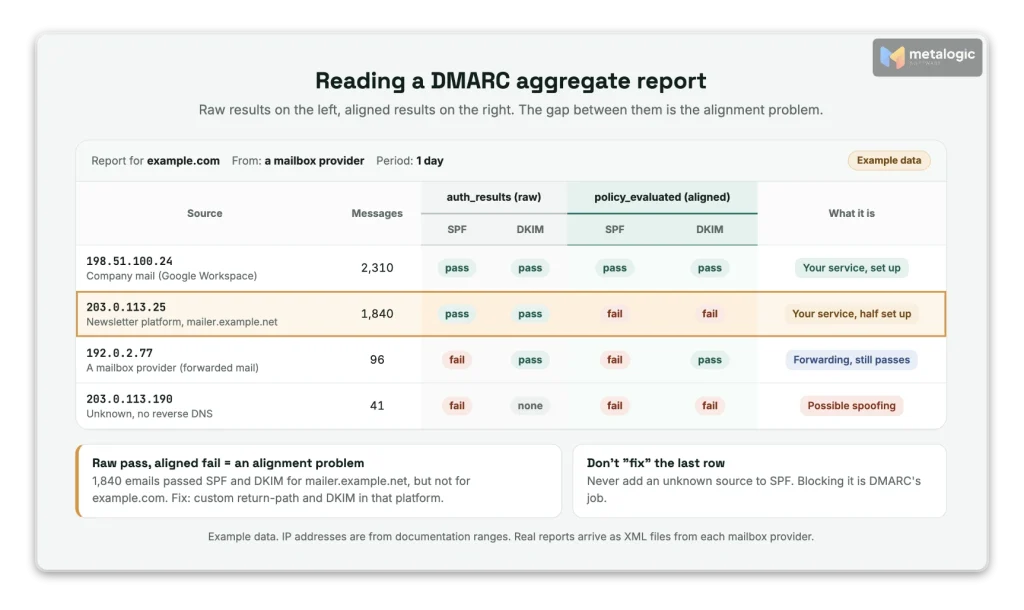
Each row in a report has two sets of results. The difference between them is exactly the alignment problem. The new reporting standard, RFC 9990, defines them:
auth_results: raw SPF and DKIM results, “uninterpreted with respect to DMARC”.policy_evaluated: “the results of applying the DMARC policy”. Itsspfanddkimvalues are the alignment results.
<row>
  <source_ip>203.0.113.25</source_ip>
  <count>1840</count>
  <policy_evaluated>
    <disposition>none</disposition>
    <dkim>fail</dkim>   <!-- not aligned -->
    <spf>fail</spf>    <!-- not aligned -->
  </policy_evaluated>
</row>
<auth_results>
  <dkim><domain>mailer.example.net</domain><result>pass</result></dkim>
  <spf><domain>mailer.example.net</domain><result>pass</result></spf>
</auth_results>Read it like this: pass in auth_results, fail in policy_evaluated = an alignment problem. Here, 1,840 emails passed for mailer.example.net but weren’t aligned with example.com. It’s one of your own services, set up halfway.
Sort every source into one of three groups
| Source | How it looks | What to do |
|---|---|---|
| Your service, not set up fully | A platform you recognise. Raw pass, aligned fail | Set up custom DKIM and/or return-path (sections 06 and 07) |
| Forwarding | Mailbox providers’ IPs. SPF fails, DKIM often still aligned | Usually nothing. Make sure DKIM is aligned |
| Spoofing or unknown | IPs and domains you don’t use | Do not authorise them. This is what DMARC is there to block |
Never add an unknown source to SPF just to make the failures go away
First find out what it is. If you authorise a spoofer, you give them your domain’s reputation. And remember: DMARC reports show authentication, not inbox placement. To track where your emails land, see how to monitor email deliverability.
Verify the fix across every sending service
A green DNS checker only shows that your records exist. It doesn’t show that real emails pass. Google’s DMARC troubleshooting guide also starts from the message headers, not from DNS. So finish with real emails:
- I sent a test email fromeveryservice that uses my domain: newsletter, CRM, website forms, store notifications, helpdesk, invoices.
- Each test shows the From domain I expect.
- Each test has at least one path that passesandaligns (SPF or DKIM).
- Each test shows
dmarc=passin the receiver’s Authentication-Results. - The platform shows my DNS records as verified and my custom domain as active.
- I wait a few days and check the next DMARC reports for anything still failing.
- Only then do I consider a stricter policy.
DMARC pass is only one part of deliverability
A DMARC pass proves one thing: your domain allowed this email. That’s important. But it says nothing about the people you’re sending to. RFC 9989 is clear that a pass doesn’t make an email “safe or desirable” on its own.
| Check | What it’s about | The question it answers |
|---|---|---|
| SPF, DKIM, DMARC | The sender (you) | Is this email really from example.com? |
| Email list validation | The recipients (your list) | Does each address exist and accept email? |
| Permission and content | The relationship | Does this person want this email? |
You can have perfect alignment and still hurt your reputation by sending to addresses that bounce. So once DMARC passes, the next step before a campaign is validating email addresses on your list.
Where MailVexa fits
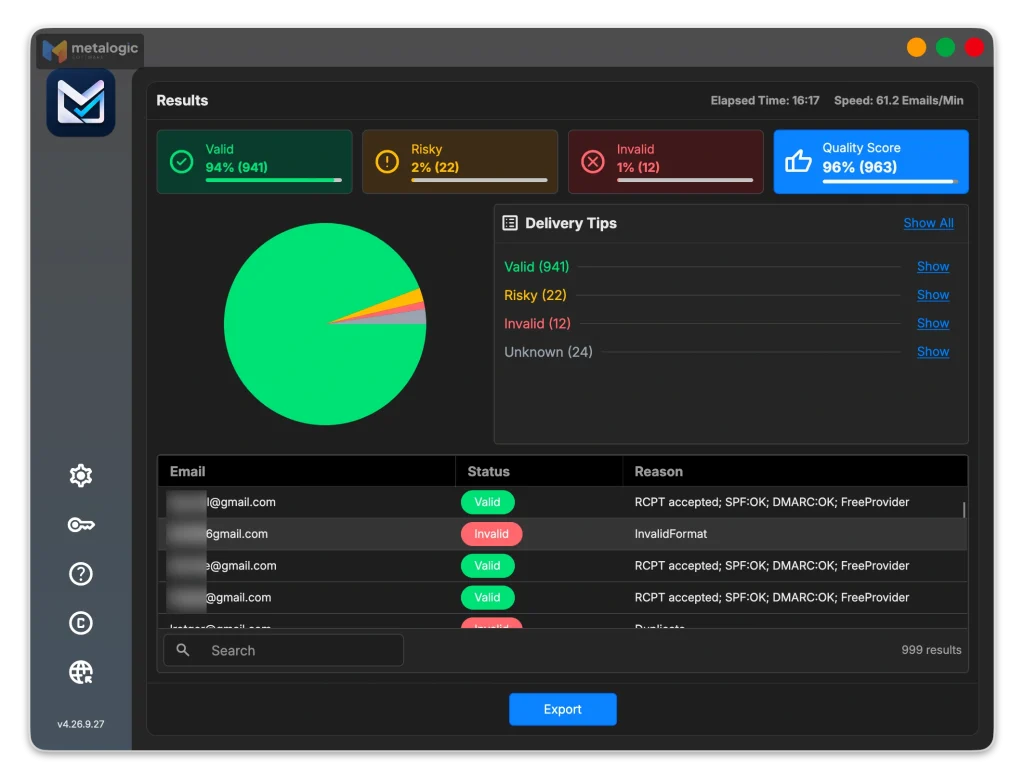
MetaLogic MailVexa is email verification software for Windows and Mac. It doesn’t touch your DMARC setup, and it doesn’t send email. It prepares the list you send to:
- Layered checks for every address: format, disposable domains, free providers, MX, SMTP and mailbox, catch-all, and the recipient domain’s SPF/DMARC records.
- Clear groups with reasons: Valid, Risky, Invalid and Unknown, so you know which addresses to send to and which to hold back.
- An exclude list for past bounces and unsubscribes, so they never come back in a new import.
- Local processing: your list stays on your computer. Checks run at about 10,000 emails an hour with one proxy.
- Exports your platform can use: CSV or XLSX, with your own columns kept.
About the SPF/DMARC column in MailVexa
MailVexa reports whether each recipient’s domain publishes SPF and DMARC records. That’s extra information about the domains on your list. It is not a test of your own sending domain’s alignment. For that, use the header method in section 05.
For the full routine, see how to clean your email list before sending a campaign. When you’re ready, download MailVexa and verify your first 2,000 addresses free.
Common questions
Why does DMARC fail when SPF and DKIM both pass?
Because they passed for another domain, usually your email platform’s. DMARC needs at least one of them to pass for a domain that aligns with your From address.
Does DMARC require both SPF and DKIM to pass?
No. One check that passes and aligns is enough. Using both is still recommended, so one can cover for the other.
Does changing Reply-To fix DMARC alignment?
No. DMARC ignores Reply-To and the display name. Only the domain in the From address counts.
Can subdomains pass DMARC alignment?
Yes. With relaxed alignment (the default), bounce.example.com aligns with example.com. With strict alignment (aspf=s or adkim=s), the domains must match exactly.
Does p=none fix a DMARC failure?
No. p=none only asks receivers not to act on failures. The emails still fail. You fix the failure by aligning SPF or DKIM.
Why does DMARC fail only for forwarded emails?
Forwarding usually breaks SPF, because a new server sends the email. If your DKIM signature is aligned and the content isn’t changed, DMARC can still pass.
Why do some emails pass while others from the same domain fail?
They come from different services. Your newsletter platform may be set up, while your CRM, helpdesk or store sends without your DKIM. Test each service, and check your DMARC reports.
Can an email pass DMARC and still go to spam?
Yes. DMARC only proves the sender is real. Spam filters also look at reputation, complaints, bounces, content and engagement.
Sources
Standards
- RFC 9989: DMARC (May 2026, replaces RFC 7489). Alignment modes, defaults, DNS Tree Walk, tags.
- RFC 9990: DMARC aggregate reporting. policy_evaluated and auth_results.
- RFC 8617: ARC (Experimental).
Mailbox providers
- Gmail: Email sender guidelines. From alignment, DKIM key length.
- Google Workspace: Troubleshoot DMARC issues
- Google Admin Toolbox: Messageheader
- Microsoft: Set up DMARC
- Microsoft: Anti-spam message headers. compauth reason codes.
- Microsoft: Message Header Analyzer
Email platforms
- Amazon SES: Custom MAIL FROM domain. Records and behavior on MX failure.
- Twilio SendGrid: Troubleshooting DMARC failures
Product
- MetaLogic MailVexa. Desktop email verification software for Windows and macOS.
DMARC proves who you are. Now make sure who you’re sending to is real.
MailVexa removes addresses that would bounce, flags risky ones, keeps your past bounces and unsubscribes out of every new list, and shows a reason for every result, all on your own computer.
Windows and macOS. Pay once, use for life. Free 14-day trial with up to 2,000 verifications.
We build MetaLogic MailVexa, so weigh our description of it accordingly. We have no commercial relationship with any email platform or mailbox provider mentioned in this guide. Standards and platform settings were checked in October 2026. Platform menus change often, so follow the exact records your own platform shows you.