Quick answer
The best watermark idea depends on your goal.
- Branding: a small logo in a corner, about 10% of the video width, at 70–80% opacity.
- Credit on social media: your @handle, placed where the app’s buttons do not cover it.
- Protecting drafts: a tiled “PREVIEW” or logo pattern at 15–25% opacity.
- More followers: an animated Subscribe or Follow button near the end.
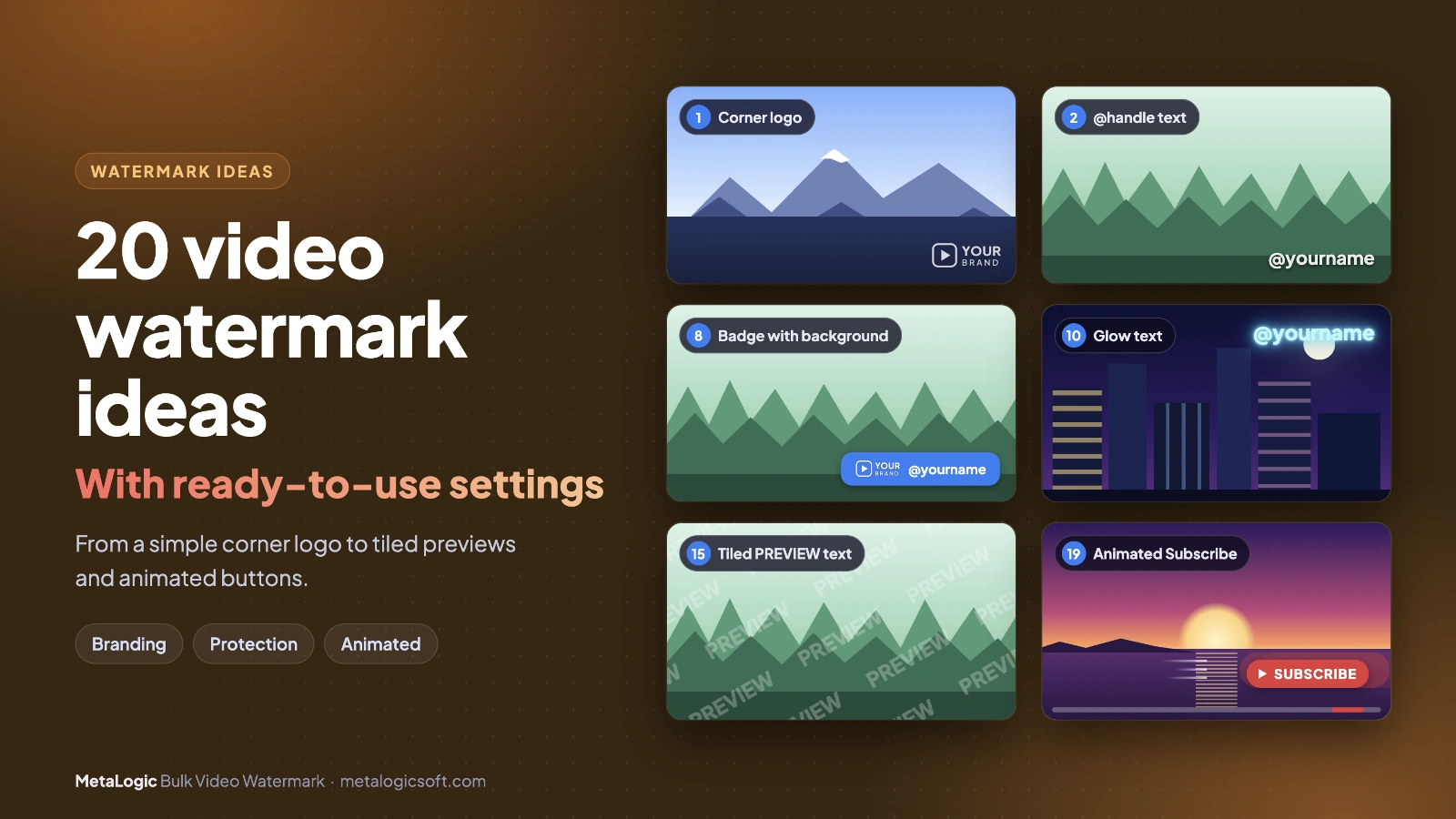
Below are 20 ideas. Each one has a ready-to-use template: position, size, opacity and effects.
A watermark does not have to be a boring grey logo. It can be your signature, a neat badge, a glowing @handle or a button that slides in at the right moment.
The hard part is choosing. Too small, and nobody notices it. Too big, and it ruins your video.
So we collected 20 watermark ideas that work in real videos. For each one, you get:
- what it looks like and who it is for
- a template with exact settings you can copy
- the trade-off: how much it protects and how much it distracts
New to the topic? Start with what a video watermark is and its main types, then come back here for ideas.
How to read the templates
Every idea below ends with a short template line. Here is what each part means:
| Part | What it means |
|---|---|
| Position | Where the mark sits, using a 3×3 grid: corners, edges or centre |
| Size | The width of the mark as a percent of the video width |
| Opacity | How solid it is. 100% is fully solid, 0% is invisible |
| Extras | Effects, rotation, timing or animation |
Why size is a percent, not pixels
A logo that is 200 pixels wide looks fine on 1080p video but tiny on 4K. A percent keeps the same look on every video, from a phone clip to a 4K film.
The numbers below are starting points. Always check the result on your own footage.
Quick picker: which idea fits your goal?
| Your goal | Ideas to try |
|---|---|
| Build a recognisable brand | 1, 3, 6, 8, 11 |
| Get credit when clips are reposted | 2, 3, 4, 7, 20 |
| Look personal or artistic | 5, 6, 7, 10 |
| Stay readable on busy footage | 8, 9, 13 |
| Protect client previews and drafts | 14, 15, 16, 17 |
| Get more subscribers or followers | 18, 19 |
| Make cropping and covering hard | 15, 16, 20 |
Simple branding ideas (1–7)
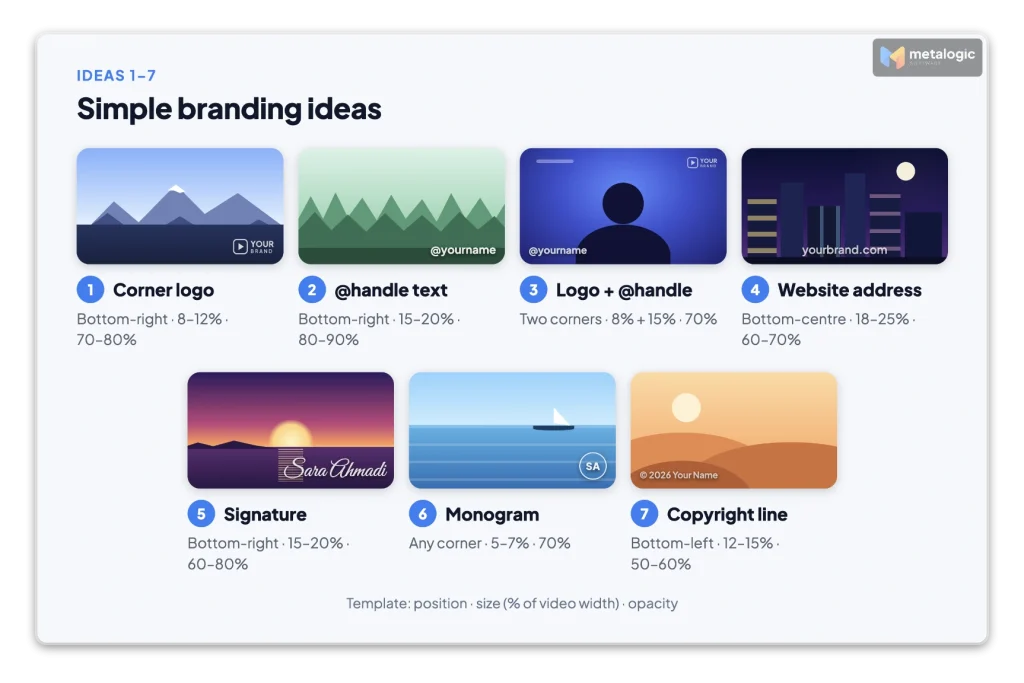
These are quiet, everyday watermarks. They work on almost any video and rarely annoy viewers. Ideas 5–7 come from photography, where artists have signed their work for a long time.
1. Small corner logo
The classic choice. TV channels have used it for decades. In broadcasting it is called a digital on-screen graphic, or “bug”.
Best for: YouTube channels, company videos, any brand with a logo.
Template: bottom-right or top-right · 8–12% of width · 70–80% opacity · soft shadow
2. @handle text
Just your username, like @yourname. When a clip is reposted, people know exactly where to find you.
Best for: TikTok, Reels and Shorts creators.
Template: top-left or top-centre on vertical video, bottom-right on horizontal · 15–20% of width · 80–90% opacity · soft shadow
3. Logo + @handle in two corners
The logo builds your brand, and the handle tells people where to follow you. Two corners also make the watermark harder to crop out.
Best for: Creators who post the same video on several platforms.
Template: logo top-right, handle bottom-left · logo 8%, handle 15% of width · 70% opacity
4. Website address
A short web address, like yourbrand.com, turns every view into a possible visit. Keep it short and leave out “https://” and “www”.
Best for: Shops, real estate agents, course creators, local businesses.
Template: bottom-centre · 18–25% of width · 60–70% opacity · background box if the footage is busy
5. Signature
Your name in a handwriting or script font. It feels personal and artistic, like a painter signing a canvas. This is one of the most popular photography watermark ideas, and it works just as well on video.
Best for: Photographers, wedding videographers, artists.
Template: bottom-right · 15–20% of width · 60–80% opacity · white text with a dark shadow
6. Monogram or initials
Two or three letters inside a circle or a square. It is small, clean and easy to recognise, even when the video is tiny on a phone.
Best for: Personal brands, studios, fashion and beauty creators.
Template: any corner · 5–7% of width · 70% opacity · border with round corners
7. Copyright line
A short line such as © 2026 Your Name. It is the most formal idea in this list. It clearly states who owns the video.
Best for: Photographers, filmmakers, anyone who licenses their work.
Template: bottom-left · 12–15% of width · 50–60% opacity
Styled ideas that stand out (8–13)
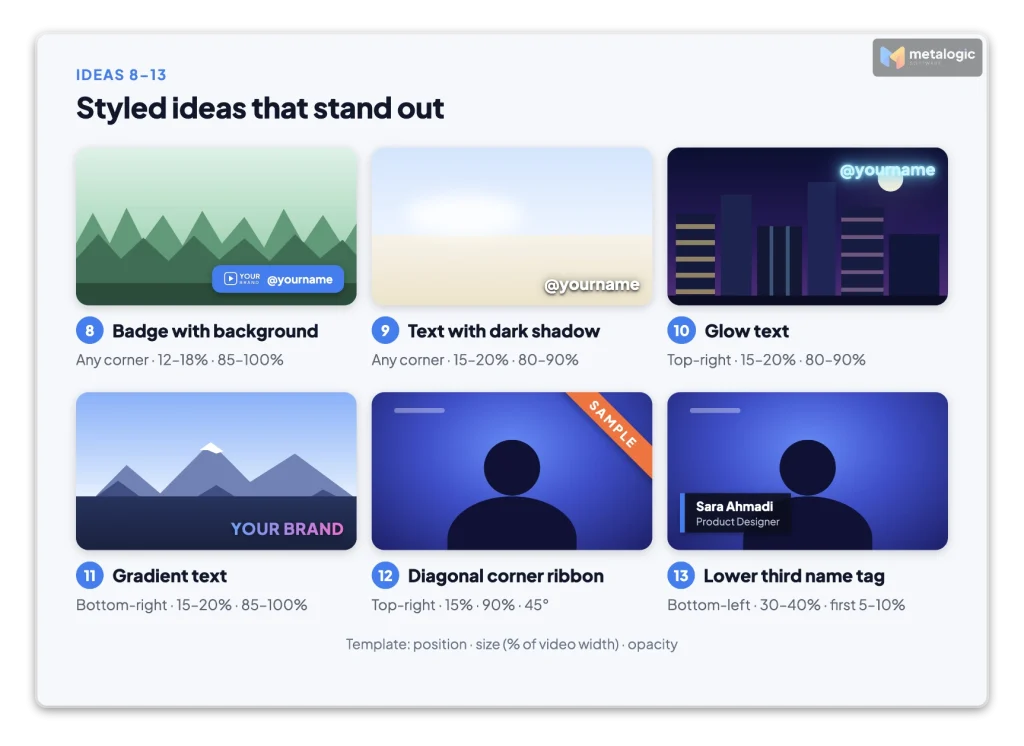
Plain white text disappears on bright snow or a white wall. These styles stay readable on any footage, and they look more designed.
8. Badge with a background
Your text or logo inside a coloured box with rounded corners. The box separates it from the video, so it is readable on any scene.
Best for: Busy footage, sports, travel, product videos.
Template: any corner · 12–18% of width · 85–100% opacity · background box in your brand colour
9. Text with a dark shadow
White text with a soft dark shadow around it. It reads on both bright and dark scenes, without a box.
Best for: Videos that switch between light and dark scenes.
Template: any corner · 15–20% of width · 80–90% opacity · black shadow, small offset, soft radius
10. Glow text
Bright text with a soft glow around it, like a neon sign. It fits energetic content and looks great on dark footage.
Best for: Gaming, music, night-time and event videos.
Template: top-right or bottom-right · 15–20% of width · 80–90% opacity · bright text colour, glow on
11. Gradient text
Your name or brand filled with two colours that blend into each other. If your brand already uses a gradient, this keeps every video on-brand.
Best for: Brands with strong colours, tech channels, modern designs.
Template: bottom-right · 15–20% of width · 85–100% opacity · linear gradient in brand colours, light shadow
12. Diagonal corner ribbon
A short word like SAMPLE, NEW or DEMO, rotated 45° across a corner. It is clear without covering the centre of the video.
Best for: Product demos, sample clips, early versions.
Template: top-right · 15% of width · 90% opacity · rotation 45°, background box
13. Lower third name tag
A bar near the bottom with a name and a title, as on the news. It introduces the speaker and brands the video at the same time.
Best for: Interviews, talks, podcasts, online lessons.
Template: bottom-left · 30–40% of width · 90–100% opacity · background box, shown only for the first 5–10% of the video
Ideas that protect previews and drafts (14–17)
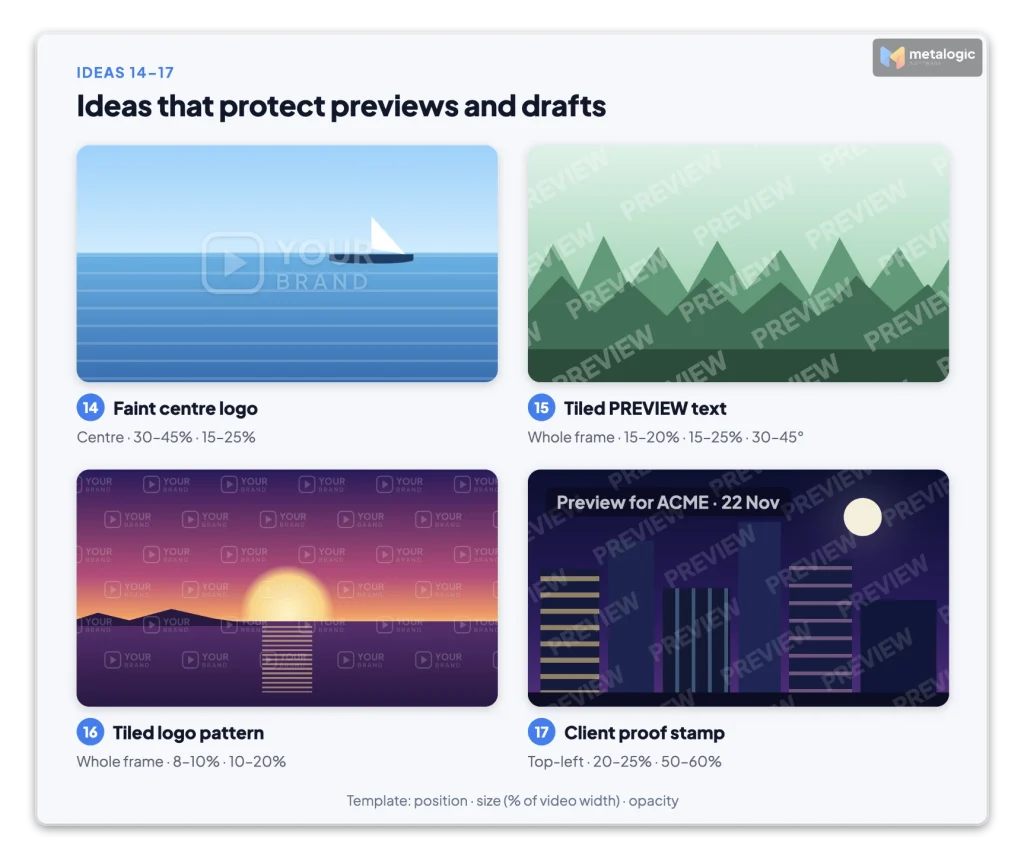
A corner logo is easy to crop. When you send work before payment, or sell footage, you need a watermark that is hard to remove.
14. Faint centre logo
A large, very faint logo in the middle of the frame. The video stays watchable, but nobody can use it as if it were clean.
Best for: Quick client reviews, social previews of paid content.
Template: centre · 30–45% of width · 15–25% opacity
15. Tiled “PREVIEW” text (tiled watermark)
A word like PREVIEW or DRAFT, repeated across the whole frame at an angle. This is the standard tiled watermark for drafts and proofs.
Best for: Draft edits sent to clients, wedding previews, proofs.
Template: repeat across the whole video · 15–20% of width per word · 15–25% opacity · rotation 30–45°
16. Tiled logo pattern
Your logo repeated in a neat grid. It protects like tiled text, but it also promotes your brand.
Best for: Stock footage previews, portfolio reels.
Template: repeat across the whole video · 8–10% of width per logo · 10–20% opacity
17. Client proof stamp
A line such as Preview for ACME · 22 Nov. If a draft leaks, you know which copy it was. Combine it with idea 15 for the strongest protection.
Best for: Agencies and freelancers who send several versions to several clients.
Template: top-left · 20–25% of width · 50–60% opacity · one line per client and date
Animated ideas (18–20)
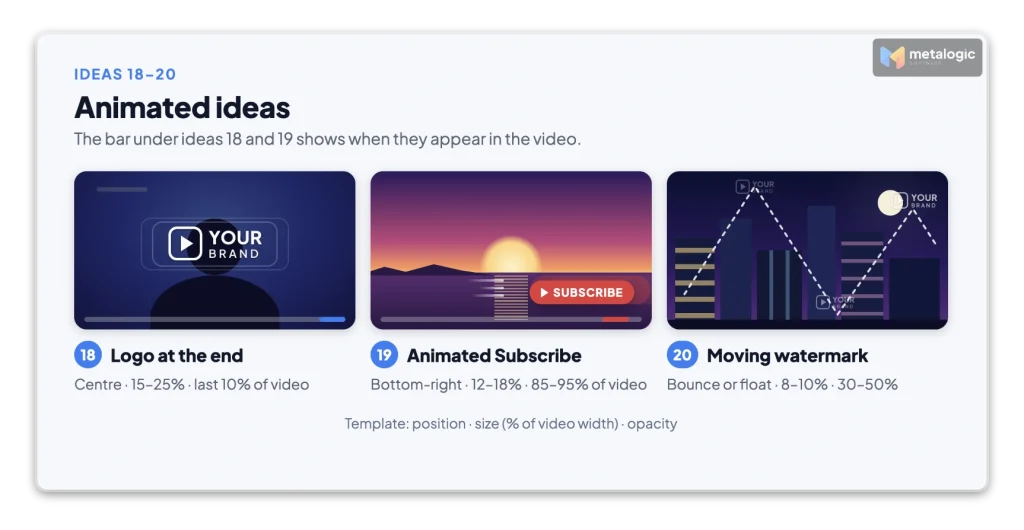
Movement catches the eye. These ideas get more attention than a still logo, so use them with care.
18. Logo that fades in at the end
Your logo appears only in the last seconds, often a little bigger, like a signature at the end of a film. It does not distract during the video itself.
Best for: Brand films, ads, short stories, trailers.
Template: centre or bottom-right · 15–25% of width · 100% opacity · shown from 90% to 100% of the video, fade or zoom-in animation
19. Animated Subscribe or Follow button
A small button that slides or pops in near the end and asks viewers to subscribe. Many ready-made buttons come as GIF, WebM, Lottie or green-screen MP4 files.
YouTube also has a built-in video watermark: a square image of at least 150 × 150 pixels and under 1 MB. You can show it for the last 15 seconds, from a custom time or for the whole video.
But YouTube adds it in its own player, so it is not baked into the video file. A button you add to the file itself travels with the video to every platform.
Best for: YouTube, Instagram and TikTok creators.
Template: bottom-right · 12–18% of width · 100% opacity · shown from about 85% to 95% of the video, slide or pop animation
20. Moving watermark
A small logo or @handle that slowly drifts or bounces around the frame. Because it never stays in one place, it is very hard to crop or cover.
Best for: Paid courses, exclusive content, videos that are often stolen.
Template: moving: bounce off the edges or float · 8–10% of width · 30–50% opacity · slow speed
Our test: how much of the picture does each idea cover?
Protection and distraction are a trade-off. To make it measurable, we drew six of the ideas on a 1920×1080 frame and counted two things:
- Pixels covered: how much of the picture the watermark actually touches.
- Zones reached: we split the frame into a 10×10 grid. How many of the 100 zones contain part of the watermark?
| Idea | Pixels covered | Zones reached (of 100) |
|---|---|---|
| 1. Corner logo, 12% wide | 0.5% | 4 |
| 2. @handle text, 18% wide | 0.3% | 2 |
| 13. Lower third with a box, 35% wide | 3.5% | 8 |
| 14. Centre logo, 40% wide | 5.8% | 16 |
| 15. Tiled PREVIEW text, 20% wide, 30° | 9.5% | 93 |
| 16. Tiled logo, 10% wide | 7.8% | 100 |
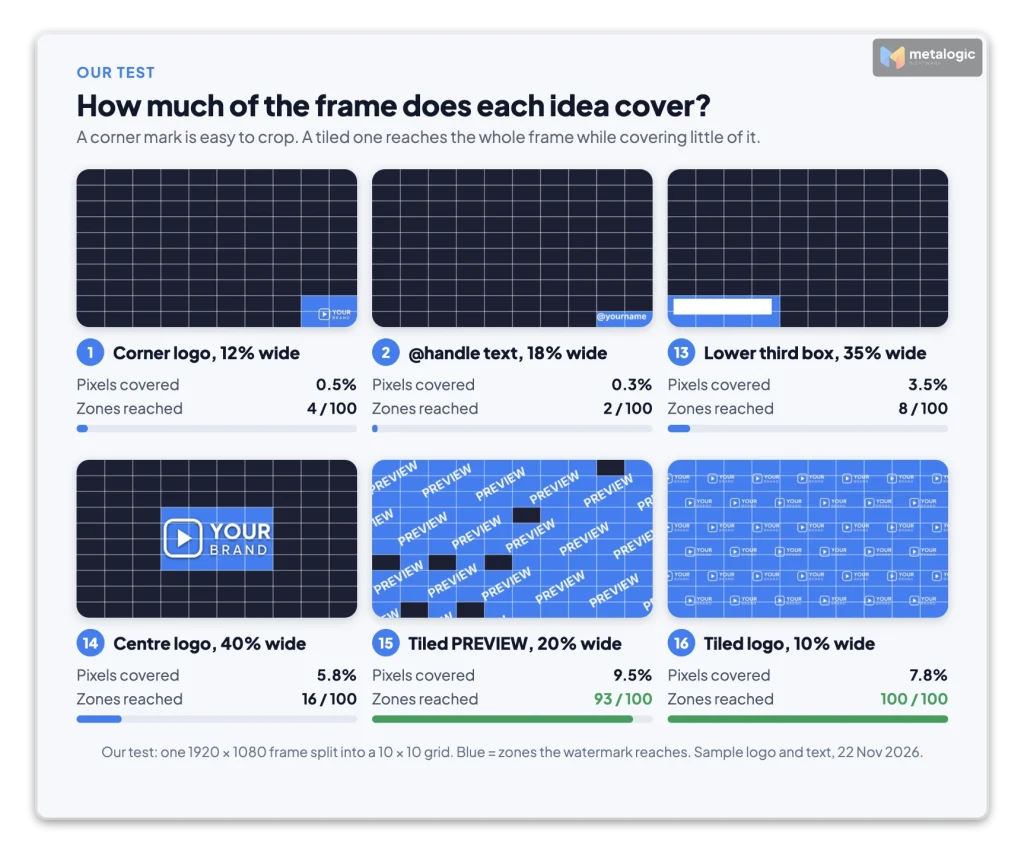
Two results stand out.
First, the corner logo covers only 0.5% of the picture, but it sits in just 4 zones. Cutting about 14% off one side of the frame removes it completely.
Second, the tiled logo covers only 2 percentage points more than one big centre logo, yet it reaches all 100 zones instead of 16.
That is why tiling is the go-to choice for drafts: it protects the whole frame without hiding much of it.
What this means for you
Use a corner idea for branding. Use a tiled idea for protection. If you need both, combine them on separate layers, and keep the tiled layer very faint.
6 tips to make any watermark idea work
- Pick one main style and keep it. The same mark in the same place on every video is what builds recognition.
- Test on your brightest and darkest scenes. If it disappears on one of them, add a shadow, a glow or a box.
- Mind the platform buttons. On vertical video, the right side and the bottom are full of buttons and captions. Keep your mark away from them.
- Use a transparent PNG for logos. A JPG logo brings a white box with it.
- Don’t stack too much. Two visible marks at once is plenty. Add a third only if it appears for a short time.
- Keep your originals. Once exported, a watermark is part of the picture. You will want clean files for clients later.
Turn these ideas into reusable templates
All 20 ideas can be built in MetaLogic Bulk Video Watermark, our desktop app for Windows and macOS. Each idea is a mix of text, image and animated layers, and you can add as many layers as you need.
| To build… | Use this in the app |
|---|---|
| Ideas 1–7 | Text and image layers, 3×3 position grid, size as a percent, opacity and shadow |
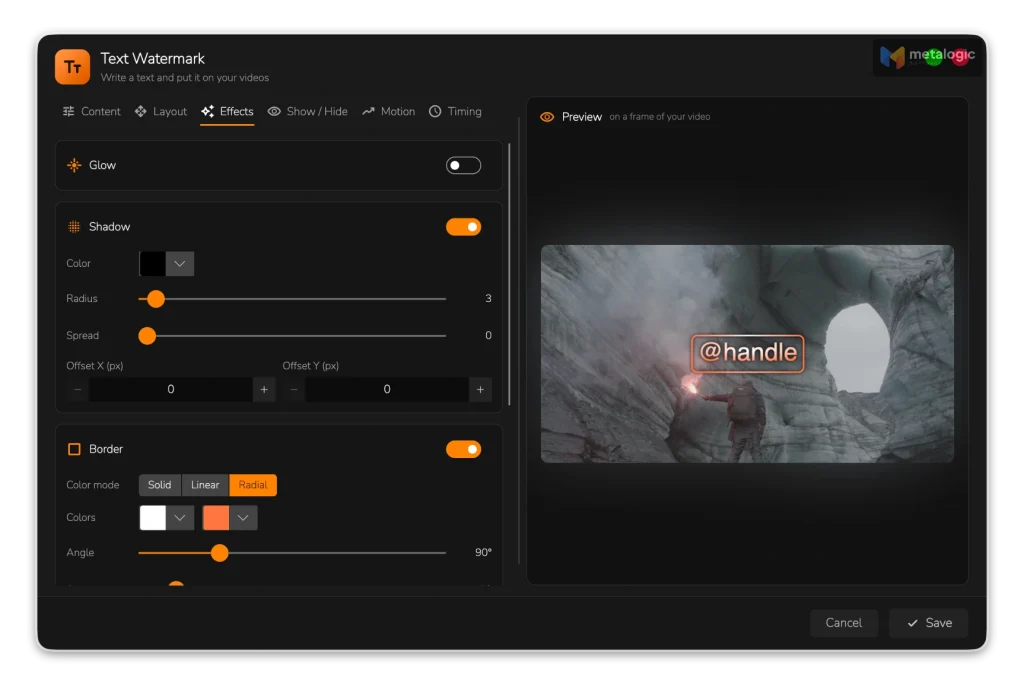
| Ideas 8–12 | Background box, border with round corners, glow, shadow, gradient text and rotation |
| Idea 13 and 18 | Timing as a percent of the video length, plus show and hide animations |
| Ideas 14–17 | Repeat across the whole video, low opacity and rotation |
| Idea 19 | Animated layers (GIF, WebP, APNG, Lottie, MOV, WebM, MP4) and background colour removal |
| Idea 20 | Moving watermarks: bounce, scroll, float, circle and more |
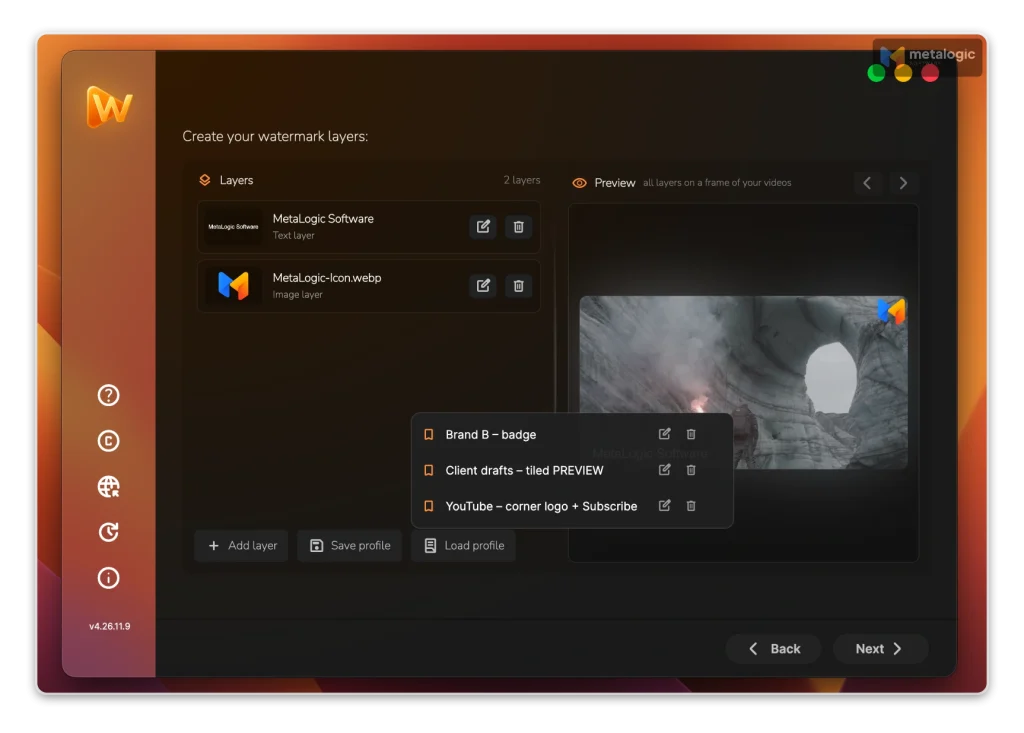
The best part: you can save each idea as a profile. A profile is your own watermark template.
Make one for YouTube, one for client drafts and one for each brand you manage. Next time, load the profile and you are done.
Because the app works in batches, one profile can be applied to a whole folder of videos. Our batch watermarking guide shows the full process.
🖼️ APP SCREENSHOT · Saved profiles
File: bulk-video-watermark-saved-profiles.webp · Width: 688px
Show: The profile menu with three saved profiles: “YouTube – corner logo + Subscribe”, “Client drafts – tiled PREVIEW” and “Brand B – badge”.
Alt text: Saved watermark profiles used as reusable templates
Prefer another tool? Our step-by-step guide to adding a watermark covers Premiere Pro, DaVinci Resolve, Clipchamp, iMovie, online tools and FFmpeg.
Frequently asked questions
What is a good watermark for a video?
For most people, a small logo or @handle in a corner, at about 10% of the video width and 70–80% opacity. It brands the video without getting in the way.
What should my watermark say?
Whatever people should search for to find you: your brand name, your @handle or your website. Keep it short. Long text becomes unreadable on phones.
How big should a video watermark be?
For branding, 8–12% of the video width for a logo and 15–20% for text. Protective watermarks are bigger, but much more transparent.
What opacity should a watermark have?
Around 60–80% for branding marks, so they are clear but calm. Around 15–25% for tiled or centre marks that cover the picture.
Is there a free watermark template?
Yes. Every idea in this article comes with a template you can copy for free. In MetaLogic Bulk Video Watermark, you can save it as a profile and reuse it.
What is a tiled watermark?
A logo or word repeated across the whole frame, often at an angle and with low opacity. It is used on drafts and previews because it cannot be cropped out.
Do these ideas work for photos too?
Yes. Most of them come from photography, especially the signature, monogram and copyright line. Only the animated ideas are video-only.
Turn your favourite idea into a template
Build any of these 20 watermark ideas, save it as a profile and apply it to one video or a whole folder. Everything runs offline on your computer.
Windows 10+ and macOS 12+. 14-day free trial and 14-day money-back guarantee.
Sources
- Wikipedia: Digital on-screen graphic. Corner logos (“bugs”) in TV broadcasting.
- YouTube Help: Manage your channel branding. Video watermark size and display times.
- vidIQ: How to add a YouTube video watermark. YouTube’s watermark is not part of the video file.
- MetaLogic Bulk Video Watermark. Layers, effects, repeat, animations and profiles.
We make MetaLogic Bulk Video Watermark. The coverage test was run on 22 November 2026 on a 1920×1080 frame with our sample logo and text. Results change with your own logo, font and spacing.