Someone opens your newsletter. They don’t want it anymore. They look for the unsubscribe link, but it’s tiny, grey and hidden at the very bottom.
So they do the easy thing. They click “Report spam”.
You didn’t just lose one subscriber. You got a complaint, and complaints are one of the strongest signals Gmail and Yahoo use to decide where your next email lands.
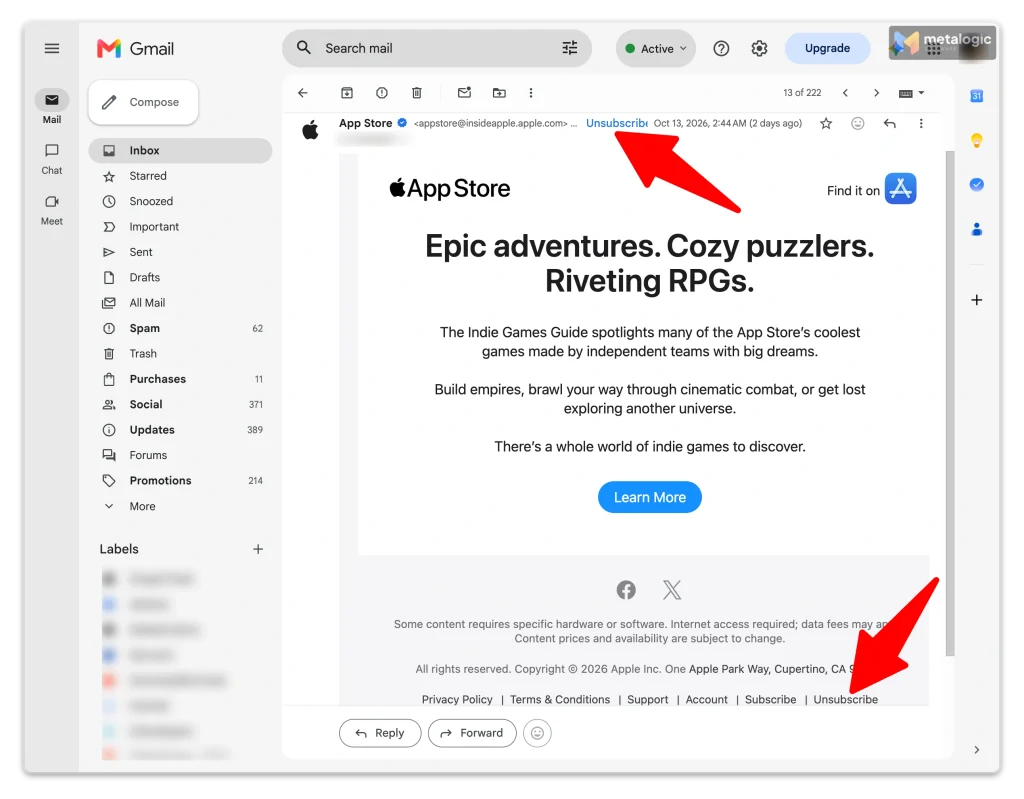
One-click unsubscribe fixes this. It puts a clear “Unsubscribe” option right next to your sender name, inside Gmail or Yahoo. For bulk marketing mail, it is no longer optional. This guide explains what it is, who needs it, how to set it up, and how to prove it really works.
Quick answer
One-click unsubscribe lets people leave your list from inside their mailbox, without visiting your website. It works through two hidden email headers: List-Unsubscribe and List-Unsubscribe-Post. The technical standard is RFC 8058.
Gmail and Yahoo require it for marketing email from bulk senders. Gmail treats you as a bulk sender once you send about 5,000 or more messages to personal Gmail accounts in one day. You also need a visible unsubscribe link in the email body, and you must honour requests within 2 days.
Most email platforms add the headers for you. Your job is to check that they are there, that DKIM covers them, and that an unsubscribed person really stops getting email.
What is one-click unsubscribe?
One-click unsubscribe is a way for the mailbox, such as Gmail or Yahoo, to send the unsubscribe request to you on behalf of the reader. The reader clicks “Unsubscribe” in their mailbox. The mailbox tells your system. Your system stops sending. The reader never has to open your website.
There are two kinds of unsubscribe option, and they live in different places:
| One-click unsubscribe | Footer unsubscribe link | |
|---|---|---|
| Where it lives | In hidden email headers | In the email body, usually at the bottom |
| Who shows it | The mailbox (Gmail, Yahoo), next to your sender name | You, in your email design |
| Who sends the request | The mailbox, automatically | The reader’s browser, when they click |
| Opens your website? | No | Usually yes |
The List-Unsubscribe header is old. It was defined in RFC 2369 back in 1998. The “one-click” part was added in 2017 by RFC 8058, which introduced a second header, List-Unsubscribe-Post. RFC 8058’s goal is simple: let people unsubscribe “in a familiar environment and without leaving” their mailbox.
“One-click” can still include a confirm step
Gmail or Yahoo may ask “Unsubscribe from this sender?” before sending the request. That is fine. The standard says the mailbox must get the user’s consent first, and leaves the “how” to the mailbox. What must be one click is your side: no login, no form, no “are you sure?” page.
Why easy unsubscribing matters
People don’t always see a difference between “unsubscribe” and “report spam”. RFC 8058 says this openly: if unsubscribing is too hard, people report the mail as junk until it stops arriving.
| Unsubscribe | Spam complaint | |
|---|---|---|
| What the person says | “I don’t want this anymore” | “This is unwanted junk” |
| Effect on you | One fewer subscriber. That’s all | Counts against your reputation |
| Effect on your next email | None | More of your mail may go to spam, for everyone |
Google makes the same link. Its sender guidelines FAQ says one-click unsubscribe helps you keep a low spam rate, which improves delivery. Gmail asks senders to keep their spam rate below 0.1%, and never let it reach 0.3%.
An unsubscribe is a small loss. A complaint is a big one.
It’s natural to want to keep every subscriber. But a person who wants to leave will leave anyway. The only question is whether they leave quietly, or leave a spam report behind that hurts every future campaign. If your mail already lands in spam, our spam troubleshooting guide shows how to find the cause.
It’s a requirement, not a magic inbox key
One-click unsubscribe is one part of healthy sending. It doesn’t guarantee the inbox. Your list quality, permission, authentication and content still matter. For the full picture, see 15 ways to improve email deliverability.
One-click vs footer links, preference centers and mailto
Many senders think they already “have” one-click unsubscribe. Often they have something else. Here is how the options compare for Gmail’s rule:
| Method | Where it lives | Meets Gmail’s one-click rule? | Good to know |
|---|---|---|---|
RFC 8058 headers (HTTPS link + List-Unsubscribe-Post) | Hidden header | Yes | The method this guide is about |
| Footer unsubscribe link | Email body | No, but it is also required | Must be clearly visible. Can go to a preference page |
| Preference center | A web page | No, not on its own | Great extra. Lets people choose fewer emails |
| mailto: in the header | Hidden header | No for Gmail. Yahoo accepts it | Fine as a second option next to the HTTPS link |
| Header link that opens a web page | Hidden header | No | Gmail says landing pages don’t comply with RFC 8058 |
So for bulk marketing mail you need both: the one-click headers, and a clear link in the body. Gmail’s email sender guidelines say marketing and subscribed messages “must support one-click unsubscribe, and include a clearly visible unsubscribe link in the message body.”
The body link can offer “fewer emails”
The footer link doesn’t have to be one-click. It can open a preference page where people pick topics or a lower frequency. Many people who click “unsubscribe” would happily stay for one email a month. Just make sure a full “unsubscribe from everything” option is on that page too.
Who needs one-click unsubscribe?
| Mailbox provider | What it asks for |
|---|---|
| Gmail | Required for marketing and subscribed messages from bulk senders. Headers (HTTPS method) plus a visible body link. Honour requests within 48 hours |
| Yahoo | Required for bulk senders. The RFC 8058 method is “highly recommended” and mailto is “acceptable”. Visible body link. Honour requests within 2 days |
| Outlook.com | Recommended: a working, clearly visible unsubscribe link for marketing and bulk mail |
Am I a “bulk sender” in Gmail’s eyes?
- The number: about 5,000 or more messages to personal Gmail accounts in 24 hours.
- Subdomains count together. 2,500 emails from
example.complus 2,500 fromnews.example.commake you a bulk sender. - It’s permanent. Reach it once, and you stay a bulk sender, even if your volume drops later.
- Personal accounts only. The rules cover @gmail.com and @googlemail.com, not Google Workspace business accounts.
Yahoo doesn’t publish any number. Its sender best practices simply say bulk senders must have a working list-unsubscribe header. Microsoft lists “functional unsubscribe links” as a recommendation in its requirements for high-volume senders.
Not a bulk sender yet? Add it anyway
It costs nothing on most platforms, and you may cross the line sooner than you think. One big campaign is enough, and the status never expires. Starting with a new domain? One-click unsubscribe is on the setup checklist in our guide to warming up an email domain and IP address.
What about transactional emails?
Password resets, order confirmations and booking confirmations don’t need one-click unsubscribe. Yahoo’s sender FAQ and Gmail both say so. But be honest about what “transactional” means. Gmail notes that recipients, not Google, decide what kind of message they received. A “receipt” full of promotions is a marketing email in the reader’s eyes.
Mailbox rules are not the same as the law
Gmail and Yahoo set their own rules. Laws are separate, and usually less strict on timing:
| Rule | Deadline to honour an unsubscribe |
|---|---|
| Gmail | 48 hours |
| Yahoo | 2 days |
| CAN-SPAM (United States) | 10 business days. Your opt-out must work for at least 30 days after sending |
| CASL (Canada) | Without delay, and no later than 10 business days |
| GDPR (European Union) | Withdrawing consent must be as easy as giving it |
The simple rule: aim for immediate. Then you meet every deadline at once.
This is not legal advice
Laws differ by country and by type of email. If you send to many countries, check the rules that apply to you with a qualified adviser.
How one-click unsubscribe works
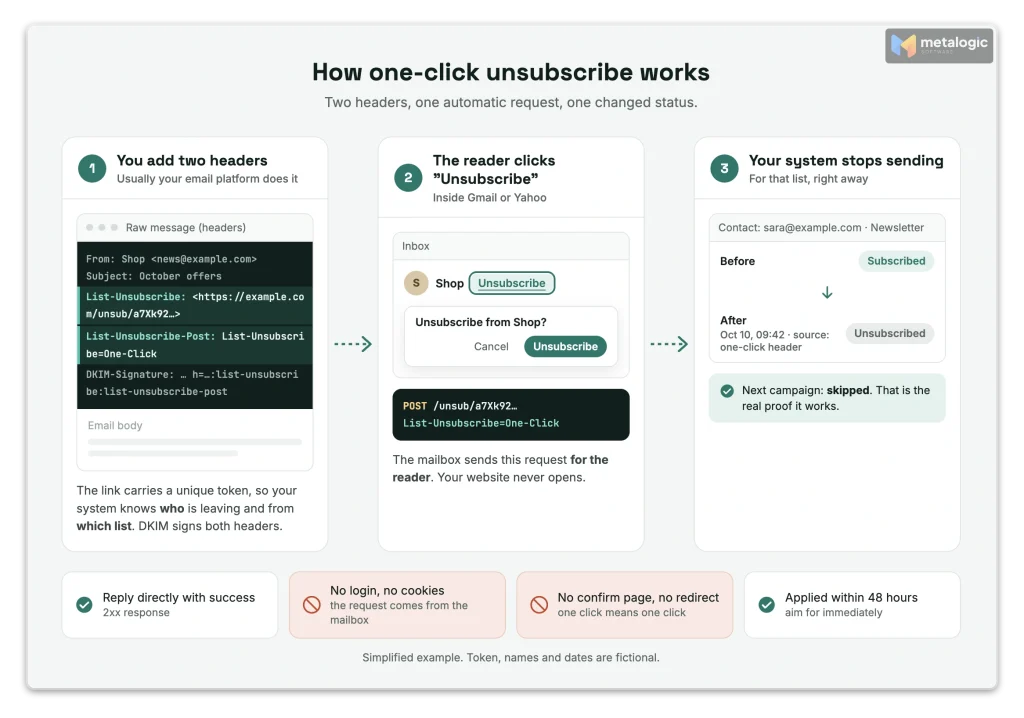
It happens in three simple steps:
- You add two headers to each marketing email.
- The reader clicks “Unsubscribe” in Gmail or Yahoo. The mailbox sends a small, automatic request (an HTTPS POST) to the link in your header.
- Your system receives it and turns off that person’s subscription for that list.
Here are the two headers. This is what Gmail and RFC 8058 show as the example:
List-Unsubscribe: <https://example.com/unsubscribe/opaquepart>
List-Unsubscribe-Post: List-Unsubscribe=One-Click| Part | What it means |
|---|---|
List-Unsubscribe | Where to send the unsubscribe request. Must contain one HTTPS link. A mailto address can be added as a second option |
opaquepart | A unique, hard-to-guess code that tells your system who is leaving and which list |
List-Unsubscribe-Post | Says “this link supports one-click”. Its value is always exactly List-Unsubscribe=One-Click |
These are email headers. Not HTML. Not DNS.
You don’t paste them into your email design, and you don’t add them to your domain’s DNS. They are part of the technical “envelope” of each message, usually added by your email platform. You can only see them in the raw message (section 09 shows how).
Why DKIM matters here
RFC 8058 says both headers must be covered by your DKIM signature. If they aren’t, the mailbox “SHOULD NOT” offer one-click unsubscribe. This stops anyone from adding a fake unsubscribe header to your mail. If DKIM is new to you, read SPF, DKIM and DMARC explained first.
How to set it up with an email platform
This is the easy path, and the right one for most marketers. Follow these six steps:
- Find your real sending path. Do you send campaigns from the platform’s editor, through its API, or both?
- Check the platform’s help pages for “List-Unsubscribe” or “one-click unsubscribe”.
- Find out if it’s automatic, or if you must turn on a setting.
- Decide what “unsubscribe” removes: one list or topic, or all marketing email.
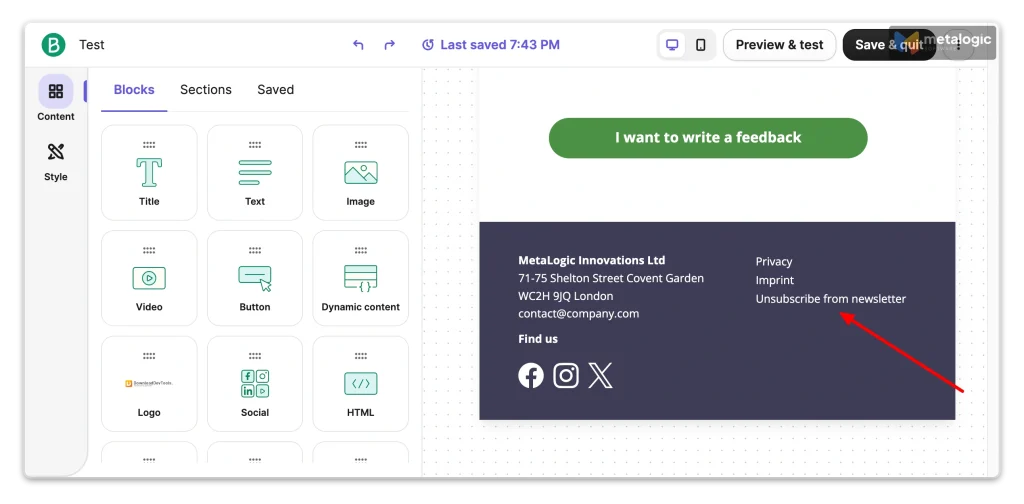
- Set up the footer link in your email template.
- Send a real test campaign to your own Gmail and Yahoo addresses, and check the result (section 09).
What popular platforms do
| Platform | One-click headers | What you need to do |
|---|---|---|
| Mailchimp | Added for marketing emails | Nothing. The body link may still ask for a confirmation, which is allowed |
| Klaviyo | Added to every email | No action needed |
| MailerLite | Included by default | No configuration needed |
| ActiveCampaign | Added to all emails | Handled by the platform |
| Brevo | Added by default | Nothing for marketing mail. See its header FAQ |
| Twilio SendGrid | Added only if Subscription Tracking is on | Turn it on: Settings > Tracking > Subscription Tracking |
| Mailgun | Added with Mailgun’s unsubscribe handling | Turn on unsubscribe handling. Not added if your message already has its own header |
| Amazon SES | Added when you use contact lists | Send with ListManagementOptions. Needs Easy DKIM and one recipient per message |
| Postmark | Added on Broadcast streams | Send marketing mail through a Broadcast stream, not a transactional one |
“I use SendGrid” doesn’t mean it’s switched on
On API-based services, one-click unsubscribe often depends on a setting or on how each message is sent. If you send through more than one path (editor, API, automations), check every path. One missing setting means one stream of email without the headers.
Still choosing a platform? Add “one-click unsubscribe is automatic” to your must-haves. Our guide on how to choose an email service provider includes it in a ready-made comparison checklist.
How to set it up with your own sending system
This part is for developers, or for anyone who sends through their own server or code. If your email platform handles it, you can skip to section 08.
| Requirement | Why |
|---|---|
| Use a unique token in the URL that identifies the person and the list | One-click has no form, so the link itself must say who is leaving. RFC 8058 says it should be hard to forge |
| Don’t put the plain email address in the URL | Use an opaque or signed token instead. Safer and cleaner |
Accept POST with the body List-Unsubscribe=One-Click | This is the request the mailbox sends. Accept both form encodings (urlencoded and multipart) |
| No login, no cookies, no confirmation page | The request comes from the mailbox, not from a person in a browser |
| Reply directly with success. Never redirect | RFC 8058: the sender “MUST NOT return an HTTPS redirect” |
| DKIM-sign after adding both headers | The signature must include both headers in its h= list |
| Let GET show a page, and only POST unsubscribe | Security scanners open links in headers automatically. They must not unsubscribe anyone by accident |
| Make repeat requests safe | A second request should just return success again. It must never re-subscribe the person |
| Allow the POST through your firewall or CDN | Some firewalls block requests that don’t come from a browser. Then unsubscribes silently fail |
Keep the endpoint online
Gmail’s FAQ warns that if your unsubscribe link doesn’t work for an extended period, your messages no longer meet the requirement. Monitor the endpoint like any other important page.
What should happen after someone unsubscribes?
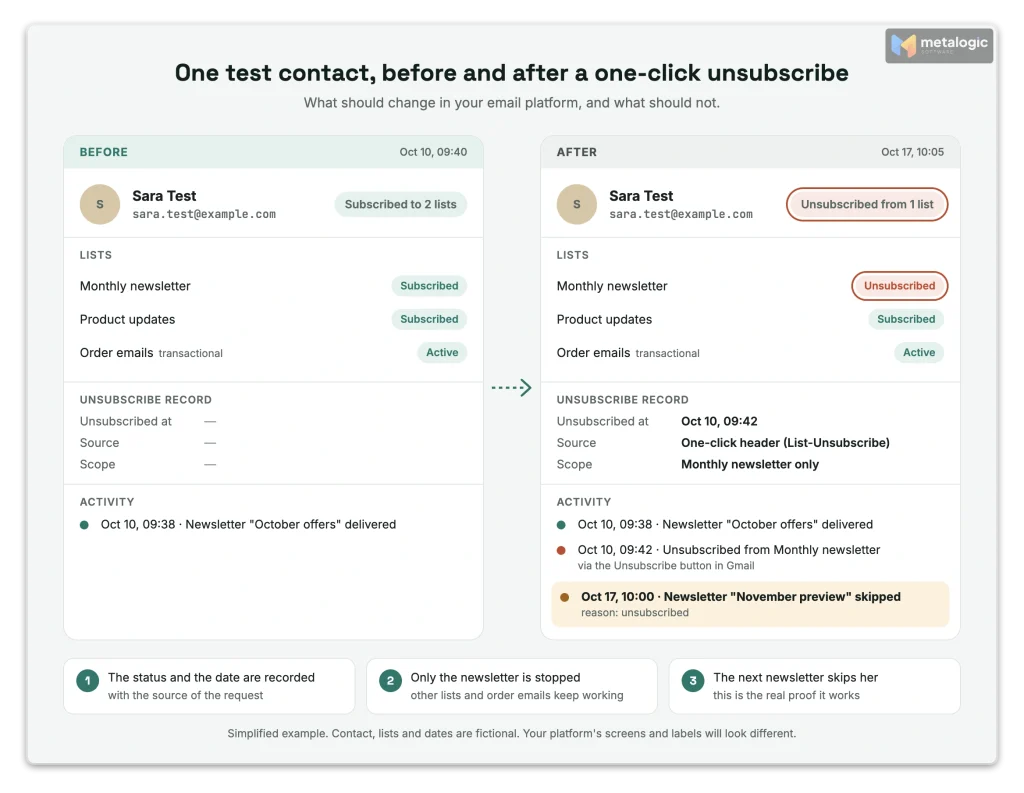
A working button is only half the job. The other half is making sure the person really stops getting email, everywhere, and stays that way.
- Record it:the status, the date and time, and where it came from (header, footer or preference page)
- Stop future sendsfor that list or topic, starting now
- Check scheduled campaigns and queues, so a message already waiting doesn’t go out
- Sync every system:your email platform, CRM, automations and any spreadsheets
- Protect against re-imports.An old CSV file must never turn the person back on. Keep a master “do not send” file (section 12 shows how)
- Keep essential messages running.A password reset or order confirmation should still arrive
One list, or everything?
Gmail says one-click unsubscribe removes the person only from the mailing list tied to that message. You control the scope. But Gmail’s newer Manage subscriptions page works differently: when someone unsubscribes there, Gmail unsubscribes them from all active mailing lists related to that sender. Be ready for both.
Don’t hide marketing inside “transactional” emails
After someone unsubscribes, it’s tempting to keep promoting through order emails. Gmail advises against mixing content types in the same message. It also risks the spam report you were trying to avoid.
How to test your one-click unsubscribe setup
Don’t assume it works. Test it from start to finish, the way a real reader would use it.
- Send a real campaign through your normal sending path to a test list with your own Gmail and Yahoo addresses.
- Open the raw message. In Gmail, open the email, click the three dots, then Show original.
- Find both headers:
List-Unsubscribewith anhttps://link, andList-Unsubscribe-Post: List-Unsubscribe=One-Click. - Check DKIM. It should say PASS, and the
h=part of the DKIM signature should list bothlist-unsubscribeandlist-unsubscribe-post. - Trigger the unsubscribe for your test contact (from the mailbox button, or with the command below).
- Check the status changed in your email platform.
- Send the next test campaign and confirm the test contact is skipped.
- Test the footer link separately, with a second test contact.
- Re-import an old file that contains the test contact, and confirm they stay unsubscribed. If you filter files with MailVexa first, the test contact should appear as Invalid with the reason “ExcludedEmail”.
For developers: test the request yourself
This command sends the same request a mailbox would send. Use your test contact’s real link.
curl -i -X POST \
  -H "Content-Type: application/x-www-form-urlencoded" \
  --data "List-Unsubscribe=One-Click" \
"https://example.com/unsubscribe/opaquepart"You should get a success response (2xx) and no Location: redirect line.
A “200 OK” is not proof
A success response only tells you the server answered. The real test is the next campaign: the unsubscribed contact must not get it.
Common problems and how to fix them
| Problem | Likely cause | Fix |
|---|---|---|
| No “Unsubscribe” button next to the sender name | Mailbox eligibility checks, low volume or reputation, DKIM not covering the headers | Check the headers and DKIM h=. A missing button alone doesn’t mean it’s broken |
| The link opens a page but nothing changes | The endpoint handles only GET (a browser visit) | Process the POST request directly |
| Success response, but emails keep coming | The status isn’t synced to the platform, CRM or queue | Sync the unsubscribe everywhere, within 48 hours at most |
| Contact is active again after an import | An old file overwrote the status | Keep a master “do not send” file and filter every import against it, for example with MailVexa’s exclude list |
| Some campaigns have no headers | A different sending path: API, transactional stream, or a setting that’s off | Check every sending path, not just one |
| Requests fail with 403, 405 or a timeout | Firewall or CDN blocks the POST, login required, or a redirect | Allow the POST, remove login, never redirect |
Why Gmail sometimes hides the button
Gmail shows its unsubscribe button next to the sender name only for messages that pass its automated eligibility checks. Yahoo says it needs correct headers plus “sufficient reputation and engagement”. So a correct setup may still show no button, especially for new or small senders. Judge your setup by the headers and the test, not by the button.
Myths about one-click unsubscribe
| Myth | The truth |
|---|---|
| “A footer link is enough.” | Not for bulk senders. Gmail and Yahoo require the header too |
| “A mailto header is enough for Gmail.” | No. Gmail says mailto doesn’t meet its one-click requirement. Yahoo accepts it |
| “It’s a DNS record.” | No. It’s two email headers. Only DKIM, which signs them, uses DNS |
| “I add it in my HTML template.” | No. Headers are separate from the email body |
| “Gmail rejects mail without it.” | Gmail says it doesn’t automatically reject or spam-folder mail for this. But you lose access to Gmail’s delivery support, and you get more spam reports |
| “I’m below 5,000 now, so I’m not a bulk sender anymore.” | Bulk-sender status is permanent once reached |
| “The address is valid, so I can email it.” | Valid means the mailbox works. It says nothing about permission (next section) |
Unsubscribing and email verification solve different problems
These two things are often confused. They answer two different questions:
| Email verification | Unsubscribe status | |
|---|---|---|
| The question | Can this address receive email? | Does this person want my marketing email? |
| Who decides | The mail server | The person |
| Protects you from | Bounces | Complaints, and breaking the rules |
An address can be perfectly valid and still be off-limits. Someone who unsubscribed last month still has a working mailbox. Email validation will say “Valid”. That must never bring them back onto your list.
This is where the two work together. Before every import, you check two things: who may receive email, and which of those addresses actually work.
Where unsubscribed people sneak back in
A one-click unsubscribe works perfectly inside your email platform. The danger is everything outside it. These are the most common back doors:
| Back door | What happens |
|---|---|
| An old export | A CSV saved months ago still lists the person as a normal contact. Someone uploads it again |
| A second list or audience | On many platforms, an unsubscribe in one audience isn’t known in another one |
| A new email platform | The suppression list stays behind unless you export and import it yourself |
| Event, webinar or sales lists | The same person signs up somewhere else, or a colleague adds them by hand |
| CRM or shop sync | A sync pushes an old “subscribed” status back into your email platform |
Your email platform can only protect what it knows. So the safest place to stop these people is before the file reaches your platform. That takes two simple habits.
Habit 1: Keep one master “do not send” file
Keep it outside your email platform, so it survives every platform change. Put these addresses in it:
- Unsubscribes, from every platform, list and audience you have ever used
- Spam complaints
- Hard bounces from past campaigns
- People who asked to stop by replying, by phone or in person
Three rules keep it reliable:
| Rule | Why |
|---|---|
Save it as a plain .txt file, one address per line | Easy to update, and MailVexa can load it directly |
| Only add. Never remove lines | A “no” doesn’t expire. Removing a line is how someone gets emailed again |
| Update it after every campaign | Export new unsubscribes, complaints and hard bounces, and add them |
Habit 2: Run every new file through MailVexa before import
MetaLogic MailVexa is email verification software that runs on your own Windows or Mac computer. It does your exclusion and your email list validation in one pass:
- Import the new file (CSV, TXT, XLSX or XLS) and confirm which column holds the email addresses.
- On the cleanup page, keep duplicate removal on. MailVexa also trims spaces and lowercases addresses, so
[email protected]and[email protected]count as one contact. - Open “Exclude specific emails” and load your
do-not-send.txtfile, or paste the list. - Read the “Excluded Emails” counter in the List Cleanup Summary. It tells you how many people from your “do not send” file were hiding in this new file.
- Verify the rest. Excluded addresses are skipped: MailVexa doesn’t check them at all.
- Review the results. Every excluded address appears under Invalid with the reason “ExcludedEmail”, so you can see exactly who was blocked and why.
- Export only Valid for your campaign. Keep Risky and Unknown in separate files. If your platform has import limits, split the export into smaller files by rows per file.
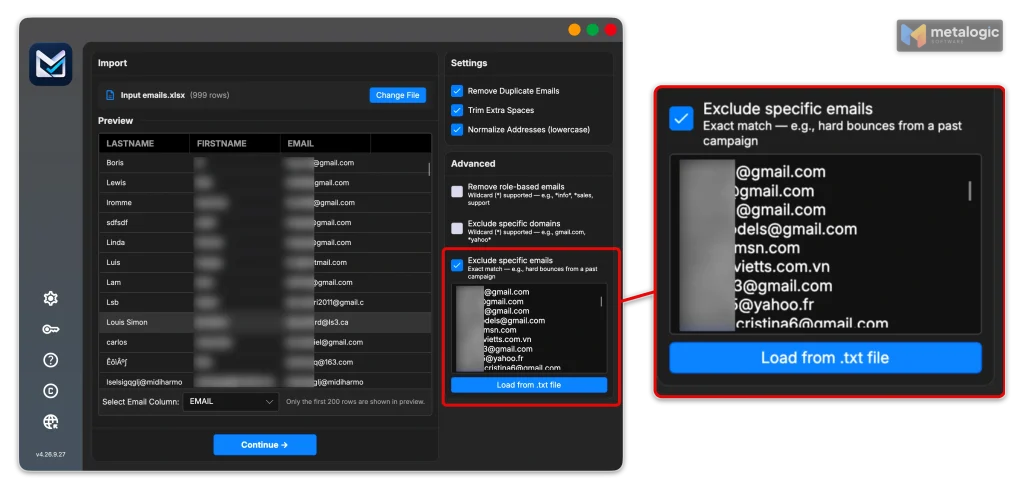
Use the counter as a safety check
If you know a file contains people who unsubscribed, the “Excluded Emails” counter should not be zero. A zero usually means the wrong file was loaded, or the addresses are not one per line. Fix that before you verify.
Why exclude before you verify?
| Benefit | What it means for you |
|---|---|
| They can’t reach your Valid export | A perfectly working mailbox that said “no” stays out, even though it would pass verification |
| No wasted checks | Excluded addresses are skipped, so verification time goes only to people you may email |
| A clear record | The reason “ExcludedEmail” shows who was blocked, and the counter shows how many |
| Your list stays on your computer | Your “do not send” file is personal data. MailVexa reads it locally and doesn’t upload it to an online service |
For the full cleaning routine, see how to clean your email list before sending a campaign, and for every screen of the app, how to use MailVexa.
MailVexa checks addresses. It doesn’t manage subscriptions.
MailVexa doesn’t send email and doesn’t process unsubscribe requests. Your email platform does that. MailVexa makes sure the file you import respects your “do not send” list and contains working addresses. For quiet subscribers who haven’t unsubscribed but stopped reading, see our guide to inactive subscribers and old email lists.
One-click unsubscribe checklist
- Every marketing email has
List-Unsubscribewith an HTTPS link - Every marketing email has
List-Unsubscribe-Post: List-Unsubscribe=One-Click - DKIM passes and covers both headers
- A clearly visible unsubscribe link is in the email body
- The one-click request needs no login, form or confirmation page, and never redirects
- Unsubscribes are applied right away, and never later than 48 hours
- Every sending path (editor, API, automations) has been checked
- Scheduled campaigns and queues respect new unsubscribes
- I keep one master “do not send” file, and only ever add to it
- Every new file is filtered against it before import
- I tested the whole flow, including the next campaign after unsubscribing
Common questions
Is a footer unsubscribe link enough?
Not for bulk marketing mail to Gmail and Yahoo. You need the one-click headers and a visible footer link. They work together.
Can I use a mailto link instead?
Yahoo accepts mailto. Gmail doesn’t count it as one-click. Use an HTTPS link, and add mailto as a second option if you like.
Do transactional emails need one-click unsubscribe?
No. Gmail and Yahoo require it only for marketing and subscribed messages. Password resets and order confirmations are excluded.
Why doesn’t Gmail show the unsubscribe button?
Gmail shows it only for messages that pass its automated eligibility checks. Check your headers and DKIM. If they’re correct, a missing button is not a setup error.
Does one-click unsubscribe remove someone from every list?
Not by default. It removes them from the list tied to that message. But Gmail’s Manage subscriptions page unsubscribes people from all of a sender’s lists.
Can I offer “fewer emails” instead of a full unsubscribe?
Yes, on a preference page linked from your footer. It can’t replace the one-click headers, and a full unsubscribe must still be available.
How do I stop unsubscribed contacts from being imported again?
Keep a permanent “do not send” list, and filter every new file against it before import. An exclude list in your email verification software, such as MailVexa, makes this automatic: excluded people are skipped and never reach your Valid export.
Sources
Standards
- RFC 8058: Signaling One-Click Functionality for List Email Headers. Headers, HTTPS POST, token, no redirect, DKIM coverage.
- RFC 2369: The Use of URLs as Meta-Syntax for Core Mail List Commands. Origin of the List-Unsubscribe header.
Mailbox providers
- Gmail email sender guidelines. One-click unsubscribe plus visible body link, spam rate.
- Gmail sender guidelines FAQ. Bulk sender definition, 48 hours, mailto, preference pages, transactional mail, enforcement, button eligibility.
- Gmail: Manage subscriptions. Unsubscribing from all of a sender’s lists.
- Yahoo Sender Best Practices. RFC 8058 highly recommended, mailto acceptable, 2 days.
- Yahoo Sender FAQ. Footer link alone not enough, transactional mail excluded.
- Microsoft: Outlook’s requirements for high-volume senders. Functional unsubscribe links recommended.
Laws
- FTC: CAN-SPAM Act compliance guide. 10 business days, 30 days.
- CRTC: CASL frequently asked questions. 10 business days.
- GDPR, Regulation (EU) 2016/679. Article 7(3), withdrawing consent.
Email platforms
- Mailchimp: About unsubscribes
- Klaviyo: List-Unsubscribe header
- MailerLite: List-unsubscribe header and one-click unsubscribe
- ActiveCampaign: How List-Unsubscribe helps email deliverability
- Brevo: FAQs about list-unsubscribe and list-help headers
- Twilio SendGrid: List-Unsubscribe
- Mailgun: Unsubscribe handling links
- Amazon SES: Subscription management
- Postmark: How to include a List-Unsubscribe header
Product
- MetaLogic MailVexa. Desktop email verification software for Windows and macOS.
Keep unsubscribed people out of every import
A working unsubscribe button means nothing if an old file brings people back. MailVexa excludes your unsubscribes and past bounces, verifies every other address with a reason, and exports a clean file for your email platform, all on your own computer.
Windows and macOS. Pay once, use for life. Free 14-day trial with up to 2,000 verifications.
We build MetaLogic MailVexa, so weigh our description of it accordingly. We have no commercial relationship with any email platform mentioned in this guide. Provider rules and platform features were checked in October 2026 and change often, so confirm them on each provider’s own site. This guide is not legal advice.