Most people choose an email service provider the same way: they open a “best ESP” list, look at the price of the first plan, and sign up.
Three months later, the problems start. The bill is higher than expected. A key feature is only on the next plan. Or the platform pauses the account after the first big campaign.
There is no single “best” email service provider. There is only the right one for your campaigns. This guide shows you how to find it. You will learn which questions to ask, which features really matter, and where the hidden costs are. At the end, you get a simple checklist to compare two or three providers side by side.
Quick answer
Start with your needs, not with a ranking. Write down what you send, how many contacts you have, how often you send, and how technical your team is.
Then check each provider on the things that are hard to change later: domain authentication, unsubscribe and suppression handling, how they count contacts for billing, reporting, account rules and support. Test two or three with a small send before you move your whole list.
And remember one thing almost no provider does for you: check whether your addresses exist before you send. Most only react after an email bounces. Verify your list yourself before you import it.
What is an email service provider (ESP)?
An email service provider is a service built to send email in bulk. It handles the sending servers, the contact list, unsubscribes and reports, and it records bounces after they happen. Amazon describes its own service, Amazon SES, as a platform for marketing emails, transactional emails like order confirmations, and newsletters.
Why not just use Gmail or Outlook?
Your normal mailbox is made for conversations, not campaigns.
| Normal mailbox | Email service provider | |
|---|---|---|
| Daily limit | Low. Google Workspace allows about 2,000 messages a day per user | Built for thousands or millions |
| Unsubscribe handling | Manual | Automatic |
| Bounce handling | You read every bounce yourself | Records each bounce and stops that address, but only after it has bounced |
| Reports | None | Deliveries, clicks, bounces, complaints |
| Risk | Your everyday mailbox can get blocked | Your daily mail stays separate |
Microsoft says it directly: Exchange Online isn’t designed for bulk mailing, and bulk senders should use a dedicated provider.
What an email provider does not do
This is the part most buyers miss. An email provider sends your email and records what happens next. It does not check, before you send, whether your addresses still exist. That is a different job, done by a different tool.
| Email service provider | Email verification software | |
|---|---|---|
| Main job | Sends your campaigns | Checks your list before you send |
| When it finds a dead address | After you send, when it bounces | Before you send, so it never bounces |
| Effect on your bounce rate | Every bounce is already counted | Dead addresses never reach the count |
| Effect on your bill | You often pay for dead contacts until they bounce | You import only addresses that can receive mail |
“Bounces are handled automatically” means after the damage
Imagine you import 10,000 old contacts, and 5% of the addresses no longer exist. Your provider sends to all of them. 500 emails bounce. Your provider records each one and stops mailing those addresses. That is what “automatic bounce handling” means.
But your first campaign already has a 5% bounce rate. That is the exact level at which Amazon SES puts an account under review (see “Account policies, security and support” section). Mailbox providers like Gmail notice it too. The only way to avoid those 500 bounces is to find the dead addresses before you send. “Prepare your list before the first import” section shows how.
Define your needs before you compare
This is the step most people skip. Answer these questions on paper first. Every later decision depends on them.
| Question | Why it matters |
|---|---|
| What do you send? Newsletters, promotions, order emails, automated welcome series? | Some providers are built for marketing, others for system emails. |
| How many contacts do you have today, and in a year? | Many plans are priced by contact count. |
| How often do you send? | Some plans limit monthly sends. |
| Who will use it? A marketer, or a developer? | Some services need code to work at all. |
| What must it connect to? Online shop, CRM, website forms? | A missing integration means manual work every week. |
| Where are you and your customers located? | Some providers don’t serve every country. Data rules vary by region. |
Write down your “must-haves” and “nice-to-haves”
Three to five must-haves are enough. If a provider fails one of them, cross it off, no matter how good the price looks. This one habit saves hours of comparing.
Marketing platform or sending service?
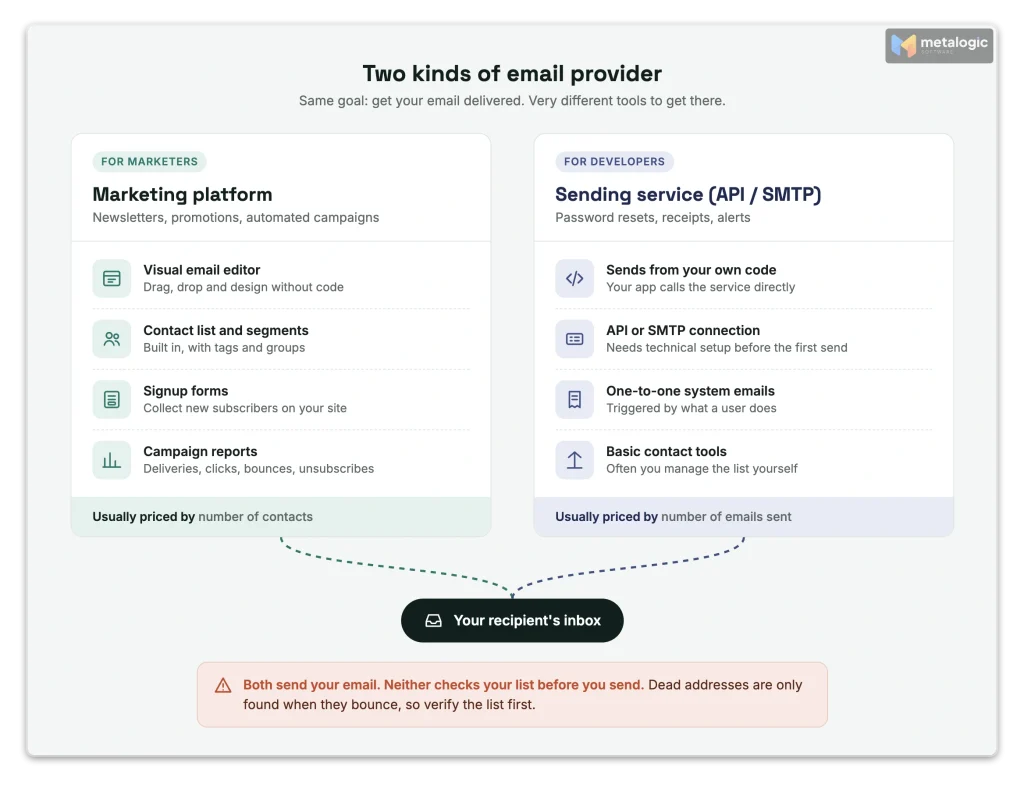
Email providers come in two broad types. Choosing the wrong type is the most expensive mistake.
| Marketing platform | Sending service (API / SMTP) | |
|---|---|---|
| Best for | Newsletters, promotions, automated campaigns | System emails: password resets, receipts, alerts |
| Who uses it | Marketers, with a visual editor | Developers, through code |
| Contact list | Built in, with segments and signup forms | Often basic, or you manage it yourself |
| Typical price model | By number of contacts | By number of emails sent |
Some providers offer both, but keep them apart. Postmark, for example, uses separate message streams for one-to-one system emails and one-to-many broadcasts, on separate infrastructure.
A sending service is not plug-and-play
Sending services often need setup before you can send to anyone. Every new Amazon SES account, for example, starts in a sandbox: it can only send to verified addresses, up to 200 messages a day, until you request production access.
Authentication and deliverability support
Your provider must let you authenticate your own domain. Without that, Gmail and Yahoo may reject or filter your mail. Gmail’s sender guidelines tell you to check that your provider authenticates your domain with SPF and DKIM.
For senders of around 5,000 or more emails a day to Gmail, the rules are stricter:
- SPF, DKIM and DMARC must all be set up
- Your “From” domain must match the authenticated domain
- Marketing emails need one-click unsubscribe
- The reported spam rate must stay below 0.3%, and ideally below 0.1%
Yahoo’s sender best practices set very similar rules. For a plain-language explanation of these records, read SPF, DKIM and DMARC explained.
What to ask each provider
| Question | Good answer |
|---|---|
| Can I authenticate my own domain? | Yes, with clear setup steps |
| Will my “From” domain align with SPF or DKIM? | Yes |
| Is one-click unsubscribe added automatically? | Yes, for marketing emails |
| Can I send marketing and system emails from different addresses? | Yes |
No provider can promise the inbox
Gmail says it cannot guarantee that mail from any provider will pass its spam filters. Inbox placement depends on your list, your content and how people react to your email. A provider can only give you good tools. For the full picture, see 15 ways to improve email deliverability.
Shared IP or dedicated IP?
Every email leaves from an IP address. On a shared IP, you send alongside other customers of the same provider. On a dedicated IP, the address is yours alone.
| Shared IP | Dedicated IP | |
|---|---|---|
| Reputation | Shared with other senders | Only yours, good or bad |
| Warm-up | Not needed | You must build volume slowly |
| Cost | Usually included | Usually extra |
| Best for | Low or irregular volume | High, steady volume |
Here is the minimum volume some providers mention:
| Provider | What they say |
|---|---|
| Amazon SES | Use shared IPs unless you send large volumes on a regular, predictable schedule |
| Twilio SendGrid | A dedicated IP is recommended only above 50,000 emails a month |
| Postmark | You need at least 300,000 messages a month to qualify |
A dedicated IP does not fix a bad list
Many small senders buy a dedicated IP hoping it will improve delivery. With low volume, it often does the opposite: mailbox providers don’t see enough mail to trust the new address. Fix your list and your content first.
Contact management, unsubscribes and suppression
This part protects your reputation every single day. A good provider makes sure you never email the same wrong address twice. Note the word “twice”: the first email to a dead address still goes out and still bounces.
| Check | Why it matters |
|---|---|
| Automatic suppression list | After an address hard-bounces or complains, it is blocked from future sends. The first bounce still counts against you. Amazon SES, for example, keeps an account-level suppression list. |
| Protection on re-import | If you upload an old file again, unsubscribed people must stay unsubscribed. Mailchimp skips unsubscribed addresses already stored in the same audience. |
| One-click unsubscribe | The standard is RFC 8058. It lets Gmail and Yahoo show their own “Unsubscribe” button. |
| Fast unsubscribe processing | Yahoo requires unsubscribes to be honored within 2 days. Google asks for 48 hours. |
| Separate lists or tags | One contact should not count twice just because they are on two lists. |
Protection usually works inside one list only
In many platforms, an unsubscribe in one audience is not known to another audience. Keep your own “do not send” file, and apply it to every import. For how bounces work, see our guide to reducing email bounce rate.
Most providers act after the bounce, not before
As section 01 showed, most email providers do not check your addresses before you send. They send first, and stop mailing an address only after it has bounced.
By then, the damage is done: that bounce already counts against your bounce rate and your sender reputation. A few providers do offer checking before sending, such as SendGrid and Mailgun, but usually as a separate paid feature or on higher plans. Ask every provider which kind it offers.
Campaign features that actually matter
Every provider lists dozens of features. These are the ones that make a real difference day to day:
| Feature | What it does | Example |
|---|---|---|
| Personalisation with fallback | Shows “Hi Sara”, or “Hi there” when the name is missing | Mailchimp default merge values |
| Time-zone sending | Delivers at 9 a.m. in each person’s own time zone | Mailchimp Timewarp, not on every plan |
| A/B testing | Tests two subject lines on a small group, then sends the winner | Common on paid plans |
| Automation exit rules | Stops an “abandoned cart” series once the person buys | Klaviyo flow filters |
| Frequency limit | Prevents one person getting too many emails in a short time | Klaviyo Smart Sending, 16 hours by default |
Check the plan, not just the product
A feature on the provider’s homepage may only exist on a higher plan. For each must-have feature, confirm which plan includes it.
Integrations and data sync
If you run an online shop or a CRM, the integration is often more important than the email editor. Ask three questions:
- Which data syncs? Customers, orders, products, tags?
- Which direction? Only into the email platform, or both ways?
- What happens to consent? Can a sync change someone from unsubscribed to subscribed?
A sync can change subscription status
Read the sync rules carefully. In Mailchimp’s Shopify integration, for example, the first sync can mark a customer as subscribed in Shopify if they are subscribed in Mailchimp. Klaviyo’s Shopify sync keeps whichever consent status is more recent. Know the rules before you connect anything.
Reporting you can trust
A pretty dashboard is not the same as useful data. Look for these:
| Report | Why it matters |
|---|---|
| Bot filtering | Security scanners open and click automatically. Mailchimp can filter bot activity out of your numbers. |
| Results by mailbox provider | Shows if a problem is only at Gmail, or only at Outlook. SendGrid offers mailbox provider statistics. |
| Bounce reasons | “Mailbox does not exist” and “blocked as spam” need very different fixes. |
| Complaints and unsubscribes | Your clearest signal that people don’t want your email. |
| How long data is kept | Short history makes problems hard to investigate. SendGrid’s email logs keep 30 days. |
Open rates are the weakest number
Privacy features and security scanners make open rates unreliable. Judge campaigns by clicks, replies, sales, bounces and complaints. If your mail starts landing in spam, our spam troubleshooting guide walks you through the checks.
The real cost: how providers count and charge
The price on the pricing page is rarely the price you pay. First, find out what the provider counts.
| Billing model | You pay for | Watch out for |
|---|---|---|
| By contacts | Every contact stored in your account | Unsubscribed and inactive contacts may still count |
| By emails sent | Each email delivered to a recipient | Sending often to a big list adds up quickly |
| By subscribers | Only active, subscribed people | Usually higher price per person |
Example 1: billing by contacts
On Mailchimp’s plans, subscribed, unsubscribed and non-subscribed contacts all count toward your bill. Archived, cleaned and deleted contacts don’t. Each plan also limits monthly sends, for example 10 times your contact limit on Essentials. Going over your contact limit means an extra charge.
Example 2: billing by emails sent
Amazon SES charges per email. New accounts on its Essentials plan pay about $0.16 per 1,000 emails (checked October 2026). It is cheap, but you need technical skills, and many marketing tools are not included.
| Hidden cost | Question to ask |
|---|---|
| Inactive and unsubscribed contacts | Do they count toward my bill? |
| Monthly send limits | How many emails can I send each month? |
| Overage | What happens if I go over my limit? |
| Extra users | How many team members are included? |
| Add-ons | Are dedicated IP, transactional email or premium support extra? |
| Price jumps | What will I pay when my list doubles? |
The cheapest contact is the one you remove
If your provider bills by contacts, every dead or inactive address costs you money every month. Removing them is often the easiest saving. See how in how to handle inactive subscribers and old email lists.
Account policies, security and support
Your provider can pause or close your account. Read the rules before you commit, not after a campaign is stopped.
| Area | What to check |
|---|---|
| Permission rules | All serious providers ban bought lists. Can you prove where every contact came from? |
| Bounce and complaint limits | Amazon SES, for example, may pause sending above a 10% bounce rate or a 0.5% complaint rate. |
| New account review | Some providers review new accounts or limit the first sends. |
| Security | Two-factor login, user roles, and the ability to export your data. |
| Support | Which plans include live help? Mailchimp’s free plan, for example, includes email support for 30 days only. |
| Country eligibility | Can you open and keep an account from your location? |
Check country eligibility first
Some providers cannot serve users in sanctioned countries or regions. Mailchimp’s terms of use, for example, list several, including Cuba, Iran, North Korea, Syria and Russia. Check the terms for your country before you spend time on setup and migration.
Test a shortlist, then migrate carefully
Don’t decide from feature pages alone. Test two or three providers in real conditions.
How to test
- Set up domain authentication on each one. Note how easy it was.
- Import a small, clean sample of your most engaged contacts.
- Build one real campaign with your normal content.
- Check the details: unsubscribe link, one-click header, mobile view, personalisation fallback.
- Read the reports and ask support one real question. See how fast and how clearly they answer.
One small test is not a ranking
A single test send tells you how the tool works, not which provider has “better delivery”. Delivery depends mostly on your list, your content and your history, which build up over weeks.
How to migrate
- Export everything from the old provider, including unsubscribes, bounces and complaints.
- Import the “do not send” lists first, so they are protected from day one. Klaviyo, for example, puts migrated unsubscribes on its suppression list.
- Pause old automations before you turn on the new ones, so nobody gets the same email twice.
- Start slowly. Gmail recommends starting with low volume to engaged people and increasing over time.
- Keep the old account for a few weeks, until reports and automations work in the new one.
Prepare your list before the first import
A new provider starts by judging you on your first campaigns. If your first import is full of dead addresses, you start with bounces, and possibly a paused account. As section 06 showed, most providers will only tell you about those bounces after the damage is done. Email list validation before the import is how you prevent them instead of just counting them.
- Remove contacts without clear permission. Google recommends double consent for new subscribers.
- Exclude unsubscribes, complaints and past hard bounces.
- Remove duplicates and badly written addresses.
- Verify the remaining addresses and remove the Invalid ones.
- Keep Risky and Unknown separate. See what a catch-all result means.
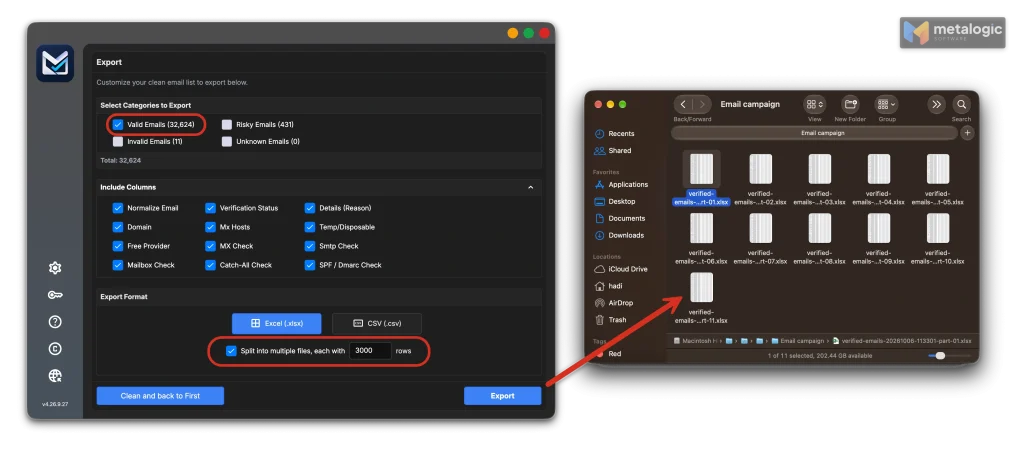
- Split very large files if your provider has import limits. Mailchimp, for example, warns that files over 200 MB, or about one million contacts, may cause import errors.
How MailVexa fits
MetaLogic MailVexa is email verification software that runs on your own Windows or Mac computer, so your list stays on your machine during the check. It works with any email provider, because it prepares the file you import.
| Step | What MailVexa does |
|---|---|
| Exclude | Paste or load your unsubscribes and past bounces. They are skipped and marked “ExcludedEmail”. |
| Clean | Removes duplicates and fixes spacing and capital letters before checking. |
| Verify | Sorts every address into Valid, Risky, Invalid or Unknown, with a reason. |
| Export | Saves each group as CSV or XLSX, and can split large files into smaller parts for import. |
Valid means the mailbox works, not that the person agreed
Verification tells you an address can receive email. It does not prove permission, interest or inbox placement. Only import contacts who asked to hear from you. For the full process, read how to clean your email list before sending a campaign, and for the app itself, how to use MailVexa.
Your ESP comparison checklist
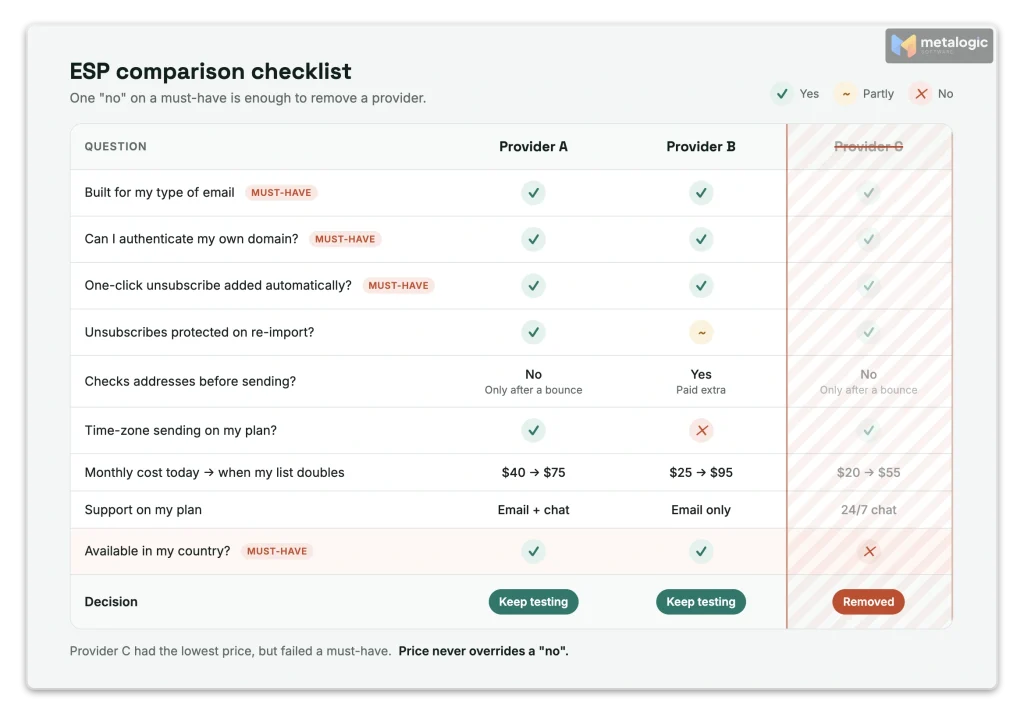
Copy this table. Fill in one column for each provider you test. Any “no” on a must-have ends the comparison for that provider.
| Question | Provider A | Provider B | Provider C |
|---|---|---|---|
| Built for my type of email (marketing / system / both)? | |||
| Can I authenticate my own domain (SPF, DKIM, DMARC alignment)? | |||
| One-click unsubscribe added automatically? | |||
| Automatic suppression of bounces and complaints? | |||
| Can it check addresses before sending, or does it only report bounces afterwards? Is that extra cost? | |||
| Unsubscribes protected on re-import? | |||
| Shared or dedicated IP, and does it fit my volume? | |||
| My must-have features on the plan I’d buy? | |||
| Integrations I need, with clear consent sync rules? | |||
| Bot filtering, bounce reasons, results by mailbox provider? | |||
| What does it count for billing? Do unsubscribed contacts count? | |||
| Monthly cost today, and when my list doubles? | |||
| Monthly send limit and overage rules? | |||
| Two-factor login, user roles, data export? | |||
| Support on my plan, and how fast was it in my test? | |||
| Available in my country? |
Common questions
Which email service provider is best?
There isn’t one best provider for everyone. The best one fits what you send, your list size, your budget, your skills and your location. Use the checklist above to decide.
Can I send marketing emails from Gmail or Outlook?
Only to a few people. Normal mailboxes have low daily limits and no unsubscribe handling. Microsoft says Exchange Online isn’t designed for bulk mail.
Do I need a dedicated IP?
Usually not, unless you send large volumes on a steady schedule. Most providers recommend shared IPs for low or irregular volume.
Will a better provider get my emails into the inbox?
Not on its own. A provider gives you the tools. Your list quality, permission and content decide where your email lands.
Should I clean my list before moving to a new provider?
Yes. Exclude unsubscribes and past bounces, then verify the rest. A clean first import protects your new account from early bounces.
Will my email provider check every address before I send?
Usually not. Most providers only stop sending to an address after it has bounced, and that bounce already counts against you. A few offer checking before sending, often as a paid extra. Verifying your list before you import it prevents those bounces in the first place.
Do unsubscribed contacts count toward my bill?
On some providers, yes. Mailchimp, for example, counts unsubscribed contacts unless you archive them. Check each provider’s rules.
How many providers should I test?
Two or three is enough. Test them with a small, engaged sample and one real campaign.
Sources
Mailbox providers and standards
- Gmail email sender guidelines. Authentication, one-click unsubscribe, spam rate, no inbox guarantee.
- Gmail email sender guidelines FAQ. Honor unsubscribes within 48 hours.
- Gmail email subscription guidelines. Double consent for new subscribers.
- Gmail sending limits in Google Workspace. About 2,000 messages a day per user.
- Microsoft: Outbound sending limits in Exchange Online. Exchange Online isn’t designed for bulk mailing.
- Yahoo Sender Best Practices. Authentication rules; unsubscribes honored within 2 days.
- RFC 8058: One-click unsubscribe. The one-click unsubscribe standard.
Amazon SES
- What is Amazon SES?. What an email sending platform does.
- Moving out of the SES sandbox. New accounts start in a limited sandbox.
- Dedicated IP addresses for Amazon SES. When shared IPs are recommended.
- SES account-level suppression list. Blocking bounced and complained addresses.
- Amazon SES pricing. Billing per email sent (checked October 2026).
- SES reputation monitoring. Bounce and complaint rates that may pause sending.
Mailchimp
- About Mailchimp pricing plans. Which contacts count toward the bill; send limits.
- Import contacts to Mailchimp. Unsubscribed addresses are skipped on import.
- Troubleshooting contact imports. Large files may cause import errors.
- Set default merge values. Personalisation fallback.
- Use Timewarp. Time-zone based sending.
- About Mailchimp for Shopify syncing. How subscription status syncs.
- About bot activity and bot filtering. Filtering automated opens and clicks.
- Mailchimp support options. Support by plan.
- Mailchimp standard terms of use. Restricted countries and regions.
Other providers
- Postmark: Message streams. Separating transactional and broadcast email.
- Postmark: Dedicated IPs. At least 300,000 messages a month to qualify.
- Twilio SendGrid: IP warm-up guide. Dedicated IP recommended above 50,000 emails a month.
- SendGrid: Mailbox provider statistics. Results grouped by Gmail, Yahoo, Outlook and others.
- SendGrid: Email logs. 30 days of email logs.
- SendGrid: Bulk email address validation. Checking addresses before sending, as a separate feature.
- Mailgun: Email validations. Pre-send address validation offered by Mailgun.
- Klaviyo: Troubleshooting metric-triggered flows. Exit filters such as ‘placed order’.
- Klaviyo: Smart Sending. Frequency limit, 16 hours by default for email.
- Klaviyo: Sync Shopify subscribers. How consent status is kept during sync.
- Klaviyo: Migrate subscribers and unsubscribes. Migrated unsubscribes go to the suppression list.
Product
- MetaLogic MailVexa product page. Exclusion list, verification groups, split export.
Start with your new provider on a clean list
Whichever provider you choose, your first import decides how it sees you. MailVexa keeps past unsubscribes and bounces out, verifies every address with a reason, and exports files ready to import, all on your own computer.
Windows and macOS. Pay once, use for life. Free 14-day trial with up to 2,000 verifications.
We build MetaLogic MailVexa, so weigh our description of it accordingly. We have no commercial relationship with any email provider mentioned in this guide. Prices and plan limits were checked in October 2026 and change often, so confirm them on each provider’s own site.