Two businesses start an email list on the same day.
The first one uploads every address it can find: old event sheets, a bought file, every customer who ever downloaded something. In one week it has 10,000 contacts.
The second one adds a simple form. It says who is writing, what about, and how often. People confirm with one click. After three months it has 1,500 contacts.
Six months later, the first business is fighting spam folders and complaints. The second one has a list that opens, clicks, replies and buys. A big list is not the goal. A list of people who want your email is.
This guide shows you how to build that second list, step by step: what real permission looks like, how to set up double opt-in, what to write in the confirmation email, how to stop bots, which records to keep, and where email validation fits in.
Quick answer
A quality email list is made of people who clearly asked for your emails, confirmed their address, and still want what you send.
Use a signup form that names your business, the topic and the frequency. Never pre-tick the box. Then turn on double opt-in: the person gets a confirmation email and joins only after they click. Gmail calls this “double consent” and asks senders to use it.
Protect the form from bots, record when and how each person agreed, and keep your promises after signup. Email validation helps later, before you send to an older list. But it never creates permission.
What makes an email list high quality?
Quality is not one number. It is five things that are true for each contact:
| Quality sign | What it means | How you can tell |
|---|---|---|
| Clear permission | The person knowingly asked for specific emails from you | You can show the form and the words they agreed to |
| A working address they control | The mailbox exists and the person can read it | They clicked a confirmation link |
| Relevant topics | What you send matches what they signed up for | They click, reply or buy |
| Known source and date | You know where and when they joined | A source and a timestamp on every contact |
| An easy way out | Leaving is simple, so nobody needs the spam button | A working unsubscribe in every email |
Mailbox providers reward exactly this. Gmail’s email sender guidelines say you should send email only to people who want it, because they are less likely to report it as spam. Over time, spam reports can lower your domain’s reputation. Yahoo’s sender best practices agree: send timely, relevant email to an engaged audience, and set clear expectations when people subscribe.
A big list vs a good list
Here is the story from the introduction as a simple comparison. These are example lists, not real data:
| List A: 10,000 contacts | List B: 1,500 contacts | |
|---|---|---|
| Where they came from | Old spreadsheets and a bought file | One signup form on the website |
| What they agreed to | Unknown | “Monthly tips from [Business], unsubscribe anytime” |
| Address confirmed? | No | Yes, by a click |
| Risk of spam reports | High: many people don’t remember you | Low: they asked last week |
| What it does to your domain | Can drag down your reputation for every email you send | Builds trust step by step |
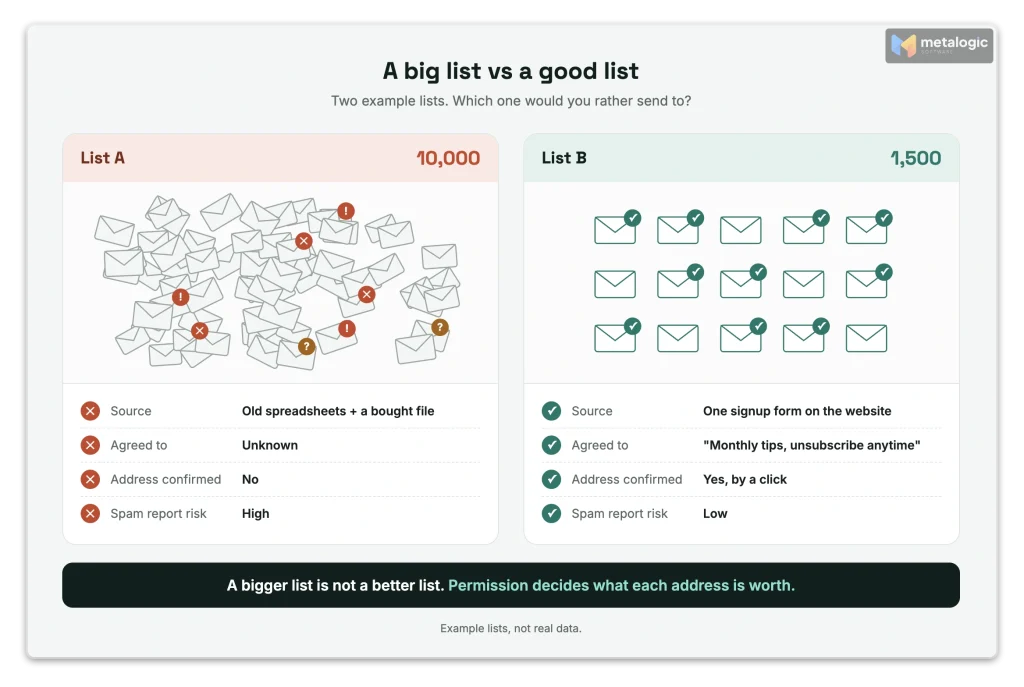
Why the small list wins over time
Every spam report from List A hurts the emails you send to everyone, including your best customers. List B grows more slowly, but every new contact makes your sending stronger, not weaker. For everything else that affects the inbox, see 15 ways to improve email deliverability.
What does permission really mean?
Permission is not “they gave us their email address”. It is a clear “yes” to three questions:
- Who will email me? (your business name)
- What will you send? (the topic: tips, offers, product news)
- How often? (weekly, monthly, a few times a year)
If a person can’t answer these three questions from your form, their “yes” is weak.
Is this permission? Common situations
| Situation | Newsletter permission? |
|---|---|
| They ticked an empty box: “Send me monthly tips from [Business]” | Yes |
| The box was already ticked, and they didn’t untick it | No |
| “By submitting your order, you agree to receive our marketing emails” | No. Consent must be separate from the order |
| They accepted your terms and privacy policy | No. That is a different agreement |
| They created an account, or sent a support request | No. Ask separately |
| They downloaded a free trial of your software | Not on its own. It depends on the country (see below) |
| They agreed to emails from Brand A. You want to email them about Brand B | No. Permission doesn’t move between brands |
| You bought or rented their address | No. Permission can’t be bought |
The UK regulator, the ICO, gives a perfect pair of examples in its email marketing guidance. Good: an unticked box saying “I would like to receive marketing emails about your services”. Bad: a sentence saying “By submitting your order, you agree to receive our marketing emails.” It also says you must not use pre-ticked boxes, silence or inactivity as consent.
Pre-ticked boxes are not consent. Anywhere that matters.
Gmail says to avoid opt-in forms that are checked by default. Yahoo says the same. And the EU’s top court ruled in the Planet49 case that consent is not valid when the user has to untick a pre-checked box to refuse.
The rules depend on where your subscribers live
Here is a short overview. It shows why “one rule for everyone” doesn’t exist:
| Where | The basic rule |
|---|---|
| European Union (GDPR) | Consent must be freely given, specific, informed and unambiguous, and you must be able to prove it |
| United Kingdom (PECR) | Consent, or the “soft opt-in”: you may email your own customers about similar products if you offered an opt-out when you collected the address, and in every email since. Since 5 February 2026, charities have their own version |
| United States (CAN-SPAM) | Opt-out based: you don’t need prior consent, but you must honour every opt-out within 10 business days. Gmail and Yahoo still expect opt-in |
| Canada (CASL) | Express or implied consent. A request for consent must say who is asking, why, and that the person can withdraw |
| Germany | No law names double opt-in. But since a 2011 Federal Court of Justice ruling (BGH, I ZR 164/09), it is the standard way to prove email consent |
A detail most guides miss: free trials in the UK
The ICO says that signing up to a free trial can count as “negotiating a sale”. So in the UK, a trial user is not a newsletter subscriber, but you may be able to email them about similar products under the soft opt-in, if you gave a clear opt-out at signup and in every message. In other countries, ask for consent separately.
This is not legal advice
Rules depend on the country, the type of audience (consumers or businesses) and your existing relationship. If you email people in many countries, check your case with a qualified adviser.
Single opt-in vs double opt-in
With single opt-in, a person submits your form and joins your list right away. With double opt-in, they submit the form, receive a confirmation email, and join only after they click the link inside.
| Single opt-in | Double opt-in | |
|---|---|---|
| Steps | Submit form → subscribed | Submit form → pending → click link → subscribed |
| Extra step for the person | None | One click in an email |
| Proves they control the mailbox | No | Yes |
| Typos and fake addresses | Join your list | Never confirm, so they never join |
| Some people don’t finish | Not possible | Yes, some never click |
| Evidence you keep | The form submission | The form submission plus the confirmation time |
Gmail now asks for this step directly. Its email subscription guidelines say: before sending subscription messages, make sure recipients confirm their email address after entering it on your website or app. Google calls this “double consent”. Mailchimp’s double opt-in guide describes the same flow: form, confirmation email, click, subscribed.
Three things double opt-in does not do
- It doesn’t fix a weak form. If the form didn’t say what people would get, a click on “confirm” doesn’t make it clear.
- It doesn’t guarantee the inbox. It proves the address is real and wanted today. Your content and sending still decide where email lands.
- It doesn’t last forever. Interest fades. Gmail also suggests checking from time to time that people still want your messages.
Is single opt-in “wrong”?
No. Single opt-in with a clear, unticked consent box is still real consent. Double opt-in adds proof and keeps typos and fake addresses out. For most small businesses today, the extra click is worth it, and Gmail recommends it.
Give the right people a reason to subscribe
The goal is not “more signups”. It is more of the right signups. Every offer attracts a certain kind of person. Choose offers that attract people who will want your future emails too.
| Where to invite people | What to promise |
|---|---|
| Next to a related article | “Get more guides like this, once a month” |
| A dedicated newsletter page | A sample issue, the topics and the frequency |
| Checkout or account signup | An optional, unticked box with clear words |
| A free checklist or template | The file, plus a separate box for future emails |
| A webinar or event | Event emails, plus a separate choice for the newsletter |
| Social media | A link to your newsletter page, with the same clear promise |
For a software business, offers that fit naturally are:
- Short tutorials and “how to” tips for the product
- Notices about new versions and fixes
- Checklists for the job your software helps with
Offer these as separate choices. Someone who wants update notices may not want sales offers.
Don’t make the download depend on marketing consent
“Give us your email to get the checklist” is fine. “You must accept marketing emails to get the checklist” is risky. Under GDPR, consent is not “freely given” if a service depends on it without need. The EU’s consent guidelines (EDPB 05/2020) leave very little room for this. Keep the download and the newsletter as two separate choices.
Design a clear and simple signup form
A good form answers every question before the person has to ask it. It needs:
- A headline that shows the value, not just “Subscribe”
- Your business name, so people know who will write
- The topic and a realistic frequency
- As few fields as possible: email, and a first name only if you will use it
- A button that says what happens, like “Send me the tips”
- A link to your privacy policy
- A note that a confirmation email is coming
- Clear error messages, and a layout that works on a phone
Before and after: the same form, fixed
| Before (weak) | After (strong) | What the change fixes |
|---|---|---|
| “Subscribe to our newsletter” | “Get one practical email-list tip every Tuesday” | The person knows the value and the frequency |
| Name, email, phone, company, country | Email (required), first name (optional) | Fewer fields, fewer drop-offs, less data to protect |
| ☑ “I agree to the Terms, Privacy Policy and marketing” (pre-ticked) | ☐ “Email me tutorials and product news from [Business]. Unsubscribe anytime.” Plus a separate privacy link | Real, separate, active consent |
| Button: “Submit” | Button: “Send me the tips” | The click matches the promise |
| No note | “We’ll email you a link to confirm. Check your spam folder if you don’t see it in 5 minutes.” | Fewer lost confirmations |
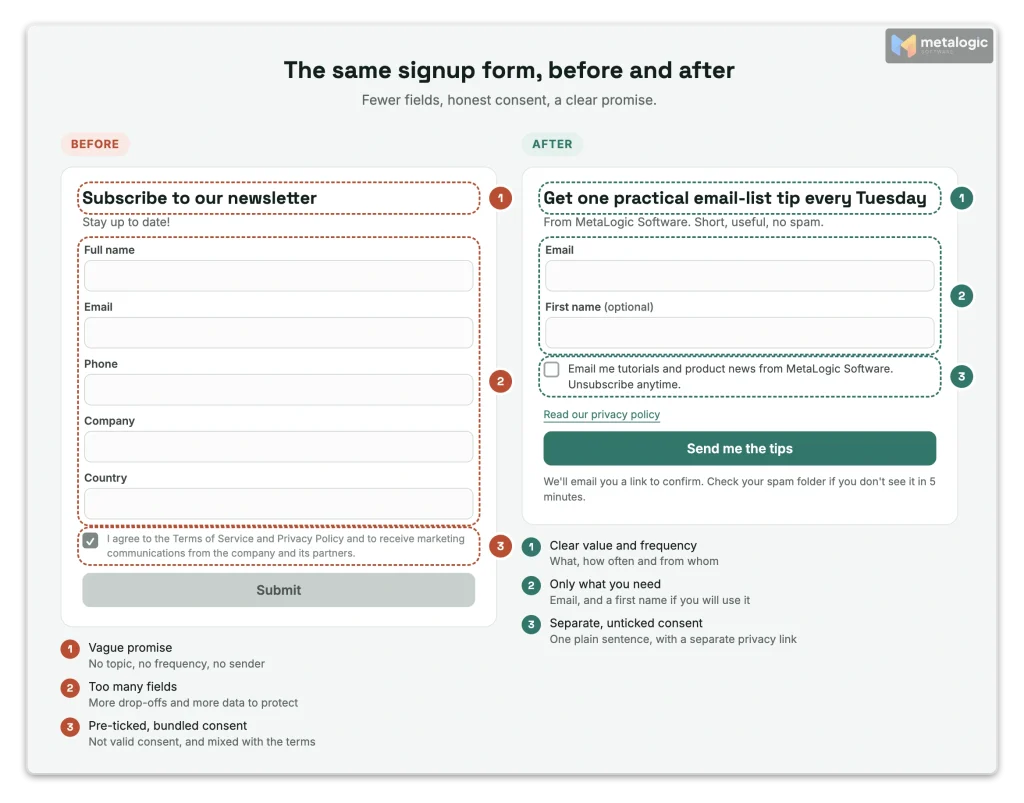
Set up the double opt-in workflow
This is the heart of the process. Here is what should happen, in order:
- The person submits your form.
- They are saved as “Pending” (or “Unconfirmed”), not as subscribed.
- A “Check your inbox” page appears. It shows the address they typed and offers a way to fix it.
- The confirmation email is sent.
- They click the confirm button.
- Their status changes to “Subscribed”, with the confirmation time saved.
- The welcome email goes out, and normal emails can start.
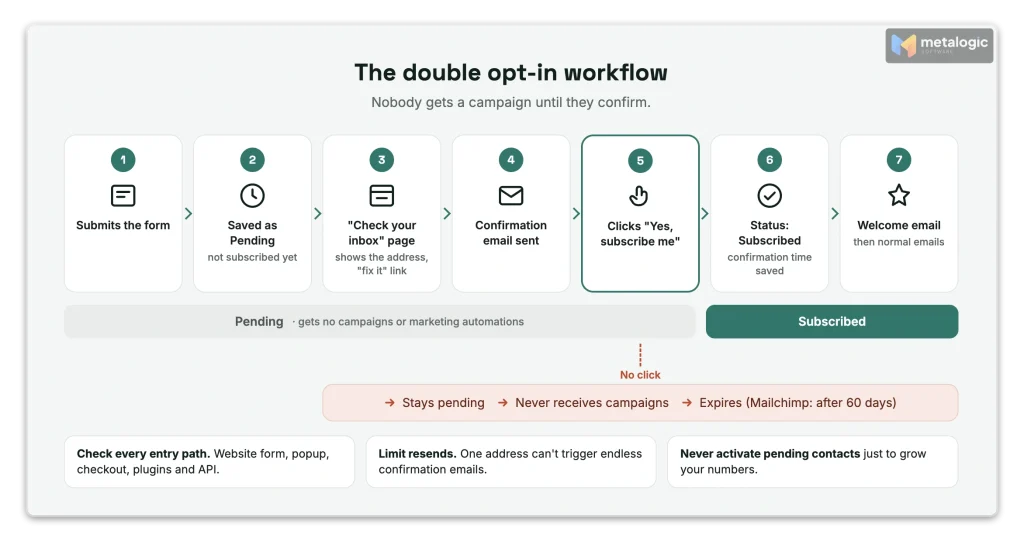
Five controls to check in your setup
| Control | Why it matters |
|---|---|
| Pending contacts never get campaigns or marketing automations | Otherwise double opt-in is only decoration |
| The same address can’t trigger endless confirmation emails | Protects real people from a flood of messages |
| An old or used link shows a friendly message and a “send a new link” button | People don’t get stuck |
| “Wrong address? Fix it” on the check-your-inbox page | Saves signups with typos |
| Every entry path is tested: website form, popup, checkout, plugins, API | Double opt-in often covers only some of them |
Watch out: “double opt-in is on” may not mean everywhere
Your email platform’s setting often covers only its own forms. Here is how three popular platforms work:
| Platform | What to know |
|---|---|
| Mailchimp | Its opt-in setting applies only to Mailchimp signup forms. Form integrations and the API are “unaffected”. Through the API, add new people as “pending”, not “subscribed”, or the confirmation email is skipped. Pending contacts who never confirm are deleted after 60 days and don’t count toward your contact limit |
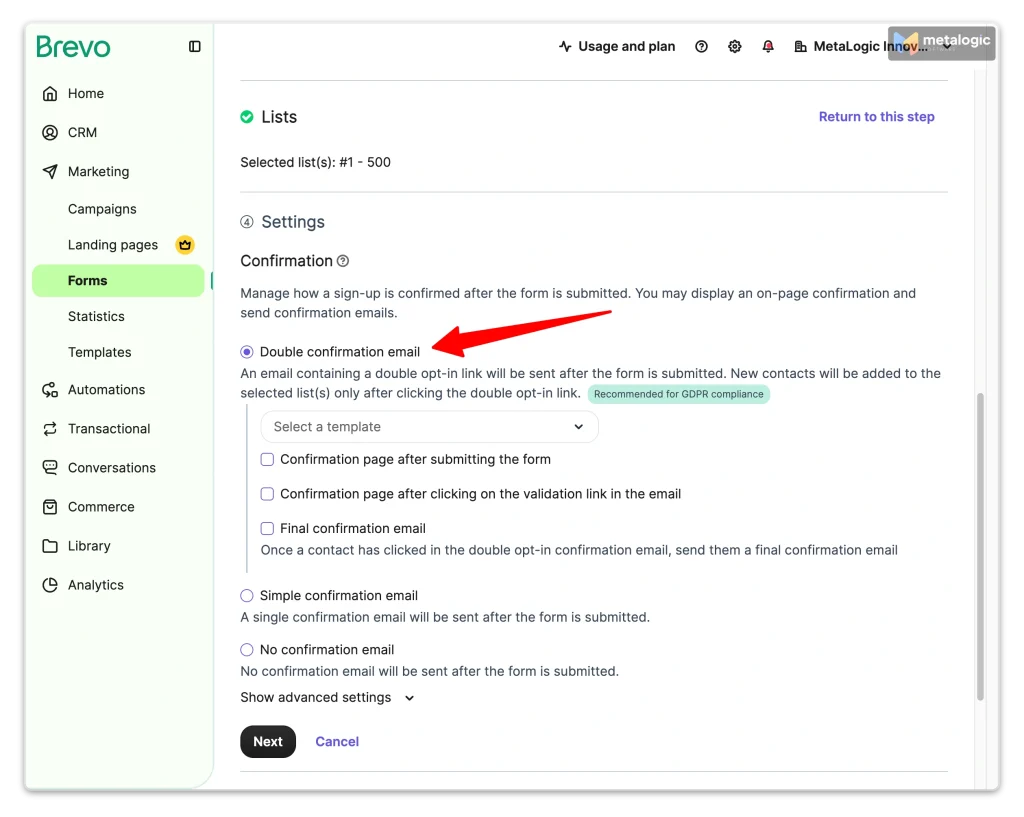
| Brevo | In a form built in Brevo, choose “Double confirmation email” in the form settings, and optionally a page to show after the click. See its sign-up form guide. A custom confirmation template needs a button with the link type “Double opt-in link” |
| Brevo, with a form outside Brevo (for example a WordPress plugin) | The built-in setting doesn’t apply. You need an automation: new contacts go to a temporary list, get the confirmation email, and move to your main list only after they click |
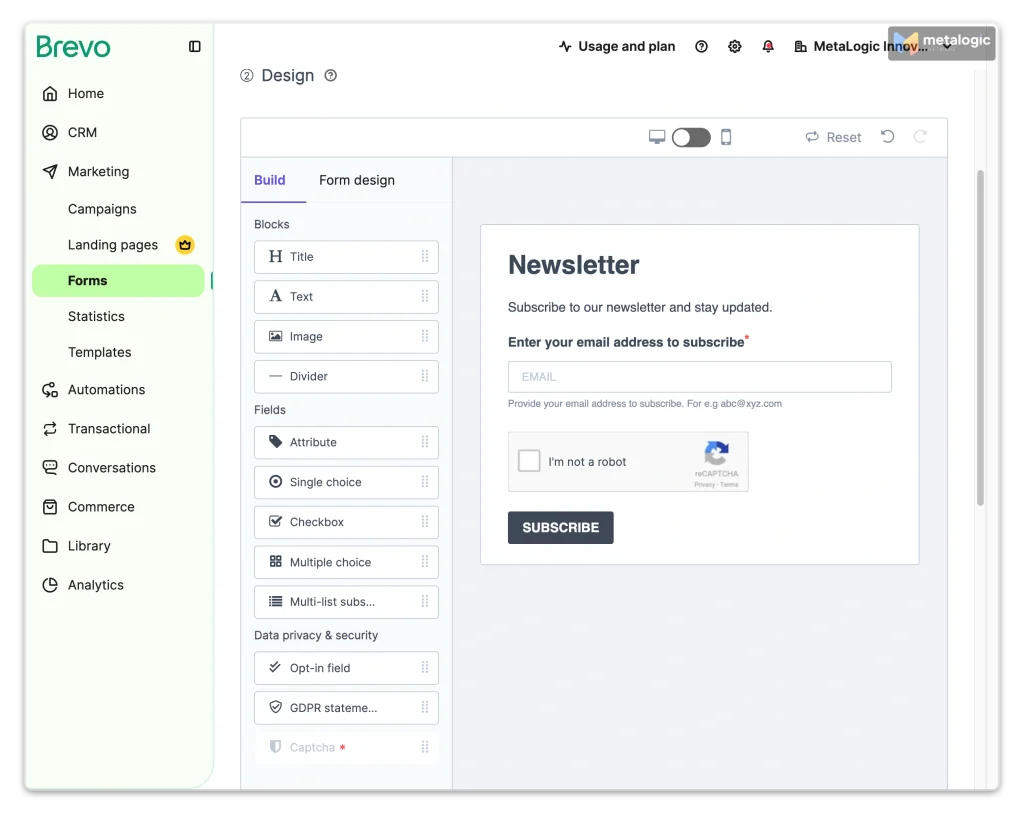
Write a confirmation email people understand
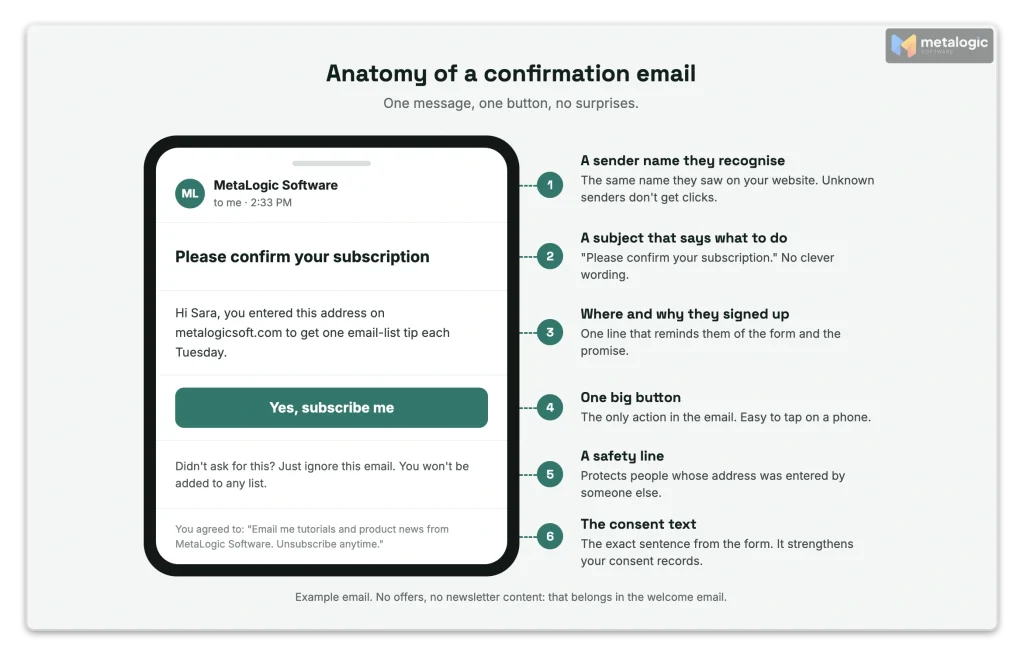
The confirmation email has one job: get one click. It is not a newsletter and not a sales email. Gmail even advises against mixing different types of content in the same message.
A sample confirmation email
| Part | Example | Why |
|---|---|---|
| From name | “MetaLogic Software” | People confirm names they recognise |
| Subject | “Please confirm your subscription” | Says exactly what is needed |
| Reminder | “You entered this address on our website to get one email-list tip each Tuesday.” | Reminds them where and why |
| One button | “Yes, subscribe me” | One clear action, easy to tap on a phone |
| Safety line | “Didn’t ask for this? Ignore this email. You won’t be added.” | Protects people whose address was misused |
| Consent text | The same short sentence they agreed to on the form | Brevo recommends adding it, and it strengthens your records |
Confirmation email vs welcome email
| Confirmation email | Welcome email | |
|---|---|---|
| When | Right after the form | Right after the click |
| Goal | One click to confirm | Deliver the promised value and start the relationship |
| Content | Short, no offers | The checklist, the first tip, what comes next |
Why people don’t confirm, and what to fix
| Reason | Fix |
|---|---|
| They made a typo in the address | Show the address on the “check your inbox” page with a “fix it” link |
| The email went to spam | Mention the spam folder on the form and the next page. Check your SPF, DKIM and DMARC setup |
| They don’t recognise the sender | Use the same name they saw on your website |
| The button doesn’t work, or is hard to see | Test on a phone. One big button only |
| They didn’t understand what to do | Say it in the subject and in one short sentence |
Never turn pending contacts into subscribers to boost your numbers
It’s tempting when you see hundreds of “pending” people. But they never said yes. Activating them removes the protection you built. At most, send one plain reminder without any promotion, and let the rest expire.
Protect your signup forms from bots and abuse
An open form is an open door. Bots and attackers can use it in two ways:
- Fake signups that fill your list with addresses that never agreed, or don’t exist.
- List bombing (also called subscription bombing): an attacker enters a victim’s address in hundreds of forms at once.
Klaviyo describes list bombing as a large number of fake submissions to a signup form or checkout page. It names forms without CAPTCHA, and the API, as common targets. Why would anyone do this? Proofpoint explains that subscription bombing is often a distraction: the flood of emails hides a real alert, like “your password was changed” or “payment sent”.
Double opt-in doesn’t stop the flood
With double opt-in, fake signups never join your list. Good. But the victim still receives your confirmation email, along with hundreds of others. To them, your brand looks like part of the attack. The request step itself needs protection.
| Protection | What it does |
|---|---|
| CAPTCHA | Blocks simple bots. Mailchimp turns on reCAPTCHA automatically when you enable double opt-in |
| Honeypot field | A hidden field people never see. Bots fill it in, and you reject the signup |
| Rate limits | Limit signups and “resend” requests per address and per IP in a short time |
| Spike alerts | Get notified when signups jump far above normal |
| Protected API | Require authentication for any API that adds contacts. Bots look for open doors |
Keep useful records of consent
If someone asks “why are you emailing me?”, you should be able to answer in one minute. Under GDPR, it is your job to prove consent. The ICO’s consent guidance lists what to record: who, when, what they were told, how they agreed, and whether they withdrew.
| Field to keep | Example | Why |
|---|---|---|
| Email address | [email protected] | Who agreed |
| Signup time | 2026-10-02 14:31 UTC | When they asked |
| Source | Blog sidebar form, /guides/ | Where they joined |
| Consent text version | “newsletter-v3” | Exactly what they agreed to. Keep a copy of every version |
| Topics chosen | Tutorials, Product updates | What you may send |
| Confirmation time | 2026-10-02 14:33 UTC | Proof of double opt-in |
| Status and unsubscribe time | Subscribed / Unsubscribed 2026-12-01 | Who you must not email |
Keep only what you need
Don’t collect extra data “just in case”. Many senders also store the IP address as evidence. That is personal data too: keep it only if you need it, mention it in your privacy notice, and decide how long you keep it.
An address in a CSV is not proof of consent
When you move to a new email platform, export the consent fields and the unsubscribe list, not just the addresses. Import the “do not send” list before your first campaign. Without these records, a file of addresses tells you nothing about permission.
Where email validation fits, and where it doesn’t
Permission, double opt-in and email validation answer three different questions:
| Permission | Double opt-in | Email validation | |
|---|---|---|---|
| The question | Did they agree to this kind of email? | Do they control this inbox? | Can this address receive email right now? |
| Creates permission? | Yes | Confirms it | No |
| Fixes a bought list? | No | No | No |
| Best moment | At signup | Right after signup | Before sending to an older or imported list |
Keep four facts in mind:
- A “Valid” result is not permission. It means the mailbox works, not that the person wants you.
- Validation can’t clean a bought list into a good list. The addresses may work. The permission still doesn’t exist.
- Confirmed addresses don’t stay confirmed forever. People change jobs, and mailboxes close. A list that was perfect last year can bounce this year.
- That’s where validating email fits: before you send to a permission list you haven’t used for a while, moved from another platform, or collected at an event with recorded consent.
How MailVexa fits into a permission-based list
MetaLogic MailVexa is email verification software that runs on your own Windows or Mac computer. It does not collect consent, send confirmation emails or connect to your signup form. Its job comes later: when you are about to send to a list that has permission but hasn’t been checked for a while.
| Situation | Use MailVexa? | Why |
|---|---|---|
| Your confirmed list hasn’t been emailed for 6 months or more | Yes | Some addresses have died since they confirmed |
| You are moving your list to a new email platform | Yes | A clean first import protects your new account |
| You collected signups at an event, with recorded consent | Yes | Handwritten or typed addresses often contain mistakes |
| You want to check new signups in real time on your form | No | MailVexa checks files in batches. Double opt-in does this job at signup |
| You bought a list | No | No tool can add the permission that is missing |
Here is a simple routine for an older permission list:
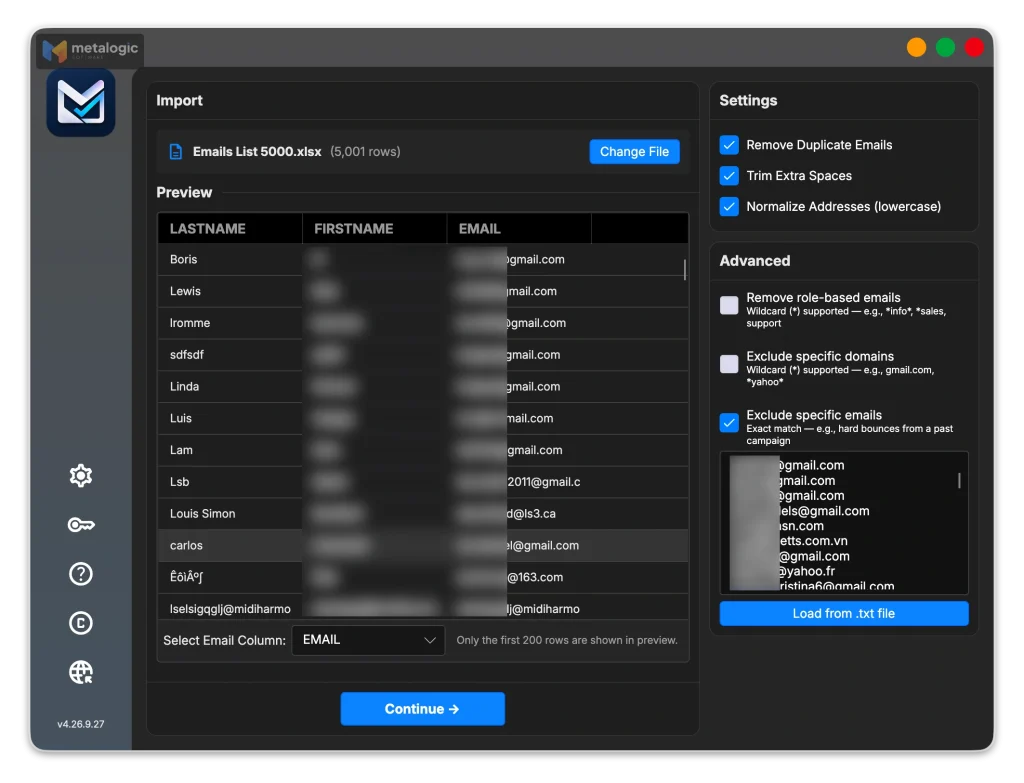
- Export only contacts with a recorded “subscribed” status from your email platform.
- Import the file into MailVexa (CSV, TXT, XLSX or XLS). Your other columns, such as signup date and source, stay with each address.
- Exclude your unsubscribes, complaints and past hard bounces in the “Exclude specific emails” panel. They are skipped and marked Invalid with the reason “ExcludedEmail”.
- Clean duplicates and spacing. MailVexa also lowercases addresses, so
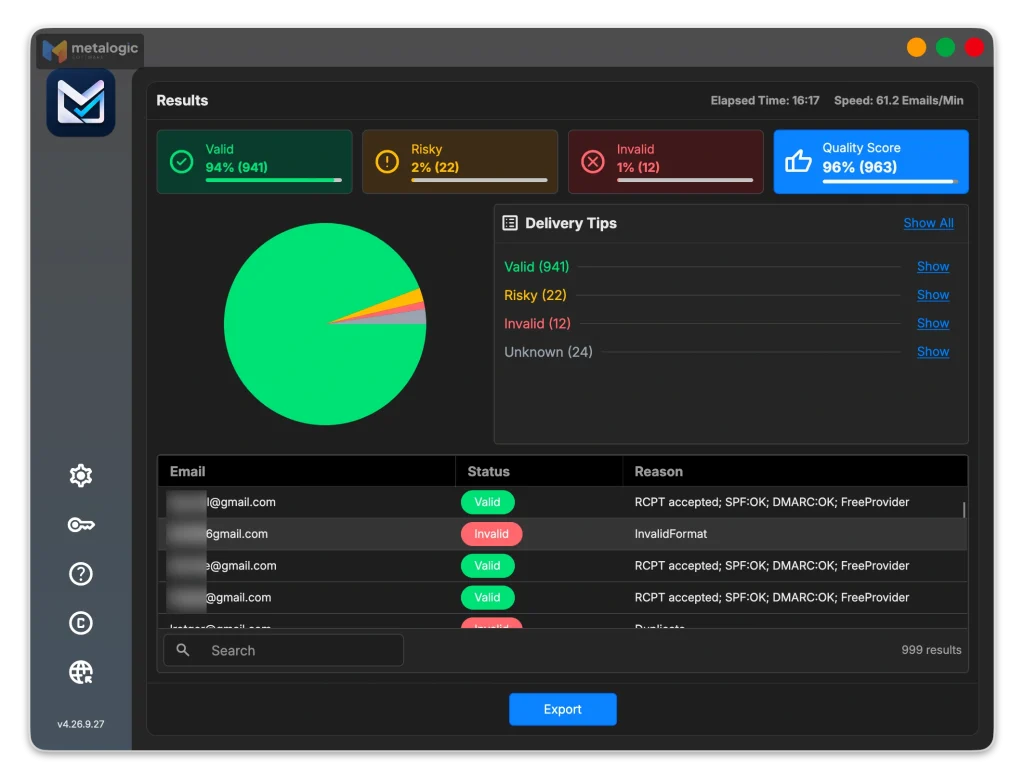
[email protected]and[email protected]count as one. - Verify. Each address goes through format, disposable and free-provider checks, then mail server (MX) and mailbox checks, a catch-all check and an SPF/DMARC check on the domain.
- Review the four groups: Valid, Risky, Invalid and Unknown, each with a reason.
- Export Valid for your campaign, and keep Risky and Unknown separate.
New to the app? Our guide on how to use MailVexa walks through every screen.
Why a desktop tool suits a consent-first list
Your subscriber file holds personal data and your consent records. MailVexa reads it on your own computer, and the file is not uploaded to an online service. Only the technical checks reach out to mail servers. For the full meaning of each result, read what email validation is and how it works.
Keep the list healthy after signup
A good list can turn into a bad one if you break your promises. After signup:
- Send the welcome email right away, with the value you promised.
- Keep your word on topics and frequency. Promised monthly? Don’t send weekly.
- Make leaving easy, with a visible unsubscribe link and one-click unsubscribe.
- Stop at once for anyone who unsubscribes or complains.
- Protect every import with your “do not send” list.
- Watch bounces and remove dead addresses. Our guide to reducing email bounce rate explains how.
- Notice when people go quiet, and follow our guide to inactive subscribers and old email lists.
For a full clean-up before a campaign, see how to clean your email list before sending a campaign.
Measure subscriber quality, not just list growth
“We added 2,000 subscribers” says nothing about quality. Track these instead:
| Metric | How to calculate it | What it tells you |
|---|---|---|
| Form conversion rate | Signups ÷ form views | Is the offer clear and attractive? |
| Confirmation rate | Confirmed ÷ unique signup requests, for the same group of days | Are your form and confirmation email working? |
| Time to confirm | Confirmation time minus signup time | Long delays can mean spam-folder problems |
| Bounces, complaints and unsubscribes by source | Each rate, split by where people joined | Which sources bring the wrong people |
| Meaningful actions | Clicks, replies, downloads, purchases | Real interest |
| Cost per confirmed subscriber | Ad spend ÷ confirmed (not total) signups | The true cost of paid growth |
How to measure confirmation rate fairly
Example numbers, not a benchmark: 400 unique people sign up between 1 and 31 March. By 15 April, 300 of them have confirmed. Your March confirmation rate is 75%. Don’t compare it with people who signed up yesterday: they haven’t had time to click yet. Remove signups you flagged as bots first.
Open rates don’t tell you much anymore
Apple’s Mail Privacy Protection loads email content in the background, so senders can’t see if a person really opened it. Gmail also says it doesn’t track open rates and that low open rates aren’t a reliable sign of delivery problems. Judge quality by clicks, replies and purchases.
Myths about permission and double opt-in
| Myth | The truth |
|---|---|
| “GDPR requires double opt-in.” | It requires valid consent you can prove. Double opt-in is the best way to prove it, not a legal word in the law |
| “A pre-ticked box is fine if people can untick it.” | No. The EU court, the ICO, Gmail and Yahoo all reject it |
| “Accepting our terms means accepting our newsletter.” | No. Consent must be separate |
| “Emailing an old list to ask for permission is harmless.” | In the UK, the ICO fined Flybe £70,000 and Honda £13,000 for exactly this |
| “Double opt-in stops bots.” | It keeps them off your list, but your confirmation emails still reach the victim |
| “Turning on double opt-in protects every form.” | Often only the platform’s own forms. Plugins and APIs may skip it |
| “A Valid result means I can email them.” | Valid means the mailbox works. Permission is a separate question |
| “A high open rate means an engaged list.” | Privacy features can load emails automatically. Clicks and replies are better signs |
Test your signup path, from first signup to unsubscribe
Use a fresh test address you control, and go through every step:
- Submit every entry point: website form, popup, checkout box, plugin and API
- The new contact appears as “Pending”, not “Subscribed”
- The “check your inbox” page shows the address and offers a way to fix it
- The confirmation email arrives in Gmail, Outlook and Yahoo test inboxes (check spam too)
- The confirm button works on a phone, and the status changes to “Subscribed” with a timestamp
- The welcome email arrives separately and matches the promise
- Submitting the same address five times quickly doesn’t send five emails
- An old or used confirmation link shows a friendly message
- The consent record shows the source, the consent text version and both timestamps
- Unsubscribing works from the footer link and from the mailbox’s own button
- Signing up again after unsubscribing goes through double opt-in again
Common questions
Is double opt-in always a legal requirement?
No. The EU, UK, US and Canadian laws don’t require it by name. But Gmail and Yahoo recommend it, and in Germany it is the standard way to prove email consent.
Does account email verification count as newsletter confirmation?
No. It confirms the address for the account, not consent to marketing. Ask for newsletter consent separately.
Can I automatically subscribe buyers or free-trial users?
Not on the basis of consent. In the UK, the soft opt-in may allow emails about similar products if you offered a clear opt-out at signup and in every message. Elsewhere, ask with a separate, unticked box.
What should I do with people who never confirm?
Leave them pending and never send them campaigns. Send at most one plain reminder, then let them expire.
Can I send a confirmation request to a bought list?
No. An email that asks for consent is itself marketing. In 2017 the ICO fined Flybe and Honda for emails that asked people to update their marketing choices without consent.
Do I still need email validation after double opt-in?
At signup, double opt-in already proves the address works. Later, addresses go stale. Validate before you send to a list you haven’t used for months, or that you moved from another platform.
How do I keep consent records when I switch email platforms?
Export the consent fields, timestamps, consent text versions and the unsubscribe list. Import the unsubscribe list before your first campaign.
Sources
Mailbox providers
- Gmail email sender guidelines. Send only to people who want your email, confirm addresses, no bought lists, no pre-checked forms, no open-rate tracking, spam rate.
- Gmail email subscription guidelines. “Double consent” before subscription messages.
- Yahoo Sender Best Practices. Engaged audience, clear expectations, confirmed opt-in, no pre-checked boxes.
Laws and regulators
- ICO: How do we comply with the PECR email marketing rules?. Consent examples, pre-ticked boxes, soft opt-in, free trials.
- ICO: How should we obtain, record and manage consent?. What to record.
- Court of Justice of the EU: Planet49 (C-673/17) press release. Pre-ticked boxes are not valid consent.
- EDPB Guidelines 05/2020 on consent. Conditional consent.
- FTC: CAN-SPAM Act compliance guide. Opt-out rules, 10 business days.
- CRTC: CASL frequently asked questions. Express and implied consent.
- German Federal Court of Justice (BGH), judgment of 10 February 2011, I ZR 164/09. Double opt-in as proof of email consent.
- ICO enforcement against Flybe (£70,000) and Honda (£13,000), March 2017. Emails asking for marketing consent.
Email platforms and security
- Mailchimp: About double opt-in
- Mailchimp: Choose opt-in settings. Integrations and API unaffected.
- Mailchimp: About your contacts. Pending contacts deleted after 60 days.
- Brevo: Create a sign-up form
- Brevo: Double opt-in for a form created outside Brevo
- Klaviyo: List bombing
- Proofpoint: Subscription bombing hides real cyberattacks
- Apple: Use Mail Privacy Protection
Product
- MetaLogic MailVexa. Desktop email verification software for Windows and macOS.
You built the permission. Keep the addresses working.
Before you send to an older or migrated permission list, MailVexa removes your unsubscribes and past bounces, checks every address with a reason, and exports a clean file for your email platform, all on your own computer.
Windows and macOS. Pay once, use for life. Free 14-day trial with up to 2,000 verifications.
We build MetaLogic MailVexa, so weigh our description of it accordingly. We have no commercial relationship with any email platform mentioned in this guide. Platform features and legal guidance were checked in October 2026 and change often, so confirm them on each official site. This guide is not legal advice.