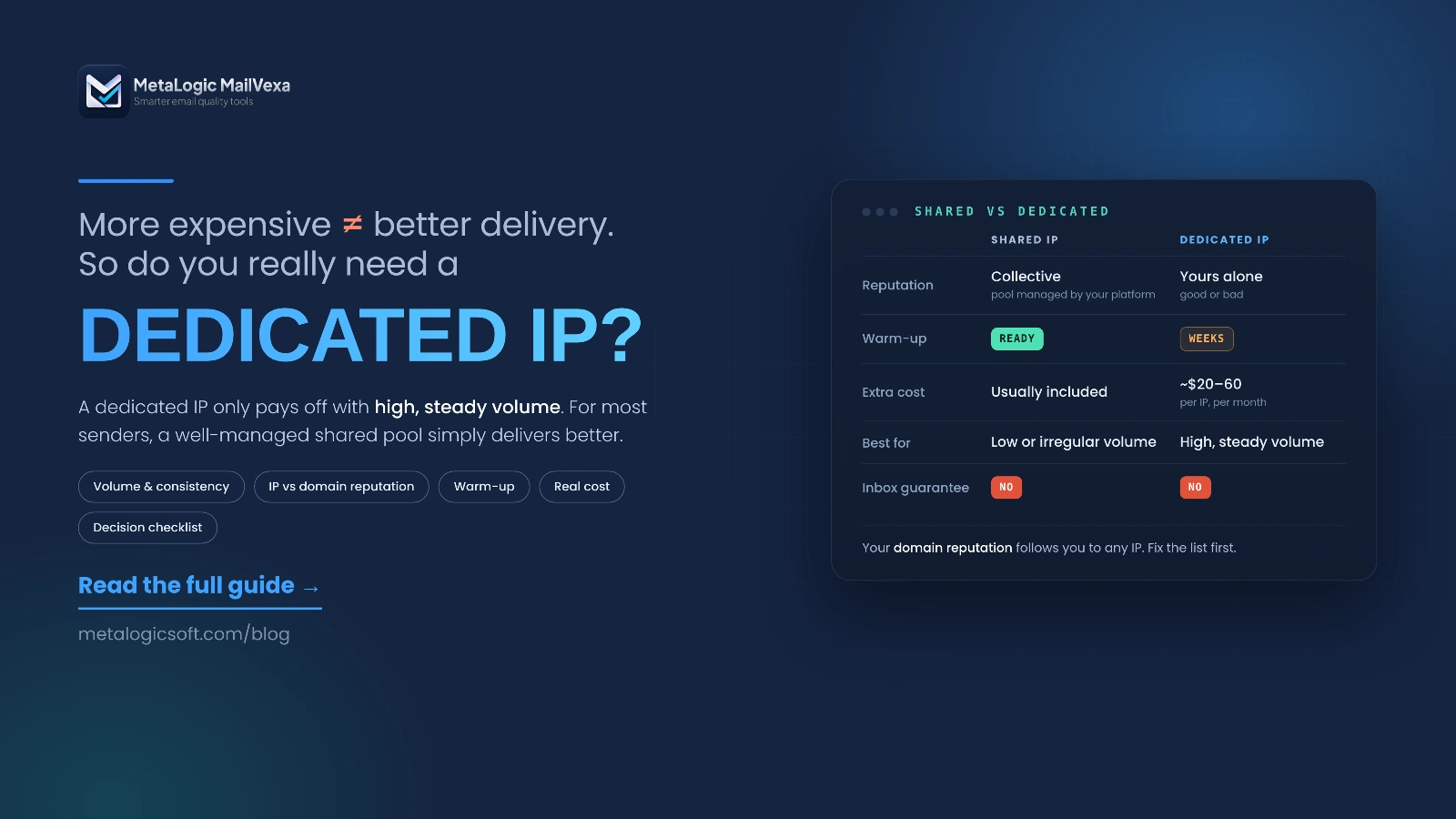
Your emails are landing in spam. Someone tells you: “You need a dedicated IP.” It sounds logical. Your own address, your own reputation, nobody else’s mistakes.
So will a dedicated IP get your emails into the inbox?
Not on its own. And for many senders it makes things worse. A new dedicated IP has no reputation at all. If you don’t send enough email, steadily, mailbox providers never learn to trust it.
This guide explains both options in plain words, compares them side by side, and shows real provider rules and prices. By the end, you’ll know which one fits your volume, your budget and your team, and what to check before you pay for anything.
Quick answer
Choose a shared IP if you send low or irregular volume, don’t have someone to watch deliverability, and your current results are fine. A well-managed shared IP is the default most providers recommend.
Consider a dedicated IP only when you send high volume on a steady schedule, need your reputation separated from other customers, and have the time (or a managed option) to warm it up and monitor it.
Neither one guarantees the inbox. Your list quality, your domain’s reputation, authentication and complaints still decide most of the result.
What is a sending IP address?
Every email is delivered by a server. That server has an IP address, like a street address on the internet. When it connects to Gmail or Outlook to hand over your email, the receiving server sees that IP and checks its history.
| Thing | Example | What it is |
|---|---|---|
| Email address | [email protected] | Who the email is from |
| Sending domain | example.com | Your brand’s name on the internet. It carries its own reputation |
| Sending IP | 198.51.100.24 | The server that physically delivers the email |
Your website’s IP is not your sending IP
Buying a dedicated IP for your website hosting doesn’t change how your campaigns are sent. If you use an email platform (an ESP) like Brevo, Mailchimp, SendGrid or Amazon SES, your campaigns leave from that platform’s servers. So this whole question is about the platform’s outgoing IPs.
What is a shared IP?
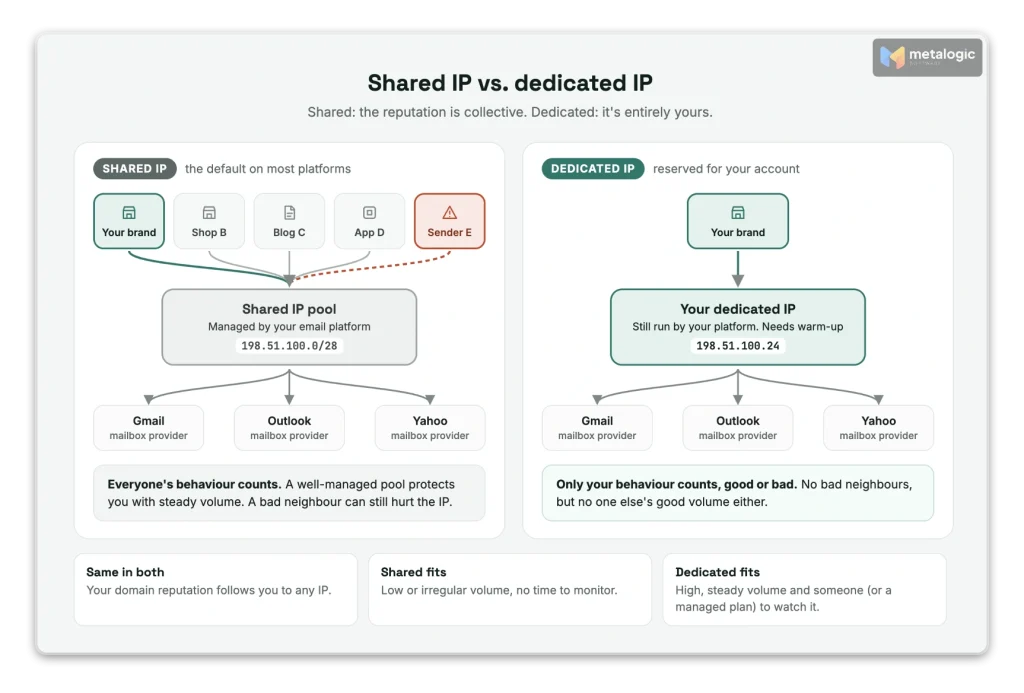
On a shared IP, many customers of the same platform send through the same IP address, or the same group (pool) of addresses. This is the default on almost every email platform.
Shared doesn’t mean weak. A good platform protects its shared IPs carefully: it checks new customers, blocks abuse, and removes senders who cause problems. Amazon SES describes its shared addresses this way: they “collectively send a large volume of email and AWS carefully manages the outbound traffic to maximize the reputations of the shared IP addresses.”
The risk is real too. Gmail’s sender guidelines say: “The activity of any senders using a shared IP address affects the reputation of all senders for that shared IP address.” So the quality of the platform’s management matters a lot.
A little-known detail: the IP limit is shared too
Gmail sets sending limits per domain and per IP. Its guidelines explain: “The IP address quota is shared for all senders that use that IP address. When the IP address hits its quota, all domains that send from that IP address stop sending emails.” Your domain’s own limit is separate. This is one reason a good platform spreads traffic across large, carefully managed pools.
Example: a small online shop sends a newsletter twice a month to 4,000 subscribers. On a well-managed shared pool, it benefits from the steady volume and reputation the whole pool has built. On its own IP, its traffic would be too small and too irregular for mailbox providers to learn anything.
What is a dedicated IP?
A dedicated IP is used only by your account or organization. No other customer of the platform sends from it.
- The main benefit: your IP reputation is separated from other customers. Their mistakes don’t affect you.
- The main responsibility: your own sending now builds, or damages, that reputation. There’s nobody else’s good traffic to balance yours.
- It’s not a server you run. The platform still runs the infrastructure. You just get your own address on it. Twilio SendGrid, for example, includes one dedicated IP with its Pro and Advanced plans and manages it for you.
Shared vs. dedicated IP: side by side
| Shared IP | Dedicated IP | |
|---|---|---|
| Who sends from it | Many customers of the platform | Only your account |
| Effect of other customers | Possible | None on the IP |
| Direct cost | Usually included in your plan | An extra monthly fee or a higher plan |
| Setup | Ready to use | Needs a warm-up period of weeks |
| Low or irregular sending | Usually the better fit | Usually a poor fit |
| Control and separation | Depends on the platform’s features | Usually more |
| Who watches the IP | Mostly the platform | Shared with you, depending on the service |
| Fixed address for allowlisting | No | Usually yes (not always, see section 09) |
| Inbox guarantee | No | No |
The details depend on the platform and its management model. Amazon SES’s own comparison table marks its standard dedicated IPs as not good for low-volume senders or for less predictable sending patterns.
IP reputation vs. domain reputation
Mailbox providers judge two things separately:
| IP reputation | Domain reputation | |
|---|---|---|
| Attached to | The server address | Your brand’s domain (example.com) |
| Changes when you switch platforms or IPs? | Yes, you start over | No. It follows you |
| Built by | Volume, consistency, bounces and complaints from that IP | Everything sent with your domain, from any IP |
This is the key point: a dedicated IP doesn’t control every deliverability factor. If people report your brand’s emails as spam, they’re reacting to your content and your list. Moving to a new IP doesn’t fix that. Gmail says it plainly: “Over time, user spam reports can lower your domain’s reputation.” The domain comes with you wherever you send from. To find the real cause, use the spam troubleshooting guide.
Your own domain works on a shared IP too
You don’t need a dedicated IP to send with your own domain. SPF, DKIM and DMARC for your domain work perfectly well on a shared IP. That’s what builds your domain reputation. See SPF, DKIM and DMARC explained.
When is a shared IP the better choice?
A shared IP is usually right when most of these are true:
- Your sending volume is low.
- You send campaigns irregularly, with gaps of days or weeks.
- Nobody on your team has time to watch deliverability every week.
- You have no specific need for a fixed, exclusive IP.
- Your current results are good, and there’s no evidence of a problem with the shared pool.
Amazon SES gives the clearest advice: “If you don’t plan to send large volumes of email on a regular and predictable basis, we recommend that you use shared IP addresses.”
Shared isn’t just for beginners
Postmark, a platform known for deliverability, says that “for most people, a pristine shared IP pool will have the best results.” And high volume alone doesn’t force you to move. If your shared pool works, there’s nothing to fix.
When does a dedicated IP make sense?
- You send enough volume, steadily. Not one big burst a month, but regular sending every week (see section 08).
- You need separation. For example, you don’t want any other customer’s behaviour to affect your important emails.
- You have the capacity. Someone can watch the numbers and react, or the provider manages the IP for you.
- Your platform recommends it based on your real sending pattern, not just as an upsell.
- A business recipient needs to allowlist a fixed IP. Some companies only accept mail from known addresses. Confirm with your platform that the IP is static (not all dedicated IPs are, see section 09).
How much email volume do you need?
First, don’t confuse list size with sending volume. A list of 20,000 people who get 8 emails a month means 160,000 messages. What matters is how many messages leave the IP, and how evenly.
Look at four things:
- Messages per day on a normal day.
- Active days per month: do you send every day, or twice a month?
- Seasonal spikes: Black Friday, launches, holidays.
- The split by mailbox provider: how much goes to Gmail, Outlook, Yahoo and others.
The last point matters because reputation is built per provider. Amazon SES explains:
“Most ISPs only track the reputation of a given IP address if they receive a significant volume of mail from that address. For each ISP with which you want to cultivate a reputation, you should send several hundred emails within a 24-hour period at least once per month.”
Each provider sets its own line
There is no single industry number. Here is what some providers say (checked October 2026):
| Provider | What they say |
|---|---|
| Postmark | You must send “at least 300,000 messages a month” to qualify |
| Mailgun | “Generally, if you are sending less than 5,000 emails per day, a shared IP may be the right solution.” Above 50,000 a week, a dedicated IP is best |
| Amazon SES | Shared IPs unless you send “large volumes of email on a regular and predictable basis” |
| Twilio SendGrid | At 250,000 messages a month, use at least two dedicated IPs (one for marketing, one for transactional) |
These are each provider’s own rules. They’re useful as a reality check, not as a universal law.
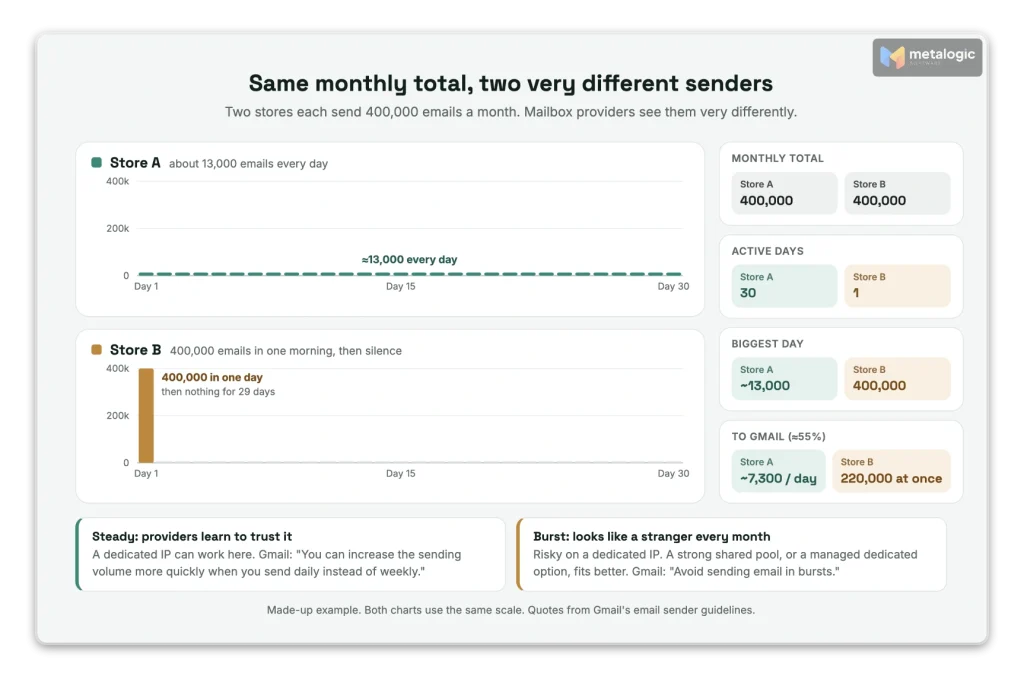
Same monthly total, very different picture
Two stores both send 400,000 emails a month:
| Store A | Store B | |
|---|---|---|
| Pattern | About 13,000 emails every day | 400,000 emails in one morning, once a month |
| To Gmail (about 55%) | About 7,300 a day, every day | 220,000 in a few hours, then nothing for weeks |
| What Gmail sees | A steady, predictable sender | A sudden burst from a quiet IP |
| Dedicated IP? | Worth considering | Risky. Shared or a managed dedicated option fits better |
Gmail’s guidelines explain why: “Send email at a consistent rate. Avoid sending email in bursts.” And: “You can increase the sending volume more quickly when you send daily instead of weekly.” Amazon SES adds that for “highly irregular” patterns, its managed dedicated IPs are the better option.
What a dedicated IP needs after setup
Buying the IP is the easy part. Then it needs care:
- Warm-up. Start with low volume and increase it gradually over weeks.
- Start with your best audience. Send first to people who gave consent and engaged recently.
- Watch the replies from receiving servers. If delays or bounces rise, slow down.
- Stay consistent after warm-up. Long gaps undo the work.
- Re-warm after a break. Twilio SendGrid says: “If you haven’t sent email messages through your IP address in more than 30 days, warm it up again.” Postmark requires a new warm-up if volume drops below 20,000 messages a week for 4 weeks.
Warm-up isn’t a guarantee either. SendGrid’s own warm-up guide says: “A gradual warmup doesn’t guarantee a perfect sending reputation.” For a step-by-step plan, see how to warm up an email domain and IP address.
Where does the extra email go during warm-up?
During warm-up, your IP can only send a limited amount each day. What happens to the rest depends on the provider. Few guides mention this, but it decides whether your campaign goes out on time:
| Provider | Email above the warm-up limit |
|---|---|
| Postmark | Sent through its shared IP pool. Most senders reach full volume in 3 to 6 weeks |
| Amazon SES (standard) | Sent through shared IPs for first-time dedicated IP customers. Otherwise through your other dedicated IPs |
| Twilio SendGrid | Since June 23, 2025, not sent through shared IPs. It goes through your other warm IPs. With none, emails are retried for up to 72 hours |
| Mailgun | Rolled over to shared IPs or your other dedicated IPs |
Need a fixed IP for allowlisting? Check which kind you get
Amazon SES’s standard dedicated IPs are static. Its managed dedicated IPs are not: SES says “the number of IPs in your pool will continue to dynamically increase or decrease.” If a client needs to allowlist your exact IP, ask your platform before you buy. (Gmail itself doesn’t accept allowlist requests from senders.)
Managed vs. standard dedicated IPs
“Dedicated” doesn’t always mean “you manage everything”. There are two models:
| Standard (self-managed) | Managed | |
|---|---|---|
| Warm-up | You plan it, or turn on the platform’s tool | Automatic |
| Number of IPs | You decide | The platform scales up or down with your volume |
| Fixed addresses | Yes | Not always |
| Good for irregular sending | No | Better |
Amazon SES offers both. Its managed IPs “automatically warm up for each ISP individually and auto-scale based on your sending volume.” Postmark manages its dedicated IPs for you too.
Managed doesn’t mean “not your problem”
Automation handles the infrastructure, not your list. Amazon SES’s managed IP FAQ is direct about it: “As you are responsible for your dedicated IP addresses, managed or standard, you need to figure out why they are getting listed in the RBL and get them delisted yourself.” Consent and list quality are still yours.
What does a dedicated IP really cost?
Here are the published prices for a dedicated IP on some common platforms (checked 27 October 2026):
| Platform | Dedicated IP price | Condition |
|---|---|---|
| Amazon SES | $24.95 per IP per month (standard). Managed: $15 per month per account plus a per-email fee | New pricing plans were added in July 2026. Check your plan |
| Twilio SendGrid | 1 IP included in Pro, from $89.95 a month. Extra IPs about $30 a month | Pro or higher |
| Postmark | $50 per IP per month | At least 300,000 messages a month |
| Mailgun | 1 IP included on some plans. Extra IPs $59 per IP per month | Foundation 100k, Growth and Scale |
| Brevo | $251 a year as an add-on | Professional and Enterprise plans |
| Mailchimp Transactional | $29.95 a month as an add-on | Transactional email only |
But the price tag is only part of the cost. Also count:
- The plan you must be on to get a dedicated IP at all, and any extra IPs you’ll need as you grow.
- Deliverability help: some platforms charge for expert support.
- Your team’s time to watch reports and react to problems.
- The migration and warm-up period: weeks of limited sending, and planning around it.
- Overflow during warm-up: if your platform doesn’t send extra email through shared IPs, a big campaign may be delayed.
Three examples: which option fits which sender?
These are guides for your own evaluation, not fixed answers:
| Sender | Situation | Start by looking at |
|---|---|---|
| A small business | A newsletter to 5,000 people, two or three times a month | A well-managed shared IP. Focus on list quality and domain authentication |
| An online store | Steady daily sending, around 15,000 messages a day | A dedicated IP may fit, if someone can monitor it or the platform manages it |
| A seasonal business | Quiet most of the year, then 10× volume in November | How the platform handles peaks. A managed dedicated option or a strong shared pool, and early warm-up before the season |
What to check before you switch
Before you pay for a dedicated IP, answer these questions honestly:
- What exact problem am I trying to solve?
- What evidence shows the problem is the IP, and not my list, content or domain?
- Have I checked authentication and cleaned my list first?
- Who will own the warm-up, the monitoring and the fixes?
- Will my unsubscribes, complaints and suppression list move with me to the new setup?
- Can I move traffic gradually, and pause if numbers get worse?
- Do I send enough, steadily enough, by my platform’s own rules?
Ask your platform one direct question
“Which specific problem in my account would a dedicated IP solve?” A good platform will look at your data and answer honestly, even if the answer is “none”. For a broader comparison of platforms, see how to choose an email service provider.
A note on visibility
A dedicated IP gives you one extra thing: data about your IP. Microsoft’s SNDS only shows data for IPs you can prove you control, which in practice means dedicated IPs. Google, meanwhile, is retiring the IP and domain reputation dashboards in Postmaster Tools. Either way, watch the numbers that matter for both setups: bounces, complaints and delivery errors. Our guide to monitoring email deliverability shows how.
Why list quality matters with either option
Here’s what both options have in common: every bounce and every complaint counts against you. On a shared IP, it hurts your domain and your standing with the platform. On a dedicated IP, it hits your IP’s reputation directly, with nobody else’s good traffic to soften it.
This is especially true during a warm-up. A new dedicated IP has no history. If its first emails go to dead addresses, the bad first impression is very hard to undo.
Before you start, or increase, your sending
- Verify the list. Remove addresses that don’t exist, and separate uncertain ones.
- Exclude your “do not send” list: past hard bounces, unsubscribes and people who complained.
- Start with your best segment: valid addresses of people who engaged recently.
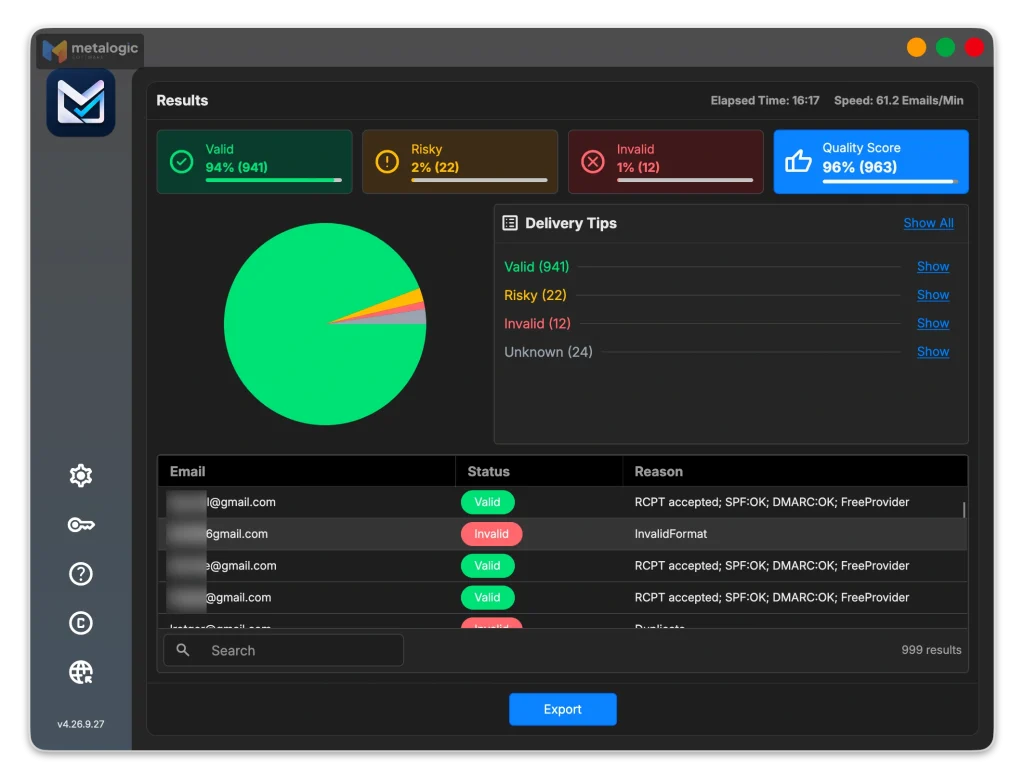
MetaLogic MailVexa is email verification software built for exactly this step. It runs on your own Windows or Mac computer, so your list never leaves your machine:
- Layered checks for every address: format, disposable domains, free providers, MX, SMTP and mailbox, catch-all, and the domain’s SPF/DMARC.
- Four clear groups with reasons: Valid, Risky, Invalid and Unknown. Send your warm-up emails to the Valid group of recently engaged people first.
- An exclude list: paste or load past bounces and unsubscribes. They’re skipped and marked
ExcludedEmail, so they can’t slip back in. - Split exports: export your list in batches of a fixed size, which fits a gradual warm-up plan nicely.
- About 10,000 checks an hour with one proxy, and a one-time license instead of credits.
What verification does, and doesn’t do
Email list validation removes addresses that would bounce. It doesn’t prove a person gave consent, it doesn’t guarantee the inbox, and it doesn’t replace IP warm-up or domain authentication. It also can’t repair an IP reputation that’s already damaged. It makes sure you don’t damage it in the first place.
For the full routine, see how to clean your email list before sending a campaign. Then download MailVexa and check your list before your next campaign, or before your first email from a new IP.
Common questions
Does a dedicated IP guarantee inbox placement?
No. It only separates your IP reputation from other senders. Inbox placement still depends on your list, your domain reputation, authentication, complaints and content.
Can I use my own domain with a shared IP?
Yes. You can authenticate your own domain with SPF, DKIM and DMARC on a shared IP. That builds your domain’s reputation, which follows you to any IP.
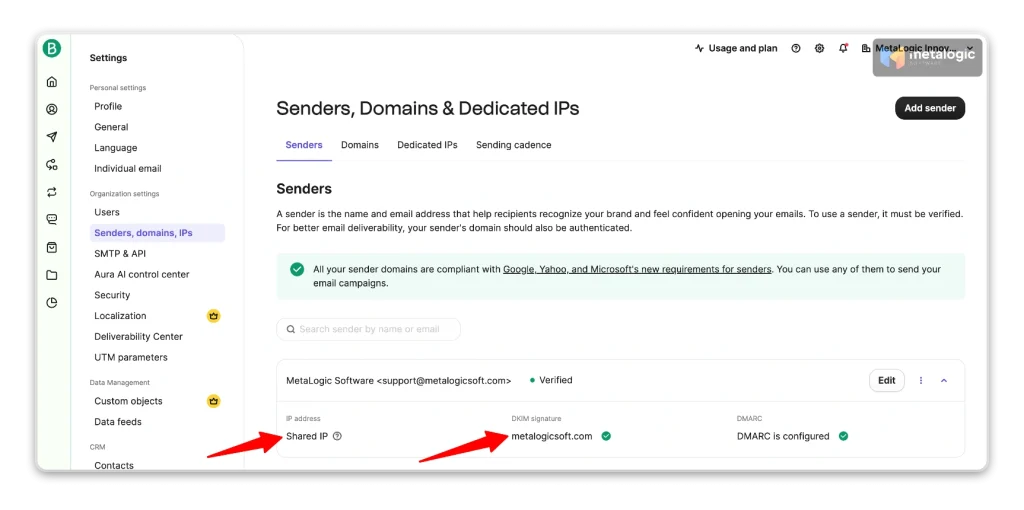
How do I know whether my email platform uses shared or dedicated IPs?
Check your platform’s settings for a “dedicated IP” or “IP addresses” section, or ask support. On most platforms, new accounts start on shared IPs by default.
Do I need a dedicated IP for a small email list?
Usually not. With low volume, mailbox providers don’t see enough email from a dedicated IP to build trust. A well-managed shared IP is normally the better choice.
Does a shared IP mean I can send a large campaign immediately?
Not safely. The shared IP may be warm, but your domain has its own reputation. A sudden jump in volume can still cause delays and filtering, so increase gradually.
Can changing IPs fix a damaged domain reputation?
No. Domain reputation follows your domain to any IP. Fix the cause first: list quality, consent, complaints and authentication.
What happens if I stop sending from a dedicated IP?
Its reputation fades. Twilio SendGrid asks you to warm up again after more than 30 days without sending, and Postmark after 4 weeks below 20,000 messages a week.
Do marketing and transactional emails need separate IPs?
Not always, but they should be separate streams. Many senders use different subdomains for each. At higher volume, platforms like SendGrid and Amazon SES let you put each stream on its own IP or IP pool, so a marketing problem never delays a password reset.
Sources
Mailbox providers
- Gmail: Email sender guidelines. Shared IP reputation, IP quota, sending consistency.
- Google: New Postmaster Tools. Reputation dashboards being retired.
- Microsoft SNDS FAQ. Data only for IPs you control.
Email platforms (checked 27 October 2026)
- Amazon SES: Dedicated IP addresses. Shared vs standard vs managed, volume guidance.
- Amazon SES: Managed dedicated IPs FAQ
- Amazon SES: Pricing
- Twilio SendGrid: Dedicated IP addresses
- Twilio SendGrid: Warm up IP addresses. Re-warm after 30 days.
- Twilio SendGrid: Changes to automated IP warmup (June 2025)
- Twilio SendGrid: Email API pricing
- Twilio SendGrid support: Dedicated IP addresses. Price of extra IPs.
- Postmark: Dedicated IPs. Eligibility, price, re-warm rule, managed warm-up.
- Mailgun: Shared vs dedicated IP
- Mailgun: Pricing
- Brevo: About pricing plans
- Mailchimp: Transactional email pricing
Product
- MetaLogic MailVexa. Desktop email verification software for Windows and macOS.
Shared or dedicated, start with a clean list
Every bounce counts against your reputation, especially on a new IP. MailVexa removes addresses that would bounce, keeps past bounces and unsubscribes out, and splits your list into warm-up-sized batches, all on your own computer.
Windows and macOS. Pay once, use for life. Free 14-day trial with up to 2,000 verifications.
We build MetaLogic MailVexa, so weigh our description of it accordingly. We have no commercial relationship with any email platform mentioned in this guide. Prices, eligibility rules and warm-up policies were checked on each provider’s own pages on 27 October 2026. They change often, so confirm them before you buy.