Your signup form says “Weekly tips”. Then November arrives.
This week you send the newsletter and two sale emails. That’s three campaigns. It doesn’t feel like much.
But one new subscriber also got two welcome emails and a cart reminder. For them, it was six emails in five days. On day six, they unsubscribe. Some people do worse: they click “Report spam”.
Most advice gives you one number: “send weekly” or “send twice a week”. This guide does something more useful. It gives you a starting point, a way to count what each person really receives, a simple test, and clear rules for when to send more, send less or pause.
Quick answer
There is no correct number for everyone. The right frequency depends on what people expected when they signed up, how much useful content you have, how engaged they are, and how many other emails (including automated ones) they already get from you.
For a general newsletter, weekly or every two weeks is a sensible starting point to test, not a rule. A daily newsletter can be daily, because people asked for that. Someone who signed up for a monthly report should get a monthly report.
Then count campaigns and automations together, set a limit per person, test a change on a small group, and judge it by results per subscriber over several weeks, not by one email’s open rate.
Frequency, cadence and volume: three different things
People use these words as if they mean the same thing. They don’t, and mixing them up leads to bad decisions.
| Term | What it means | Example |
|---|---|---|
| Frequency | How many emails one person receives in a period | Each subscriber gets 2 emails a week |
| Cadence | The order and spacing of messages in a plan | Welcome, then a tutorial 3 days later, then an offer |
| Sending volume | The total number of emails you send | One campaign to 20,000 people = 20,000 emails |
“We sent two campaigns” is not your frequency
Your team counts campaigns. Your subscribers count emails in their inbox. Those two numbers are often different, because automated emails, resends and overlapping segments add up. This article is mainly about frequency: what one person receives.
What happens when you send too often, or too rarely
Too often: more sales today, fewer subscribers tomorrow
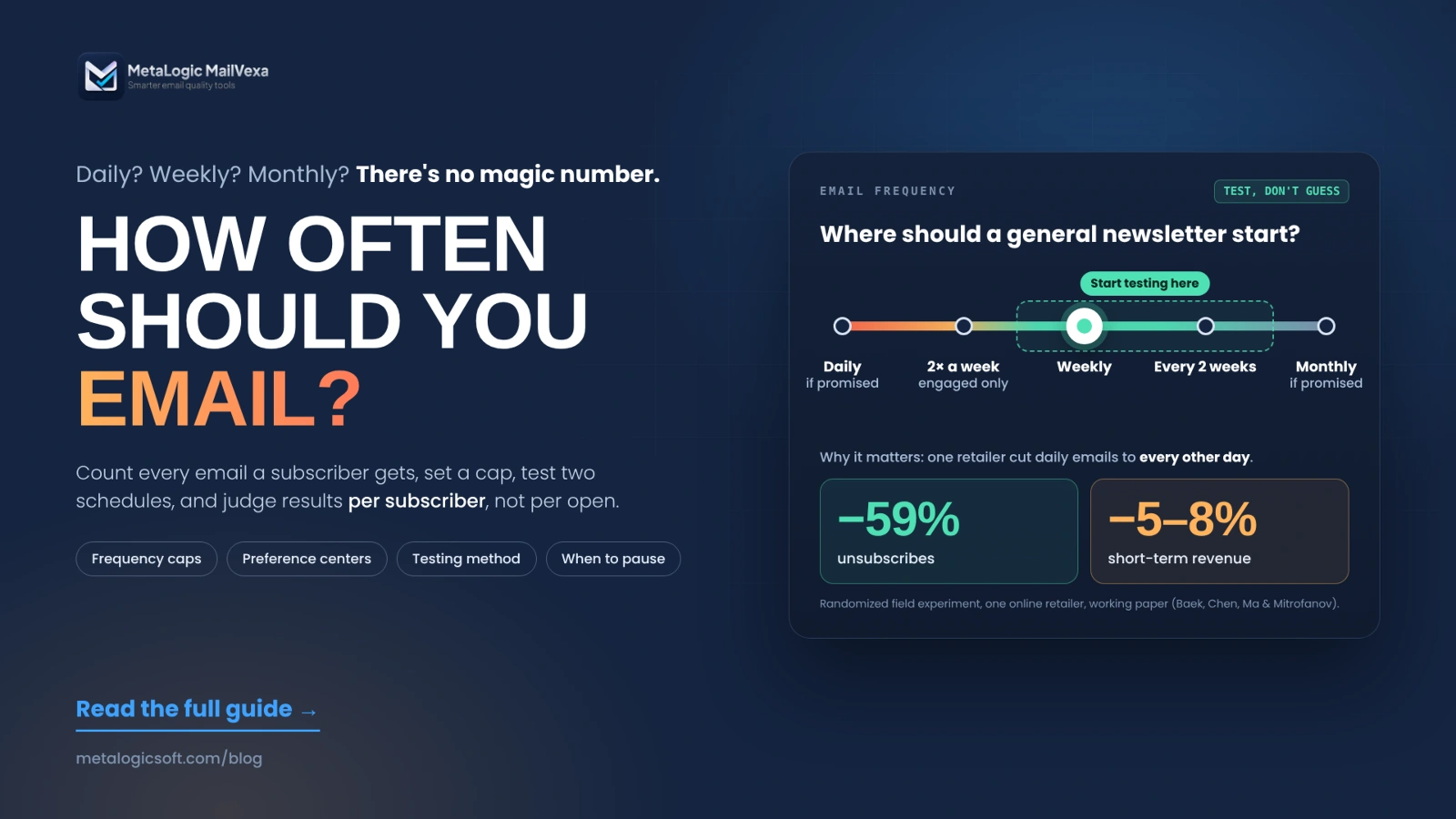
The best evidence we found comes from a randomized field experiment by researchers from NYU, Boston College and Columbia. A large North American online retailer split about 603,000 customers into two groups for one week. One group kept getting a daily coupon email. The other got one email every two days.
| Result of halving the emails | Change |
|---|---|
| Unsubscribes | 59% lower |
| Short-term revenue and purchase rate | 5–8% lower |
| Monthly spending after a customer unsubscribes (from the retailer’s past data) | 36% lower |
That is the real trade-off. More emails can bring more sales this week. They can also push people to leave, and people who leave spend less later. If you only look at this week’s revenue, more email always looks better.
Surveys point the same way. In the UK’s DMA Consumer Email Tracker 2023 (2,004 adults), 57% of people who unsubscribe said they “simply get too many” emails.
Read the research carefully
The experiment is strong because people were randomly assigned. But it is one retailer, coupon emails, a one-week test, and a working paper. The DMA figure is what people say, not what they do. Use both as a warning sign, not as a rule for your list.
Too rarely: people forget you
If you email twice a year, many people won’t remember signing up. Your email looks like a stranger’s, and strangers get reported as spam. Klaviyo puts it simply: sending “too infrequently to engaged customers is leaving money on the table.” Long silences also create a technical problem. Restarting after months can look like a sudden spike to mailbox providers (more in section 10).
Frequency alone doesn’t decide inbox or spam
Mailbox providers react to how people respond: complaints, deletes, replies. Yahoo says the best way to get delivered is to “send timely and relevant email to an active and engaged audience”. Gmail’s sender FAQ asks senders to keep their spam rate below 0.1% and never reach 0.3%. A relevant email twice a week can do better than an irrelevant one each month. If you already land in spam, see why emails go to spam.
What should decide your frequency
Before you pick a number, answer these six questions:
| Factor | Question to ask |
|---|---|
| Expectations | What did the signup form promise? “Weekly tips” is a promise. |
| Content value | Do you have something truly useful for every send, or are you filling a calendar? |
| Business type | Newsletter, online store, software or B2B service? Each has a different rhythm. |
| Buying cycle | Is the person comparing options now, or will they buy again in six months? |
| Lifecycle stage | New subscriber, trial user, customer or inactive contact? They need different treatment. |
| Automations | Is this person also in a welcome, onboarding or cart series right now? |
Starting schedules for different email programs
These are starting points for a test, not industry averages
We found no neutral, reliable dataset of “normal” frequency by industry. The examples below are reasonable places to start. Your own test decides where you end up.
| Email program | Start testing with | What to watch |
|---|---|---|
| Educational newsletter | Weekly or every two weeks | Can you write something useful each time? Does it match the promise? |
| Software product news | Monthly, plus truly important updates | Don’t invent news to fill the calendar |
| Online store offers | Weekly; test more only for an engaged group | Recent purchases, stated preferences and other emails they get |
| Daily newsletter | Daily | Only when people clearly signed up for daily |
| Trial onboarding | Based on product steps, not the calendar | Stop a reminder once the person has done the action |
Count campaigns and automated emails together
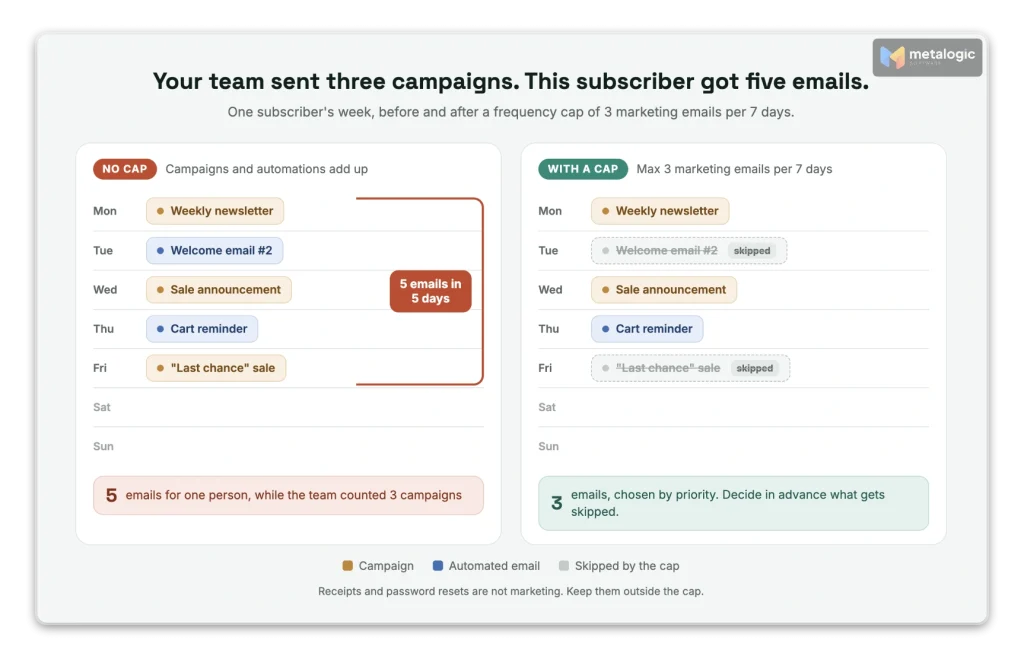
This is where most frequency problems hide. Here is one subscriber’s real week:
| Day | Who planned it | |
|---|---|---|
| Monday | Weekly newsletter | Content team |
| Tuesday | Welcome email #2 | Automation |
| Wednesday | Sale announcement | Marketing team |
| Thursday | Abandoned cart reminder | Automation |
| Friday | “Last chance” sale email | Marketing team |
| Total for this person | 5 emails, not 3 | |
Each email made sense on its own. Together, they feel like too much. The fix has three parts.
1. Set a frequency cap
A frequency cap is a limit on how many marketing emails one person can receive in a period. For example: “No more than 3 marketing emails in any 7 days, and no more than 1 per day.” Pick your own numbers, then apply them to campaigns and automations.
2. Decide what wins when two emails collide
- Priority: a cart reminder for something the person wanted beats a general newsletter.
- Skip or delay: decide if the lower-priority email is dropped or moved to another day.
- Exit rules: once someone buys, stop the sale reminders for that product.
3. Know how your platform’s cap really works
Caps behave differently in each platform, so read the details. For example, Klaviyo’s Smart Sending:
- uses a 16-hour window for email by default;
- is on by default for campaigns, and set per message in flows;
- does not reschedule: “Messages skipped due to Smart Sending are not rescheduled automatically”;
- checks each channel separately, so an email doesn’t count against a text message;
- never skips messages marked as transactional.
Essential emails need their own policy
Password resets, receipts and license keys are not marketing. They must never be blocked by a marketing cap or a newsletter unsubscribe. See why you should separate marketing and transactional emails.
Give different subscribers different frequencies
Sending the same number of emails to your whole list is the easiest option. It is rarely the best one. Klaviyo’s engagement-based sending guide explains why: “Sending too often to unengaged profiles will hurt your sender reputation.”
| Group | How to recognise them | What to do |
|---|---|---|
| Highly engaged | Recent clicks, replies or purchases | Can test a small increase |
| New subscribers | Joined recently, little history yet | Follow the promise. Don’t call them “inactive” just because there’s no history |
| Low engagement | Few clicks over many sends | Check relevance first, then send less |
| Inactive | No real activity for a long time (based on your buying cycle) | Re-engagement, then your sunset policy |
| Chose a frequency | Picked “monthly” in the preference center | Respect it in campaigns and automations |
For comparison, Klaviyo’s example plan for a brand that sends three times a week keeps that rhythm for its most engaged group, sends twice a week and weekly to the next groups, and stops regular sends for the least engaged. Treat it as one platform’s template, not a standard.
How long is “inactive”? It depends on how often you send and how often people buy. Six quiet months means a lot for a weekly newsletter and much less for a seasonal one. Our guide to inactive subscribers and old email lists covers this in detail.
Don’t measure engagement with opens alone
Apple Mail Privacy Protection and security scanners create “opens” that no human made. A segment built only on opens will put the wrong people in the “engaged” group. Use clicks, replies and purchases too.
Let subscribers choose how often they hear from you
The simplest way to get frequency right is to ask. Mailchimp suggests the same: create groups “based on send frequency, like monthly, weekly, and daily subscribers.”
At signup
Say what you will send and how often: “One practical tip every Tuesday.” No law we checked requires this, but it sets the expectation you will be judged on. Our guide to building a list with permission and double opt-in shows good signup forms.
In a preference center
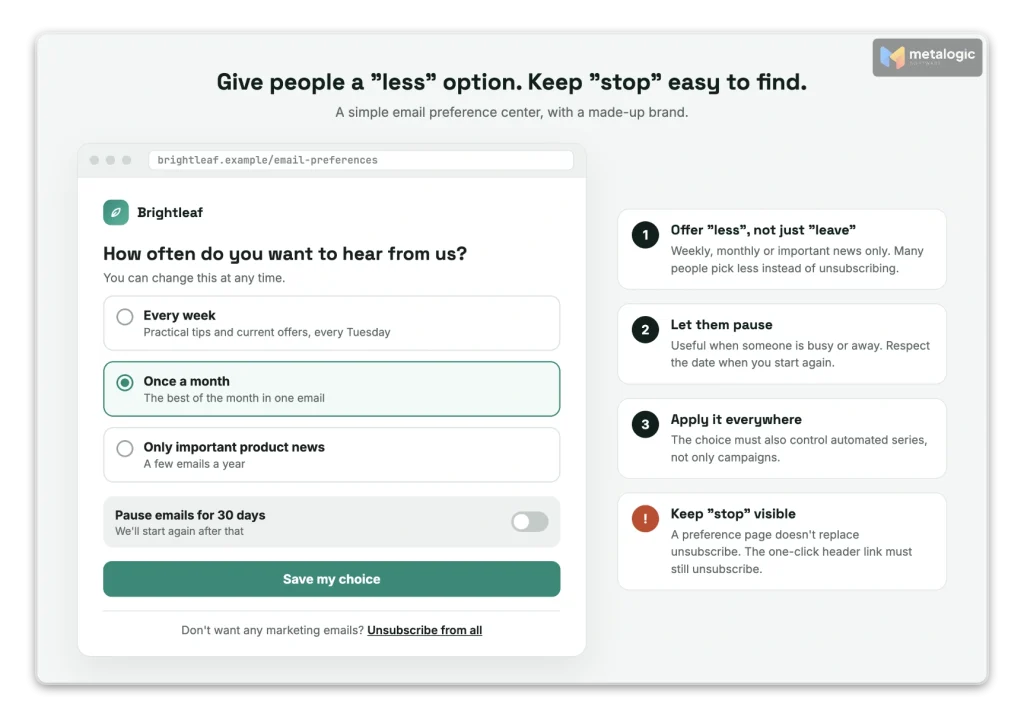
- Offer clear choices: weekly, monthly, or important news only.
- Add a pause option if your platform supports it (“pause for 30 days”).
- Apply the choice everywhere, including automated series.
- Keep “unsubscribe from all” visible on the same page.
A preference center doesn’t replace unsubscribe
The FTC’s CAN-SPAM guide allows a menu of choices, “but you must include the option to stop all marketing messages from you.” Gmail and Yahoo also require bulk senders to support one-click unsubscribe in the email header. Your footer link may lead to a preference page. The header link must still unsubscribe.
| Rule | Deadline to stop sending after an unsubscribe |
|---|---|
| Gmail (bulk senders) | 48 hours |
| Yahoo (bulk senders) | 2 days |
| US CAN-SPAM | 10 business days |
How to test your email frequency
Here is a simple test you can run with any email platform:
- Record a baseline. Write down your current results per subscriber for the last few weeks.
- Pick the right group. Only people for whom more email fits what they signed up for.
- Split them randomly into two similar groups. Don’t hand-pick “good” people for one side.
- Change only the frequency. For example, weekly vs. twice a week. Keep content, offers and design as similar as possible.
- Log automated emails for both groups, so you know the real totals.
- Run several cycles. For a weekly program, 4 to 6 weeks is a reasonable example. Small lists and long buying cycles need longer.
- Set the winner rule and stop rule first. For example: “Group B wins if revenue per subscriber is 10% higher and unsubscribes stay under 1%. Stop early if complaints double.”
Measure the whole period, not each email
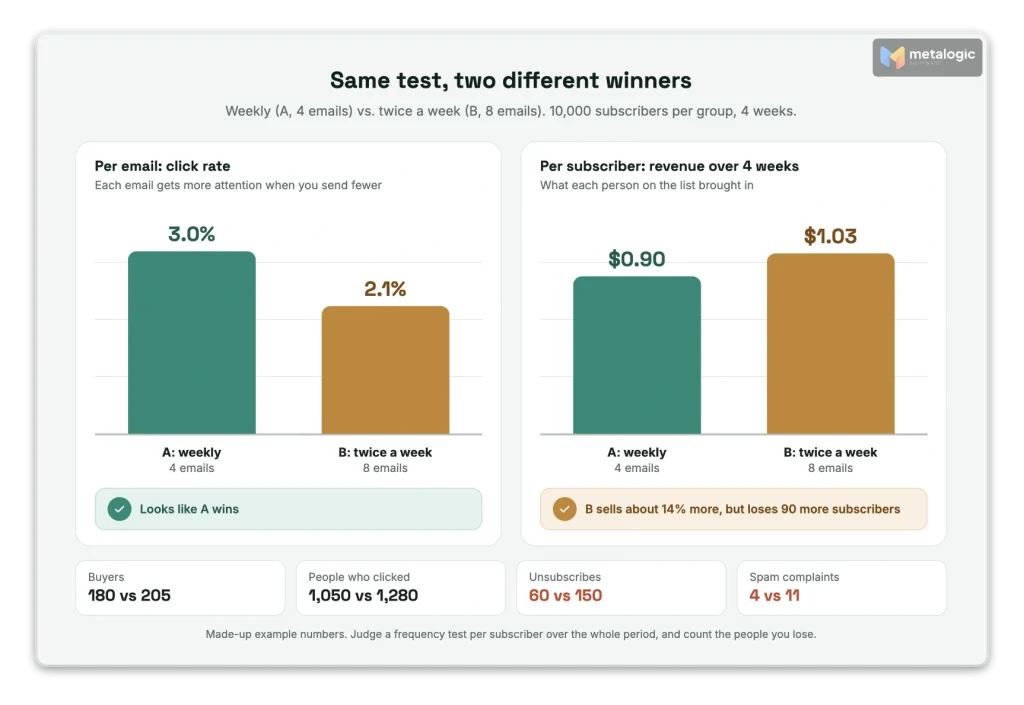
Here is the most common mistake. Email expert Kath Pay explains it in MarTech: if you measure only open, click and unsubscribe rates, the group with fewer emails will usually “win”, because each email gets all the attention. Compare total results per subscriber over the full test instead.
An example with made-up numbers, 10,000 subscribers in each group, over 4 weeks:
| Result | Group A: weekly (4 emails) | Group B: twice a week (8 emails) |
|---|---|---|
| Average click rate per email | 3.0% | 2.1% |
| People who clicked at least once | 1,050 | 1,280 |
| Buyers | 180 | 205 |
| Revenue per subscriber | $0.90 | $1.03 |
| Unsubscribes | 60 | 150 |
| Spam complaints | 4 | 11 |
Per email, A looks better. Per subscriber, B sold about 14% more. But B also lost 90 more subscribers, who will never buy from an email again. A sensible decision: keep weekly as the default and offer twice a week only to the most engaged group. Then test again.
Why one week is not enough
A short test shows the extra sales quickly. The damage, people who stop caring or leave, shows up later. The field experiment above found exactly this pattern. Give your test time to show both sides.
Which metrics to watch
| Metric | What it tells you |
|---|---|
| Conversions per subscriber (same period) | Did more email create more results? |
| Revenue per subscriber | The money value of each schedule |
| Unique clickers | Did more people engage, or did the same people just click more? |
| Unsubscribes and spam complaints | Did the new schedule annoy people? |
| Bounces and delivery errors | Is there a list or technical problem? |
| Trend over several periods | Did the first result last? |
- Don’t decide with open rate. Mailchimp warns that bot activity, such as security scans, can inflate opens and clicks, and that Apple’s Mail Privacy Protection “impacts your opens and open-related metrics.”
- Don’t blame bounces on fatigue. Tired subscribers unsubscribe or ignore you. They don’t bounce. More bounces point to old addresses or a technical issue. See how to reduce your email bounce rate.
- Look at mailbox providers too. Our guide to monitoring email deliverability shows how to check Gmail, Outlook and Yahoo separately.
When to send more, send less, or pause
| What you see | What to try |
|---|---|
| Engaged people ask for more, and results are good | A small increase for that group only, then measure |
| Unsubscribes or complaints rise after a change | Go back to the old schedule, then check content and targeting |
| People get several emails close together | Fix overlaps between campaigns and automations |
| A group has been inactive for a long time | Send less, offer preferences, then apply your sunset policy |
| Temporary errors or “slow down” replies from servers | Lower the volume and find the technical cause |
Volume is not the same as frequency
Gmail’s sender guidelines say: “Send email at a consistent rate” and “Avoid introducing sudden volume spikes.” They also say to “reduce the sending volume” if messages start bouncing or being deferred. This is about your total daily volume. It does not tell you how many emails one person should get. But a frequency change that doubles your volume is also a volume change, so raise it step by step.
Prefer “smaller” to “stop”
Stopping everything feels safe. It can create a new problem. Klaviyo recommends “using a more strict segment with fewer profiles instead of stopping overall”, and warns that if you stop sending campaigns entirely, “you will need to rewarm the domain.” Keep sending to your best group while you fix the rest. If you do need a restart, follow our domain and IP warm-up guide.
Sales events, launches and resends
A big sale or a product launch can justify more email for a short time. Keep it under control:
- Treat it as a separate, short plan with a clear start and end date.
- Send to people who care. Past buyers of that category, or people who clicked related content.
- Stop reminders after a purchase. A “last chance” email to someone who already bought feels careless.
- Pause overlapping automations, or let your frequency cap handle them.
- Return to normal when the event ends. Don’t let a busy week become the new default.
Be careful with “resend to non-openers”
Resending to people who “didn’t open” sounds harmless. But opens are not reliable. Some people who read your email will look like non-openers, and some “openers” were only machines. So a resend can reach people who already saw the email. If you resend, change the subject, send it only to a small engaged group, and count it inside your frequency cap.
Restarting an old email program? Check the list first
Maybe you stopped sending for a year. Now you want to restart, at a new frequency. Before you decide how often, check who is still on the list:
- Where did these contacts come from, and what did they agree to?
- Remove past unsubscribes, complaints and hard bounces before anything else.
- Check that the addresses still work. Old lists hide addresses that no longer exist. Sending to them creates bounces at the worst possible moment: right when you restart.
- Start with a small, recent group, then widen step by step.
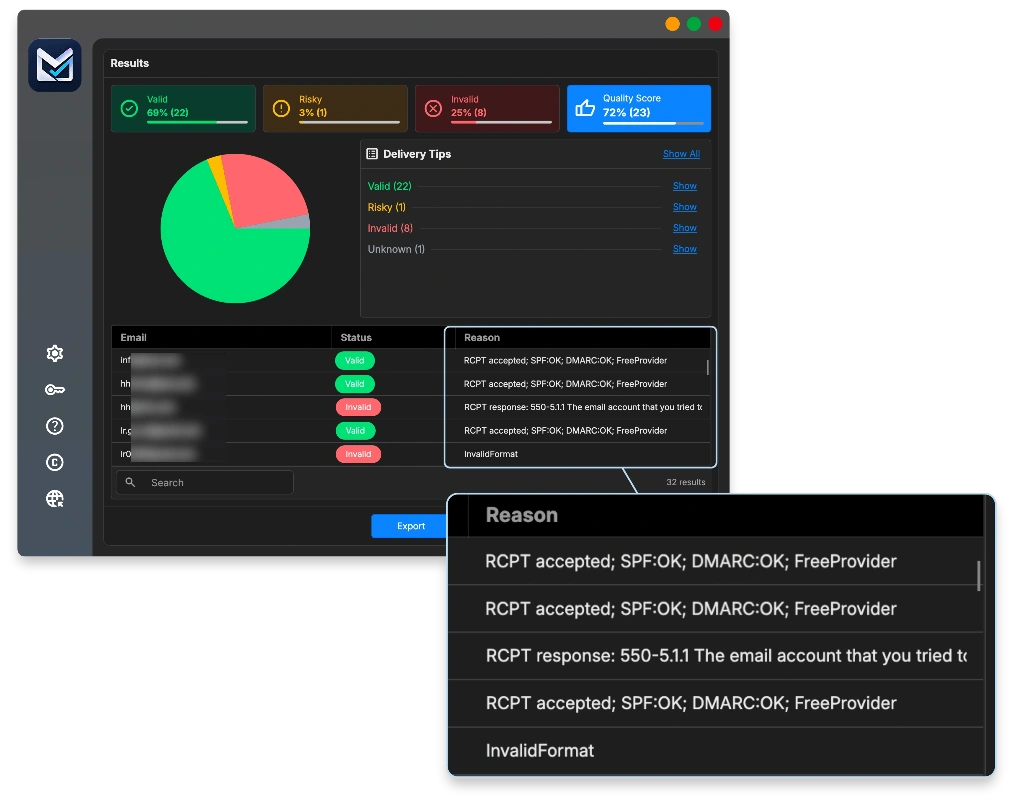
That third step is email list validation. MetaLogic MailVexa is email verification software that runs on your own Windows or Mac computer, so your list is not uploaded to an online service. For each address it checks the format, disposable and free-provider domains, MX records, the SMTP server and mailbox, catch-all behaviour, and the domain’s SPF and DMARC. Then it puts each address in one of four groups, with a reason:
| Result | What it means | Before restarting |
|---|---|---|
| Valid | The format passes, the domain has MX records, and the server accepts the recipient | Can go into your restart groups |
| Risky | Catch-all or disposable. May deliver, may not | Review the reason. Leave them out of the first sends |
| Invalid | Very likely to bounce | Keep out of every campaign |
| Unknown | The server didn’t give a clear answer | Run again later, or treat cautiously |
Features that help most when you restart an old list:
- Exclude specific emails. Load your past hard bounces and unsubscribes from a .txt file. Matching rows are skipped and marked
ExcludedEmail, so they never slip back in. - Role-based and domain filters, for addresses such as info@ or domains you don’t want to email.
- Exports by group, in CSV or XLSX, split into smaller files if your platform has an import limit.
- About 10,000 checks per hour with one proxy, and a one-time license instead of buying credits.
A valid address is not a “yes, email me more”
Validating email tells you an address can receive mail. It does not tell you the person wants your emails, or wants them more often. Interest, consent and frequency are decided by your list practices and tests, not by verification. And a positive result is not a delivery guarantee.
For the full process, read how to clean your email list before a campaign and what each verification result means. Then download MailVexa and check your list before you restart.
Your email frequency checklist
- The signup form says what you will send and how often.
- You count campaignsandautomated emails per person.
- A frequency cap is set, and you know what happens to skipped emails.
- Receipts, password resets and other essential emails are outside the marketing cap.
- Engaged, new and inactive subscribers get different schedules.
- People can choose “less”, and “unsubscribe” is always easy to find.
- Every frequency test has a winner rule, a stop rule and several weeks.
- You judge results per subscriber, not by open rate.
- Old lists are checked and cleaned before a restart.
Frequently asked questions
Is sending marketing emails every day too much?
For most lists, yes, unless people signed up for a daily email. A daily newsletter that people asked for is fine. Daily promotions to people who expected a weekly email will raise unsubscribes and complaints.
Is one email per month enough?
It can be, if that is what you promised and each email is valuable. The risk is that people forget you between emails. If monthly results are good but recognition is low, test every two weeks with an engaged group.
Should every subscriber receive the same number of emails?
No. Engaged subscribers can often receive more. Low-engagement contacts should usually receive less. New subscribers should get what they were promised, and people who chose a frequency should get exactly that.
Do automated emails count toward sending frequency?
Yes. Welcome series, cart reminders and other marketing automations land in the same inbox. Count them with your campaigns. Essential emails such as receipts and password resets need a separate policy and should not be capped.
Should I resend emails to people who did not open them?
Be careful. Open tracking is not reliable, so some “non-openers” already read your email. If you resend, use a new subject, send to a small engaged group, and count the resend in your frequency cap.
How long should I test a new sending schedule?
Long enough to cover several sends and enough purchases to compare. For a weekly program, 4 to 6 weeks is a reasonable example. Small lists and long buying cycles need longer tests.
Does sending fewer emails guarantee better inbox placement?
No. Fewer emails can lower complaints, but placement also depends on relevance, list quality, authentication and how people react. Fewer irrelevant emails are still irrelevant.
Sources
Research and surveys
- Baek, Chen, Ma and Mitrofanov: Balancing Customer Engagement and Annoyance in Online Retail. Randomized field experiment, daily vs. every other day (working paper).
- DMA: Consumer Email Tracker 2023. 57% of unsubscribers say they get too many emails (UK survey, 2,004 adults).
- MarTech (Kath Pay): Frequency testing. Why per-email rates favour the lower-frequency group.
Mailbox providers and regulators
- Gmail: Email sender guidelines. Consistent rate, no sudden volume spikes, reduce volume on deferrals.
- Gmail: Sender guidelines FAQ. Spam rate below 0.1%, never 0.3%; unsubscribes within 48 hours.
- Yahoo: Sender best practices. Timely and relevant email, preference page, 2-day unsubscribe.
- FTC: CAN-SPAM compliance guide. Opt-out menus and 10 business days.
Email platforms
- Klaviyo: Smart Sending. 16-hour default, skipped messages not rescheduled.
- Klaviyo: Engagement-based sending schedule. Different cadences per engagement group.
- Klaviyo: Slowing down sending. Use a stricter segment; a full stop means rewarming.
- Mailchimp: About subscriber engagement. Test frequency, frequency groups.
- Mailchimp: About bot activity. Bots and Apple MPP inflate opens and clicks.
Product
- MetaLogic MailVexa. Desktop email verification software for Windows and macOS.
Pick your schedule. Then make sure the list is ready for it.
The right frequency only works on a list of real, working addresses. MailVexa keeps past bounces and unsubscribes out, sorts every address with a reason, and exports files ready to import, all on your own computer.
Windows and macOS. Pay once, use for life. Free 14-day trial with up to 2,000 verifications.
We make MetaLogic MailVexa, so take our description of it with that in mind. We have no commercial relationship with the email platforms named in this guide. Platform documentation and rules were checked in November 2026 and change often. Example numbers in tables are illustrations, not benchmarks. Legal notes are general information, not legal advice.