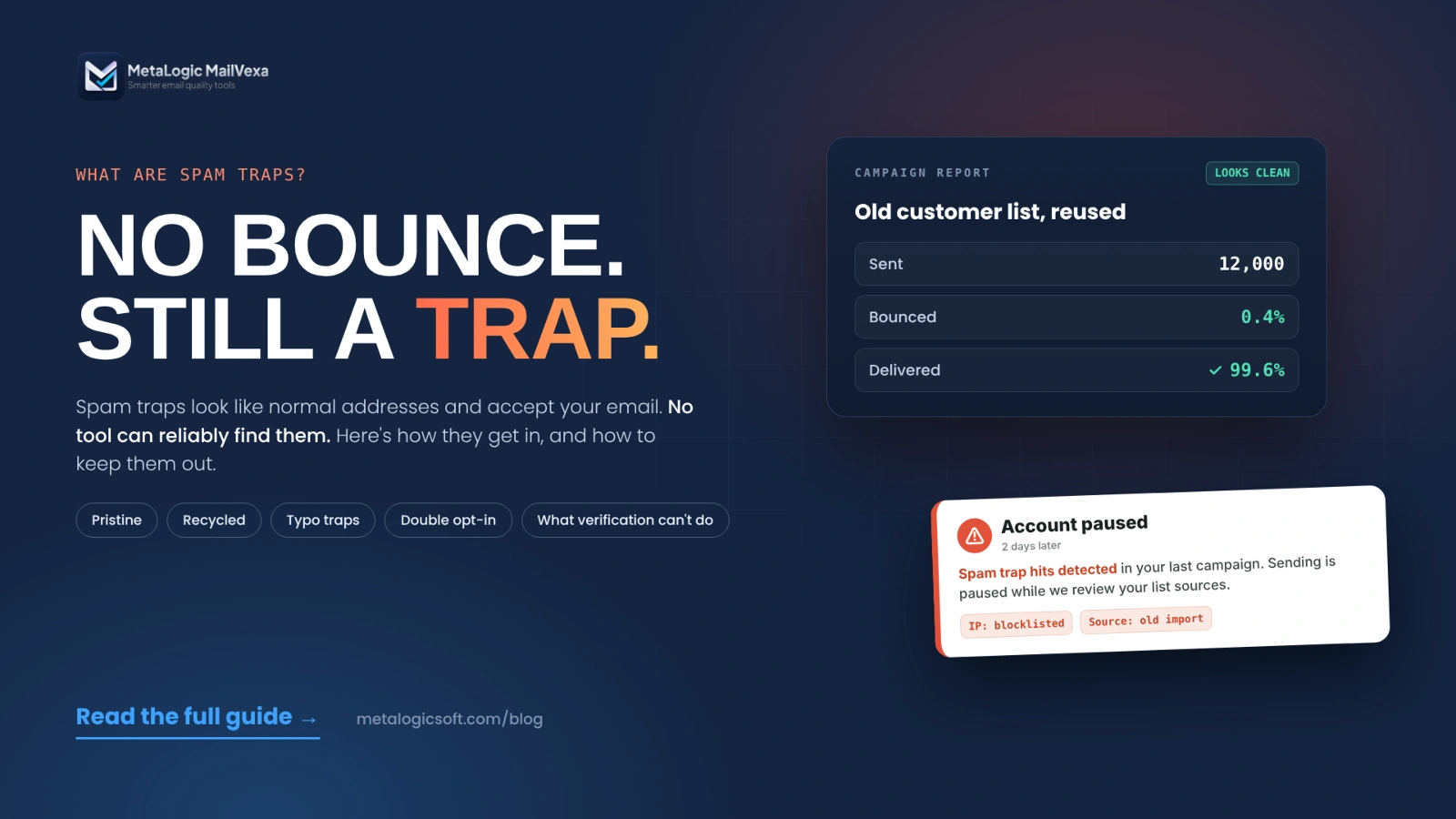
You find a customer list from two years ago. 12,000 addresses. You verify it first, remove the bad ones, and send.
Almost nothing bounces. The report looks great.
Two days later, your email platform pauses your account. The message says: “spam trap hits detected.” Then you notice your IP on a blocklist.
How? Nothing bounced. The addresses were “valid.”
That’s exactly how spam traps work. They look like normal addresses, they accept your email, and they quietly report you. This guide explains what they are, how they get onto lists, what a verification tool can and can’t tell you, and the habits that really keep them out. No promise of “finding every trap.” That promise doesn’t exist.
Quick answer
A spam trap is an email address that no real subscriber uses. Mailbox providers, anti-spam groups and blocklist operators run them to catch senders who email people without permission or don’t clean their lists.
Traps are designed to look normal, so no tool can reliably find them. You avoid them by how you collect and keep addresses: only email people who signed up (ideally with double opt-in), protect your forms from bots, stop mailing addresses that bounce, retire long-inactive contacts, and never buy, rent or scrape lists.
Email verification helps by removing broken and risky addresses. It doesn’t prove consent, and it doesn’t detect traps.
What is a spam trap?
M3AAWG, the global anti-abuse working group, defines it simply in Help! I Hit a Spam Trap!: “A spam trap is an email address used to collect, record, and monitor spam and other unsolicited or abusive email.” The key part comes next: spam traps “are designed to be indistinguishable from other email addresses.”
One thing all traps share: they “don’t send email or subscribe to email distribution lists or newsletters.” So if a trap is on your list, nobody signed it up the normal way.
Who runs spam traps?
According to Validity’s State of Email 2024 report, traps are used “by mailbox providers, filtering companies, and blocklist operators to identify senders who don’t follow email best practices, particularly around acquisition and list hygiene.”
A spam trap is not the same as…
| Term | What it is | What it tells you |
|---|---|---|
| Spam trap | An address with no real subscriber behind it | Your collection or list upkeep has a gap |
| Spam folder | Where a mailbox provider put your email | A placement decision, not a type of recipient |
| Spam complaint | A real person clicked “Report spam” | Someone didn’t want or expect your email |
| Invalid address | An address that doesn’t exist and bounces | The mailbox is gone or was typed wrong |
“Accepted” doesn’t mean “real subscriber”
A trap accepts your email just like a real inbox. No bounce, no error. That’s why a clean bounce report doesn’t prove your list is clean.
The main types of spam traps
Most guides use three categories. They’re useful for learning, but they don’t cover every kind of trap.
| Type | What it is | What usually let it in |
|---|---|---|
| Pristine | An address never given to a real person. Often hidden on web pages to catch address scrapers | Bought, rented or scraped lists. Fake form entries |
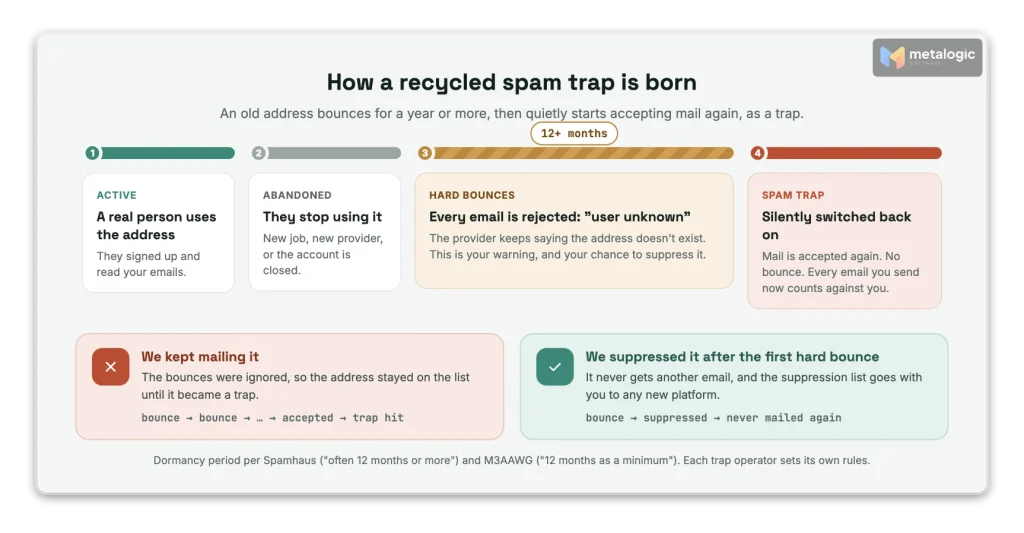
| Recycled | A real address that was abandoned, bounced for a long time, then switched back on as a trap | Old lists, ignored bounces, no plan for inactive contacts |
| Typo | An address on a domain that looks like a popular one, such as gmial.com | Signups with no address check or confirmation |
Two important details:
- Recycled traps take a long time to appear. Spamhaus says these addresses reject mail with a hard bounce “for a period of time, often 12 months or more” before they’re turned back on. M3AAWG “suggests 12 months as a minimum.” So the danger is old addresses you kept mailing, or stopped mailing and then came back to.
- Pristine traps point to how you got the list. M3AAWG says: “Pristine trap hits may be a strong indicator of the presence of purchased lists.”
There are more than three types
Spamhaus describes seven, including traps seeded in website code, expired domains bought to collect mail, and “live traps” that belong to real people. It also says role addresses such as postmaster@ and abuse@ should “almost NEVER be on a marketing mailing list.” And not every typo is a trap: a typo usually just bounces.
How do spam traps get into an email list?
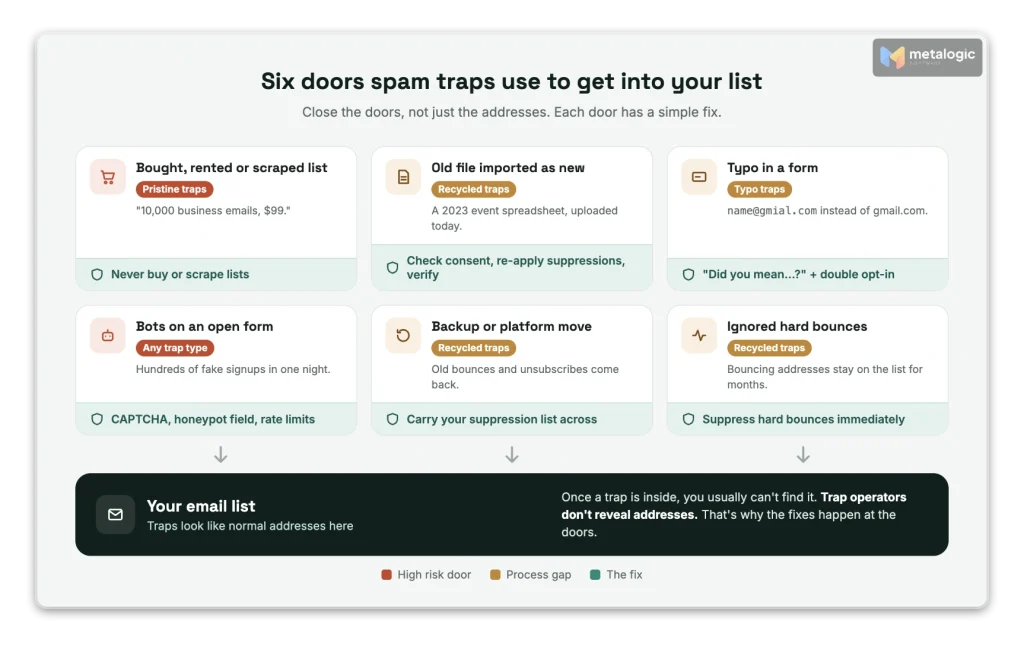
Traps don’t appear by magic. They come in through a few predictable doors:
| Door | Example |
|---|---|
| Bought, rented or scraped lists | “10,000 business emails in your industry, $99.” Spamhaus calls these lists “the most common source of spam trap hits.” |
| Old files imported without checks | A 2023 spreadsheet from a past event, uploaded as if it were a fresh list |
| Wrong addresses in forms | A typo like @hotmial.com, or someone entering another person’s email |
| Bots on unprotected forms | Hundreds of fake signups in one night. M3AAWG warns that traps “are sometimes added to lists by automated form submissions” |
| Suppressed contacts coming back | Restoring a backup or moving to a new platform without your bounce and unsubscribe history |
| Ignoring bounces | Keeping addresses that hard-bounced, until they turn into recycled traps |
Changing your email platform? Take your suppression list with you
Spamhaus’s sender guidelines say: “Do not begin sending on new infrastructure without carrying the suppression list across.” Otherwise, old bounces and unsubscribes get mailed again, “and old inactive addresses are where recycled spam traps sit.”
What happens if you send to a spam trap?
There’s no single answer. M3AAWG says the consequences “can vary greatly depending on the number of trap hits, what type of trap was hit, who operates the trap, and other variables.”
| Possible effect | What it looks like |
|---|---|
| Lower reputation | More of your email goes to spam at one or more providers |
| Blocking | A provider rejects mail from your IP or domain |
| Blocklisting | Your IP or domain appears on a public list used by many mail servers |
| Platform action | Your email platform limits imports, moves you, or suspends your account |
- One hit can be enough, but not always. Validity notes that “Particularly with pristine traps, a single hit can be sufficient to generate a blocklisting.” Recycled and typo traps are often weighted less heavily.
- A hit usually means a process problem, not evil intent. Typo traps, for example, suggest you were trying to reach real people but didn’t check their addresses.
- Repetition matters most. Hitting traps again and again shows the problem isn’t fixed.
Can email verification tools detect spam traps?
Short answer: no, not reliably. And any tool that promises to remove “all spam traps” is promising something the trap operators say isn’t possible.
Why technical checks can’t prove an address isn’t a trap
Email verification software checks whether an address can receive mail: the format, the domain’s mail servers (MX), and how the mail server answers. That’s useful. But look at what traps are:
- Traps are built to look normal. M3AAWG: “indistinguishable from other email addresses.”
- Traps accept mail. A working mailbox passes the technical checks.
- Some traps sit on domains that accept every address. Spamhaus notes some pristine traps are on “wildcard domains.” A verifier can only flag these as catch-all.
- Recycled traps change over time. An address that bounced last year can accept mail today.
Spamhaus says it plainly in a 2015 post on verification services: they “determine whether an email address exists,” but do “nothing to verify the permission of the recipient.” Its current guidelines go further: avoid using list validation “as a source to clean spamtraps as it does not do so, and is not and never will be a replacement for permission.”
“Valid” means “can receive mail”, not “safe to send”
A Valid result tells you a mailbox accepts mail. It doesn’t tell you who owns it, whether they agreed to hear from you, or whether it’s a trap. Treat it as one input, not a green light.
So what is verification good for?
Quite a lot, as long as you know its job. Spamhaus itself recommends validating addresses at collection time: “Bad addresses caught at signup are far less likely to bounce, go unengaged, or turn out to be a spam trap.”
| Verification can | Verification can’t |
|---|---|
| Remove addresses that no longer exist, before they bounce | Prove the person agreed to receive your email |
| Flag catch-all, disposable and role addresses for review | Tell you if a working address is a trap |
| Catch broken formats and dead domains | Make a bought or scraped list safe to send |
| Keep known bad addresses out of a reused list | Replace confirmed opt-in and good list habits |
Where MailVexa fits
MetaLogic MailVexa is email verification software for Windows and macOS. It does not detect spam traps, and we don’t claim it does. What it does is the technical part of email list validation, on your own computer:
- Layered checks for each address: format, disposable and free-provider domains, MX records, SMTP and mailbox, catch-all, and the domain’s SPF and DMARC.
- Four clear results, Valid, Risky, Invalid and Unknown, each with a reason, so you decide instead of guessing.
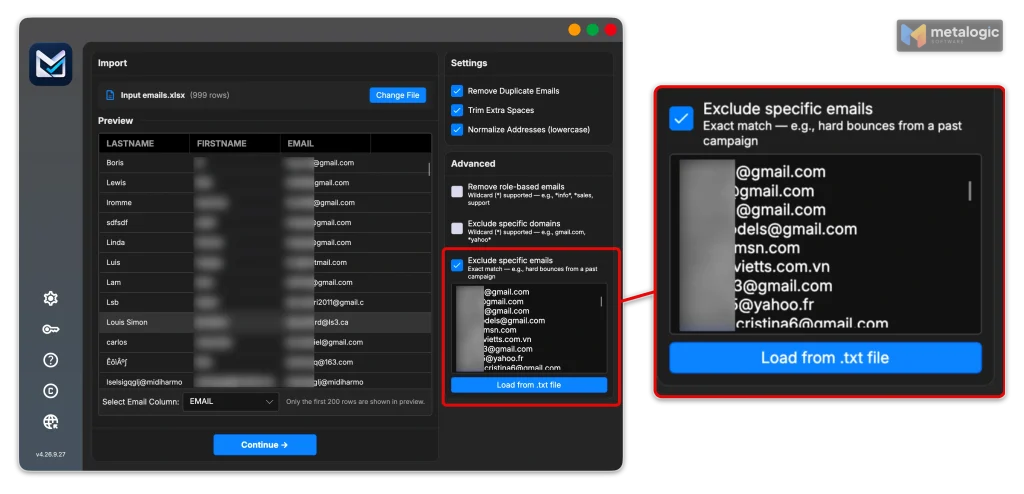
- Exclude specific emails. Load past hard bounces and unsubscribes from a .txt file. Matching rows are skipped and marked
ExcludedEmail. This is exactly what you need before reusing an old file, because re-mailed bounces are how recycled traps get hit. - Role-based and domain filters, to keep addresses like
abuse@orpostmaster@off a marketing list. - Local processing. Your list isn’t uploaded to an online service.
To understand each result, see email verification results explained. For catch-all addresses in particular, read what a catch-all email address is.
How to keep spam traps out at signup
Most trap problems start at the moment an address enters your list. Fix that moment, and you prevent most of them.
- Ask for clear consent for your brand’s emails. Not a pre-ticked box, not “partners”.
- Use double opt-in (confirmed opt-in). Spamhaus’s first minimum requirement is: “Use confirmed opt-in (COI) for all subscribers.” Because traps never click a confirmation link, they never become active subscribers. See our guide to building a list with permission and double opt-in.
- Catch typos while the person is still there. M3AAWG recommends to “validate the email address as it is entered, and to prompt the subscriber to re-enter their address if validation fails.” A simple “Did you mean gmail.com?” works well.
- Protect your forms from bots. Spamhaus’s guidelines for email platforms say: “Protect subscription forms with CAPTCHA and a honeypot field.” Add rate limits so one source can’t submit hundreds of signups.
- Record the evidence. Spamhaus: “Keep a timestamped record of when and how permission was obtained.” Save the source, date, form and confirmation status.
- Test the flow yourself. Sign up with a test address. Does the confirmation email arrive? Does an unconfirmed address stay off the list? A setting that’s “on” in a panel isn’t proof it works.
How to keep your list clean over time
- Suppress hard bounces immediately. Spamhaus also advises removing addresses after “typically 3–5 consecutive” soft bounces, and keeping the overall bounce rate “below 5%.” See how to reduce your email bounce rate.
- Never re-add unsubscribed or suppressed addresses, even in a “new” segment or campaign.
- Have a sunset policy. Reduce, then stop, sending to people who haven’t engaged for a long time. Spamhaus suggests starting at one year and tightening based on results. Our guide to inactive subscribers and old email lists shows how.
- Check old lists separately before you use them again. Don’t mix them into your active list.
- Take your suppression list with you when you change platforms or restore a backup.
An open or a click doesn’t prove a real subscriber
Security systems open emails and click links to check them. M3AAWG’s paper on non-human interactions says these result in a “click” or an “open” being recorded, and can even trigger “double or confirmed opt-in.” So engagement data helps, but it can’t prove an address belongs to a real, consenting person.
How can you tell if you have a spam trap problem?
- A warning from your email platform or a credible anti-spam operator. This is the clearest signal.
- A new blocklist listing, or a sudden rise in rejected mail.
- Timing. Did the problem start right after an import, a new signup form, or a campaign to an old segment?
- Split your results by source, signup date and campaign. Problems usually cluster in one source.
Don’t expect to be told which address is the trap
Spamhaus says traps “are never revealed by their owners,” partly because a sender who knows the address “simply suppresses the trap address” and doesn’t fix the real issue. Also, a lower open rate or more bounces on their own don’t mean you hit a trap. Look for the source, not the address.
What to do after a suspected spam trap hit
- Stop sending to the suspicious part of your list.
- Read the alert carefully, and ask your platform’s deliverability team for details.
- Trace the source. Which form, import, event or segment did these contacts come from? Do you have consent records for them?
- Fix the cause: the form, the import process, the bounce handling, or the missing suppression list.
- Decide about the risky segment. M3AAWG says senders may need to “dispose of segments lacking confirmed permissions,” or first try to reconfirm them.
- Request removal only after the fix. Spamhaus: “The only way to be removed from a Spamhaus listing to is to fix the problem that caused the listing.” Start at the Spamhaus reputation checker.
Fix the door, not the address
Before you send,
Spamhaus warns: “Attempting to locate and remove traps only treats the symptom and not the underlying problem.” M3AAWG agrees: “The spam trap isn’t the problem; it is a sign of an underlying problem.” Removing one suspected address leaves the door open for the next one.
Common spam trap myths
| Myth | Reality |
|---|---|
| “If an email doesn’t bounce, it’s safe to send to.” | Traps accept mail. A clean bounce report proves nothing about traps (section 1). |
| “Every inactive subscriber is a trap.” | Inactivity is a risk signal, not proof. Recycled traps take 12+ months of rejected mail to appear (section 2). |
| “Every catch-all or role address is a trap.” | No. But role addresses rarely belong on a marketing list, and catch-all results deserve review (section 2). |
| “Verification makes a bought list safe.” | Verification checks if a mailbox exists, not consent. Spamhaus says bought lists “inevitably” contain traps (section 5). |
| “If it clicked, it can’t be a trap.” | Security scanners open and click automatically (section 7). |
| “Find and delete the trap, and the problem is solved.” | Operators don’t reveal traps, and the source keeps adding new ones (section 9). |
If your emails are landing in spam and you’re not sure why, start with why emails go to spam.
Final checklist and next step
- You know where every contact came from.
- Consent and confirmation are recorded, with date and source.
- Signup forms catch typos and block bots.
- Hard bounces and unsubscribes are suppressed, and the suppression list moves with you.
- Old and inactive contacts follow a clear sunset policy.
- Email verification is part of your list check, especially for old imports.
- Platform warnings are investigated, and the root cause is fixed.
- You never buy, rent or scrape lists.
Ready to check a list before your next campaign? Our guide to cleaning your email list before a campaign walks through the full process. Then download MailVexa, put your old bounces back in with the exclude list, and decide what to do with each result, one group at a time.
Frequently asked questions
What is a spam trap in simple words?
An email address that no real person uses to receive your emails. Anti-spam groups and mailbox providers run them to spot senders who email people without permission or keep mailing old addresses.
Can I find out which address on my list is a spam trap?
Usually not. Trap operators don’t reveal them. Instead, find the source that added problem contacts, such as an import or a form, and fix or remove that source.
Can email verification remove spam traps?
Not reliably. Verification checks whether a mailbox can receive mail. A trap can be a working mailbox. Verification still helps by removing dead addresses and keeping known bounces out, which lowers some recycled-trap risk.
How long does it take for an address to become a recycled trap?
Usually a year or more. Spamhaus says these addresses hard-bounce “often 12 months or more” before being turned on as traps, and M3AAWG suggests 12 months as a minimum.
Does double opt-in protect me from spam traps?
It’s the strongest single protection. Traps don’t click confirmation links, so they never become confirmed subscribers. Combine it with bot protection, because bots can abuse forms.
Will one spam trap hit get me blocklisted?
It can, especially with a pristine trap, but it isn’t automatic. The result depends on the trap type, who runs it, how many hits there are and whether it keeps happening.
Sources
Anti-abuse organizations
- M3AAWG: Help! I Hit a Spam Trap! (2023). Definition, trap types, consequences, remediation.
- M3AAWG: Exploring the Impact of Nonhuman Interactions on Email Send Metrics (2020). Automated opens and clicks.
- Spamhaus: Sender guidelines. Confirmed opt-in, bounces, suppression lists, list validation.
- Spamhaus: Guidelines for ESPs and large senders. Validation at signup, form protection.
- Spamhaus: Spamtraps, fix the problem, not the symptom (2022). Seven trap types.
- Spamhaus: On the dubious merits of email verification services (2015).
- Spamhaus: IP and domain reputation checker. Checking and removing listings.
Industry data
- Validity: The State of Email in 2024. Who runs traps, single-hit blocklisting.
Product
- MetaLogic MailVexa. Desktop email verification software for Windows and macOS.
Check the addresses. Then decide with clear reasons.
MailVexa won’t find spam traps, and nothing reliably can. It will remove dead addresses, flag risky ones, keep your old bounces and unsubscribes out, and show you why each address got its result, all on your own computer.
Windows and macOS. Pay once, use for life. Free 14-day trial with up to 2,000 verifications.
We make MetaLogic MailVexa, so take our description of it with that in mind. Guidance from Spamhaus, M3AAWG and Validity was checked in November 2026. Blocklist and platform policies change often.