You verified your list. Most addresses came back Valid. A few came back Invalid. And then there is a third group, labelled catch-all or accept-all.
Now you have to decide. If you delete them, you might lose real customers. If you send to them, you might get bounces. Neither choice feels safe.
Here is the short version: a catch-all result does not mean the address is bad. But it does not prove the address is good either. This guide explains what the label really means, why your verifier cannot simply tell you “yes” or “no”, and gives you a simple table to decide what to do with each address.
Quick answer
Don’t delete all catch-all addresses, and don’t send to all of them either. Decide one address at a time, based on where it came from, whether the person agreed to hear from you, and whether they have engaged recently.
Keep catch-all addresses in a separate group. Send to the ones with clear permission and recent activity. Hold back the ones with no history, an unknown source, or a guessed name.
What is a catch-all email address?
“Catch-all” is not really a type of address. It is a setting on the whole domain.
Normally, if you email an address that does not exist, the mail server rejects it and you get a bounce. A catch-all domain does something different: it accepts mail for any address, real or not, and sends the mail for unknown addresses to one central mailbox. Google explains how businesses set this up in its guide to catch-all mailboxes in Google Workspace.
A simple example
| Address | Does the mailbox exist? | What happens on a catch-all domain |
|---|---|---|
[email protected] | Yes | Delivered to Sara |
[email protected] | No (typo) | Accepted anyway, sent to the company’s shared mailbox |
[email protected] | No (random) | Accepted anyway, sent to the shared mailbox |
From the outside, all three look the same: the server says “accepted”. That is exactly why a verifier cannot tell which one is real.
Catch-all and accept-all mean the same thing here
Verification tools use both names. Some say “catch-all”, others say “accept-all”. Both describe a domain that accepts mail for any address.
One small difference worth knowing: a catch-all mailbox is the real setting inside the company. A catch-all result is what your verifier saw from the outside. The tool can see the behaviour, not the setting itself.
Microsoft 365 has no single “catch-all” switch. Administrators usually build one with mail flow rules and a domain set to internal relay. The result, from your side, looks the same.
Why do businesses use catch-all settings?
For ordinary, sensible reasons:
- Typos. A customer writes
suport@instead ofsupport@. The message still arrives. - No lost enquiries. Mail to old or misspelled addresses lands in one place someone checks.
- One central inbox. Google’s overview of email routing options describes collecting misaddressed messages in one mailbox.
- Privacy. Some companies use it so outsiders cannot test which employee addresses exist.
It is common in small businesses, and also in government, medical and education organisations, according to NeverBounce’s result codes guide. As NeverBounce puts it, catch-all is a setting on the server, not a verdict on the address.
Catch-all is not a warning sign about the company
A catch-all domain is a normal business choice. It says nothing bad about the company or the person. It only means you cannot confirm one specific mailbox from the outside.
How do verification tools detect catch-all domains?
Think of a company receptionist.
- A normal receptionist checks the staff list. “Sara? Yes, she works here.” “Saraa? Sorry, nobody by that name.”
- A catch-all receptionist says “Yes, leave it with me” for every name you ask about. Even a made-up one.
Email verification works the same way:
- The tool asks the mail server: “Will you accept mail for
[email protected]?” - It then asks about an address that certainly does not exist, like
[email protected]. - If the server says yes to the made-up address too, the domain is flagged as catch-all.
Hunter’s guide to accept-all email addresses describes this test in detail.
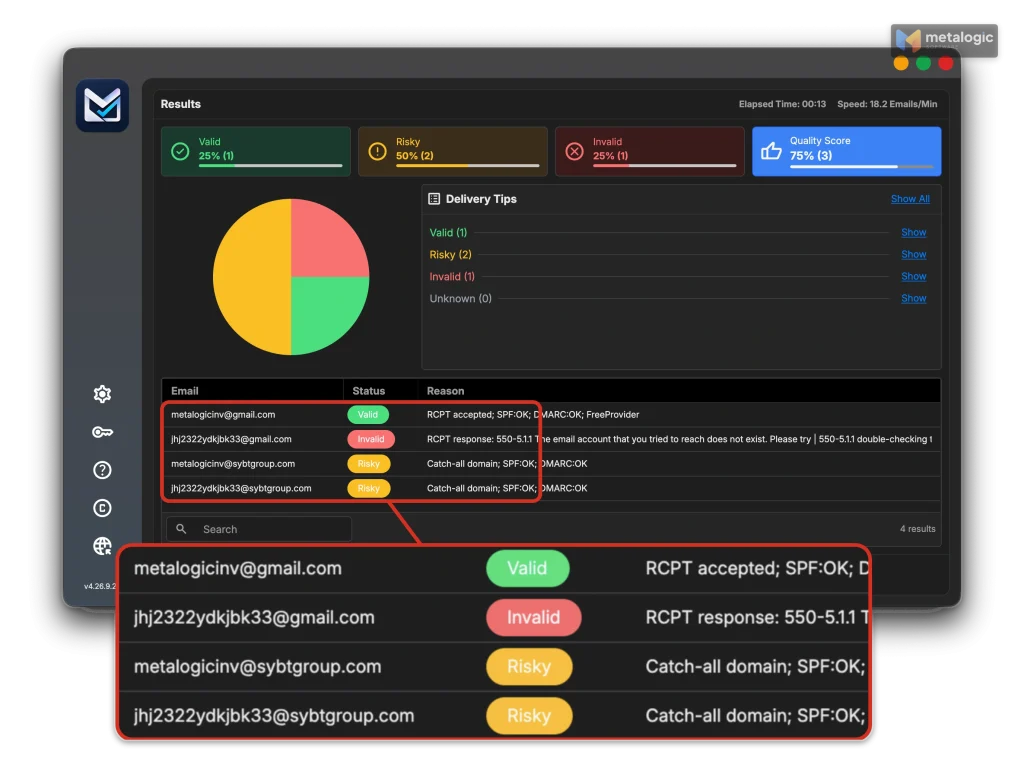
“Accepted” is not the same as “delivered to metalogicinv”
The email standard, RFC 5321, allows a server to accept a recipient first and check it later. If the mailbox turns out not to exist, the server sends a bounce afterwards.
So a “yes” during verification tells you the domain takes mail. It does not tell you a specific person will read it.
Catch-all vs Valid, Invalid, Unknown and role-based
| Result | What it means |
|---|---|
| Valid | The server confirmed this specific mailbox. Still not an inbox guarantee. |
| Invalid | A clear problem was found, such as “mailbox does not exist”. Read the reason. |
| Catch-all | The domain accepts everything, so this mailbox cannot be confirmed either way. |
| Unknown | The check did not finish, for example because the server timed out. |
| Role-based | A shared address like sales@ or support@. A separate label: a role address may or may not be on a catch-all domain. |
Different tools, different names
The idea is the same everywhere, but the labels are not. This matters when you compare tools.
| Tool | How catch-all appears |
|---|---|
| MailVexa | Inside Risky, with the reason “Catch-all domain” |
| Bouncer | Inside Risky, with the reason “low deliverability” |
| NeverBounce | Its own result: “catchall” |
| ZeroBounce | Its own status: “catch-all” |
| Hunter | Its own status: “Accept all” |
For the full meaning of every result, see email verification results explained.
What are the risks of sending to catch-all addresses?
The catch-all setting itself does not hurt you. The risks come from sending blindly:
| Risk | What it means for you |
|---|---|
| You don’t know who reads it | The mail may land in a shared mailbox nobody checks. |
| Late bounces | The server accepted the address, then bounced it later. Mailgun calls this a “delayed bounce”. |
| False comfort from “no bounce” | No bounce does not mean the email reached the right person, or was read. |
| Messy reports | Uncertain recipients make open and click rates harder to interpret, and may cost you per contact. |
| All-or-nothing decisions | Deleting all of them loses real people. Sending to all of them ignores the uncertainty. |
Emailable makes the same point: accept-all addresses take the message at first, but it may never reach a real inbox. For how bounces affect you, see our guide to reducing email bounce rate.
How big is the difference? One small test
In the Hunter guide mentioned above, the same campaign went to 100 accept-all addresses and 100 valid ones. 27% of the accept-all addresses bounced, against 1% of the valid ones. Hunter also found that 38% of domains in a sample of 2,572 addresses were accept-all.
These are small tests from one vendor, not industry averages. But the direction is clear: catch-all addresses deserve more care than Valid ones.
Should you send? A practical decision table
The verifier’s label is only one piece of information. What you know about the person matters more. Use this table as a starting point.
| The contact… | What to do |
|---|---|
| Confirmed their subscription, gave clear permission, and engaged recently | Keep sending. Don’t remove them just because of the catch-all label. Watch the results. |
| Recently replied to you personally and agreed to this kind of email | Keep sending. Real contact history beats the tool’s label. |
| Signed up long ago and has not engaged in a long time | Separate them. Treat them like an old list and re-check before mailing. |
| Address was built by guessing an employee’s name (for example firstname@company) | Don’t treat “accepted” as proof. The person may not exist at that address. |
| Source is unknown, or the list was bought | Don’t send. Catch-all is not permission to send marketing. |
| Unsubscribed or complained | Never send marketing. Even if a later check says Valid. |
| A real send already bounced with “mailbox does not exist” | Stop. Add it to your suppression list. The old catch-all result no longer counts. |
“The address works” is not “the person agreed”
Even a perfectly valid address does not give you permission to email it. Gmail’s sender guidelines are direct: don’t purchase email addresses, and don’t send to people who didn’t sign up.
Yahoo’s sender best practices say the same in other words: send relevant email to an active, engaged audience.
How to manage catch-all addresses before your next campaign
- Separate them. Keep catch-all results in their own group, apart from Valid.
- Record the facts. Where each address came from, when they signed up, and when you last checked it.
- Remove the clear no’s. Unsubscribes, complaints and confirmed “mailbox does not exist” bounces stay out.
- Check permission and history. Use the decision table above.
- Start small with the ones that qualify. Send to a limited group you can watch closely.
- Watch and update. Record bounces, complaints and real replies, and update each contact.
A small test send does not clean a bought list
Step 5 is for contacts who already gave you permission. It is not a way to “test” addresses you had no right to email in the first place. And there is no magic safe percentage of catch-alls: it depends on your list and your history.
Results get old
Companies change their mail settings, and people leave jobs. A catch-all result from last year may be wrong today. ZeroBounce suggests re-verifying a list at least every three months.
For the full cleaning process, see how to clean your email list before sending a campaign.
Can catch-all addresses be verified more accurately?
Sometimes, partly. Some tools go beyond the standard check:
- ZeroBounce runs an optional second phase when a list has at least 10 catch-alls. It can take up to 12 hours, and the addresses it cannot resolve stay catch-all.
- Emailable says it can fully resolve some accept-all domains, but not all of them.
- Bouncer advertises extra catch-all checks for Google and Microsoft mail servers.
- Hunter says it can verify some accept-all addresses with major providers, but not all with full confidence.
Three things to keep in mind:
- A confidence score is not a guarantee. “85% likely” still means some will bounce.
- Repeating the same check rarely helps. If the domain accepts everything today, it will probably accept everything tomorrow.
- The date matters. Settings change, so an old result is weaker evidence than a new one.
No tool resolves every catch-all
Be careful with any claim in either direction. “Catch-all can never be verified” is wrong, and so is “we verify every catch-all with certainty”. Every vendor’s own documentation uses words like “some” and “not all”.
Where MailVexa fits
MetaLogic MailVexa is email verification software that runs on your own Windows or Mac computer. For catch-all addresses, it helps with three of the steps above.
| Step | What MailVexa does |
|---|---|
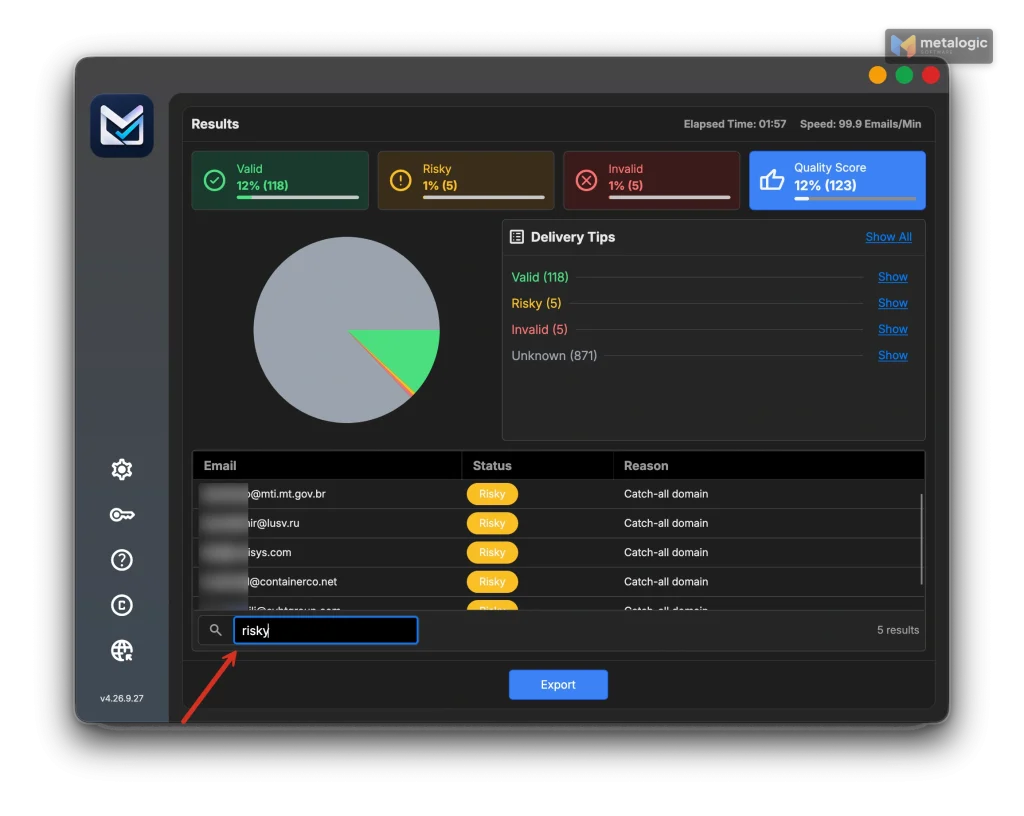
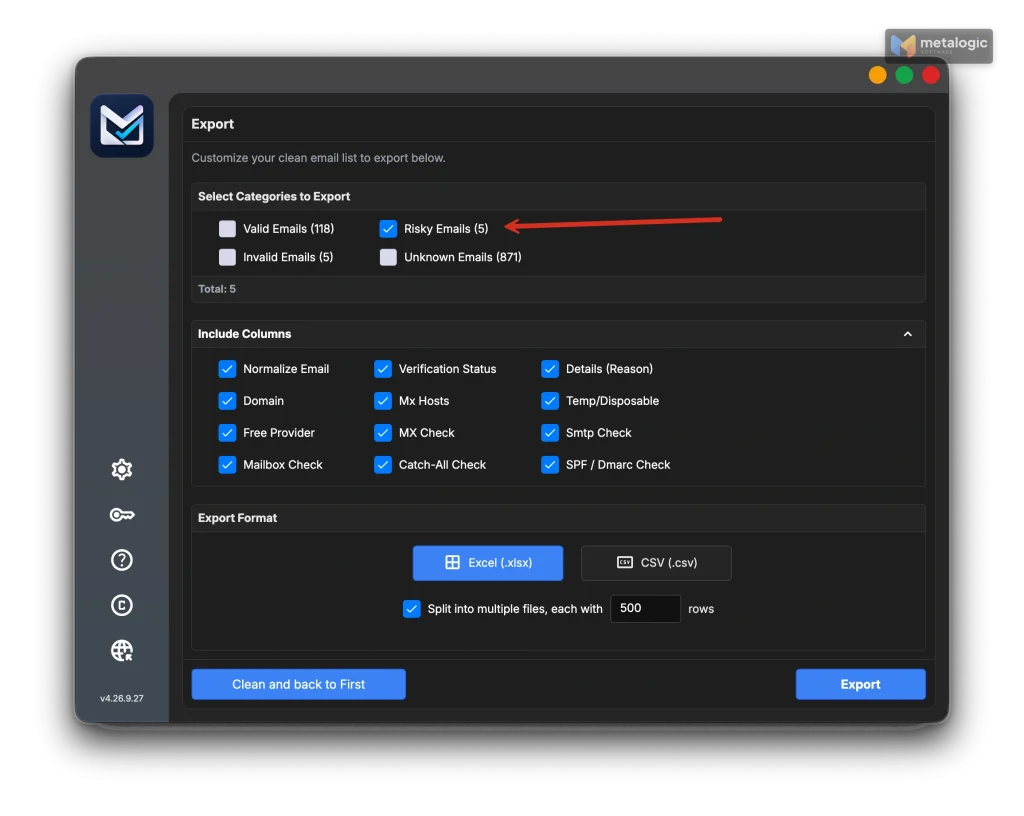
| 1. Separate them | Catch-all addresses appear in the Risky group, each with the reason “Catch-all domain”. Nothing is guessed or hidden. |
| 1. Separate them | At export, you choose which groups to include. Export Valid and Risky as separate files, so catch-alls never mix into your main campaign by accident. |
| 3. Remove the clear no’s | Paste your unsubscribes, complaints and past hard bounces into the exclusion list. They are kept out of the results automatically. |
Like every honest tool, MailVexa cannot confirm a single mailbox behind a catch-all domain. What it gives you is a clear, separate group and a reason for every result, so your decision table has something solid to work with. In our own side-by-side test against NeverBounce, every disagreement could be explained by that reason column.
To see the whole workflow, read how to use MailVexa from import to verified export.
Common questions
Is a catch-all email address valid or invalid?
Neither, as far as the verifier can tell. The domain accepts mail, but the specific mailbox cannot be confirmed.
Are catch-all and accept-all the same thing?
Yes, in verification results. Different tools simply use different names for the same behaviour.
Can catch-all emails still bounce?
Yes. The server may accept the address during the check and bounce the message later, once it finds no real mailbox.
Should I delete all catch-all addresses from my list?
No. Keep the ones with clear permission and recent engagement. Separate or remove the ones with no history or an unknown source.
Is a role-based address like info@ always catch-all?
No. They are two separate labels. An info@ address can be on a normal domain, and a personal address can be on a catch-all domain.
Will verifying the address again give me a definite answer?
Usually not with the same check. Some tools offer deeper catch-all checks that resolve part of them, but none resolves every one.
Does no bounce mean my email reached the right person?
No. On a catch-all domain, the message may have gone to a shared mailbox that nobody reads.
Catch-all checklist
- Catch-all results are in their own group, not mixed with Valid
- I know where each catch-all address came from
- Unsubscribes, complaints and confirmed bad addresses are excluded
- I send only to catch-alls with clear permission and recent engagement
- I start small and watch bounces and replies
- I update contacts after every send
- I re-verify the list regularly
Sources
Mailbox providers and standards
- Google Workspace: Get misaddressed email in a catch-all mailbox. Official definition and setup of catch-all routing.
- Google Workspace: Email routing and delivery options. Misaddressed mail sent to one mailbox.
- Microsoft Learn: Manage accepted domains in Exchange Online. Internal relay domains, used to build catch-all setups.
- RFC 5321: SMTP. Servers may accept a recipient first and bounce later.
- Gmail email sender guidelines. Don’t purchase email addresses; send only to people who signed up.
- Yahoo Sender Best Practices. Send relevant email to an active, engaged audience.
Verification vendors
- Hunter: What are accept-all email addresses. How detection works, 27% vs 1% bounce test, 38% of domains (vendor data).
- Hunter: Verification statuses. The Accept all status.
- NeverBounce: Result codes. Catch-all as a server setting; where it is common.
- NeverBounce API: single check. The catchall result code.
- ZeroBounce: Status codes. The catch-all status.
- ZeroBounce: Catch-all email validation. Optional second phase, up to 12 hours.
- ZeroBounce: How often should I verify my list?. At least every three months.
- Bouncer: Terminology. Risky with reason low_deliverability.
- Bouncer: Email verification. Advertised extra catch-all checks.
- Emailable: Risky emails. Accept-all mail may not reach a real inbox.
- Emailable: Understanding accept-all verification. Some accept-all domains can be resolved, not all.
- Mailgun: Email validations. Accept-all may cause a delayed bounce.
Product
- MetaLogic MailVexa product page. Catch-all detection, Risky group, export by category.
See which of your addresses are catch-all
Check your list on your own computer. MailVexa puts catch-all addresses in their own group, shows the reason for every result, and lets you export them separately, so you decide, not the tool.
Windows and macOS. Pay once, use for life. Free 14-day trial with up to 2,000 verifications.
We build MetaLogic MailVexa, so weigh our description of it accordingly. Everything else in this guide applies whichever tool you use.

2 Comments
Been using catch-all for years on my own domain, mainly so I never typo an address and bounce a message, but yeah, the spam filter has to work overtime.
Catch-all addresses are such a trap — half the time you’re just feeding spam traps and tanking your sender rep. I learned that the hard way after a campaign to a “verified” list bounced hard.